
- Posts: 50
- Thank you received: 1
Kunena 7.0.4 Released
The Kunena team has announce the arrival of Kunena 7.0.4 [K 7.0.4] in stable which is now available for download as a native Joomla extension for J! 5.4.x/6.0.x. This version addresses most of the issues that were discovered in K 6.2 / K 6.3 / K 6.4 and issues discovered during the last development stages of K 7.0
Before posting in this category, please read sticky topics and, as general background,
My Joomla site template makes a mess of Kunena
.
If you have questions about third-party templates, please use the User-written Templates category or contact the author directly. This category should only be used for questions about templates developed and supported by the Kunena project.
If you have questions about third-party templates, please use the User-written Templates category or contact the author directly. This category should only be used for questions about templates developed and supported by the Kunena project.
Sticky [Merged topic] How to create category icons
- blacktino79
-

- Offline
- Junior Member
-

Less
More
14 years 8 months ago #104701
by blacktino79
Replied by blacktino79 on topic How do you change subcategory icons?
What I really am trying to do is change the subcategory icons while looking in category view.
(1) Cateogry - Other Languages (ID 1)
(2) Sub Categories - Spanish, French, German (ID 2, ID 3, ID 4)
If I follow the instructions for changing category icons and use "2Spanish_read, 12Spanish_unread, 12Spanish_notlogged", you'll only see the category icon change when you click on the parent category (Other Languages) and view the Sub Categories in Category Mode (i.e entering Other Languages, but not yet clicking on Spanish, French, etc).
I want to change the individual folder icons that represent the sub-categories in Category mode so substitute those folders with custom icons for each one.
See the pictures below
BEFORE = How it is now
AFTER = How we want it
(1) Cateogry - Other Languages (ID 1)
(2) Sub Categories - Spanish, French, German (ID 2, ID 3, ID 4)
If I follow the instructions for changing category icons and use "2Spanish_read, 12Spanish_unread, 12Spanish_notlogged", you'll only see the category icon change when you click on the parent category (Other Languages) and view the Sub Categories in Category Mode (i.e entering Other Languages, but not yet clicking on Spanish, French, etc).
I want to change the individual folder icons that represent the sub-categories in Category mode so substitute those folders with custom icons for each one.
See the pictures below
BEFORE = How it is now
AFTER = How we want it
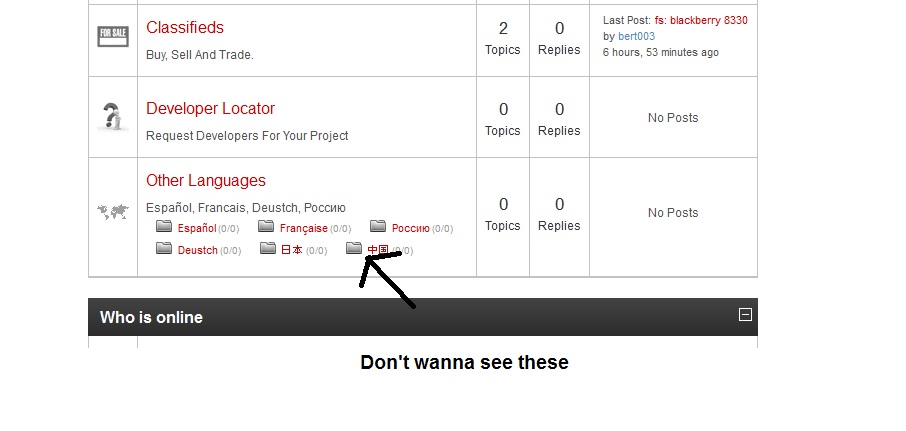
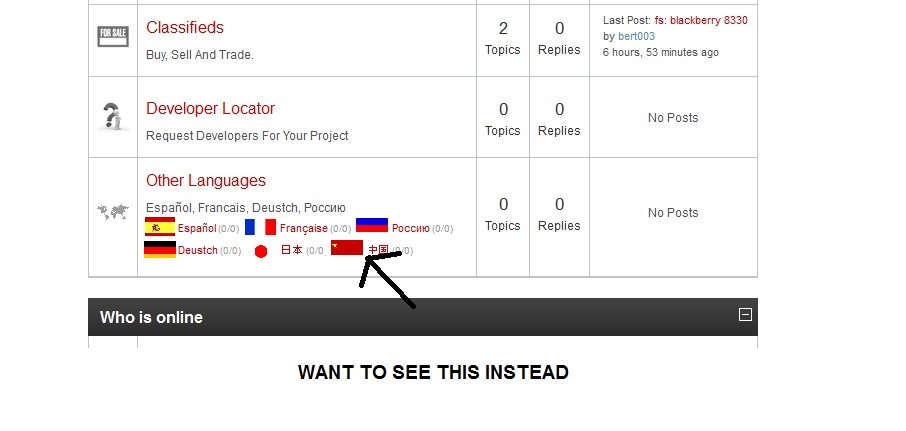
Please Log in or Create an account to join the conversation.


14 years 8 months ago - 14 years 8 months ago #104702
by sozzled
Matias wrote in msg #2 in this topic that you need three other images for sub-categories. The documentation - Category icons - says the same thing, too. If you want 32 x 32 px category icons, you need three images for each category. If you want 12 x 12 px sub-category icons you need another three images for each sub-category.
Matias gave you the answer but, as you implied, you weren't interested in the recommended, documented way of doing things. You want to do solve this issue via CSS instead - in a similar way to how we discussed Different Image For Each Category . I'm sorry to disappoint you but you can't use the same technique. You can't use the same technique because there's no unique CSS class that's defined each sub-category image. In other words, you cannot change sub-category icons from "outside" the method we've documented.
Blue Eagle vs. Crypsis reference guide
Read my blog and

Replied by sozzled on topic How do you change subcategory icons?
Yes, but that won't work. It works, if you go to the category givemeapps.com/index.php?option=com_kune...&catid=23&Itemid=804 , just as we discussed in Different Image For Each Category but now we're talking about these things as sub-categories and that's a completely different matter.blacktino79 wrote: If I follow the instructions for changing category icons and use "2Spanish_read, 12Spanish_unread, 12Spanish_notlogged", you'll only see the category icon change when you click on the parent category (Other Languages) and view the Sub Categories in Category Mode (i.e entering Other Languages, but not yet clicking on Spanish, French, etc).
Matias wrote in msg #2 in this topic that you need three other images for sub-categories. The documentation - Category icons - says the same thing, too. If you want 32 x 32 px category icons, you need three images for each category. If you want 12 x 12 px sub-category icons you need another three images for each sub-category.
Matias gave you the answer but, as you implied, you weren't interested in the recommended, documented way of doing things. You want to do solve this issue via CSS instead - in a similar way to how we discussed Different Image For Each Category . I'm sorry to disappoint you but you can't use the same technique. You can't use the same technique because there's no unique CSS class that's defined each sub-category image. In other words, you cannot change sub-category icons from "outside" the method we've documented.
Blue Eagle vs. Crypsis reference guide
Read my blog and
Last edit: 14 years 8 months ago by sozzled.
Please Log in or Create an account to join the conversation.
- blacktino79
-
- Offline
- Junior Member
-
Less
More
- Posts: 50
- Thank you received: 1
14 years 8 months ago #104710
by blacktino79
Replied by blacktino79 on topic How do you change subcategory icons?
I am a little confused with your response. Are you saying that it can't be done via CSS? How do I modify these icons from the outside by uploading three more images named "childsmall" if no CSS code will have any effect?
Or are you saying just create the childsmall images, upload them, and leave the CSS code as is?
Or are you saying just create the childsmall images, upload them, and leave the CSS code as is?
Please Log in or Create an account to join the conversation.
14 years 8 months ago #104722
by sozzled
Blue Eagle vs. Crypsis reference guide
Read my blog and
Replied by sozzled on topic How do you change subcategory icons?
This is not a debating society. There is one way to do this job and you are shown what you need to do in
Category icons
. Matias has given you the answer in msg #2.
Sub-category icons:
Sub-category icons:
- must be named in a specific way - you can't choose your own naming structure.
- must be stored in a specific folder - you can't choose where you want to store these files
- must be type .GIF
Blue Eagle vs. Crypsis reference guide
Read my blog and
Please Log in or Create an account to join the conversation.
- blacktino79
-
- Offline
- Junior Member
-
Less
More
- Posts: 50
- Thank you received: 1
14 years 8 months ago - 14 years 8 months ago #104731
by blacktino79
Replied by blacktino79 on topic How do you change subcategory icons?
That attitude is unnecessary buddy. I wasn't clear on your answer and wanted clarification, which is why I asked further questions, and I wasn't rude about it either. That's it. Thank you. "This isn't a debating society".... Yeah okay.
"Thank you" for your answer, but my question still wasn't answered (clearly).
I'll ask it again.
To change the Category Icons, I used this code:
If this is my code
#Kunena tr#kcat51 td.kcol-category-icon span.kreadforum {
background: url("/media/kunena/category_images/mChinese_51_read.png") no-repeat scroll left center transparent;
}
#Kunena tr#kcat51 td.kcol-category-icon span.kunreadforum {
background: url("/media/kunena/category_images/mChinese_51_unread.png") no-repeat scroll left center transparent;
}
#Kunena tr#kcat51 td.kcol-category-icon span.knotloginforum {
background: url("/media/kunena/category_images/mChinese_51_notlogged.png") no-repeat scroll left center transparent;
}
Do I just add the same code again, but instead this time add the Childsmall filenames like this?
#Kunena tr#kcat51 td.kcol-category-icon span.kreadforum {
background: url("/media/kunena/category_images/51_on_childsmall.gif") no-repeat scroll left center transparent;
}
#Kunena tr#kcat51 td.kcol-category-icon span.kunreadforum {
background: url("/media/kunena/category_images/51_off_childsmall.gif") no-repeat scroll left center transparent;
}
#Kunena tr#kcat51 td.kcol-category-icon span.knotloginforum {
background: url("/media/kunena/category_images/51_notlogin_childsmal.gif") no-repeat scroll left center transparent;
}
And do I upload those childsmall.gifs to the media/kunena/category_images like the other ones ??
"Thank you" for your answer, but my question still wasn't answered (clearly).
I'll ask it again.
To change the Category Icons, I used this code:
If this is my code
#Kunena tr#kcat51 td.kcol-category-icon span.kreadforum {
background: url("/media/kunena/category_images/mChinese_51_read.png") no-repeat scroll left center transparent;
}
#Kunena tr#kcat51 td.kcol-category-icon span.kunreadforum {
background: url("/media/kunena/category_images/mChinese_51_unread.png") no-repeat scroll left center transparent;
}
#Kunena tr#kcat51 td.kcol-category-icon span.knotloginforum {
background: url("/media/kunena/category_images/mChinese_51_notlogged.png") no-repeat scroll left center transparent;
}
Do I just add the same code again, but instead this time add the Childsmall filenames like this?
#Kunena tr#kcat51 td.kcol-category-icon span.kreadforum {
background: url("/media/kunena/category_images/51_on_childsmall.gif") no-repeat scroll left center transparent;
}
#Kunena tr#kcat51 td.kcol-category-icon span.kunreadforum {
background: url("/media/kunena/category_images/51_off_childsmall.gif") no-repeat scroll left center transparent;
}
#Kunena tr#kcat51 td.kcol-category-icon span.knotloginforum {
background: url("/media/kunena/category_images/51_notlogin_childsmal.gif") no-repeat scroll left center transparent;
}
And do I upload those childsmall.gifs to the media/kunena/category_images like the other ones ??
Last edit: 14 years 8 months ago by blacktino79.
Please Log in or Create an account to join the conversation.
14 years 8 months ago - 14 years 8 months ago #104746
by sozzled
Blue Eagle vs. Crypsis reference guide
Read my blog and
Replied by sozzled on topic How do you change subcategory icons?
No.blacktino79 wrote: Do I just add the same code again, but instead this time add the Childsmall filenames like this?
Blue Eagle vs. Crypsis reference guide
Read my blog and
Last edit: 14 years 8 months ago by sozzled.
Please Log in or Create an account to join the conversation.
Time to create page: 0.268 seconds