
Kunena 7.0.9 & Kunena 6.4.14 – Security Updates Released
The Kunena team has announce the arrival of Kunena 7.0.9 [K 7.0.9] in stable which is now available for download as a native Joomla extension for J! 5.4.x/6.0.x./6.1.x. This version addresses most of the issues that were discovered in K 6.2 / K 6.3 / K 6.4 and issues discovered during the last development stages of K 7.0
Before posting in this category, please read sticky topics and, as general background,
My Joomla site template makes a mess of Kunena
.
If you have questions about third-party templates, please use the User-written Templates category or contact the author directly. This category should only be used for questions about templates developed and supported by the Kunena project.
If you have questions about third-party templates, please use the User-written Templates category or contact the author directly. This category should only be used for questions about templates developed and supported by the Kunena project.
Sticky [Merged topic] How to create category icons


15 years 1 month ago #102038
by MfGLucker
Mark Twain
Replied by MfGLucker on topic Aw: Re: Aw: Re: Aw: Re: Different Image For Each Category..
Can i make this for every catehorie head ?
Or does this work for the categorie head different ?
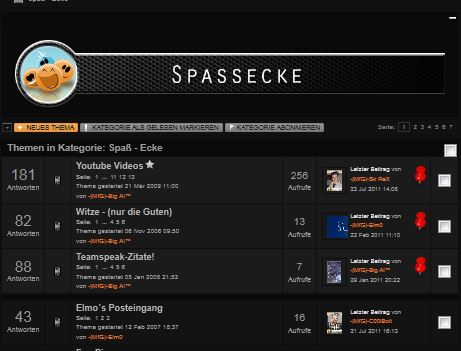
There we have also bb-code images, and here i cant find also the right div id
Or does this work for the categorie head different ?
There we have also bb-code images, and here i cant find also the right div id
Sammle erst die Fakten, dann kannst du sie verdrehen, wie es dir passt.
Mark Twain
Please Log in or Create an account to join the conversation.


15 years 1 month ago #102039
by @quila
Replied by @quila on topic Re: Aw: Re: Aw: Re: Aw: Re: Different Image For Each Category..
Hi,
no, actually it is not possible to do this in that page without changing template code. You can use only bbcode for this.
no, actually it is not possible to do this in that page without changing template code. You can use only bbcode for this.
Please Log in or Create an account to join the conversation.
15 years 1 month ago #102040
by MfGLucker
Mark Twain
Replied by MfGLucker on topic Aw: Re: Aw: Re: Aw: Re: Aw: Re: Different Image For Each Category..
thx for this info 
Sammle erst die Fakten, dann kannst du sie verdrehen, wie es dir passt.
Mark Twain
Please Log in or Create an account to join the conversation.
- blacktino79
-

- Offline
- Junior Member
-

Less
More
- Posts: 50
- Thank you received: 1
15 years 1 month ago - 15 years 1 month ago #103908
by blacktino79
Replied by blacktino79 on topic Changing Category Icons - Yes I Did Read All Of The Previous Posts On This Topic - Please Help
I am a newbie and before I get flamed, yes I did research all of the previous posts on this topic. Thing is, it still doesn't work.
1. I am using Kunena 1.6.4
2. I Uploaded the images to media / kunena / category_images
3. The Cat ID is 9
4. Uploaded files were a) mAndroid_9_notloged.png b) mAndroid_9_read.png c) mAndroid_9_unread.png
5. I pasted/saved the following code into the CSS editor in Joomla NinjaXplorer:
#Kunena tr#kcat9 td.kcol-category-icon span.kreadforum {
background: url("../../../media/kunena/category_images/mAndroid_9_read.png") no-repeat scroll left center transparent;
}
#Kunena tr#kcat9 td.kcol-category-icon span.kunreadforum {
background: url("../../../media/kunena/category_images/mAndroid_9_unread.png") no-repeat scroll left center transparent;
}
#Kunena tr#kcat9 td.kcol-category-icon span.knotloginforum {
background: url("../../../media/kunena/category_images/mAndroid_9_notloged.png") no-repeat scroll left center transparent;
}
The original folder for the icon I was trying to change DID disappear, but the Android icon I uploaded did not replace it. Right now, that area is just blank.
I am using the Euro-BRED template which was modified by my developer. I didn't develop the website, but am trying to change the individual category icons.
I want each Category to use a different icon.
Any help/advice?
Thanks
(By the way, my developers have Joomla 1.5 running on Legacy Mode, in case that helps).
1. I am using Kunena 1.6.4
2. I Uploaded the images to media / kunena / category_images
3. The Cat ID is 9
4. Uploaded files were a) mAndroid_9_notloged.png b) mAndroid_9_read.png c) mAndroid_9_unread.png
5. I pasted/saved the following code into the CSS editor in Joomla NinjaXplorer:
#Kunena tr#kcat9 td.kcol-category-icon span.kreadforum {
background: url("../../../media/kunena/category_images/mAndroid_9_read.png") no-repeat scroll left center transparent;
}
#Kunena tr#kcat9 td.kcol-category-icon span.kunreadforum {
background: url("../../../media/kunena/category_images/mAndroid_9_unread.png") no-repeat scroll left center transparent;
}
#Kunena tr#kcat9 td.kcol-category-icon span.knotloginforum {
background: url("../../../media/kunena/category_images/mAndroid_9_notloged.png") no-repeat scroll left center transparent;
}
The original folder for the icon I was trying to change DID disappear, but the Android icon I uploaded did not replace it. Right now, that area is just blank.
I am using the Euro-BRED template which was modified by my developer. I didn't develop the website, but am trying to change the individual category icons.
I want each Category to use a different icon.
Any help/advice?
Thanks
(By the way, my developers have Joomla 1.5 running on Legacy Mode, in case that helps).
Last edit: 15 years 1 month ago by blacktino79.
Please Log in or Create an account to join the conversation.


15 years 1 month ago #103914
by sozzled
Blue Eagle vs. Crypsis reference guide
Read my blog and

Replied by sozzled on topic Re: Changing Category Icons
Did you read
Category icons
in the Wiki?
Blue Eagle vs. Crypsis reference guide
Read my blog and
Please Log in or Create an account to join the conversation.
- blacktino79
-
- Offline
- Junior Member
-
Less
More
- Posts: 50
- Thank you received: 1
15 years 1 month ago #103957
by blacktino79
Replied by blacktino79 on topic Re: Different Image For Each Category..
Yes I did actually. It doesn't change my problem.
Please Log in or Create an account to join the conversation.
Time to create page: 0.252 seconds