
Kunena 7.0.9 & Kunena 6.4.14 – Security Updates Released
The Kunena team has announce the arrival of Kunena 7.0.9 [K 7.0.9] in stable which is now available for download as a native Joomla extension for J! 5.4.x/6.0.x./6.1.x. This version addresses most of the issues that were discovered in K 6.2 / K 6.3 / K 6.4 and issues discovered during the last development stages of K 7.0
If you have questions about third-party templates, please use the User-written Templates category or contact the author directly. This category should only be used for questions about templates developed and supported by the Kunena project.
Sticky [Merged topic] How to create category icons


Blue Eagle vs. Crypsis reference guide
Read my blog and

Please Log in or Create an account to join the conversation.


sozzled wrote: Please read Category icons in the Wiki. Everything is explained there.
Hello friend, I have already read this article and explains exactly what I did. In fact if you look at the image above I have done two things: the first is to change the icon (the original) in all categories, but simply to test; what I want to do is associate an image to each category. The guide tells me that you show me exactly what I did (in fact I had already read this guide), that create 3 files:
18_notlogin.gif
18_off.gif
18_on.gif
with the ID of the category to which I want to change the default image (for me it's 18), right? I copied the three files in the folder .. / media / Kunena / category_images but nothing appears in the front end ...
where I went wrong?
thanks
Please Log in or Create an account to join the conversation.
I have no idea what you have done because I don't know the address of your forum.robytotem wrote: Where I went wrong?
Blue Eagle vs. Crypsis reference guide
Read my blog and
Please Log in or Create an account to join the conversation.
- cengznucel
-

- Offline
- New Member
-

- Posts: 14
- Thank you received: 0
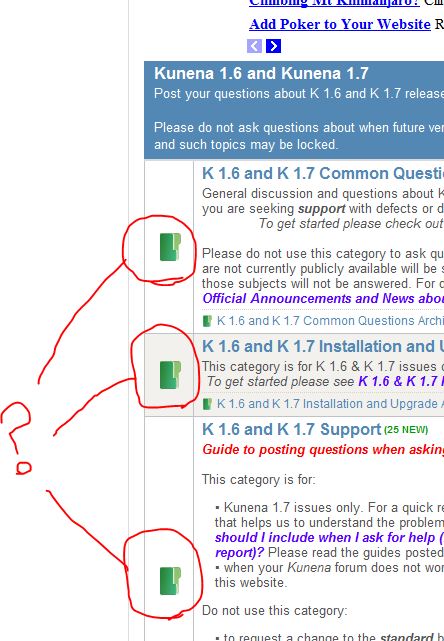
Firstly sorry for low English. (my English is not well enogh)
I put a jpg file for this post. And i marked which location i wanna change as red circles.
I can find the jpg file and change it from ftp (kunena folder) but if i change file all of them changing same.
I wanna use difrent pictures for each my kategories.
At my added picture there is 3 kategoris.
I wanna put 3 difreft picture for each as like:
K 1.6 and K 1.7 Common Questions (question.jpg + question_new.jpg)
K 1.6 and K 1.7 Installation and Upgrade (instal.jpg + instal_new.jpg)
K 1.6 and K 1.7 Support (support.jpg + support_new.jpg)
Anyone know... how can i make it?
again sorry for low English, i hope i can writed what i want
 And i hope you can understand my wish.
 Please Log in or Create an account to join the conversation.
Blue Eagle vs. Crypsis reference guide
Read my blog and
Please Log in or Create an account to join the conversation.
- larrybertleman
-

- Offline
- New Member
-
- Posts: 14
- Thank you received: 0
Is it possible to change the folder image (located to the left of topic title in categories) for another image? I have seen a forum which has a different image for every category a bit like this:
www.radioandtelly.co.uk/cgi-bin/forum/Ya...?catselect=digitaltv
Please Log in or Create an account to join the conversation.