


- Posts: 1663
- Thank you received: 201
Kunena 7.0.9 & Kunena 6.4.14 – Security Updates Released
The Kunena team has announce the arrival of Kunena 7.0.9 [K 7.0.9] in stable which is now available for download as a native Joomla extension for J! 5.4.x/6.0.x./6.1.x. This version addresses most of the issues that were discovered in K 6.2 / K 6.3 / K 6.4 and issues discovered during the last development stages of K 7.0
Before posting in this category, please read sticky topics and, as general background,
My Joomla site template makes a mess of Kunena
.
If you have questions about third-party templates, please use the User-written Templates category or contact the author directly. This category should only be used for questions about templates developed and supported by the Kunena project.
If you have questions about third-party templates, please use the User-written Templates category or contact the author directly. This category should only be used for questions about templates developed and supported by the Kunena project.
Sticky [Merged topic] How to create category icons
15 years 3 weeks ago #104993
by @quila
you should be aware that in the way you have done this your changes will be lost when you upgrade current Kunena template you are using (Euro-BRed) and you'll need to apply again all changes.
The same if you switch Kunena to another template.
Points and forward slash's are there on purpose.
If you want that you changes are safe when upgrade you need to do it like I described in message #6 of this topic.
Regards
Replied by @quila on topic Re: Different Image For Each Category..
Hi,blacktino79 wrote: So sorry Sozzled and thank you for looking! I changed my files after frustration of no one being able to help here which is why you saw the error in the CSS code. At the time there was a Cat whose ID was 77. I got rid of that cat. The ANDROID category you saw yes was Cat 9, and even with the code changed to 9, it doesn't work.
The problem most likely lies with using Joomla Legacy mode. See, I didn't program the site. My developers did. Perhaps I am going to have to inquire about upgrading to Kunena 1.6.5 (let's hope they don't charage me) and ask them why they decided to use legacy mode. In any case, with the code modification, it still isn't working
WAIT/.....
I CHANGED THE FOLDER SPECIFICATION AND IT WORKS!!!!!!!!!!!!!!!!!!!!!!
Thank you SO SO SO SO SO SO MUCH! You don't know how much this has been bugging me over the last week! I can finally customize my forum and not get charged for it! If you need some advertising, send me a banner or something! This will really help with the attractiveness of my forum!
THANKS AGAIN!!!!!!!!!!!!!!!!!!!! OMG!
you should be aware that in the way you have done this your changes will be lost when you upgrade current Kunena template you are using (Euro-BRed) and you'll need to apply again all changes.
The same if you switch Kunena to another template.
Points and forward slash's are there on purpose.
If you want that you changes are safe when upgrade you need to do it like I described in message #6 of this topic.
Regards
Please Log in or Create an account to join the conversation.


15 years 3 weeks ago #105025
by Fong74
Hi quila,
where do I insert those statements in general? I inserted it in /templates/system/css/template.css but it had no effect. Of course I placed a .png in /media/kunena/category_images
My goal is to have images in the category headlines like here ( KLICK ).
Our forum can be found HERE , if you want to take a look
Thanks for your help in advance.
Regards
Fong
Replied by Fong74 on topic Re: Aw: Re: Aw: Re: Different Image For Each Category..
@quila wrote: Hi,
yes it is possible.
Your can use this code to show image in your "Community Forum":where "1" is Section ID.Code:#Kunena div.kcategories-1 div.ktitle-desc { background: url("/media/kunena/category_images/community_medium.png") no-repeat scroll center center transparent; height: 50px; }
For Games Forum this code should be:Code:#Kunena div.kcategories-5 div.ktitle-desc { background: url("/media/kunena/category_images/games_medium.png") no-repeat scroll center center transparent; height: 50px; }
As you can see there change section ID to 5 and name of image.
Hope this helps
Hi quila,
where do I insert those statements in general? I inserted it in /templates/system/css/template.css but it had no effect. Of course I placed a .png in /media/kunena/category_images
My goal is to have images in the category headlines like here ( KLICK ).
Our forum can be found HERE , if you want to take a look
Thanks for your help in advance.
Regards
Fong
Please Log in or Create an account to join the conversation.
15 years 3 weeks ago #105084
by @quila
Replied by @quila on topic Re: Aw: Re: Aw: Re: Different Image For Each Category..
Hi Fong,
the right file should be / templates / rt_zephyr_j15 / css / template.css
Regards
the right file should be / templates / rt_zephyr_j15 / css / template.css
Regards
The following user(s) said Thank You: Fong74
Please Log in or Create an account to join the conversation.


14 years 10 months ago - 14 years 10 months ago #110423
by robytotem
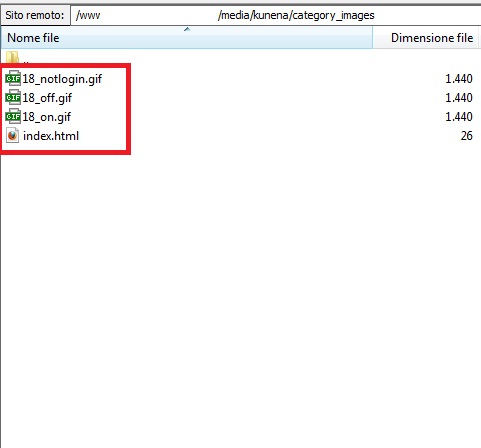
Hello, I am using Kunena 1.7.0. and I copied the 3 files .gif in the folder indicated by the number 18 of my category of my forum, but nothing happens!
I am using the template Blue Eagle (default) and now works only the image changed from the original folder_nonew.png ...
why does not work the images gif?
18_notlogin.gif
18_off.gif
18_on.gif
thanks
Replied by robytotem on topic Re: Different Image For Each Category..
@quila wrote: Hi Vue,
in that old topic route is wrong becouse it was for Kunena 1.0. The right route where you need to upload images is:So you need to know Category ID number and create 3 images for one category./ media / kunena / category_images /
Look at this image, you need to change number 2 with your category ID number.
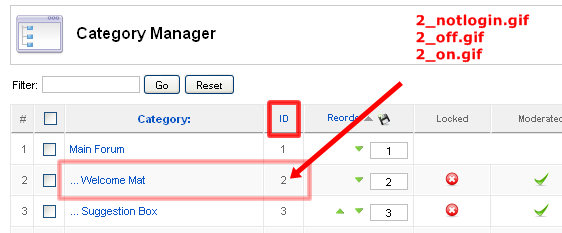
Be sure to create all 3 images for category becouse if you are missing one this will not work. Also only .gif images will work
For this option we need to wait for Kunena 2It would be cool if that was an option inside the category creation page
Hello, I am using Kunena 1.7.0. and I copied the 3 files .gif in the folder indicated by the number 18 of my category of my forum, but nothing happens!
I am using the template Blue Eagle (default) and now works only the image changed from the original folder_nonew.png ...
why does not work the images gif?
18_notlogin.gif
18_off.gif
18_on.gif
thanks
Last edit: 14 years 10 months ago by robytotem.
Please Log in or Create an account to join the conversation.


14 years 10 months ago #110430
by sozzled
Blue Eagle vs. Crypsis reference guide
Read my blog and

Replied by sozzled on topic Re: Different Image For Each Category..
Please use English in this category. Thank you.
Blue Eagle vs. Crypsis reference guide
Read my blog and
The following user(s) said Thank You: robytotem
Please Log in or Create an account to join the conversation.
14 years 10 months ago #110445
by robytotem
can you now help me?
thanks

Replied by robytotem on topic Re: Different Image For Each Category..
sozzled wrote: Please use English in this category. Thank you.
can you now help me?
thanks
Please Log in or Create an account to join the conversation.
Time to create page: 0.215 seconds