


- Posts: 26
- Thank you received: 0
Kunena 7.0.9 & Kunena 6.4.14 – Security Updates Released
The Kunena team has announce the arrival of Kunena 7.0.9 [K 7.0.9] in stable which is now available for download as a native Joomla extension for J! 5.4.x/6.0.x./6.1.x. This version addresses most of the issues that were discovered in K 6.2 / K 6.3 / K 6.4 and issues discovered during the last development stages of K 7.0
Before posting in this category, please read sticky topics and, as general background,
My Joomla site template makes a mess of Kunena
.
If you have questions about third-party templates, please use the User-written Templates category or contact the author directly. This category should only be used for questions about templates developed and supported by the Kunena project.
If you have questions about third-party templates, please use the User-written Templates category or contact the author directly. This category should only be used for questions about templates developed and supported by the Kunena project.
Sticky [Merged topic] How to create category icons
15 years 1 month ago #101636
by Vue
Replied by Vue on topic Re: Different Image For Each Category..
Ok cool thought that was someone from another site 
Thanks a lot!
Thanks a lot!
Please Log in or Create an account to join the conversation.


15 years 1 month ago - 15 years 1 month ago #101689
by MfGLucker
Mark Twain
Replied by MfGLucker on topic Aw: Re: Different Image For Each Category..
Hi, sorry for using this Thread, but i have a similar question in german forum postet.
I just want to have in every main categorie-description an image with css and not with bb-code.
Is that possible ?
At the moment i have this solution but its only for all main categories
Ich habe mal wieder eine Frage.
Und zwar haben wir bei uns mfg-esports.com Bilder in der Kategoriebschreibung per BB-Code eingefügt. Hier ein Bild dazu.Es wird allerdings von der Kunena Image Lightbox vergrössert.
Ist es möglich diese Bilder per CSS einzufügen ?
Ich habe es gestern versucht, ich habe aber nicht ganz herausgefunden wie.
I just want to have in every main categorie-description an image with css and not with bb-code.
Is that possible ?
At the moment i have this solution but its only for all main categories
Code:
#Kunena div.ktitle-desc {
background: url(/media/kunena/category_images/community_medium.png) no-repeat scroll center;
height: 50px;
}
Sammle erst die Fakten, dann kannst du sie verdrehen, wie es dir passt.
Mark Twain
Last edit: 15 years 1 month ago by MfGLucker.
Please Log in or Create an account to join the conversation.


15 years 1 month ago #102032
by @quila
Replied by @quila on topic Re: Aw: Re: Different Image For Each Category..
Hi MfGLucker, sorry for delay, haven't seen your post.
Not sure if understand your question.
You want different image for each Sections header?
Is that right?
Not sure if understand your question.
You want different image for each Sections header?
Is that right?
Please Log in or Create an account to join the conversation.
15 years 1 month ago - 15 years 1 month ago #102033
by MfGLucker
Mark Twain
Replied by MfGLucker on topic Aw: Re: Aw: Re: Different Image For Each Category..
Here you can see it.
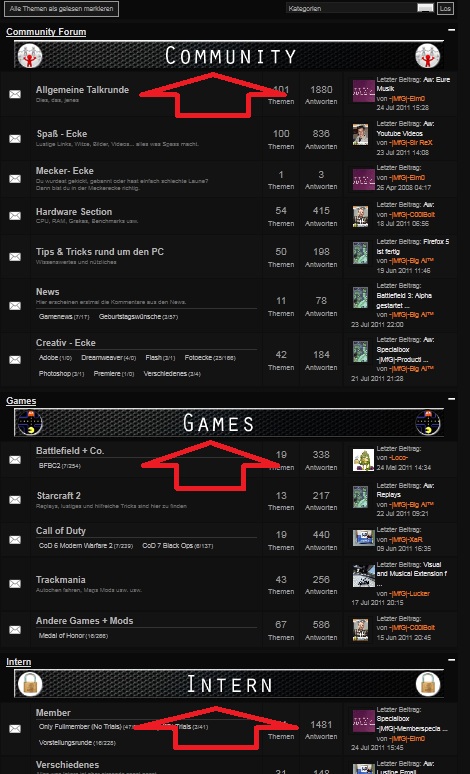
The Images for the Maincategories are set with bb-code.
But i try put them there with css. Is that possible ?
because, the lightbox from kunena make them clickable and i cannot use my image sizer for joomla, because this sizes the images in forum also.
The Images for the Maincategories are set with bb-code.
But i try put them there with css. Is that possible ?
because, the lightbox from kunena make them clickable and i cannot use my image sizer for joomla, because this sizes the images in forum also.
Sammle erst die Fakten, dann kannst du sie verdrehen, wie es dir passt.
Mark Twain
Last edit: 15 years 1 month ago by MfGLucker.
Please Log in or Create an account to join the conversation.
15 years 1 month ago - 15 years 1 month ago #102034
by @quila
Replied by @quila on topic Re: Aw: Re: Aw: Re: Different Image For Each Category..
Hi,
yes it is possible.
Your can use this code to show image in your "Community Forum":
where "1" is Section ID.
For Games Forum this code should be:
As you can see there change section ID to 5 and name of image.
Hope this helps
yes it is possible.
Your can use this code to show image in your "Community Forum":
Code:
#Kunena div.kcategories-1 div.ktitle-desc {
background: url("/media/kunena/category_images/community_medium.png") no-repeat scroll center center transparent;
height: 50px;
}
For Games Forum this code should be:
Code:
#Kunena div.kcategories-5 div.ktitle-desc {
background: url("/media/kunena/category_images/games_medium.png") no-repeat scroll center center transparent;
height: 50px;
}
As you can see there change section ID to 5 and name of image.
Hope this helps
Last edit: 15 years 1 month ago by @quila.
Please Log in or Create an account to join the conversation.
15 years 1 month ago #102036
by MfGLucker
Mark Twain
Replied by MfGLucker on topic Aw: Re: Aw: Re: Aw: Re: Different Image For Each Category..
Great, thank you
Sammle erst die Fakten, dann kannst du sie verdrehen, wie es dir passt.
Mark Twain
Please Log in or Create an account to join the conversation.
Time to create page: 0.248 seconds