
Kunena 7.0.9 & Kunena 6.4.14 – Security Updates Released
The Kunena team has announce the arrival of Kunena 7.0.9 [K 7.0.9] in stable which is now available for download as a native Joomla extension for J! 5.4.x/6.0.x./6.1.x. This version addresses most of the issues that were discovered in K 6.2 / K 6.3 / K 6.4 and issues discovered during the last development stages of K 7.0
Before posting in this category, please read sticky topics and, as general background,
My Joomla site template makes a mess of Kunena
.
If you have questions about third-party templates, please use the User-written Templates category or contact the author directly. This category should only be used for questions about templates developed and supported by the Kunena project.
If you have questions about third-party templates, please use the User-written Templates category or contact the author directly. This category should only be used for questions about templates developed and supported by the Kunena project.
Sticky [Merged topic] How to create category icons


15 years 4 weeks ago #104541
by sozzled
Blue Eagle vs. Crypsis reference guide
Read my blog and

Replied by sozzled on topic Re: Different Image For Each Category..
I looked at your site (thank you for providing us with the details) and, of course, now I understand why your CSS changes won't work.
blacktino79 wrote:
For a dozen good reasons, people should not directly modify minified files (e.g. kunena.forum-min.css) and it's a lot easier - from a debugging perspective - to make changes to your Joomla site template instead. Aside from this small issue that meant that I spent 15 minutes sifting through a dozen CSS files before I found the cause of the problem, here's the solution.
You are trying to modify the category icon for catID = 9. Your CSS rule basically says "this is the image to use for catID = 77". You don't have a category whose ID is 77. But you've also made an error in the relative folder specification in that rule. This is what you should have done instead:
Trust me, it works.
While I have your attention, your configuration report shows that you are running legacy mode and that you are using K 1.6.4.
Please read the important advice that we have consistently given to all people who continue to rely on unsupported Joomla features like legacy mode . Please update to K 1.6.5 (see K 1.6 Upgrade Guide ).
You should also be aware that third-party templates, such as the Euro-BRed one you are using, that were developed for earlier versions of Kunena may not always remain fully-compatible with future versions of Kunena.
blacktino79 wrote:
I could not find a category called "App Talk" but I found a category called "Android" and I focused my attention on that category.If you look at the category App Talk ...
For a dozen good reasons, people should not directly modify minified files (e.g. kunena.forum-min.css) and it's a lot easier - from a debugging perspective - to make changes to your Joomla site template instead. Aside from this small issue that meant that I spent 15 minutes sifting through a dozen CSS files before I found the cause of the problem, here's the solution.
You are trying to modify the category icon for catID = 9. Your CSS rule basically says "this is the image to use for catID = 77". You don't have a category whose ID is 77. But you've also made an error in the relative folder specification in that rule. This is what you should have done instead:
Code:
#Kunena tr#kcat9 td.kcol-category-icon span.kreadforum {
background: url("/media/kunena/category_images/mAndroid_9_read.png") no-repeat scroll left center transparent;
}
#Kunena tr#kcat9 td.kcol-category-icon span.kunreadforum {
background: url("/media/kunena/category_images/mAndroid_9_unread.png") no-repeat scroll left center transparent;
}
#Kunena tr#kcat9 td.kcol-category-icon span.knotloginforum {
background: url("/media/kunena/category_images/mAndroid_9_notlogged.png") no-repeat scroll left center transparent;
}
While I have your attention, your configuration report shows that you are running legacy mode and that you are using K 1.6.4.
Please read the important advice that we have consistently given to all people who continue to rely on unsupported Joomla features like legacy mode . Please update to K 1.6.5 (see K 1.6 Upgrade Guide ).
You should also be aware that third-party templates, such as the Euro-BRed one you are using, that were developed for earlier versions of Kunena may not always remain fully-compatible with future versions of Kunena.
Blue Eagle vs. Crypsis reference guide
Read my blog and
Please Log in or Create an account to join the conversation.
- blacktino79
-

- Offline
- Junior Member
-

Less
More
- Posts: 50
- Thank you received: 1
15 years 4 weeks ago #104618
by blacktino79
Replied by blacktino79 on topic Re: Different Image For Each Category..
So sorry Sozzled and thank you for looking! I changed my files after frustration of no one being able to help here which is why you saw the error in the CSS code. At the time there was a Cat whose ID was 77. I got rid of that cat. The ANDROID category you saw yes was Cat 9, and even with the code changed to 9, it doesn't work.
The problem most likely lies with using Joomla Legacy mode. See, I didn't program the site. My developers did. Perhaps I am going to have to inquire about upgrading to Kunena 1.6.5 (let's hope they don't charage me) and ask them why they decided to use legacy mode. In any case, with the code modification, it still isn't working
WAIT/.....
I CHANGED THE FOLDER SPECIFICATION AND IT WORKS!!!!!!!!!!!!!!!!!!!!!!
Thank you SO SO SO SO SO SO MUCH! You don't know how much this has been bugging me over the last week! I can finally customize my forum and not get charged for it! If you need some advertising, send me a banner or something! This will really help with the attractiveness of my forum!
THANKS AGAIN!!!!!!!!!!!!!!!!!!!! OMG!
The problem most likely lies with using Joomla Legacy mode. See, I didn't program the site. My developers did. Perhaps I am going to have to inquire about upgrading to Kunena 1.6.5 (let's hope they don't charage me) and ask them why they decided to use legacy mode. In any case, with the code modification, it still isn't working
WAIT/.....
I CHANGED THE FOLDER SPECIFICATION AND IT WORKS!!!!!!!!!!!!!!!!!!!!!!
Thank you SO SO SO SO SO SO MUCH! You don't know how much this has been bugging me over the last week! I can finally customize my forum and not get charged for it! If you need some advertising, send me a banner or something! This will really help with the attractiveness of my forum!
THANKS AGAIN!!!!!!!!!!!!!!!!!!!! OMG!
Please Log in or Create an account to join the conversation.
- blacktino79
-
- Offline
- Junior Member
-
Less
More
- Posts: 50
- Thank you received: 1
15 years 4 weeks ago #104632
by blacktino79
Replied by blacktino79 on topic How do you change subcategory icons?
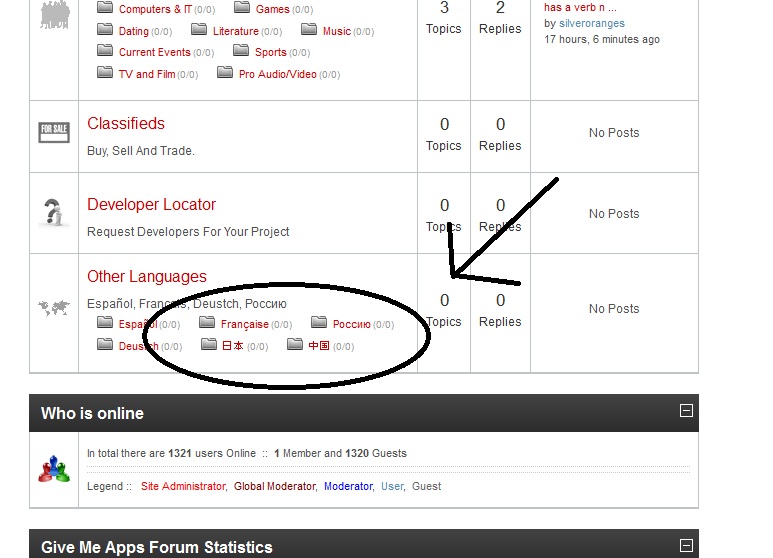
I am trying to change the sub-category icons from the "outside".In other words, using the usual instructions on changing category icons works, but in the case of sub-forums, you can't see those icons unless you go into the category. The aforementioned icons are 32x32.
Please look at the attached JPG to see what I am trying to change.
Please help
Please look at the attached JPG to see what I am trying to change.
Please help
Please Log in or Create an account to join the conversation.


15 years 4 weeks ago #104658
by Matias
Replied by Matias on topic How do you change subcategory icons?
For category 12 filenames are:
12_on_childsmall.gif
12_off_childsmall.gif
12_notlogin_childsmall.gif
(sozzled, can you add these into doc?)
12_on_childsmall.gif
12_off_childsmall.gif
12_notlogin_childsmall.gif
(sozzled, can you add these into doc?)
Please Log in or Create an account to join the conversation.
- blacktino79
-
- Offline
- Junior Member
-
Less
More
- Posts: 50
- Thank you received: 1
15 years 4 weeks ago #104667
by blacktino79
Replied by blacktino79 on topic How do you change subcategory icons?
You're giving me general directions. Thanks, but this doesn't work for the icons that I circled in the above attached pics. Using those file names will change the icons of the categories (and sub categories AFTER they are clicked on), but NOT the Sub Categories as PICTURED.
What is the coding for that? I can get the sub categories icon to change when they are viewed as a list of forums (i.e. after clicking on the parent), however, prior to clicking on the parent, all I see are the regular folders.
I don't know if I am being clear. Just look at the picture.
What is the coding for that? I can get the sub categories icon to change when they are viewed as a list of forums (i.e. after clicking on the parent), however, prior to clicking on the parent, all I see are the regular folders.
I don't know if I am being clear. Just look at the picture.
Please Log in or Create an account to join the conversation.
15 years 4 weeks ago #104685
by sozzled
Blue Eagle vs. Crypsis reference guide
Read my blog and
Replied by sozzled on topic How do you change subcategory icons?
What's difficult, in this topic, is what you mean by "from the 'Outside'".
We have provided general instructions, and these are documented in Category icons , and these are generally sufficient for most users. For everyone else who wants to specialise and use CSS to manipulate those things, then you need to know a lot more. Perhaps, if someone is knowledgeable about such things (and they have a spare few hours) they might like to write a detailed step-by-step guide.
Simply, use an in-browser web developer's tool like Firebug for Firefox and you will solve your problems. Another alternative is to pay an experienced web developer for their time to customise your site down to the minutest level of specificity to your own requirements.
Let's choose one example, one sub-category whose icon you want to change. For example, let's choose your "Française" sub-category. What are the image filenames (that exist on your website) that you want to use for for that sub-category and then let's see what we need to do to make this work for you.
We have provided general instructions, and these are documented in Category icons , and these are generally sufficient for most users. For everyone else who wants to specialise and use CSS to manipulate those things, then you need to know a lot more. Perhaps, if someone is knowledgeable about such things (and they have a spare few hours) they might like to write a detailed step-by-step guide.
Simply, use an in-browser web developer's tool like Firebug for Firefox and you will solve your problems. Another alternative is to pay an experienced web developer for their time to customise your site down to the minutest level of specificity to your own requirements.
Let's choose one example, one sub-category whose icon you want to change. For example, let's choose your "Française" sub-category. What are the image filenames (that exist on your website) that you want to use for for that sub-category and then let's see what we need to do to make this work for you.
Blue Eagle vs. Crypsis reference guide
Read my blog and
Please Log in or Create an account to join the conversation.
Time to create page: 0.276 seconds