
Kunena 7.0.9 & Kunena 6.4.14 – Security Updates Released
The Kunena team has announce the arrival of Kunena 7.0.9 [K 7.0.9] in stable which is now available for download as a native Joomla extension for J! 5.4.x/6.0.x./6.1.x. This version addresses most of the issues that were discovered in K 6.2 / K 6.3 / K 6.4 and issues discovered during the last development stages of K 7.0
This category is only for reporting defects or problems with Kunena 1.6 test versions with Joomla 1.6. This is NOT a support forum - there is no support for test versions. Users should NOT install K 1.6 alpha or beta test versions on websites with live production data.
Sticky [Merged topic] J! 1.6 + K 1.6 - How do I restore my Kunena menu?


15 years 7 months ago #86164
by sozzled
Blue Eagle vs. Crypsis reference guide
Read my blog and

Replied by sozzled on topic Re: Kunena Menu Invisible?
Thank you for clarifying that point. I have merged your topic with the topic that contains the answer. 
Blue Eagle vs. Crypsis reference guide
Read my blog and
The topic has been locked.
- weltweites
-

- Offline
- New Member
-

Less
More
- Posts: 5
- Thank you received: 0
15 years 7 months ago - 15 years 7 months ago #86487
by weltweites
Replied by weltweites on topic Re: [Merged topic] How do I restore my Kunena menu?
@lassev This wortks also for me !!! Thanx man !!!
His answer to the problem :
Problem solved:
1. At Kunena Control Panel: create a menu if you don´t have it yet
2. At Joomla menu admin: Add a new menu item to ie. main menu
3. "menu item type": choose: Kunena -> Entry page
4. "required menu settings" -> Default menu item -> choose ie. recent topics
and this works !!!
Finally i can go on with preparing and making the webside
Ok this is actually what i did and everything is working acceptable :
Installed CB
Installed Kunena
Clicked make menu in kunena settings
deinstalled CB
cleared cache
Deleted the menu-structure kunena made
Made a new menu-structure as described above
Hope this helps also others .. or someone else !!
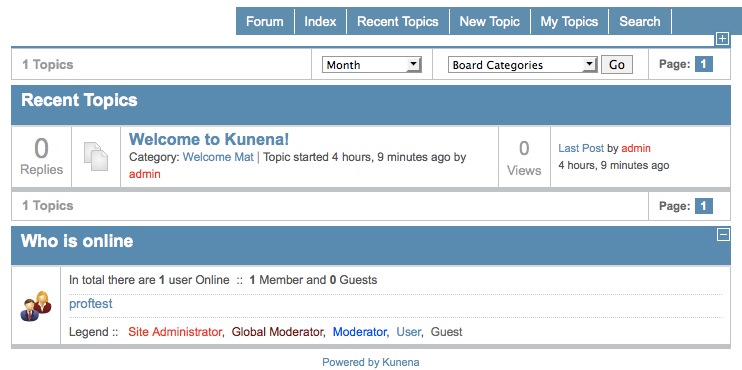
This is how it looks like now :
c.u.
here some more details .. if i click now the make menu button this error comes :
* The database row is empty.
His answer to the problem :
Problem solved:
1. At Kunena Control Panel: create a menu if you don´t have it yet
2. At Joomla menu admin: Add a new menu item to ie. main menu
3. "menu item type": choose: Kunena -> Entry page
4. "required menu settings" -> Default menu item -> choose ie. recent topics
and this works !!!
Finally i can go on with preparing and making the webside
Ok this is actually what i did and everything is working acceptable :
Installed CB
Installed Kunena
Clicked make menu in kunena settings
deinstalled CB
cleared cache
Deleted the menu-structure kunena made
Made a new menu-structure as described above
Hope this helps also others .. or someone else !!
This is how it looks like now :
c.u.
here some more details .. if i click now the make menu button this error comes :
* The database row is empty.
Last edit: 15 years 7 months ago by weltweites.
The topic has been locked.
- LucBrussels
-
- Offline
- New Member
-
Less
More
- Posts: 3
- Thank you received: 0
15 years 7 months ago - 15 years 7 months ago #86638
by LucBrussels
Ha, 4. helped me in the right direction.
I set "required settings" -> Default menu item to 'Forum' and now the Kunena menu shows up and at the correct position. Thanks !!! I missed this during setup.
Thanks,
Luc.
Replied by LucBrussels on topic Re: [Merged topic] How do I restore my Kunena menu?
weltweites wrote: @lassev This wortks also for me !!! Thanx man !!!
His answer to the problem :
Problem solved:
1. At Kunena Control Panel: create a menu if you don´t have it yet
2. At Joomla menu admin: Add a new menu item to ie. main menu
3. "menu item type": choose: Kunena -> Entry page
4. "required menu settings" -> Default menu item -> choose ie. recent topics
and this works !!!
Ha, 4. helped me in the right direction.
I set "required settings" -> Default menu item to 'Forum' and now the Kunena menu shows up and at the correct position. Thanks !!! I missed this during setup.
Thanks,
Luc.
Last edit: 15 years 7 months ago by LucBrussels. Reason: typo
The topic has been locked.
- John Twenty
-

- Offline
- New Member
-
Less
More
- Posts: 9
- Thank you received: 0
15 years 7 months ago #87588
by John Twenty
Replied by John Twenty on topic My Tabs are gone
Hi,
I have two webpages (well one, and the other is currently under construction). The one I am currently setting up runs Joomla 1.6. I have a local copy and one that is already online (but only accesible for the admin user).
I was fiddeling around with the colors of the tabs (I tried adjusting various css-files). Now, my tabs are gone completely. I have tried completely uninstalling Kunena 1.6, deleting all kunena tables, all files and do a new clean installation.
However the tabs are still gone
I used the most recent version (1.6.3) I installed it using the link: joomlacode.org/gf/download/frsrelease/14...b4344_2011-01-31.zip
Cheers
John
I have two webpages (well one, and the other is currently under construction). The one I am currently setting up runs Joomla 1.6. I have a local copy and one that is already online (but only accesible for the admin user).
I was fiddeling around with the colors of the tabs (I tried adjusting various css-files). Now, my tabs are gone completely. I have tried completely uninstalling Kunena 1.6, deleting all kunena tables, all files and do a new clean installation.
However the tabs are still gone
I used the most recent version (1.6.3) I installed it using the link: joomlacode.org/gf/download/frsrelease/14...b4344_2011-01-31.zip
Cheers
John
The topic has been locked.


15 years 7 months ago #87596
by xillibit
I don't provide support by PM, because this can be useful for someone else.
Replied by xillibit on topic Re: My Tabs are gone
Hello,
What exact Kunena version do you have ? What Joomla version do you have ?
To create a kunena menu you need to use, the function "Create menu" in Kunena configuration panel
What exact Kunena version do you have ? What Joomla version do you have ?
To create a kunena menu you need to use, the function "Create menu" in Kunena configuration panel
I don't provide support by PM, because this can be useful for someone else.
The following user(s) said Thank You: John Twenty
The topic has been locked.
- John Twenty
-
- Offline
- New Member
-
Less
More
- Posts: 9
- Thank you received: 0
15 years 7 months ago - 15 years 7 months ago #87604
by John Twenty
Replied by John Twenty on topic Re: My Tabs are gone
I am using Kunena 1.6.3 with Joomla 1.6.0
My problem is that I was able to navigate using the Kunena tabs, but now they seem to have vanished.
I mean the ones at the top of the board, where it says: Index, Recent Topic, New Topic, etc.
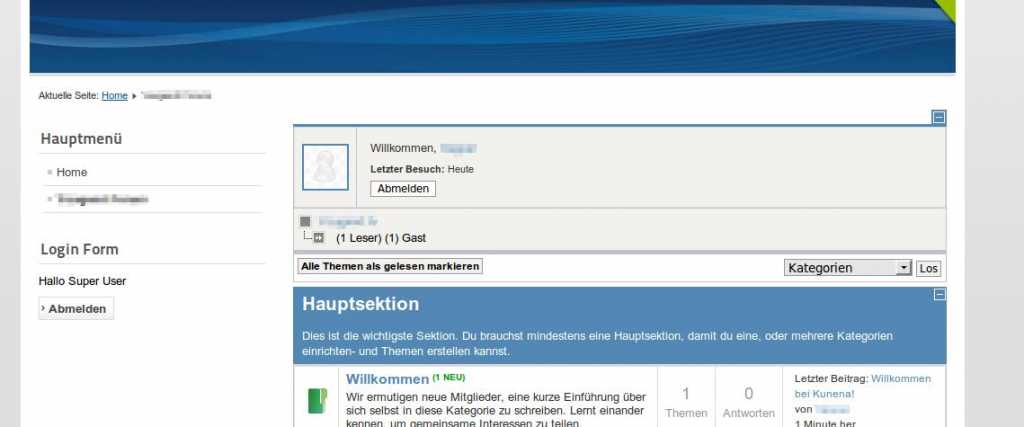
My problem is that I was able to navigate using the Kunena tabs, but now they seem to have vanished.
I mean the ones at the top of the board, where it says: Index, Recent Topic, New Topic, etc.
Last edit: 15 years 7 months ago by John Twenty. Reason: More Information / attached a picture
The topic has been locked.
Time to create page: 0.276 seconds