
Kunena 7.0.9 & Kunena 6.4.14 – Security Updates Released
The Kunena team has announce the arrival of Kunena 7.0.9 [K 7.0.9] in stable which is now available for download as a native Joomla extension for J! 5.4.x/6.0.x./6.1.x. This version addresses most of the issues that were discovered in K 6.2 / K 6.3 / K 6.4 and issues discovered during the last development stages of K 7.0
Sticky [Merged topic] How do I restore my Kunena menu?


Sorry. That was a mistake on my part. I misread what you wrote earlier. (6:30 am, been awake since 4:30 am answering questions in the forum, old age, y'know?)Elnablo wrote: There is no missing BBcode toolbar, also the user profile works without a problem.
Yes, that is strange. You haven't mentioned this before. Let's not introduce new problems at this time, shall we? It's difficult enough staying focused on this problem that the tab menus "disappear". Your Kunena menu is there (as you showed in your images), so I don't understand the disappearing act.Elnablo wrote: The really strange thing is, that I can build a Forum where the buttons show at times and disappear during the use of KUNENA.
Again, this issue has been discussed before in the topic I referred you to in my previous reply. You need to read how to re-establish your Kunena menu properly.Elnablo wrote: When I used the forum that was installed as default, the menubuttons where right there nice and blue on top. They ALWAYS went bye bye as soon as I clicked on a topic. Ooops, the buttons are GONE. Used the back-button on the browser and there it was again, my blue menu!!
Well, stranger things have been known to happen! :laugh: The point I would like to make is that the behaviour of Kunena is dependent on having a solid, trustworthy Joomla platform. The proper functioning of Kunena depends on establishing that other software does not adversely interact with it. The proper functioning of the Kunena menus normally requires next-to-no knowledge about the Joomla menu system except in cases where users have an unconventional approach to their menu setup. In those cases it is necessary to apply the techniques explained in Customised Menus .Elnablo wrote: I just can't believe, that KUNENA would react differently
at different points within KUNENA itself.
But before we get into the situation as to why your menu tabs are not highlighting in ways that you might expect to see (or in ways that you see here at www.kunena.org ) let's look at your template.
You say that you've tried other templates. Have you tried rhuk_milkyway?
Blue Eagle vs. Crypsis reference guide
Read my blog and


As I wrote before, these menubuttons only work at all times, because I changed the type of menu in the "mod_mainmenu" I use for the menus (sse the pic). If I set the "Menüstil" (menustile?) to the default, all buttons are gone..... The "normal" buttons where blue with white text and about 3 times as high.sozzled wrote: Yes, that is strange. You haven't mentioned this before. Let's not introduce new problems at this time, shall we? It's difficult enough staying focused on this problem that the tab menus "disappear". Your Kunena menu is there (as you showed in your images), so I don't understand the disappearing act.
By the way, I am talking about the menubuttons after "Start > Index". That ugly gray blob with the blue lettering.
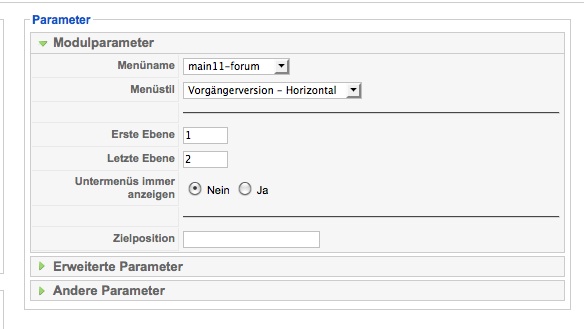
I go to nein11.sonnabend-edv.de/ and I can't see how to get to your forum. Your configuration report shows that you do not have a kunenamenu. Have you read Customised Menus ? Yes or no?
The topic that I referred you to before had a similar problem. Did you read through that discussion topic? Yes or no?
Blue Eagle vs. Crypsis reference guide
Read my blog and
I will now read "Customised menus". I could send you a login to my site per PM, if you want to take a look.
Regards from germany,
Robert
I renamen "kunenamenu", could that be a problem?
Looks REALLY NICE now.......

Blue Eagle vs. Crypsis reference guide
Read my blog and