
- Posts: 4
- Thank you received: 0
Kunena 7.0.8 Released
The Kunena team has announce the arrival of Kunena 7.0.8 [K 7.0.8] in stable which is now available for download as a native Joomla extension for J! 5.4.x/6.0.x./6.1.x. This version addresses most of the issues that were discovered in K 6.2 / K 6.3 / K 6.4 and issues discovered during the last development stages of K 7.0
Topics that are moved into this category are generally considered to be closed. Users may want to add additional information but these topics should not be resurrected in order to discuss new problems or unrelated matters.
Merged Problems with Gravatar avatar images
13 years 5 months ago - 13 years 5 months ago #141635
by diogo814
Replied by diogo814 on topic Can't Change avatar
Hi,
I have change all my kurena forum configs more than once to be sure about this before open this topic.
I have seen other topics like this but the solutions you guys gave i can't use them.
I Send a print screen of my site so you can see, there is no Avatar image section, well in my site its in portuguese but thats the same.
http://db.tt/AMO5n1fG
your forum:
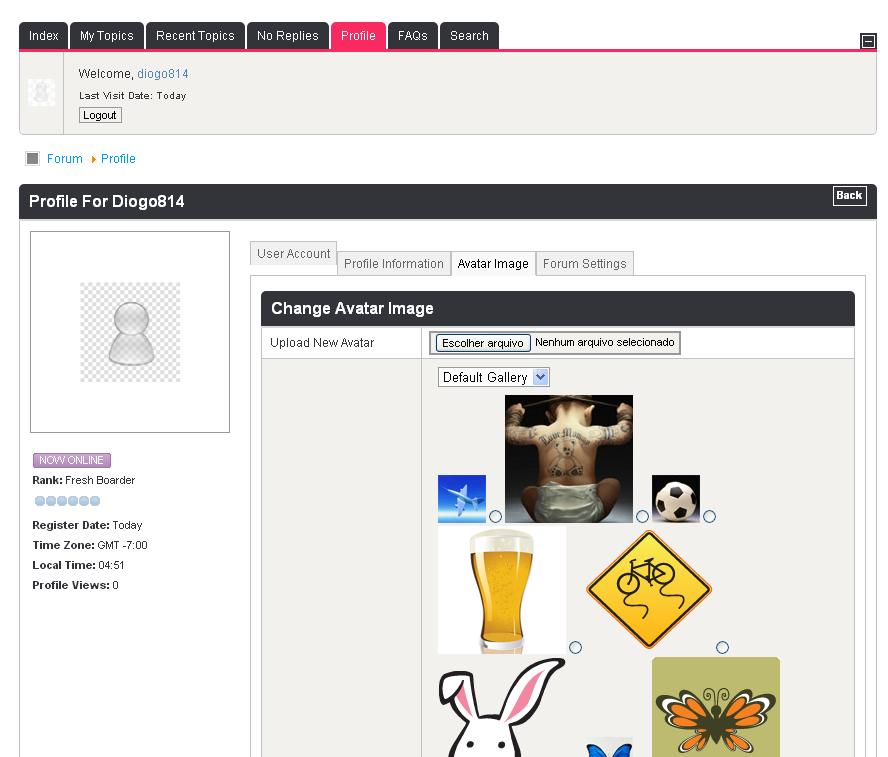
I have change all my kurena forum configs more than once to be sure about this before open this topic.
I have seen other topics like this but the solutions you guys gave i can't use them.
I Send a print screen of my site so you can see, there is no Avatar image section, well in my site its in portuguese but thats the same.
http://db.tt/AMO5n1fG
your forum:
Last edit: 13 years 5 months ago by diogo814.
Please Log in or Create an account to join the conversation.

13 years 5 months ago #141637
by TKtemp
Replied by TKtemp on topic Can't Change avatar
Hi,
go to Joomla Administration -> Kunena Forum -> Kunena Plugins and disable "Kunena - Gravatar Integration" plugin.
That's it
go to Joomla Administration -> Kunena Forum -> Kunena Plugins and disable "Kunena - Gravatar Integration" plugin.
That's it
The following user(s) said Thank You: diogo814
Please Log in or Create an account to join the conversation.
13 years 5 months ago #141640
by diogo814
ohhh... i saw that option on kunena plugins but when i read gravatar i tought it must be on so avatars work...
Ty TKtemp
Replied by diogo814 on topic Can't Change avatar
TKtemp wrote: Hi,
go to Joomla Administration -> Kunena Forum -> Kunena Plugins and disable "Kunena - Gravatar Integration" plugin.
That's it
ohhh... i saw that option on kunena plugins but when i read gravatar i tought it must be on so avatars work...
Ty TKtemp
Please Log in or Create an account to join the conversation.


13 years 5 months ago #141641
by sozzled
Blue Eagle vs. Crypsis reference guide
Read my blog and

Replied by sozzled on topic Can't Change avatar
*** Topics merged ***
Sometimes it helps to mention those "other" topics.diogo814 wrote: I have seen other topics like this but the solutions you guys gave i can't use them
Sometimes it helps to read the " manual " which helps to explain whether an option should be enabled or not enabled. It's a good idea to check to see if software works, "out of the box" after you've installed it, before you change any software settings.diogo814 wrote: I saw that option on kunena plugins but when i read gravatar i tought it must be on so avatars work...
Blue Eagle vs. Crypsis reference guide
Read my blog and
Please Log in or Create an account to join the conversation.
- Maurointer
-

- Offline
- New Member
-

Less
More
- Posts: 10
- Thank you received: 0
13 years 5 months ago - 13 years 5 months ago #141806
by Maurointer
Replied by Maurointer on topic Problem with avatar
Hi, I have installed Kunena on a site with joomla, but when I go in the profile options, does not make me change the avatar. Can you help me?.
P.S. I activated the avatar
P.S. I activated the avatar
Last edit: 13 years 5 months ago by Maurointer.
Please Log in or Create an account to join the conversation.
- Maurointer
-
- Offline
- New Member
-
Less
More
- Posts: 10
- Thank you received: 0
13 years 5 months ago #141807
by Maurointer
Replied by Maurointer on topic Problem with avatar
I solved the problem was the plugin GAvatar enabled, disabled that, I solved the problem
Please Log in or Create an account to join the conversation.
Time to create page: 0.273 seconds