
Search Results (Searched for: you do not have)

Hello,I also included the nice undo.js plugin, which I have edit to include 2 buttons to the menu - just use and test it
(to add a plugin you must edit your template file com_kunena/templates/???/assets/js/sceditor.js (???=your template):
near the end (aurelia = line 714 + 776) you must add the plugin command like this:
sceditor.create(textarea, { = line 714 | sceditor.create(textarea_private, { = line 776
plugins: 'undo', adds undo plugin
format: 'bbcode',
toolbar: toolbar_buttons,
and of course the undo.js must be uploaded to the folder where sceditor.js (the main file) is stored
I have just tried to include the plugin undo but it doesn't want to be loaded because even putting a console.log in the code of undo.js itself and an alert i get nothing. I have tried to put the undo.js at the same place that teh sceditor.js script and even under plugins folder but it didn't hange anything. Someone has posted a change not yet inclued into sceditor to add undo/redo buttons : github.com/samclarke/SCEditor/issues/900...uecomment-1384386965 . I have tried i don't get able to get the the buttons redo/undo displayed
I have tried too with autoyoutube : www.sceditor.com/documentation/plugins/autoyoutube/ but it the same the plugin isn't laoded

(as it uses an iframe, it was a bit tricky to fetch the image properties)
EDIT:
In my euphory I was too fast.
Although the editor is working quite well, I forgot the bbcode part which is mainly needed to save the setting.
so stay quiet - I'm working on.
I also see, that sceditor ignores all Kunena config setting
(eg. left buttons if you had disabled them, no buttons for hide, spoiler or confidential)
I have edited the script, so if you have an image selected and click the image button,
the dialog pops up with the actual properties (at least url, height and width) of this image,
so you can edit them (in basic sceditor this is not possible, you must create new)
I also added 2 more properties during this work, so you now have a field for an ALT text,
and you have a select option, where you can set a float property for the image, to let the text float around.
It is only the sceditor.js file which has been changed (the bbcode is just used/edit as discussed before,
but take care if you use the new Kunena files (I think it will be included in v7.0.5), Kunena calls a sceditor.min.js,
so you must rename my file like the min version, otherwise (or in debug mode) it is just sceditor.js
this new file (based on v321) only works correctly if you use the updated Kunena files (which uses SCeditor v3.2.1)
with an edited version of bbcode.js and the little correction in libraries/src/BBCode/KunenaBBCode.php
(
I also included the nice undo.js plugin, which I have edit to include 2 buttons to the menu - just use and test it
(to add a plugin you must edit your template file com_kunena/templates/???/assets/js/sceditor.js (???=your template):
near the end (aurelia = line 714 + 776) you must add the plugin command like this:
sceditor.create(textarea, { = line 714 | sceditor.create(textarea_private, { = line 776
plugins: 'undo', adds undo plugin
format: 'bbcode',
toolbar: toolbar_buttons,
and of course the undo.js must be uploaded to the folder where sceditor.js (the main file) is stored
when deactivating a main category (but not explicite the subcategories) the forum doesn't show them all - that's fine,
BUT
you will see the newer entries of a not deactived subcategory if switching to "Recent topics".
is this as it should be??
ok, as I'm logged in as superadmin I always see the topics (also if the subcat is disabled),
but when disabled the topics are colored like "deleted" style und if only the maincategory
is disabled the topics looks normal.
now, just checked as basic user and it is what I have said:
if only the main-category is disabled the topics of an enabled subcategory are shown in recent
to hide these topics the subcategory must be disabled too
I don't understand why you want change this regex
because of the 2nd problem.
1. is the missing "translation" of image properties to bbcode
2. error when opening CKeditor if img has some attributes added within the tag using whitespace.
(disabling the bbcode does open the editor as it should be, so there must be a problem within bbcode)
for the first I'm ready with the insertation, but as there is the 2nd bug I cannot
test if the bbcode is correctly read and translated to html.
also I'm not shure if the CK bbcode plugin basicly will work with all the special addons like ebay, video etc.
In the demo it works : ckeditor.com/docs/ckeditor4/latest/examples/image.html , so it's probably the bbcode plugin which disable it when used
that's correct. the original bbcode plugin disables the properties settings of images (see "tab.remove('basic') in the screenshot,
mainly because the there is no implenentation of properties to the bbcode or
the main problem, as each addition (style= or direct width=) will be added using whitespace in the img tag, which causes problems.
In the moment I have done this:
in the ckeditor_config.js
config.removePlugins = 'bbcode'; //disable the original bbcode plugin, because included in the big minified file
config.extraPlugins = 'bbcode2'; //just renaming the standalone bbcode to bbcode2, so I can easily edit it
1st steps:
disabling the remove of properties dialog (see screenshot)
adding properties inclusion
I attach the bbcode2 plugin without any edition, (only the neccearry renaming to bbcode2 in the .add comand line 558)
- also I packed the plugin-edited.js version with my first test correction for imgsize
basicly I found this statement to the original bbcode plugin.js
The BBCode plugin is more of a showcase plugin which presents how to make your own implementation for bbcode. This is not a full bbcode implementation but more of a jump start code. This plugin doesn't support width for images and it is a user responsibility to add it.
There is a version 3.2.1 of SCeditor and i have updated it in developpement branch : github.com/Kunena/Kunena-Forum/commit/e1...2451928c95f256e08f0f
that's fine - I will look if there are important changes.
Nevertheless, as SCEditor generates a width x height property there is the need to change the lKunenaBBCode.php
to allow the 'x' letter (allow /^\d*x\d*$ line 728), otherwise Kunena would ignore it
(also the change to attribute 'size=' would be useful, so SCEditor could read old message styles)
There is a version 3.2.1 of SCeditor and i have updated it in developpement branch : github.com/Kunena/Kunena-Forum/commit/e1...2451928c95f256e08f0f
Hello,any thoughts about switching to the new CKEditor 5 ?
Yes, it's a possibility but because CKeditor 5 uses markdown and not support bbcode there should be a way to convert bbcode to markdown. I haven't looked at this actually.
In the demo it works : ckeditor.com/docs/ckeditor4/latest/examples/image.html , so it's probably the bbcode plugin which disable it when usedone step beyond:
the main problem is the very basic bbcode plugin
(somewhere I read it is just a kind of skeleton and must be edited for full/own use)
I don't understand why you want change this regex
I upload the plugin.js is someone can/wants help
as I'm not so good in RegEx Expressions: can someone check this line from the code, as my program marks an error hereCode:bbcPartsRegex: /(?:\[([^\/\]=]*?)(?:=([^\]]*?))?\])|(?:\[\/([a-z]{1,16})\])/ig
When looking the plugins/bbcode/plugin.js, there are two part where img is handled :
- github.com/ckeditor/ckeditor4/blob/maste...bcode/plugin.js#L611
- github.com/ckeditor/ckeditor4/blob/maste...bcode/plugin.js#L719
Hello,thank you,
can you explain in which file Kunena disables the image property settings ?
(in not in the ckeditor_config, may be in the image.js but Kunena has minified them, so hard to read).
I would like to experiment a bit more.
also do you know/see why CK Editor skipps if there is an attribute in the image tag (not depending on the value)?
I don't think that there are ways to disable this extra settings, in the CKeditor 4 docs they don't explain to disable these extra settings. We use the builder : ckeditor.com/cke4/builder which minify all itself. I have tried to download the version from ckeditor.com/cke4/builder i don't have neither the extra settings in image.
main aspect was to keep old messages (may be from update) in db also work.
old img tag was
so 1. edit the bbcode.js from sceditor (media/kunena/core/js/sceditor/bbcode.js)
line 566: (add 'size' attribute name) attribs = ' size=' + dom.width(element) + 'x' + dom.height(element)
to recognize the new 'size' attribute add these after line 578
//handle [img size=340x240]url[/img]
_important_ 2. in libraries/src/BBCode/KunenaBBCode.php
we must define the size connector 'x' to be allowed now (formerly only numbers \d*)
so line 728 must be edited to: allow /^\d*x\d*$/[/b]']
after this images will display in forum view and preview correctly, no matter if they come with
the new style from sceditor [img size=340x240] or from old kunena messages having [img size=340]
the big thing missing in SCEditor is, that the script has no possibility to edit img attributes
(if you activate an image and click the picture icon it does not load the properties of the selected image,
you have to delete and add new to change properties - or use the source code)
I could find out anything about CKEditor because Kunena has cut out property settings
can anyone help please ???
you can try with the attached files:
thanks again for your effort.
I tested the code changes and it still does not really fix my issue:
In your line 1616:
the most confusing thing is, that CK Editor works well on all messages #2 and up of a topic, but NOT on the first (opening) message.Could be a javascript which is corrupted or could be an issue with the language file for Ckeditor which is a javascript file
(also as written, SK Editor works on ALL)
so what I'm interested in, from the kunena insiders, if there is some db setting in this new versions 6-7 for the opening (first) message,
which I may have missed during my import (also because CK Editor works on the first message of the new created kunena 'welcome' message.
so what is the difference on calling the CK Editor on the top, first message against loading on a following message?
as there are no problems on higher messages the JS files seems to be ok, but as all are minified it is hard to read
thank you
EDIT:
I found out some more details:
it is not the first or second or somthing message, it depends on images.
(as mostly in the first message there are images, I thought just of the first as reason)
it only happens (or better does not
 ) if the image is inline, which means included by using a link with the URL tag,
images included as attachment are no problems.
so CK Editor must have a problem with images included the "old way" not using attachment
any ideas ???
thanks for your fast answer and pull request.
You are right, I have a public part and just want to delete the private part of the message.
If I just change the if in line 1588 like you provided, the message automatically fallbacks to "No private message has been set, only private attachments" because of line 1612:
Also even if I would unset the $private->body there,
However if I quickly try to unset both, $private->body and $private->attachments, the private part is deleted as I would expect.
I don't have a Github account at work but I try to find the time to do some more debugging in private and will then answer your pull request.
Thanks again for your help.

1) When a new user creates a new account, they don't receive their confirmation email.
2) On the Create an Account form in Kunena, the birthdate field is shown as requiring YYYY-MM-DD, but the 'Date Picker' in Kunena Config is set to mm/dd/yyyy
3) If an admin authenticates the account and the user logs in, the entire site freezes and defaults to the home page. None of the nav links work unless you clear browser cache and cookies, then the Joomla site appears to work properly, except . . .
4) Kunena then shows user logged in (at the bottom) but the 'log in' dropdown still asks them to log in (verified that they're activated) and they don't have posting privs.
5) Additionally, if I get back to the 'forum' it shows a number of 'guest' online. If I refresh the browser, it increases the number of 'guests' by 18 each time i do so — I'm currently up to 273 guests which I know is not true.
6) I have tried this with both our template (NTS Kay v6.3.0) and the Kunena template (Aurelia v6.4.9) with the same results
7) When I run Kunena Diagnostics, everything passes.
I've asked for help from Kunena but get no response. Does anyone have thoughts on where and how to begin fixing this?
Joomla v5.4.3
PHP v8.3.30
Kunena v6.4.9
Template: NTS Kay v6.3.0
Configuration Report
- - - - - - - - - - -
Database collation check: The collation of your table fields are correct
Joomla! SEF: Disabled | Joomla! SEF rewrite: Enabled | FTP layer: Disabled |
This message contains confidential informationhtaccess: Exists | PHP environment: Max execution time: 60 seconds | Max execution memory: 512M | Max file upload:
Kunena menu details:
Warning: Spoiler!
ID Name Menutype Link Path In trash 968 Forum kunenamenu view=home&defaultmenu=969 forum No 969 Index kunenamenu view=category&layout=list forum/index No 970 Recent Topics kunenamenu view=topics&mode=replies forum/recent No 971 Unread kunenamenu view=topics&layout=unread forum/unread No 972 New Topic kunenamenu view=topic&layout=create forum/newtopic No 973 No Replies kunenamenu view=topics&mode=noreplies forum/noreplies No 974 My Topics kunenamenu view=topics&layout=user&mode=default forum/mylatest No 975 Profile kunenamenu view=user forum/profile No 976 Help kunenamenu view=misc forum/help No 977 Search kunenamenu view=search forum/search No 978 Forum mainmenu Itemid=968 kunena-2025-04-26 Yes
Joomla default template details : shaper_helixultimate | author: JoomShaper.com | version: 2.2.4 | creationdate: Feb 2018
Kunena default template details : Aurelia | author: Kunena Team | version: 6.4.9 | creationdate: 2026-01-31
Kunena template params:
Warning: Spoiler!
DefaultCategoryicon profileIconset default DefaultIconset default editorIconset default bootstrap 1 borderless 1 tooltips 1 SubjectLengthMessage 80 fullactions 1 quick 0 displayMenu 1 displayDropdownMenu 1 displayDropdownContent 1 displayModule 1 displayBreadcrumb 0 displayAnnouncement 1 displayFooter 0 avatarPosition left formRecover 0 labels 0 whoisonlineName default avatarType rounded topicicontype svg fontawesome 1 socialshare 0 socialsharetag socialtheme classic optional_username 0 writeaccess 0 localstorage 0 IconColor inherit IconColorNew #48a348 editorType ckeditor Bold 1 Italic 1 Underline 1 Strike 1 Subscript 1 Superscript 1 RemoveFormat 1 BulletedList 1 NumberedList 1 Blockquote 1 JustifyLeft 1 JustifyCenter 1 JustifyRight 1 JustifyBlock 1 Link_Unlink 1 Image 1 Smiley 1 Confidential 1 Hidetext 1 Spoiler 1 Code 1 Ebay 1 1 1 Soundcloud 1 FontSize 1 TextColor 1 Maximize 1 Map 1 Video 1 editorButtons nameskinckeditor ckeditorcustomprefixconfigfile avatarSizeX 40 avatarSizeY 90 avatarSizeXThumb 36 avatarSizeYThumb 36 avatarSizeXWelcome 72 avatarSizeYWelcome 72 avatarSizeXList 36 avatarSizeYList 36 avatarSizeXPost 144 avatarSizeYPost 144 avatarSizeXProfile 200 avatarSizeYProfile 200 moduleIdWebauthn 0 X_Social 1 templatebyText templatebyName templatebyLink
Kunena version detailed: Kunena 6.4.9 | 2026-01-31 [ Git Repository ]
| Kunena detailed configuration:| Kunena integration settings:Warning: Spoiler!
Kunena config settings: boardOffline 0 enableRss 0 threadsPerPage 20 messagesPerPage 6 messagesPerPageSearch 15 showHistory 1 historyLimit 6 showNew 1 disableEmoticons 0 template aurelia showAnnouncement 1 avatarOnCategory 0 showChildCatIcon 0 rteWidth 450 rteHeight 300 enableForumJump 1 reportMsg 1 username 1 askEmail 1 showEmail 0 showUserStats 1 showKarma 1 userEdit 1 userEditTime 0 userEditTimeGrace 600 editMarkup 1 allowSubscriptions 1 subscriptionsChecked 1 allowFavorites 1 maxSig 300 regOnly 0 pubWrite 0 floodProtection 0 mailModerators 0 mailAdministrators 0 captcha 1 mailFull 1 allowAvatarUpload 1 allowAvatarGallery 1 avatarQuality 75 avatarSize 2048 imageHeight 800 imageWidth 800 imageSize 150 fileTypes txt,rtf,pdf,zip,tar.gz,tgz,tar.bz2 fileSize 120 showRanking 1 rankImages 1 userlistRows 30 userlistOnline 1 userlistAvatar 1 userlistPosts 1 userlistKarma 1 userlistEmail 0 userlistJoinDate 1 userlistLastVisitDate 1 userlistUserHits 1 latestCategory 0 showStats 1 showWhoIsOnline 1 showGenStats 1 showPopUserStats 1 popUserCount 5 showPopSubjectStats 1 popSubjectCount 5 showSpoilerTag 1 showVideoTag 1 showEbayTag 1 trimLongUrls 1 trimLongUrlsFront 40 trimLongUrlsBack 20 autoEmbedYoutube 1 autoEmbedEbay 1 ebayLanguageCode en-us sessionTimeOut 1800 highlightCode 0 rssType topic rssTimeLimit 1 month rssLimit 100 rssIncludedCategories rssExcludedCategories rssSpecification rss2.0 rssAllowHtml 1 rssAuthorFormat name rssAuthorInTitle 1 rssWordCount 0 rssOldTitles 1 rssCache 900 defaultPage recent defaultSort desc sef 1 showImgForGuest 1 showFileForGuest 1 pollNbOptions 4 pollAllowVoteOne 1 pollEnabled 1 popPollsCount 5 showPopPollStats 1 pollTimeBtVotes 00:15:00 pollNbVotesByUser 100 pollResultsUserslist 1 allowUserEditPoll 0 maxPersonalText 50 orderingSystem mesid postDateFormat ago postDateFormatHover datetime hideIp 1 imageTypes jpg,jpeg,gif,png checkMimeTypes 1 imageMimeTypes image/jpeg,image/jpg,image/gif,image/png imageQuality 50 thumbHeight 32 thumbWidth 32 hideUserProfileInfo put_empty boxGhostMessage 1 userDeleteMessage 0 latestCategoryIn 1 topicIcons 1 debug 0 catsAutoSubscribed 0 showBannedReason 0 showThankYou 1 showPopThankYouStats 1 popThanksCount 5 modSeeDeleted 0 bbcodeImgSecure text listCatShowModerators 1 lightbox 1 showListTime 720 showSessionType 2 showSessionStartTime 1800 userlistAllowed 0 userlistCountUsers 1 enableThreadedLayouts 0 categorySubscriptions post topicSubscriptions every pubProfile 0 thankYouMax 10 emailRecipientCount 0 emailRecipientPrivacy bcc captchaPostLimit 3 imageUpload registered fileUpload registered topicLayout flat timeToCreatePage 0 showImgFilesManageProfile 1 holdNewUsersPosts 0 holdGuestPosts 1 attachmentLimit 8 pickupCategory 0 articleDisplay intro sendEmails 1 fallbackEnglish 1 cache 1 cacheTime 60 ipTracking 1 rssFeedBurnerUrl autoLink 1 accessComponent 1 statsLinkAllowed 1 superAdminUserlist 0 attachmentProtection 0 categoryIcons 1 avatarCrop 0 userReport 1 searchTime 365 teaser 0 ebayLanguage 0 ebayCertId allowChangeSubject 1 maxLinks 6 readOnly 0 ratingEnabled 0 urlSubjectTopic 1 logModeration 0 attachStart 0 attachEnd 14 attachmentUtf8 1 autoEmbedSoundcloud 1 emailHeader media/kunena/email/hero-wide.png userStatus 1 signature 1 personal 1 plainEmail 0 moderatorPermDelete 0 avatarTypes gif,jpeg,jpg,png smartLinking 0 defaultAvatar nophoto.png defaultAvatarSmall s_nophoto.png quickReply 1 avatarEdit 0 activeMenuItem mainMenuId homeId indexId moderatorsId topicListId miscId profileId searchId custom_id avatarType 1 sefRedirect 1 allowEditPoll 1 useSystemEmails 0 autoEmbedInstagram 1 disableRe 0 email_sender_name Endeavour Owners Group display_filename_attachment 0 new_users_prevent_post_url_images 0 minimal_user_posts_add_url_image 10 utmSource 0 emailHeaderSizeY 560 emailHeaderSizeX 560 profiler 0 privateMessage 1 datePickerFormat mm/dd/yyyy sendMailUserBanned 0 mailBodyUserBanned mailBodyUserUnBanned | Joomla! detailed language files installed:Warning: Spoiler!Kunena - Finder Disabled
Kunena - Community Builder Disabled
Kunena - Easyblog Disabled
Kunena - Easyprofile Disabled
Kunena - Easysocial Disabled
Kunena - Gravatar Disabled
Kunena - JomSocial Disabled
Kunena - Joomla Enabled: access=1 login=1
Kunena - Kunena Enabled: avatar=1 profile=1
Kunena - UddeIm Disabled
Warning: Spoiler!
Joomla! languages installed: en-GB English (United Kingdom) en-US English (United States)
Third-party components: None
Third-party SEF components: None
Plugins: None
Modules: None
I setup a new Joomla site with a fresh Kunena 7.0.2.
as this should be an update to an old J3 website I saved all Kunena db entries, updated them to the K7 schema and imported ALL
to the new installation.
everything works fine - instead of on error.
when I'm logged in as superuser I can edit or quote each message BUT NOT the first one of a topic.
(the new sample message of the kunena 7 install I can edit)
the CKeditor is opened, but no message appears and the browser console gives me this error:
Uncaught TypeError: can't access property "type", g is null
onTagClose /media/kunena/core/js/ckeditor.js?aa68f1:1298
parse /media/kunena/core/js/ckeditor.js?aa68f1:1295
fromBBCode /media/kunena/core/js/ckeditor.js?aa68f1:1299
b /media/kunena/core/js/ckeditor.js?aa68f1:1303
l /media/kunena/core/js/ckeditor.js?aa68f1:10
.....
and many, many more
I rerun the installation and during the db import I checked this after each single import,
but the import of categories, topics and messages must be present to open an old topic to check for this error.
in the moment I have not yet importet the kunena user tables, but on the installation before it was complete.
I don't know how the kunena script works on edit or reply and what rights or settings are checked during script run
may be some of you knows what is running in the background and can help me please to find if/where I must change
something. (in the db tables)
as far as I see every all other functions work.
btw. switching to private message the editor works fine
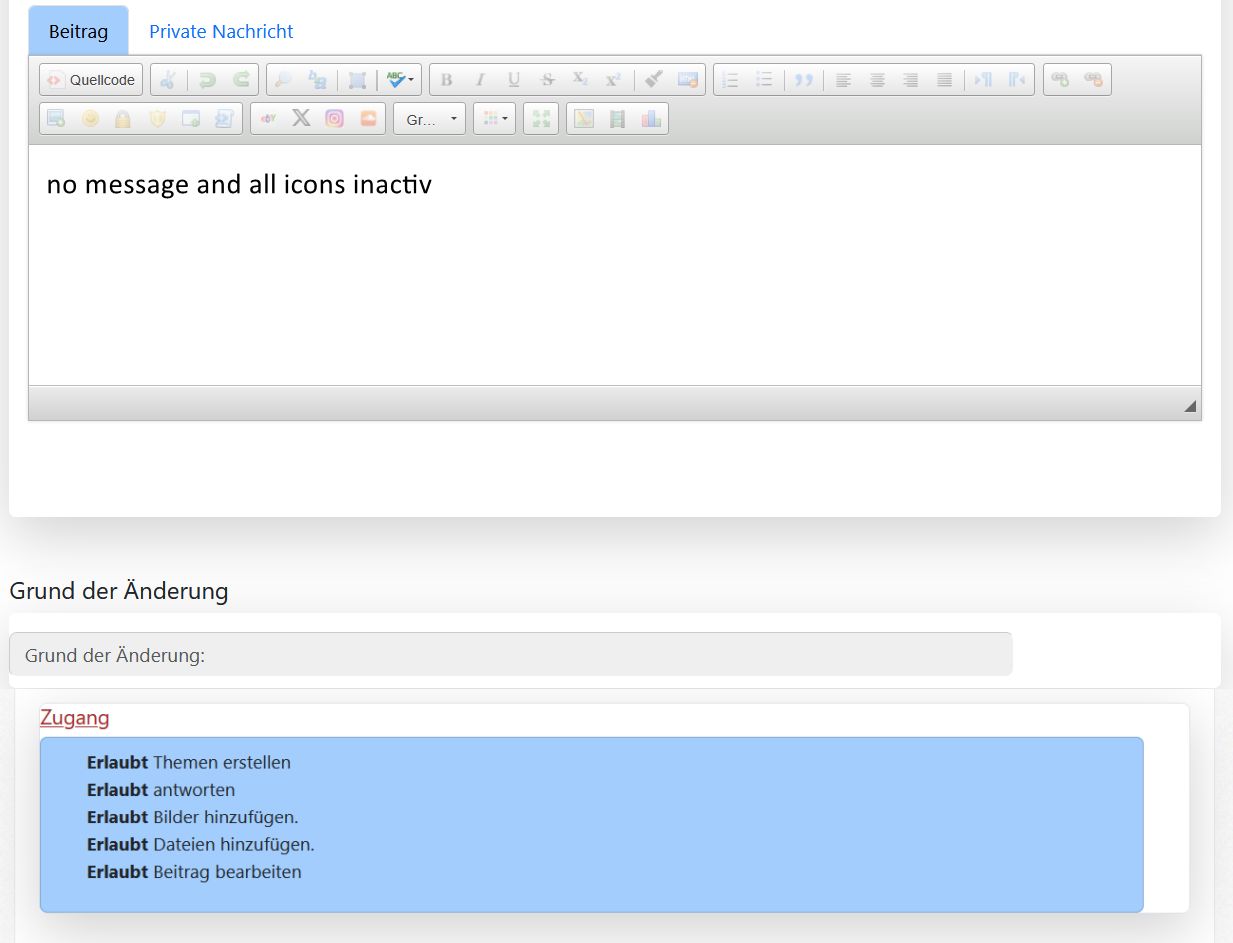
I wouldn't rule that out. In the Kunena 6.0 versions, it was very easy to trace the entries in the configuration report to the entries in the configuration. Since Kunena 7.0, this is hardly possible anymore. The entries in the configuration report are no longer in order but rather jumbled up.Hi Gindi, THX for your reply. So this means to me, that it's probably no configuration problem
.
Some entries have been added and some have been removed.
You should check the configuration settings thoroughly, as the new additions set defaults that you may not want.
In any case, I would synchronise the users and run the diagnostics in the Kunena Dashboard/Tools.
If the diagnostics show ‘Test failed’ for some entries, you can safely delete the error message.
If you click on Documentation in the menu bar at the top of the Kunena forum, you will find help for Kumema 6 and Kunena 7.Do you have an idea if there is a documentation available anywhere?
gindi
- Joomla can send e-mails - that works both with the test mail from the mail configuration as well as with serial mails.
- Users without admin or moderator privileges never get any notification about new messages from kunena.
- If an administrator or moderator is set in the security settings of the Kunena config to receive all messages, he gets them, but users without admin or moderator rights do not get any messages about answers - even if an admin or moderator replies to the thread and the user has a subscription for the thread.
- If administrators and moderators are turned off in the security settings and instead "Send mail as system mail" is activated in the subscription settings, no one will receive a notification - not even moderators or admins who have systemails activated.
- The problem is independent of the mail server settings and occurs with both PHP mail and SMTP Mail.
Database collation check: The collation of your table fields are correct
Joomla! SEF: Enabled | Joomla! SEF rewrite: Enabled | FTP layer: Disabled |
This message contains confidential informationhtaccess: Exists | PHP environment: Max execution time: 240 seconds | Max execution memory: 512M | Max file upload:
Kunena menu details:
Warning: Spoiler!
ID Name Menutype Link Path In trash 638 Online-Selbsthilfe-Forum mainmenu view=home&defaultmenu=299 verein/selbsthilfeangebot/forum-und-erfahrungsaustausch Yes 299 Forum mainmenu view=home&defaultmenu=184 erfahrungsaustausch-forum No 1089 Forum mainmenu view=home&defaultmenu=1180 erfahrungsaustausch-forum/forum No 1095 Forum durchsuchen mainmenu view=search erfahrungsaustausch-forum/suchen No 1090 Neuen Beitrag schreiben mainmenu view=topic&layout=create erfahrungsaustausch-forum/beitrag-schreiben No 1094 Profil bearbeiten mainmenu view=user erfahrungsaustausch-forum/profil No 1106 Ungelesen mainmenu view=topics&layout=unread erfahrungsaustausch-forum/ungelesen Yes 1179 Forum kunenamenu view=home&defaultmenu=1179 forum No 1180 Index kunenamenu view=category&layout=list forum/index No 1181 Aktuell kunenamenu view=topics&mode=replies forum/aktuell-beitraege No 1182 Ungelesen kunenamenu view=topics&layout=unread forum/ungelesen No 1183 Neues Thema kunenamenu view=topic&layout=create forum/neuesthema No 1184 Ohne Antwort kunenamenu view=topics&mode=noreplies forum/ohneantwort No 1185 Meine Themen kunenamenu view=topics&layout=user&mode=default forum/meinethemen No 1186 Profil kunenamenu view=user forum/profil No 1187 Hilfe kunenamenu view=misc forum/hilfe No 1188 Suche kunenamenu view=search forum/suche No 1189 Forum mainmenu Itemid=1179 kunena-2026-03-04 Yes
Joomla default template details : tp_master | author: joomlaPlates | version: 2.6 | creationdate: 2025-11-12
Kunena default template details : Aurelia | author: Kunena Team | version: 7.0.2 | creationdate: 2026-03-03
Kunena template params:
Warning: Spoiler!
DefaultCategoryicon profileIconset default DefaultIconset default editorIconset default bootstrap 1 borderless 1 tooltips 1 SubjectLengthMessage 80 fullactions 1 quick 1 displayMenu 1 displayDropdownMenu 1 displayDropdownContent 1 displayModule 1 displayBreadcrumb 1 displayAnnouncement 1 displayFooter 1 avatarPosition left formRecover 1 labels 1 whoisonlineName default avatarType rounded topicicontype image fontawesome 1 optional_username 0 writeaccess 0 localstorage 0 moduleIdWebauthn 0 IconColor inherit IconColorNew #e05915 editorType sceditor Bold 1 Italic 1 Underline 1 Strike 1 Subscript 1 Smiley 1 Superscript 1 RemoveFormat 1 BulletedList 1 NumberedList 1 Blockquote 1 JustifyLeft 1 JustifyCenter 1 JustifyRight 1 JustifyBlock 1 Link_Unlink 1 Image 1 Confidential 1 Hidetext 1 Spoiler 1 Code 1 Ebay 0 X_Social 0 0 Soundcloud 0 FontSize 1 TextColor 1 Maximize 0 Map 0 Video 1 editorButtons bold,italic,underline,strike,superscript,subscript,right,left,justify,center,removeFormat,font,size,color,Image,Video,link,unlink,bulletedList,orderedlist,Code nameskinckeditor ckeditorcustomprefixconfigfile avatarSizeX 40 avatarSizeY 90 avatarSizeXThumb 36 avatarSizeYThumb 36 avatarSizeXWelcome 72 avatarSizeYWelcome 72 avatarSizeXList 36 avatarSizeYList 36 avatarSizeXPost 144 avatarSizeYPost 144 avatarSizeXProfile 200 avatarSizeYProfile 200 templatebyText templatebyName templatebyLink
Kunena version detailed: Kunena 7.0.2 | 2026-03-03 [ Git Repository ] | Kunena detailed configuration:
| Kunena integration settings:Warning: Spoiler!
Kunena config settings: template aurelia emailSenderName [email protected] sendEmails 1 boardOffline 0 readOnly 0 sessionTimeOut 1800 enableRss 1 debug 1 profiler 0 fallbackEnglish 1 timeToCreatePage 1 sef 1 accessComponent 1 sefRedirect 1 cache 1 cacheTime 60 threadsPerPage 10 messagesPerPage 15 messagesPerPageSearch 15 showHistory 1 historyLimit 15 postDateFormat ago postDateFormatHover datetime showNew 1 showAnnouncement 1 avatarOnCategory 1 listCatShowModerators 0 showChildCatIcon 1 enableForumJump 0 reportMsg 1 orderingSystem mesid hideIp 0 latestCategoryIn 1 topicIcons 1 lightbox 1 showListTime 8760 topicLayout indented pickupCategory 1 articleDisplay full defaultSort desc searchTime 365 allowChangeSubject 0 ratingEnabled 0 attachStart 0 attachEnd 14 quickReply 0 disableRe 1 displayFilenameAttachment 0 datePickerFormat mm/dd/yyyy username 1 askEmail 1 showEmail 0 showUserStats 1 showKarma 0 showThankYou 1 thankYouMax 15 userEdit 2 userEditTime 600 userEditTimeGrace 600 editMarkup 0 allowFavorites 1 boxGhostMessage 0 showBannedReason 0 showImgFilesManageProfile 1 userReport 1 logModeration 1 userStatus 1 signature 1 maxSig 300 personal 0 privateMessage 0 emailHeader /images/Blogfotos/logos%20IKS/Inkontinenz%20Selbsthilfe%20Logo%20mit%20transparentem%20Hintergrund%20600%20x%20300%20px%203.png emailHeaderSizeY 560 emailHeaderSizeX 560 allowSubscriptions 1 mailFull 0 plainEmail 1 categorySubscriptions post topicSubscriptions every subscriptionsChecked 1 emailRecipientCount 10 emailRecipientPrivacy bcc useSystemEmails 0 utmSource 0 sendMailUserBanned 0 mailBodyUserBanned --- mailBodyUserUnBanned --- pubWrite 0 holdGuestPosts 0 userlistAllowed 0 pubProfile 0 regOnly 0 holdNewUsersPosts 0 userDeleteMessage 0 modSeeDeleted 0 floodProtection 5 mailModerators 0 mailAdministrators 1 ipTracking 1 statsLinkAllowed 1 maxLinks 6 teaser 0 urlSubjectTopic 1 moderatorPermDelete 0 newUsersPreventPostUrlImages 0 minimalUserPostsAddUrlImage 10 captcha 0 captchaPostLimit 0 stopForumSpamNewUserCheck 0 avatarType 0 defaultAvatar nophoto.png defaultAvatarSmall s_nophoto.png avatarTypes gif,jpeg,jpg,png allowAvatarUpload 1 allowAvatarGallery 1 avatarSize 2048 avatarQuality 75 avatarCrop 1 avatarEdit 1 attachmentLimit 8 attachmentProtection 1 attachmentUtf8 1 imageUpload registered showImgForGuest 1 imageTypes jpg,jpeg,gif,png,webp,avif checkMimeTypes 1 imageMimeTypes image/jpeg,image/jpg,image/gif,image/png,image/webp,image/avif imageSize 250 imageWidth 800 imageHeight 800 thumbWidth 32 thumbHeight 32 imageQuality 50 fileUpload registered showFileForGuest 1 fileTypes txt,rtf,pdf,zip,tar.gz,tgz,tar.bz2 fileSize 120 showRanking 1 rankImages 3 trimLongUrls 1 trimLongUrlsFront 40 trimLongUrlsBack 20 autoLink 1 smartLinking 0 autoEmbedYoutube 1 autoEmbedEbay 0 autoEmbedInstagram 0 autoEmbedSoundcloud 0 highlightCode 0 bbcodeImgSecure text ebayLanguage 77 ebayCertId rssType post rssSpecification rss2.0 rssTimeLimit 1 month rssLimit 100 rssAllowHtml 1 rssAuthorFormat name rssAuthorInTitle 1 rssWordCount 0 rssOldTitles 0 rssCache 900 rssFeedBurnerUrl userlistRows 30 userlistOnline 1 userlistAvatar 1 userlistPosts 1 userlistKarma 0 userlistEmail 0 userlistJoinDate 1 userlistLastVisitDate 1 userlistUserHits 1 superAdminUserlist 1 userListUserType 1 showSessionType 1 showSessionStartTime 1800 showWhoIsOnline 1 showStats 1 showGenStats 1 showPopUserStats 1 popUserCount 5 showPopSubjectStats 1 popSubjectCount 10 showPopPollStats 1 popPollsCount 5 showPopThankYouStats 1 popThanksCount 5 userlistCountUsers 0 pollEnabled 1 pollNbOptions 4 pollTimeBtVotes 00:15:00 pollNbVotesByUser 100 pollAllowVoteOne 1 pollResultsUserslist 1 allowUserEditPoll 0 defaultPage recent activeMenuItem mainMenuId homeId indexId moderatorsId topicListId miscId profileId searchId rules | Joomla! detailed language files installed:Warning: Spoiler!Kunena - Finder DisabledKunena - Community Builder DisabledKunena - Easyblog DisabledKunena - Easysocial DisabledKunena - Gravatar DisabledKunena - JomSocial DisabledKunena - Joomla Enabled: access=1 login=1Kunena - Kunena Enabled: avatar=1 profile=1Kunena - UddeIm DisabledWarning: Spoiler!
Joomla! languages installed: de-DE German (Germany) en-GB English (United Kingdom)
Third-party components: None
Third-party SEF components: None
Plugins: None
Modules: Kunena Stats 6.1.0
Hello,Hi rich,
I'm maybe a step further: I turned the extended php debugging on and get two error messages, that I couldn't interpret well - it seems that they are caused by the migration - how ever I wondering how this could be possible because kunena was set up completely new (now with v. 7.0.1).
Do you have a idea, what causes the following error and how to fix it?:
Deprecated: Creation of dynamic property Kunena\Forum\Libraries\Forum\Category\KunenaCategory::$allow_ratings is deprecated in /mnt/web508/e1/97/510678697/htdocs/Update/libraries/kunena/src/Database/KunenaDatabaseObject.php on line 128 Deprecated: Creation of dynamic property
Since K6.0.0 beta3 the column allow_ratings has been renammed in allowRatings, so make an export of the table #__kunena_categories with phpmyadmin just in case. Then you can apply this query to fix the table :
Same here on table #__kunena_ranks before K6.0.0 beta3 there was a column nammed rank_id which has been renammed. so make an export of the table #__kunena_ranks with phpmyadmin just in case, then apply this query :and,
Warning: Undefined property: stdClass::$rankId in /mnt/web508/e1/97/510678697/htdocs/Update/libraries/vendor/joomla/database/src/DatabaseDriver.php on line 1309
THX