


- Posts: 68
- Thank you received: 13
Kunena 7.0.9 & Kunena 6.4.14 – Security Updates Released
The Kunena team has announce the arrival of Kunena 7.0.9 [K 7.0.9] in stable which is now available for download as a native Joomla extension for J! 5.4.x/6.0.x./6.1.x. This version addresses most of the issues that were discovered in K 6.2 / K 6.3 / K 6.4 and issues discovered during the last development stages of K 7.0
Topics must relate to a currently supported version of Kunena. If you are unsure what is the current supported version of Kunena, please go to the
download
page.
If you are having problems then, for your own benefit, it would save us all a lot of time if you would kindly post your configuration report when you ask for help from this forum. If you do not post your configuration report we will not ask you for it but you will probably not get your problem solved, either.
If you are having problems then, for your own benefit, it would save us all a lot of time if you would kindly post your configuration report when you ask for help from this forum. If you do not post your configuration report we will not ask you for it but you will probably not get your problem solved, either.
Question set image size in posting not working (reason for my former problem)
5 months 21 hours ago #234944
by joomod
Replied by joomod on topic set image size in posting not working (reason for my former problem)
one step beyond:
the main problem is the very basic bbcode plugin
(somewhere I read it is just a kind of skeleton and must be edited for full/own use)
1. this is the part where the properties dialog is cut out
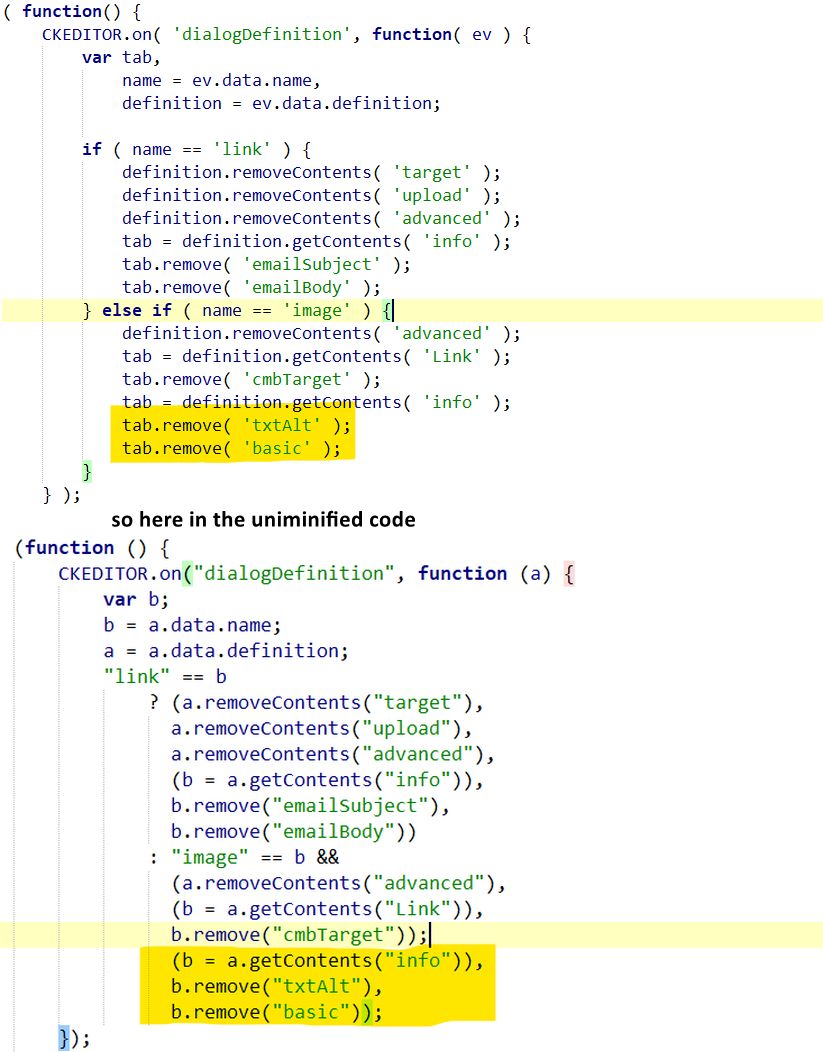
now the next step is to find out how to send the properties to the bbcode
and
where this attributes must be set to be allowed so the editor will fully work
the important thing is that it looks like all depends on the bbcode plugin, nowhere else
I upload the plugin.js is someone can/wants help
as I'm not so good in RegEx Expressions: can someone check this line from the code, as my program marks an error here
the main problem is the very basic bbcode plugin
(somewhere I read it is just a kind of skeleton and must be edited for full/own use)
1. this is the part where the properties dialog is cut out
now the next step is to find out how to send the properties to the bbcode
and
where this attributes must be set to be allowed so the editor will fully work
the important thing is that it looks like all depends on the bbcode plugin, nowhere else
I upload the plugin.js is someone can/wants help
as I'm not so good in RegEx Expressions: can someone check this line from the code, as my program marks an error here
Code:
bbcPartsRegex: /(?:\[([^\/\]=]*?)(?:=([^\]]*?))?\])|(?:\[\/([a-z]{1,16})\])/ig
Please Log in or Create an account to join the conversation.


4 months 4 weeks ago - 4 months 4 weeks ago #234945
by xillibit
I don't provide support by PM, because this can be useful for someone else.
Replied by xillibit on topic set image size in posting not working (reason for my former problem)
I have just tried but i can't anymore add new issues on ckeditor 4 :
github.com/ckeditor/ckeditor4/issues
There is a version 3.2.1 of SCeditor and i have updated it in developpement branch : github.com/Kunena/Kunena-Forum/commit/e1...2451928c95f256e08f0f
Yes, it's a possibility but because CKeditor 5 uses markdown and not support bbcode there should be a way to convert bbcode to markdown. I haven't looked at this actually.
When looking the plugins/bbcode/plugin.js, there are two part where img is handled :
There is a version 3.2.1 of SCeditor and i have updated it in developpement branch : github.com/Kunena/Kunena-Forum/commit/e1...2451928c95f256e08f0f
Hello,any thoughts about switching to the new CKEditor 5 ?
Yes, it's a possibility but because CKeditor 5 uses markdown and not support bbcode there should be a way to convert bbcode to markdown. I haven't looked at this actually.
In the demo it works : ckeditor.com/docs/ckeditor4/latest/examples/image.html , so it's probably the bbcode plugin which disable it when usedone step beyond:
the main problem is the very basic bbcode plugin
(somewhere I read it is just a kind of skeleton and must be edited for full/own use)
I don't understand why you want change this regex
I upload the plugin.js is someone can/wants help
as I'm not so good in RegEx Expressions: can someone check this line from the code, as my program marks an error hereCode:bbcPartsRegex: /(?:\[([^\/\]=]*?)(?:=([^\]]*?))?\])|(?:\[\/([a-z]{1,16})\])/ig
When looking the plugins/bbcode/plugin.js, there are two part where img is handled :
- github.com/ckeditor/ckeditor4/blob/maste...bcode/plugin.js#L611
- github.com/ckeditor/ckeditor4/blob/maste...bcode/plugin.js#L719
I don't provide support by PM, because this can be useful for someone else.
Last edit: 4 months 4 weeks ago by xillibit.
Please Log in or Create an account to join the conversation.
4 months 4 weeks ago - 4 months 4 weeks ago #234946
by joomod
because of the 2nd problem.
1. is the missing "translation" of image properties to bbcode
2. error when opening CKeditor if img has some attributes added within the tag using whitespace.
(disabling the bbcode does open the editor as it should be, so there must be a problem within bbcode)
for the first I'm ready with the insertation, but as there is the 2nd bug I cannot
test if the bbcode is correctly read and translated to html.
also I'm not shure if the CK bbcode plugin basicly will work with all the special addons like ebay, video etc.
that's correct. the original bbcode plugin disables the properties settings of images (see "tab.remove('basic') in the screenshot,
mainly because the there is no implenentation of properties to the bbcode or
the main problem, as each addition (style= or direct width=) will be added using whitespace in the img tag, which causes problems.
In the moment I have done this:
in the ckeditor_config.js
config.removePlugins = 'bbcode'; //disable the original bbcode plugin, because included in the big minified file
config.extraPlugins = 'bbcode2'; //just renaming the standalone bbcode to bbcode2, so I can easily edit it
1st steps:
disabling the remove of properties dialog (see screenshot)
adding properties inclusion
I attach the bbcode2 plugin without any edition, (only the neccearry renaming to bbcode2 in the .add comand line 558)
- also I packed the plugin-edited.js version with my first test correction for imgsize
basicly I found this statement to the original bbcode plugin.js
that's fine - I will look if there are important changes.
Nevertheless, as SCEditor generates a width x height property there is the need to change the lKunenaBBCode.php
to allow the 'x' letter (allow /^\d*x\d*$ line 728), otherwise Kunena would ignore it
(also the change to attribute 'size=' would be useful, so SCEditor could read old message styles)
Replied by joomod on topic set image size in posting not working (reason for my former problem)
I don't understand why you want change this regex
because of the 2nd problem.
1. is the missing "translation" of image properties to bbcode
2. error when opening CKeditor if img has some attributes added within the tag using whitespace.
(disabling the bbcode does open the editor as it should be, so there must be a problem within bbcode)
for the first I'm ready with the insertation, but as there is the 2nd bug I cannot
test if the bbcode is correctly read and translated to html.
also I'm not shure if the CK bbcode plugin basicly will work with all the special addons like ebay, video etc.
In the demo it works : ckeditor.com/docs/ckeditor4/latest/examples/image.html , so it's probably the bbcode plugin which disable it when used
that's correct. the original bbcode plugin disables the properties settings of images (see "tab.remove('basic') in the screenshot,
mainly because the there is no implenentation of properties to the bbcode or
the main problem, as each addition (style= or direct width=) will be added using whitespace in the img tag, which causes problems.
In the moment I have done this:
in the ckeditor_config.js
config.removePlugins = 'bbcode'; //disable the original bbcode plugin, because included in the big minified file
config.extraPlugins = 'bbcode2'; //just renaming the standalone bbcode to bbcode2, so I can easily edit it
1st steps:
disabling the remove of properties dialog (see screenshot)
adding properties inclusion
I attach the bbcode2 plugin without any edition, (only the neccearry renaming to bbcode2 in the .add comand line 558)
- also I packed the plugin-edited.js version with my first test correction for imgsize
basicly I found this statement to the original bbcode plugin.js
The BBCode plugin is more of a showcase plugin which presents how to make your own implementation for bbcode. This is not a full bbcode implementation but more of a jump start code. This plugin doesn't support width for images and it is a user responsibility to add it.
There is a version 3.2.1 of SCeditor and i have updated it in developpement branch : github.com/Kunena/Kunena-Forum/commit/e1...2451928c95f256e08f0f
that's fine - I will look if there are important changes.
Nevertheless, as SCEditor generates a width x height property there is the need to change the lKunenaBBCode.php
to allow the 'x' letter (allow /^\d*x\d*$ line 728), otherwise Kunena would ignore it
(also the change to attribute 'size=' would be useful, so SCEditor could read old message styles)
Last edit: 4 months 4 weeks ago by joomod.
Please Log in or Create an account to join the conversation.
4 months 4 weeks ago - 4 months 4 weeks ago #234947
by xillibit
I don't provide support by PM, because this can be useful for someone else.
Replied by xillibit on topic set image size in posting not working (reason for my former problem)
I have digged a bit by working on the unminified version of bbcode plugin :
on line 31, i have changed it and added the width and height attibutes :
To use it you need to have that in the message column #__kunena_messages_text
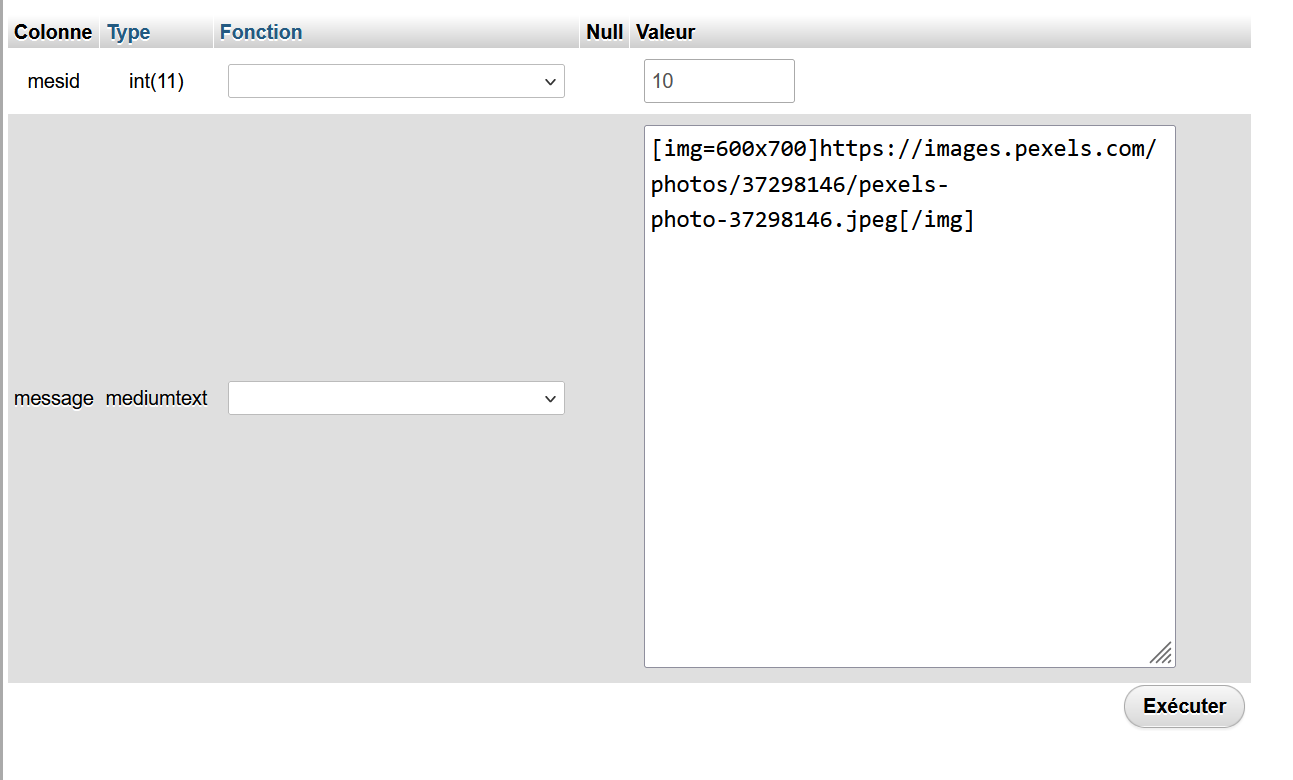
It's not keeped when you create/edit your message
on line 31, i have changed it and added the width and height attibutes :
Code:
attributesMap = { url: 'href', email: 'mailhref', quote: 'cite', list: 'listType', img: 'height', img: 'width' };
on line 613, i have added var tempImageSize = element.attributes.width;var imageSizes = tempImageSize.split("x");element.attributes.height = imageSizes[0];element.attributes.width = imageSizes[1];
To use it you need to have that in the message column #__kunena_messages_text
It's not keeped when you create/edit your message
I had made a Pull Request with your cahnges on this : github.com/Kunena/Kunena-Forum/pull/10051 . I'am waiting your feedback on this
There is a version 3.2.1 of SCeditor and i have updated it in developpement branch : github.com/Kunena/Kunena-Forum/commit/e1...2451928c95f256e08f0f
that's fine - I will look if there are important changes.
Nevertheless, as SCEditor generates a width x height property there is the need to change the lKunenaBBCode.php
to allow the 'x' letter (allow /^\d*x\d*$ line 728), otherwise Kunena would ignore it
(also the change to attribute 'size=' would be useful, so SCEditor could read old message styles)
I don't provide support by PM, because this can be useful for someone else.
Last edit: 4 months 4 weeks ago by xillibit.
Please Log in or Create an account to join the conversation.
4 months 4 weeks ago - 4 months 4 weeks ago #234948
by joomod
Replied by joomod on topic set image size in posting not working (reason for my former problem)
your result looks quite good, as it comes in the same format as basicly SCEditor returns,
and of course it should work and be opened in the CKEditor,
but my main intent was to find a solution, which will open old Kunena posts as well which uses the
img size=xxx attribute
btw. feel free to publish my SCEditor changes in the pull request, as I'm not so confirmed with github
and of course it should work and be opened in the CKEditor,
but my main intent was to find a solution, which will open old Kunena posts as well which uses the
img size=xxx attribute
btw. feel free to publish my SCEditor changes in the pull request, as I'm not so confirmed with github
Last edit: 4 months 4 weeks ago by joomod.
Please Log in or Create an account to join the conversation.
4 months 2 weeks ago - 4 months 2 weeks ago #234961
by joomod
Replied by joomod on topic set image size in posting not working (reason for my former problem)
after some nights I have an edited version of SCeditor ready.
(as it uses an iframe, it was a bit tricky to fetch the image properties)
EDIT:
In my euphory I was too fast.
Although the editor is working quite well, I forgot the bbcode part which is mainly needed to save the setting.
so stay quiet - I'm working on.
I also see, that sceditor ignores all Kunena config setting
(eg. left buttons if you had disabled them, no buttons for hide, spoiler or confidential)
I have edited the script, so if you have an image selected and click the image button,
the dialog pops up with the actual properties (at least url, height and width) of this image,
so you can edit them (in basic sceditor this is not possible, you must create new)
I also added 2 more properties during this work, so you now have a field for an ALT text,
and you have a select option, where you can set a float property for the image, to let the text float around.
It is only the sceditor.js file which has been changed (the bbcode is just used/edit as discussed before,
but take care if you use the new Kunena files (I think it will be included in v7.0.5), Kunena calls a sceditor.min.js,
so you must rename my file like the min version, otherwise (or in debug mode) it is just sceditor.js
this new file (based on v321) only works correctly if you use the updated Kunena files (which uses SCeditor v3.2.1)
with an edited version of bbcode.js and the little correction in libraries/src/BBCode/KunenaBBCode.php
(
I also included the nice undo.js plugin, which I have edit to include 2 buttons to the menu - just use and test it
(to add a plugin you must edit your template file com_kunena/templates/???/assets/js/sceditor.js (???=your template):
near the end (aurelia = line 714 + 776) you must add the plugin command like this:
sceditor.create(textarea, { = line 714 | sceditor.create(textarea_private, { = line 776
plugins: 'undo', adds undo plugin
format: 'bbcode',
toolbar: toolbar_buttons,
and of course the undo.js must be uploaded to the folder where sceditor.js (the main file) is stored
(as it uses an iframe, it was a bit tricky to fetch the image properties)
EDIT:
In my euphory I was too fast.
Although the editor is working quite well, I forgot the bbcode part which is mainly needed to save the setting.
so stay quiet - I'm working on.
I also see, that sceditor ignores all Kunena config setting
(eg. left buttons if you had disabled them, no buttons for hide, spoiler or confidential)
I have edited the script, so if you have an image selected and click the image button,
the dialog pops up with the actual properties (at least url, height and width) of this image,
so you can edit them (in basic sceditor this is not possible, you must create new)
I also added 2 more properties during this work, so you now have a field for an ALT text,
and you have a select option, where you can set a float property for the image, to let the text float around.
It is only the sceditor.js file which has been changed (the bbcode is just used/edit as discussed before,
but take care if you use the new Kunena files (I think it will be included in v7.0.5), Kunena calls a sceditor.min.js,
so you must rename my file like the min version, otherwise (or in debug mode) it is just sceditor.js
this new file (based on v321) only works correctly if you use the updated Kunena files (which uses SCeditor v3.2.1)
with an edited version of bbcode.js and the little correction in libraries/src/BBCode/KunenaBBCode.php
(
Code:
line 728 must be edited to: allow ['size' => '/^\d*x?\d*$/'])
[attachment=22853]sceditor.png[/attachment]
I also included the nice undo.js plugin, which I have edit to include 2 buttons to the menu - just use and test it
(to add a plugin you must edit your template file com_kunena/templates/???/assets/js/sceditor.js (???=your template):
near the end (aurelia = line 714 + 776) you must add the plugin command like this:
sceditor.create(textarea, { = line 714 | sceditor.create(textarea_private, { = line 776
plugins: 'undo', adds undo plugin
format: 'bbcode',
toolbar: toolbar_buttons,
and of course the undo.js must be uploaded to the folder where sceditor.js (the main file) is stored
Last edit: 4 months 2 weeks ago by joomod.
Please Log in or Create an account to join the conversation.
Time to create page: 0.261 seconds