


- Posts: 68
- Thank you received: 13
Kunena 7.0.9 & Kunena 6.4.14 – Security Updates Released
The Kunena team has announce the arrival of Kunena 7.0.9 [K 7.0.9] in stable which is now available for download as a native Joomla extension for J! 5.4.x/6.0.x./6.1.x. This version addresses most of the issues that were discovered in K 6.2 / K 6.3 / K 6.4 and issues discovered during the last development stages of K 7.0
Topics must relate to a currently supported version of Kunena. If you are unsure what is the current supported version of Kunena, please go to the
download
page.
If you are having problems then, for your own benefit, it would save us all a lot of time if you would kindly post your configuration report when you ask for help from this forum. If you do not post your configuration report we will not ask you for it but you will probably not get your problem solved, either.
If you are having problems then, for your own benefit, it would save us all a lot of time if you would kindly post your configuration report when you ask for help from this forum. If you do not post your configuration report we will not ask you for it but you will probably not get your problem solved, either.
Question set image size in posting not working (reason for my former problem)
5 months 1 week ago - 5 months 1 week ago #234919
by joomod
Kunena has changed the method how to define the size of inline images.
in Kunena5 (don't know v6) the code looked like [img size=150]*
*may be if an admin will try to edit this post CK Editor will not work because of this tag
but having this in a posting in Kunena 7 CK Editor won't open to work with.
now in Kunena 7 I cannot find how to set the image size in CK Editor,
even if it is set (by using SK Editor) CK Editor ignors the params.
so how can wet set the size of inline images in CK Editor ?
and also:
SK Editor does not fully work
setting the size on an inline image gives the expected preview,
BUT in the normal posting view the image is still original size
in Kunena5 (don't know v6) the code looked like [img size=150]*
*may be if an admin will try to edit this post CK Editor will not work because of this tag
but having this in a posting in Kunena 7 CK Editor won't open to work with.
now in Kunena 7 I cannot find how to set the image size in CK Editor,
even if it is set (by using SK Editor) CK Editor ignors the params.
Code:
original code set by SK [img=200x67] only comes as [img]
so how can wet set the size of inline images in CK Editor ?
and also:
SK Editor does not fully work
setting the size on an inline image gives the expected preview,
BUT in the normal posting view the image is still original size
Last edit: 5 months 1 week ago by joomod.
Please Log in or Create an account to join the conversation.
5 months 1 week ago - 5 months 1 week ago #234921
by joomod
Replied by joomod on topic set image size in posting not working (reason for my former problem)
here is the orig. image code as from aurelia layout/bbcode/image (also dublicated in other templates)
you see, the size setting of an img is declared (included as width), but not CKEditor or SCEditor are giving a size attribute to images.
so how can we set image size ?
Code:
namespace Kunena\Forum\Site;
\defined('_JEXEC') or die();
use Kunena\Forum\Libraries\Config\KunenaConfig;
$title = $this->title;
$url = $this->url;
$size = $this->size;
$alt = $this->alt;
$canLink = isset($this->canLink) ? $this->canLink : true;
echo $this->subLayout('Widget/Lightbox');
$config = KunenaConfig::getInstance();
$attributesLink = $config->lightbox ? ' data-fancybox="gallery"' : '';
$width = $size ? (int) $size . "px;" : 'auto ';
$attributesImg = ' style="max-height: ' . (int) $config->imageHeight . 'px;' . ' max-width:' . $width . '"';
$attributesImg .= $alt ? ' alt="' . htmlspecialchars($alt) . '"' : '';
?>
<div class="kmsgimage">
<?php if ($canLink) :
?>
<a href="<?php echo $this->escape($url); ?>" data-bs-toggle="tooltip" title="<?php echo $alt; ?>" <?php echo $attributesLink; ?>>
<?php endif; ?>
<img loading=lazy src="<?php echo $this->escape($url); ?>" <?php echo $attributesImg; ?> alt="<?php echo $title; ?>"/>
<?php if ($canLink) :
?>
</a>
<?php endif; ?>
</div>
you see, the size setting of an img is declared (included as width), but not CKEditor or SCEditor are giving a size attribute to images.
so how can we set image size ?
Last edit: 5 months 1 week ago by joomod.
Please Log in or Create an account to join the conversation.
5 months 1 week ago - 5 months 1 week ago #234922
by joomod
Replied by joomod on topic set image size in posting not working (reason for my former problem)
summary of image settings:
[img] => works, but no size settings
[img=200x67] works in SC preview, but not in forum view CK removes the size setting
[img size=200] works in SC forum view, but not in preview CK does not open in working mode
[img] => works, but no size settings
[img=200x67] works in SC preview, but not in forum view CK removes the size setting
[img size=200] works in SC forum view, but not in preview CK does not open in working mode
Last edit: 5 months 1 week ago by joomod.
Please Log in or Create an account to join the conversation.
5 months 1 week ago - 5 months 1 week ago #234925
by joomod
Replied by joomod on topic set image size in posting not working (reason for my former problem)
I searched on many ckeditor 4 articles and finally ended with this question:
why (where?) have you disabled the images size and property settings in the basic image plugin?
this is what the image insert dialog looks like normally:
btw. also the upload option could be helpful, (using config to disable)
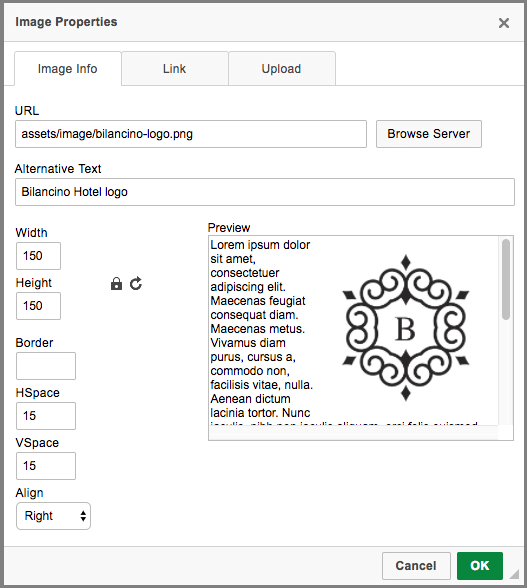
why (where?) have you disabled the images size and property settings in the basic image plugin?
this is what the image insert dialog looks like normally:
btw. also the upload option could be helpful, (using config to disable)
Last edit: 5 months 1 week ago by joomod.
Please Log in or Create an account to join the conversation.


Less
More
- Posts: 12291
- Thank you received: 2538
5 months 1 week ago #234926
by rich
Important! Always create a backup before you make any changes to your website!
Replied by rich on topic set image size in posting not working (reason for my former problem)
I can confirm the problem and have added it to the bug list. It appears to be two separate bugs, as CKEditor removes the size information upon saving, while SCEditor saves the size information but Kunena ignores it.
Important! Always create a backup before you make any changes to your website!
The following user(s) said Thank You: joomod
Please Log in or Create an account to join the conversation.
5 months 1 week ago #234927
by joomod
Replied by joomod on topic set image size in posting not working (reason for my former problem)
thank you,
can you explain in which file Kunena disables the image property settings ?
(in not in the ckeditor_config, may be in the image.js but Kunena has minified them, so hard to read).
I would like to experiment a bit more.
also do you know/see why CK Editor skipps if there is an attribute in the image tag (not depending on the value)?
can you explain in which file Kunena disables the image property settings ?
(in not in the ckeditor_config, may be in the image.js but Kunena has minified them, so hard to read).
I would like to experiment a bit more.
also do you know/see why CK Editor skipps if there is an attribute in the image tag (not depending on the value)?
Please Log in or Create an account to join the conversation.
Time to create page: 0.282 seconds