
Kunena 7.0.9 & Kunena 6.4.14 – Security Updates Released
The Kunena team has announce the arrival of Kunena 7.0.9 [K 7.0.9] in stable which is now available for download as a native Joomla extension for J! 5.4.x/6.0.x./6.1.x. This version addresses most of the issues that were discovered in K 6.2 / K 6.3 / K 6.4 and issues discovered during the last development stages of K 7.0
Sticky If you are having problems with Kunena, please read this first
- Jiminimonka
-

- Offline
- Elite Member
-

- YBAS!
Less
More
14 years 7 months ago - 14 years 7 months ago #117689
by Jiminimonka
Replied by Jiminimonka on topic Re: Configuring Kunena- possible mootools conflict?
What trouble are you having loading avatars, what happens? Mootools is part of Joomla now.
EDIT: You should update to Kunena 1.7.2 by the way.
EDIT: You should update to Kunena 1.7.2 by the way.
Last edit: 14 years 7 months ago by Jiminimonka.
Please Log in or Create an account to join the conversation.


14 years 7 months ago - 14 years 7 months ago #117695
by Melinda
Replied by Melinda on topic Re: Configuring Kunena- possible mootools conflict?
Hey there,
the problem Im having is I am unable to upload an avatar, or change/configure profile data.
This screen grab is from my profile page. All the stuff that should be configurable is all completely unclickable and uneditable. You cant upload photos or add location data.
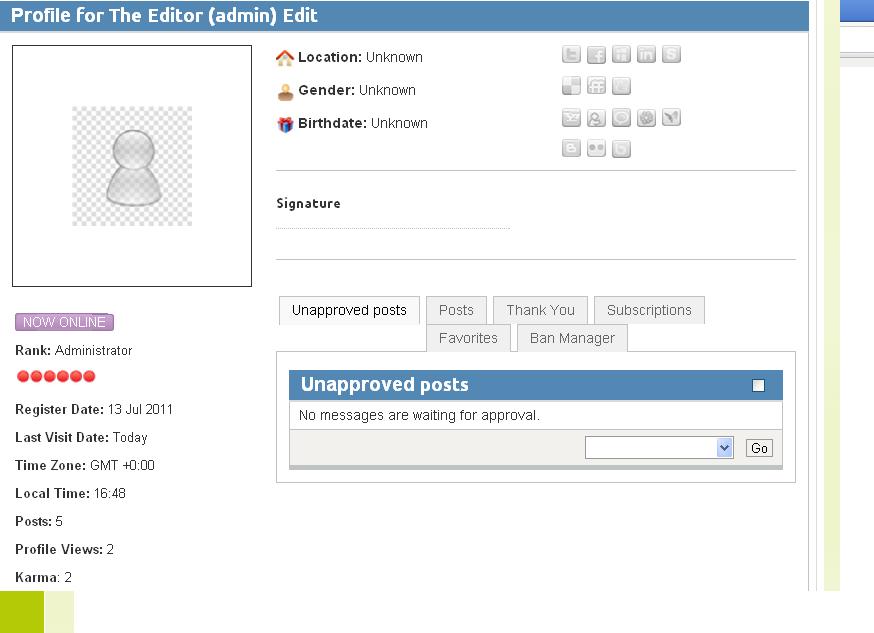
Jim, thanks for the advice about updating to 1.7.2 - might it resolve this avatar issue?
the problem Im having is I am unable to upload an avatar, or change/configure profile data.
This screen grab is from my profile page. All the stuff that should be configurable is all completely unclickable and uneditable. You cant upload photos or add location data.
Jim, thanks for the advice about updating to 1.7.2 - might it resolve this avatar issue?
Last edit: 14 years 7 months ago by Melinda.
Please Log in or Create an account to join the conversation.
- Jiminimonka
-
- Offline
- Elite Member
-
- YBAS!
14 years 7 months ago - 14 years 7 months ago #117697
by Jiminimonka
Replied by Jiminimonka on topic Re: Configuring Kunena- possible mootools conflict?
The problem is that you cannot see the Edit button isn't it.
Go into the Gantry Template setting Advanced and turn off Build Title Spans - problem fixed.
Still you need to update to Kunena 1.7.2. It works better and fixes many things.
Also, the Example Template is really just a blank example for template makers to use, you should use Blue Eagle for now, until K2.0 comes out.
Go into the Gantry Template setting Advanced and turn off Build Title Spans - problem fixed.
Still you need to update to Kunena 1.7.2. It works better and fixes many things.
Also, the Example Template is really just a blank example for template makers to use, you should use Blue Eagle for now, until K2.0 comes out.
Last edit: 14 years 7 months ago by Jiminimonka.
The following user(s) said Thank You: Melinda
Please Log in or Create an account to join the conversation.
14 years 7 months ago #117723
by Melinda
Replied by Melinda on topic Re: Configuring Kunena- possible mootools conflict?
Hi Jim, thanks for taking the time to advise me- I will change the Kunena templates over.
And thank you so much for telling me about 'Build Title Spans!'
Solved my proved completely!
Easy when you know how isnt it?! Thanks so much!
Mel x.
And thank you so much for telling me about 'Build Title Spans!'
Solved my proved completely!
Easy when you know how isnt it?! Thanks so much!
Mel x.
Please Log in or Create an account to join the conversation.
- Jiminimonka
-
- Offline
- Elite Member
-
- YBAS!
14 years 7 months ago #117747
by Jiminimonka
Replied by Jiminimonka on topic Re: Configuring Kunena- possible mootools conflict?
Thanks. It happened to me, that is how I know :silly:
The following user(s) said Thank You: CheechDogg, Melinda
Please Log in or Create an account to join the conversation.


14 years 7 months ago - 14 years 7 months ago #117758
by sozzled
Blue Eagle vs. Crypsis reference guide
Read my blog and

Replied by sozzled on topic Re: If you are having problems with Kunena, please read this first
Melinda: do not use the Example template (it is actually not a working template); use the Blue Eagle template. K 1.6.4 is not supported.
Build Title Spans = Off is the solution (... yes, it's a Mootools conflict, yes, the answer is contained in the links in msg #1 of this topic ... and yes, this is a known issue with Cloudbase.net templates!)
J! 1.6.4 is not supported by Joomla.
Build Title Spans = Off is the solution (... yes, it's a Mootools conflict, yes, the answer is contained in the links in msg #1 of this topic ... and yes, this is a known issue with Cloudbase.net templates!)
J! 1.6.4 is not supported by Joomla.
Blue Eagle vs. Crypsis reference guide
Read my blog and
Last edit: 14 years 7 months ago by sozzled.
Please Log in or Create an account to join the conversation.
Time to create page: 0.272 seconds