
Kunena 7.0.5 & Kunena 6.4.11 – Security Updates Released
The Kunena team has announce the arrival of Kunena 7.0.5 [K 7.0.5] in stable which is now available for download as a native Joomla extension for J! 5.4.x/6.0.x. This version addresses most of the issues that were discovered in K 6.2 / K 6.3 / K 6.4 and issues discovered during the last development stages of K 7.0.
The Kunena team is also pleased to announce the eleventh version of Kunena 6.4, a native Joomla extension for Joomla! 5.0, 5.1, 5.2, 5.3, 5.4 and 6.0.
Sticky [Merged topic] How do I restore my Kunena menu?


Blue Eagle vs. Crypsis reference guide
Read my blog and

Blue Eagle vs. Crypsis reference guide
Read my blog and


Database collation check: The collation of your table fields are correct
Legacy mode: Disabled | Joomla! SEF: Enabled | Joomla! SEF rewrite: Enabled | FTP layer: Disabled |
This message contains confidential informationhtaccess: Exists | PHP environment: Max execution time: 30 seconds | Max execution memory: 128M | Max file upload: 20M
Joomla default template details : newgreen6 | author: | version: 1.0 | creationdate: 2011-04-15
Kunena default template details : Blue Eagle (default) | author: Kunena Team | version: 1.6.3 | creationdate: 2011-01-31
Kunena version detailled: Installed version: 1.6.3 | Build: 4344 | Version name: Parlare | Kunena detailled configuration:
Warning: Spoiler![th]Kunena config settings:[/th]
board_title The Perky Pickle board_offline 0 board_ofset 0.00 offline_message <h2>The Forum is currently offline for maintenance.</h2>
<div>Check back soon!</div>enablerss 1 enablepdf 1 threads_per_page 10 messages_per_page 10 messages_per_page_search 10 showhistory 1 historylimit 10 shownew 1 jmambot 1 disemoticons 0 template default showannouncement 1 avataroncat 1 catimagepath category_images/ showchildcaticon 1 annmodid 54 rtewidth 500 rteheight 300 enableforumjump 1 reportmsg 1 username 1 askemail 0 showemail 0 showuserstats 1 showkarma 1 useredit 1 useredittime 0 useredittimegrace 600 editmarkup 0 allowsubscriptions 1 subscriptionschecked 1 allowfavorites 1 maxsubject 50 maxsig 300 regonly 0 changename 1 pubwrite 0 floodprotection 0 mailmod 0 mailadmin 0 captcha 0 mailfull 1 allowavatar 1 allowavatarupload 1 allowavatargallery 0 avatarquality 65 avatarsize 2048 allowimageupload 0 allowimageregupload 1 imageheight 800 imagewidth 800 imagesize 150 allowfileupload 0 allowfileregupload 0 filetypes txt,rtf,pdf,zip,tar.gz,tgz,tar.bz2 filesize 120 showranking 1 rankimages 1 avatar_src fb fb_profile fb pm_component no userlist_rows 5 userlist_online 1 userlist_avatar 1 userlist_name 0 userlist_username 1 userlist_posts 1 userlist_karma 1 userlist_email 0 userlist_usertype 1 userlist_joindate 1 userlist_lastvisitdate 0 userlist_userhits 1 latestcategory 0 showstats 1 showwhoisonline 1 showgenstats 0 showpopuserstats 1 popusercount 5 showpopsubjectstats 1 popsubjectcount 5 usernamechange 1 rules_infb 1 rules_cid 69 help_infb 1 help_cid 1 showspoilertag 1 showvideotag 0 showebaytag 1 trimlongurls 0 trimlongurlsfront 40 trimlongurlsback 20 autoembedyoutube 1 autoembedebay 1 ebaylanguagecode en-us fbsessiontimeout 18000 highlightcode 0 rss_type topic rss_timelimit week rss_limit 100 rss_included_categories rss_excluded_categories rss_specification rss2.0 rss_allow_html 1 rss_author_format name rss_author_in_title 1 rss_word_count 0 rss_old_titles 1 rss_cache 900 fbdefaultpage recent default_sort asc alphauserpointsnumchars 5 sef 1 sefcats 1 sefutf8 0 showimgforguest 1 showfileforguest 0 pollnboptions 10 pollallowvoteone 1 pollenabled 1 poppollscount 5 showpoppollstats 1 polltimebtvotes 00:15:00 pollnbvotesbyuser 100 pollresultsuserslist 0 maxpersotext 50 ordering_system replyid post_dateformat datetime post_dateformat_hover datetime hide_ip 1 js_actstr_integration 0 imagetypes jpg,jpeg,gif,png checkmimetypes 1 imagemimetypes image/jpeg,image/jpg,image/gif,image/png imagequality 50 thumbheight 32 thumbwidth 32 hideuserprofileinfo put_empty integration_access auto integration_login auto integration_avatar auto integration_profile kunena integration_private jomsocial integration_activity jomsocial boxghostmessage 0 userdeletetmessage 1 latestcategory_in 1 topicicons 1 onlineusers 1 debug 0 catsautosubscribed 0 showbannedreason 0 version_check 1 showthankyou 1 showpopthankyoustats 1 popthankscount 5 mod_see_deleted 1 bbcode_img_secure text listcat_show_moderators 1 lightbox 1 activity_limit 0 show_list_time 0 show_session_type 0 show_session_starttime 0 userlist_allowed 1
Third-party components: AlphaUserPoints: Disabled or not installed | CommunityBuilder: Disabled or not installed | Jomsocial: Installed (Version : 2.2.1) | UddeIm: Disabled or not installed
Third-party SEF components: sh404sef: Disabled or not installed | ARTIO JoomSEF: Disabled or not installed | AceSEF: Disabled or not installed
Plugins: System - Mootools12: Disabled | System - Mootools Upgrade: Enabled | JFirePHP: Disabled or not installed | Kunena Discuss: Disabled or not installed | Kunena Search: Disabled or not installed | My Kunena Forum Menu: Disabled or not installed | My Kunena Forum Posts: Disabled or not installed
Modules: Kunena Latest: Enabled (Version : 1.6.2) | Kunena Stats: Disabled or not installed | Kunena Login: Disabled or not installed
The default Kunena toolbar only shows up if it is on the forum entry page or one of the other pages that have tabs,i.e. index, recent topics, new topic, no replies, etc.
If you go into an actual forum topic, the toolbar disappears. Breadcrumbs don't work either. Help? Please?
aka343 wrote: How enable those tabs? seartch prifile index no replies............
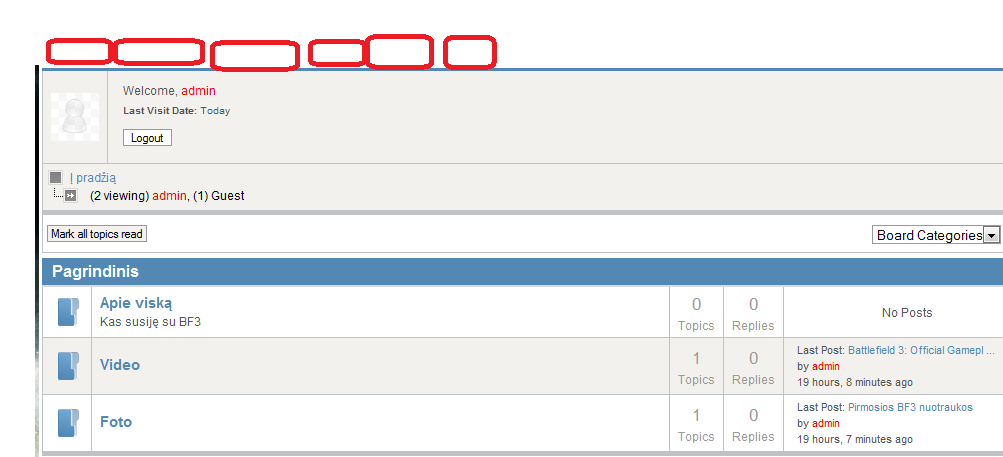
forum:
bf3.lt/index.php/forumas
How did you ever get this resolved? I am having the same problem. Any help would be great. Thx! Kim
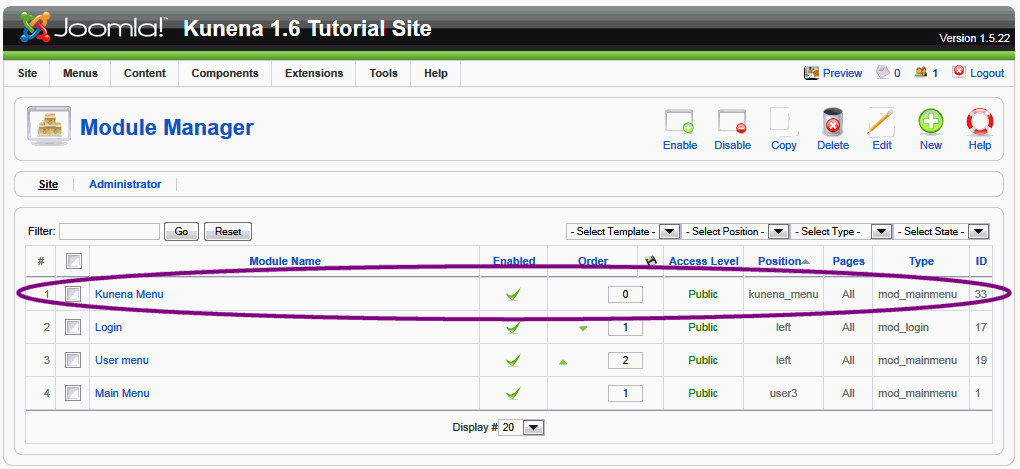
(1) In Extensions » Module Manager, make sure that you have not disabled or changed the module position of the "Kunena Menu" module (see image below):
(2) It depends on your site template, but (using Menu Manager) look at the menu item that points to your Kunena component. You should have something like this:
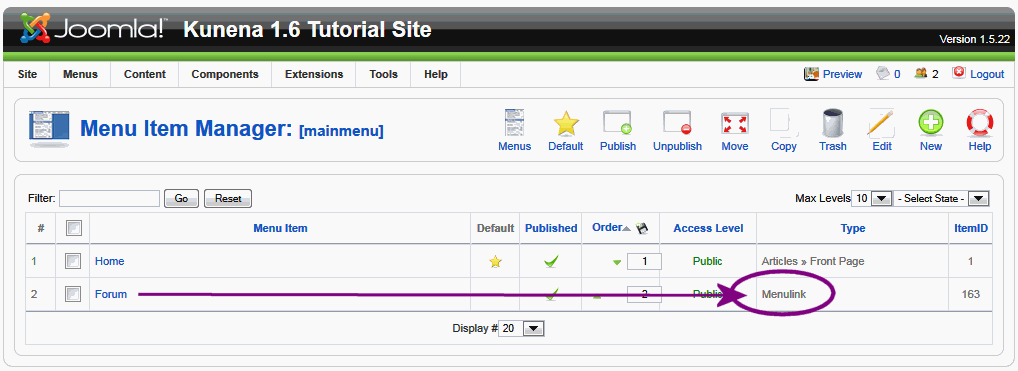
It is important that the menu type = alias. The parameters of this "forum link" should be like this:
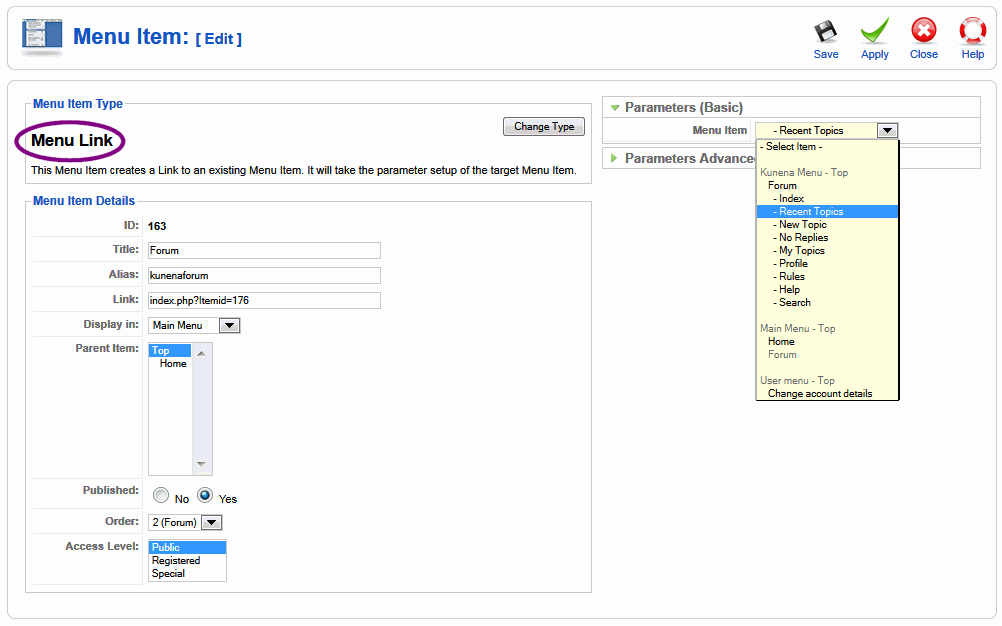
There's a bit more to this, too, and it's all covered in excrutiatingly fine detail in the Wiki article Customised menus , but those are the two key ingredients that you need to have in place. If you don't have these things set up the way I've described then you have either changed something or your site template does not offer a place where the Kunena installer program could place a menu item for Kunena.
The solution is to either try the "trash-burn-build" approach (mentioned a dozen or more times on this site) to rebuild the standard Kunena menu "buttons" or, using your own skills in constructing Joomla websites, build the menu items again, from scratch. What seems rather apparent (from the number of messages posted on this forum) is that Joomla menu item construction seems to be a highly skilled art and may be difficult to teach in a self-help forum like this.
The "trash-burn-build" approach is simple:
(1) Find all menu items that relate to your forum.
(2) Trash all menu items that relate to your forum.
(3) Delete the menu kunena-menu from your site
(4) Empty the menu trash
(5) Use the Kunena control panel option Create Menu
... and that should be all that you have to do. Looking back over the number of times I've answered this question and the amount of time I've spent grabbing and editing screen shots (and the number of screen shots that I've posted here) I hope that, in future, people will read this topic and use the information we've written here. I most sincerely hope that what I've posted on this occasion helps.
Ultimately, if all of this is too difficult for people to do for themselves, there are many people who can perform this kind of service for a small fee, or course.

Blue Eagle vs. Crypsis reference guide
Read my blog and


Hey everyone, I've been going through the same problem (Kunena menu disappears when you click a category or other link)
Forget mootools and all that junk. This is the solution. We are going to create our own menu, and scrap the buggy kunena menu.
1. Edit your templates index.php & add a module BEFORE the component. (Search for adding module positions in Joomla on Google) This involves adding code like
2. Add a Custom HTML module, and position it to the new position you created above. Add this to the HTML code
3. Then under Menu Assignment, make sure the menu is only viewed on the Forum page. If this doesn't work, uncheck ALL and try again.
4. Now still in your backend, go to Menus -> Kunena Menu. Check all menu items except the top one, Forum, and click the green tick to uncheck them all. You should now only have your top forum link, published.
5. Style it up with some css, I used
6. DONE!
I registered just to leave this comment for others experiencing the same problem with Joomla 1.6 & Kunena menus. I know how it sucks & nobody solved this to help. Hope this saves you much headaches. Good luck!