


- Posts: 5
- Thank you received: 0
Kunena 7.1.1 & Kunena 6.4.17 – Security Updates Released
The Kunena team has announce the arrival of Kunena 7.1.1 [K 7.1.1] in stable which is now available for download as a native Joomla extension for J! 5.4.x/6.0.x./6.1.x./6.2.x This version addresses most of the issues that were discovered in K 6.2 / K 6.3 / K 6.4 / K7.0 and issues discovered during the last development stages of K 7.1
Just a reminder: K6.4.17 receives only securities fixes until end of 2026, so it's advised for users to upgrade to K7.1.
Topics that are moved into this category are generally considered to be closed. Users may want to add additional information but these topics should not be resurrected in order to discuss new problems or unrelated matters.
Question Mail not working 1.5.7
16 years 8 months ago #41321
by arpitap
Replied by arpitap on topic Re:Mail not working 1.5.7
Now I am getting mails but not able to see posted reply when I click on provide link it only displays topic not the reply which is required to be approved.
How can I approve new replies?
How can I approve new replies?
Please Log in or Create an account to join the conversation.


16 years 8 months ago - 16 years 8 months ago #41323
by sozzled
Blue Eagle vs. Crypsis reference guide
Read my blog and

Replied by sozzled on topic Re:Mail not working 1.5.8
arpitap: your question is off-topic to this discussion. In your case you are receiving emails. The discussion topic is about people who are not receiving emails.
The answer to your question is here: Moderated forum with notification to moderator/confirmation
The answer to your question is here: Moderated forum with notification to moderator/confirmation
Blue Eagle vs. Crypsis reference guide
Read my blog and
Last edit: 16 years 8 months ago by sozzled.
Please Log in or Create an account to join the conversation.


16 years 8 months ago - 16 years 8 months ago #41909
by mibnbikes
Replied by mibnbikes on topic Re:Mail not working 1.5.7
Hello again Sozzled,
I have done all the things that Matias/you described, at least that is what I am hoping. I have given certain admin/users the following rights:
----
1) admin (global moderator: no selected forums)
2) admin (moderator in test category)
3) moderator (global moderator: no selected forums)
4) moderator (in test category)
5) registered
6) test user posting topics
----
And I have also done this:
* Sync user cache in Kunena backend!
* Enable E-mail Moderators, E-mail Administrators and Allow Subscriptions
* User 6: post two topics into test category ("Subscribe test", "Moderator test")
* All other users: Subscribe first topic
* User 6: post answer for both topics
----
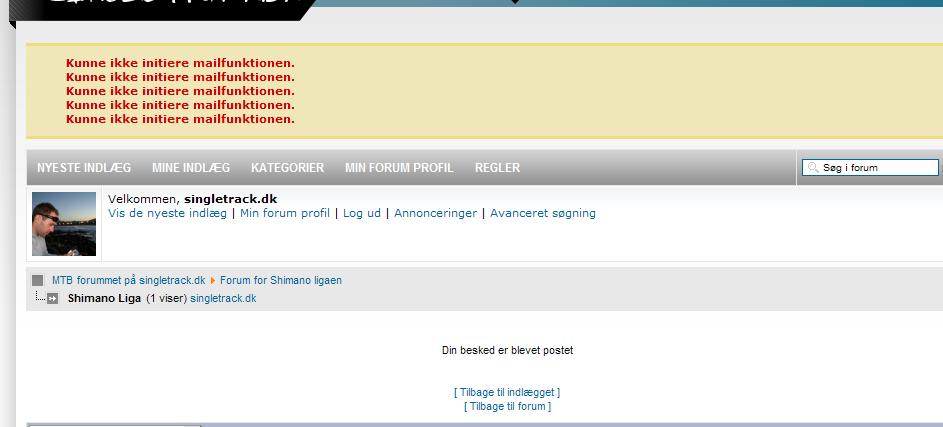
No one gets any emails at all, please see attach picture for the error message that I get, it is in danish, but means "Could not instantiate mail function" As you can see Kunena tries to send mutiple mails but does not succeed.
Best reagards Mikkel.
Last edit: 16 years 8 months ago by mibnbikes.
Please Log in or Create an account to join the conversation.


16 years 8 months ago #42148
by Matias
Replied by Matias on topic Re:Mail not working 1.5.7
Well, finally, that error message from Joomla gives me all the information I need. 
This error usually happens when server does not have local mail server installed or configured for php mailer. The odd thing is that we are sending email just like Joomla does when user asks his lost password. Does it work?
Can you still provide me screenshot of mail settings in Joomla settings?
This error usually happens when server does not have local mail server installed or configured for php mailer. The odd thing is that we are sending email just like Joomla does when user asks his lost password. Does it work?
Can you still provide me screenshot of mail settings in Joomla settings?
Please Log in or Create an account to join the conversation.
16 years 8 months ago - 16 years 8 months ago #42150
by sozzled
Blue Eagle vs. Crypsis reference guide
Read my blog and
Replied by sozzled on topic Re:Mail not working 1.5.8
This has been a real puzzlement. Matias and I have discussed your problem from a variety of angles to determine the cause of your problem. Although it appears that there might be a configuration issue with the PHP mail function, we suspect that there is an easier way to address your particular problem.
Please go to Kunena Configuration » Basics » Basic Settings » Board E-mail Address. Change the email address to the same as you used when you created your Joomla website. Check to see if this solves your "Cannot instantiate mail function" issue. We think that it will.
I'm keeping my fingers crossed for you.
Blue Eagle vs. Crypsis reference guide
Read my blog and
Last edit: 16 years 8 months ago by sozzled.
Please Log in or Create an account to join the conversation.
16 years 8 months ago - 16 years 8 months ago #42193
by mibnbikes
Replied by mibnbikes on topic Re:Mail not working 1.5.8
You guys are gonna hate me now... It still dont work, im sorry friends.
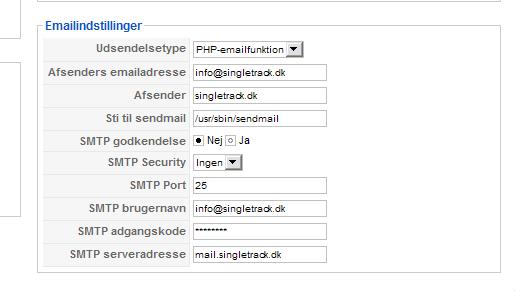
Matias, please see this screenshot of my mail setting, I guess there is no secutity issue in publishing it here??
Image of email settings removed...
As described earlier, the PHP mail system works fine for all the components that uses it(jReviews, Jomsocial, CK forms and so on but not Kunena), and also the lost password function works fine.
Sozzled.. I have tried to change my email adress back to the original one when I created the Joomla site, and also change the email adress in Joomla mail settings.
I can provide a admin login and FTP details if any of you are up for it??
The site www.singletrack.dk
Regards Mikkel.
Last edit: 16 years 8 months ago by mibnbikes.
Please Log in or Create an account to join the conversation.
Time to create page: 0.133 seconds