
Search Results (Searched for: you do not have)

(Links to detailed instructions for working with the post tree and the modified Kunena interface are given below.)
The topic is presented in the window as a tree according to the following rules:
- each post is displayed as one row containing the post subject and, optionally, the author's name, creation time, and post index.
Additional useful information may be placed in and under the post row, for example symbols that help navigate the tree.
The latest post in the topic by creation time is shown in bold in the tree.
The way the tree is displayed is determined by the tree view settings. When the settings are changed, the tree view changes instantly. Registered users of the site can save individual tree display settings and, if desired, restore them in another session and even for other topics.
Since the "level" of each post is known (the distance from the root of the tree, a term explained in the theoretical part), this level is graphically expressed by the length of the indent from the left edge of the window. Literally, the indent of the post row from the left edge equals the "indent size" multiplied by the post level. There is also a setting that adds a grid to the window to show the tree structure more clearly.
The 💬 symbol, when hovered over, shows the beginning of the post text as a tooltip. All other TreeK buttons and symbols also have explanatory tooltips.

You can choose what is shown at the beginning of the post row in the tree: the post subject followed by the author, the author followed by the subject, or only the subject.
The display of the date and time, as well as the post index, can be enabled or disabled.
TreeK has important options for showing post excerpts. The "text excerpt" setting displays a text fragment from the beginning of the post under the first post row, with a specified number of characters. The "screenshot excerpt" setting shows a fragment from the beginning of the post under the first post row as a screenshot with a specified height in pixels.

Additional symbols can be enabled in tree rows to help users navigate the tree more quickly.
TreeK can copy the topic tree to the clipboard in three export formats: BBCode, HTML (where subjects contain links to the posts of the exported tree), and Text.
Many users can work with the same topic at the same time, especially shortly after the topic is created. Working with a topic means simply reading its posts, replying to existing posts or editing them, studying the tree, and so on.
If a post is added to the topic while a user is working with the TreeK tree, an information message about this appears over the tree window no later than within one minute.
***
TreeK is based on the standard packages of the Kunena forum and the Aurelia template, but it changes some of their files and also connects a number of its own files, including language files that provide TreeK localization. These modified and additional files and their functions are combined in the TreekView part of the Treek package.
The interface changes required for working with topic post trees provide:
- freedom to assign post subjects and fixation of the topic title;
- clickability of the number of replies in a topic on the Recent Topics tab and of the 🌳 button in topic posts.
The other additions and changes in TreekView are not mandatory, but from the developer's point of view they make working with the forum a little faster.
(The developer could not resist implementing some of his own views on this matter, since he had to study the Kunena code in depth anyway.)
For example, the following features have been added.
The topic title is now protected: it is set once when the first post is created and never changes from the frontend. (And if a user really made a tragic mistake in the topic title and wrote "My Best Tupic" instead of "My Best Topic" in the first post, the kind site administrator and the database are always nearby.)
The reply form has been slightly changed. In particular, the subject field name Thema has been replaced with Subject, because it should describe the idea of this reply. The reply form title has been made understandable and shows whose post, and exactly which post, the user is replying to.
The subject of every reply now begins with an up arrow (⇑). This is a link to the parent post. Clicking ⇑ takes the user to the post that was replied to.
Instead of words requiring localization, such as "replied to", TreekView uses a simple, understandable, and quickly learned system of arrows listed below. Clickable arrows are buttons because they trigger certain actions. Arrows may be visible in reply forms (Reply and Quick Reply) and in post subjects.
As mentioned above, the subject of the post being created can be arbitrary text. But to speed up work with the forum, the concept of a suffix has been introduced.
Suffixes
When replying to a message, special text related to the subject of the parent post can be added to the reply subject.
In TreekView, this special text is called a suffix. Suffixes help automatically preserve the link between the reply subject and the parent post subject, and make the topic easier to read because they help show which post was replied to.
The use of suffixes looks as follows.
When the reply form is opened, information about the parent post subject is automatically added to the subject field in the form "⇒ Parent subject" (the "⇒" arrow is a replacement for "Reply to").

If the user does not add new text to the subject to clarify the meaning of the post, the suffix becomes the subject of the created post.
If new text is entered in the Subject field and the suffix is not completely removed, it becomes part of the post subject together with the new subject text.
New text is entered in the Subject field to the left of the suffix. The cursor is positioned automatically, and it is impossible to place it inside the suffix.
The suffix cannot be changed by editing. However, if the new post subject becomes so long that the combined length of the new text and the suffix exceeds the subject length set in Kunena, the end of the suffix is gradually pushed out of the line. If the user decides to shorten their text, for example by deleting the end of their text with Backspace, the pushed-out end of the suffix returns accordingly. If the suffix is partially pushed out, it is included in the post subject in shortened form.
The suffix can be removed at any time by clicking the ⇏ button located to the right of the word Subject. The ⇏ button then changes to ⇍. Clicking ⇍ disables the addition of suffixes for the whole session. After that, the ⇒ button appears next to the word Subject; clicking it restores the use of suffixes.
The site administrator can disable the use of suffixes entirely, although this is not recommended.
If the parent's Subject already has the form "⇒ Reply to post", the child's suffix will become "⇒ ⇒ Reply to post", with two ⇒ ⇒ arrows. These two arrows remain in suffixes regardless of which generation in a chain of posts with suffix-only subjects the given post belongs to.
The administrator can change the arrow symbols in the language file, for example replacing "⇒" with "→".
(Adding no more than two ⇒ arrows gives us a reason to discuss the theory of working with posts; and where, if not on this forum, should theory be discussed?
The situation with posts in a topic can, forgive me, be compared with the situation among people. Just as in life someone dies, and someone divorces and takes the children with them, so in a topic a post can be deleted, and some part of a topic can be moderated and moved to another topic. This leads to important consequences for the TreeK tree-building algorithm, but, as stated above, we will not go into theory here.)
Let us note a few more interface changes that, in the developer's view, make the user's work with Kunena slightly faster.
Attachments
In post creation and editing forms (screenshots), there is an Attachments block. Although it is used relatively rarely, when an attachment really needs to be inserted into or removed from a message, users still have to spend time scrolling past this block every time.
In TreekView, the Attachments block is collapsed by default. Instead of the full block, the existing word Attachments is shown, followed in parentheses by the number of attachments if there are any, and then by the expansion symbol for this block: a black filled triangle ▼. This triangle has a tooltip: "Open attachments block". Clicking ▼ opens the Attachments block, and the user sees what is currently visible in the block.
The arrow then changes to ▲, with the tooltip: "Close attachments block". Clicking ▲ collapses the block.

The Action menu in a post.
The developer considered the drop-down Action "menu" at the bottom of a post to be another factor slowing work down.
TreekView restores a view that once existed in Kunena, where each option - Reply, Quote, and Edit - has its own button.
Some other small interface details have also been changed, for example the reply form title has been changed from <h1> to <h5>.

I have made some tests, in CKeditor the toolbar settings are in uppercase :
In fact these errors are coming because (Cut, Copy...) are not defined in the config.xml
you are right, these are not defined in config, but they come from your orig. TemplateController,
I only changed to negation (because they are not in config and not selectable)
as there is no need here (these buttons are fix set in the template sceditor.js) you can simply delete it
(cut, copy, paste, source are fix - table you don't want - quote is old and replaced by blockquote)
but I wonder why I don't get this error, I only have the 'table' and horizontalrule add to my config
In SCeditor, the settings are in lowercase :
So that explains the errors in the php error log

I've just learned that my users cannot change their avatars. When I try to upload an avatar nothing is displayed. I then run the Kunena diagnostics and see that I have orphaned avatars.
Here's my configuration report:
Database collation check: The collation of your table fields are correct
Joomla! SEF: Enabled | Joomla! SEF rewrite: Enabled | FTP layer: Disabled |
This message contains confidential informationhtaccess: Exists | PHP environment: Max execution time: 300 seconds | Max execution memory: 1024M | Max file upload:
Kunena menu details:
Warning: Spoiler!
ID Name Menutype Link Path In trash 2617 Forum kunenamenu view=home&defaultmenu=2618 forum No 2618 Index kunenamenu view=category&layout=list forum/index No 2619 Recent Topics kunenamenu view=topics&mode=replies forum/recent No 2620 Unread kunenamenu view=topics&layout=unread forum/unread No 2621 New Topic kunenamenu view=topic&layout=create forum/newtopic No 2622 No Replies kunenamenu view=topics&mode=noreplies forum/noreplies No 2623 My Topics kunenamenu view=topics&layout=user&mode=default forum/mylatest No 2624 Profile kunenamenu view=user forum/profile No 2625 Help kunenamenu view=misc forum/help No 2626 Search kunenamenu view=search forum/search No
Joomla default template details : cassiopeia | author: Joomla! Project | version: 1.0 | creationdate: 2017-02
Kunena default template details : NTS KBee | author: Nice Theme Store Team | version: 6.1.7 | creationdate: 2025-10-05
Kunena template params:
Warning: Spoiler!
DefaultCategoryicon profileIconset default DefaultIconset default editorIconset default bootstrap 1 borderless 1 tooltips 1 SubjectLengthMessage 80 fullactions 1 quick 0 displayMenu 1 displayDropdownMenu 1 displayDropdownContent 1 displayModule 1 displayBreadcrumb 1 displayAnnouncement 1 displayFooter 1 avatarPosition left formRecover 0 labels 0 whoisonlineName default avatarType none topicicontype fa fontawesome 0 optional_username 0 writeaccess 0 localstorage 0 moduleIdWebauthn 0 kPreset blue kPrimary #f9a510 kAccent #be9ac7 kSuccess #15803d kWarning #f9a510 kDanger #dc2626 kText #374151 kLink #f9a510 kLinkHover #f9a510 kNavInactiveBg #737373 kNavInactive #ffffff kNavHoverBg #656565 kNavHover #ffffff kNavActiveBg #f9a510 kNavActive #ffffff kHeaderBg #f9a510 kheaderText #ffffff kHeaderLink #ffffff kHeaderLinkHover #ffffff kIconBg #f0f0f0 kIcon #999999 kIconHover #f9a510 IconColorNew #48a348 editorType ckeditor Bold 1 Italic 1 Underline 1 Strike 1 Subscript 1 Smiley 1 Superscript 1 RemoveFormat 1 BulletedList 1 NumberedList 1 Blockquote 1 JustifyLeft 1 JustifyCenter 1 JustifyRight 1 JustifyBlock 1 Link_Unlink 1 Image 1 Confidential 1 Hidetext 1 Spoiler 1 Code 1 Ebay 1 X_Social 1 1 Soundcloud 1 FontSize 1 TextColor 1 Maximize 1 Map 1 Video 1 editorButtons nameskinckeditor ckeditorcustomprefixconfigfile avatarSizeX 40 avatarSizeY 90 avatarSizeXThumb 40 avatarSizeYThumb 40 avatarSizeXWelcome 72 avatarSizeYWelcome 72 avatarSizeXList 40 avatarSizeYList 40 avatarSizeXPost 144 avatarSizeYPost 144 avatarSizeXProfile 200 avatarSizeYProfile 200 templatebyText templatebyName templatebyLink
Kunena version detailed: Kunena 6.4.11 | 2026-05-18 [ Git Repository ]
| Kunena detailed configuration:| Kunena integration settings:Warning: Spoiler!
Kunena config settings: boardOffline 0 enableRss 1 threadsPerPage 20 messagesPerPage 12 messagesPerPageSearch 10 showHistory 1 historyLimit 6 showNew 1 disableEmoticons 0 template nts_kbee showAnnouncement 0 avatarOnCategory 1 showChildCatIcon 1 rteWidth 475 rteHeight 300 enableForumJump 1 reportMsg 1 username 1 askEmail 0 showEmail 0 showUserStats 1 showKarma 0 userEdit 1 userEditTime 86400 userEditTimeGrace 600 editMarkup 1 allowSubscriptions 1 subscriptionsChecked 0 allowFavorites 1 maxSig 300 regOnly 0 pubWrite 0 floodProtection 0 mailModerators 0 mailAdministrators -1 captcha 1 mailFull 1 allowAvatarUpload 1 allowAvatarGallery 0 avatarQuality 100 avatarSize 2048 imageHeight 1200 imageWidth 2400 imageSize 2048 fileTypes wmv,avi,mpg,mov,zip,txt,doc,xls,gz,tgz,pdf,xlsx fileSize 10240 showRanking 1 rankImages 3 userlistRows 30 userlistOnline 1 userlistAvatar 1 userlistPosts 1 userlistKarma 0 userlistEmail 0 userlistJoinDate 1 userlistLastVisitDate 1 userlistUserHits 1 latestCategory 0 showStats 1 showWhoIsOnline 1 showGenStats 1 showPopUserStats 1 popUserCount 5 showPopSubjectStats 1 popSubjectCount 5 showSpoilerTag 1 showVideoTag 1 showEbayTag 1 trimLongUrls 1 trimLongUrlsFront 40 trimLongUrlsBack 20 autoEmbedYoutube 1 autoEmbedEbay 1 ebayLanguageCode en-us sessionTimeOut 1800 highlightCode 0 rssType post rssTimeLimit 1 week rssLimit 100 rssIncludedCategories 2,3,4,5,6,21,26,8,10,11,13,17,15,25,14,23,24 rssExcludedCategories 9,16,19,20 rssSpecification atom1.0 rssAllowHtml 1 rssAuthorFormat name rssAuthorInTitle 1 rssWordCount 0 rssOldTitles 0 rssCache 900 defaultPage categories defaultSort asc sef 1 showImgForGuest 1 showFileForGuest 1 pollNbOptions 12 pollAllowVoteOne 1 pollEnabled 1 popPollsCount 5 showPopPollStats 1 pollTimeBtVotes 00:15:00 pollNbVotesByUser 100 pollResultsUserslist 1 allowUserEditPoll 0 maxPersonalText 50 orderingSystem mesid postDateFormat datetime_today postDateFormatHover datetime hideIp 0 imageTypes jpg,jpeg,gif,png,pdf checkMimeTypes 1 imageMimeTypes image/jpeg,image/jpg,image/gif,image/png imageQuality 80 thumbHeight 32 thumbWidth 32 hideUserProfileInfo put_empty boxGhostMessage 0 userDeleteMessage 0 latestCategoryIn 1 topicIcons 0 debug 0 catsAutoSubscribed 0 showBannedReason 1 showThankYou 1 showPopThankYouStats 1 popThanksCount 5 modSeeDeleted 1 bbcodeImgSecure image listCatShowModerators 0 lightbox 1 showListTime 720 showSessionType 0 showSessionStartTime 0 userlistAllowed 0 userlistCountUsers 1 enableThreadedLayouts 0 categorySubscriptions disabled topicSubscriptions first pubProfile 0 thankYouMax 8 emailRecipientCount 10 emailRecipientPrivacy bcc captchaPostLimit 3 imageUpload registered fileUpload registered topicLayout flat timeToCreatePage 0 showImgFilesManageProfile 1 holdNewUsersPosts 2 holdGuestPosts 0 attachmentLimit 20 pickupCategory 1 articleDisplay intro sendEmails 1 fallbackEnglish 1 cache 1 cacheTime 60 ipTracking 1 rssFeedBurnerUrl autoLink 1 accessComponent 0 statsLinkAllowed 1 superAdminUserlist 0 attachmentProtection 1 categoryIcons 1 avatarCrop 0 userReport 1 searchTime all teaser 0 ebayLanguage 0 ebayCertId allowChangeSubject 0 maxLinks 6 readOnly 0 ratingEnabled 0 urlSubjectTopic 1 logModeration 0 attachStart 0 attachEnd 14 attachmentUtf8 1 autoEmbedSoundcloud 1 emailHeader /media/kunena/email/hero-wide.png userStatus 1 signature 1 personal 1 plainEmail 1 moderatorPermDelete 0 avatarTypes gif,jpeg,jpg,png smartLinking 0 defaultAvatar nophoto.png defaultAvatarSmall s_nophoto.png quickReply 0 avatarEdit 1 activeMenuItem mainMenuId homeId indexId moderatorsId topicListId miscId profileId searchId custom_id avatarType 0 sefRedirect 1 allowEditPoll 1 useSystemEmails 0 autoEmbedInstagram 1 disableRe 1 email_sender_name KZRider Forum display_filename_attachment 1 new_users_prevent_post_url_images 0 minimal_user_posts_add_url_image 10 utmSource 0 emailHeaderSizeY 560 emailHeaderSizeX 560 profiler 0 privateMessage 0 datePickerFormat mm/dd/yyyy sendMailUserBanned 0 mailBodyUserBanned mailBodyUserUnBanned | Joomla! detailed language files installed:Warning: Spoiler!Kunena - Finder Enabled
Kunena - Community Builder Enabled: access=1 login=1 activity=1 avatar=1 profile=1 private=1
Kunena - Easyblog Disabled
Kunena - Easyprofile Disabled
Kunena - Easysocial Disabled
Kunena - Gravatar Disabled
Kunena - JomSocial Enabled: access=1 login=1 activity=1 avatar=1 profile=1 private=1 activity_points_limit=0
Kunena - Joomla Enabled: access=1 login=1
Kunena - Kunena Enabled: avatar=1 profile=1
Kunena - UddeIm Enabled: private=1
Warning: Spoiler!
Joomla! languages installed: en-GB English (United Kingdom)
Third-party components: UddeIm 5.6.1
Third-party SEF components: None
Plugins: None
Modules: Kunena Latest 6.0.7 | Kunena Stats 6.0.5 | Kunena Login 6.0.6 | Kunena Search 6.0.5
Thank you
Bill
In fact these errors are coming because (Cut, Copy...) are not defined in the config.xml
you are right, these are not defined in config, but they come from your orig. TemplateController,
I only changed to negation (because they are not in config and not selectable)
as there is no need here (these buttons are fix set in the template sceditor.js) you can simply delete it
(cut, copy, paste, source are fix - table you don't want - quote is old and replaced by blockquote)
but I wonder why I don't get this error, I only have the 'table' and horizontalrule add to my config
I know what you mean, but there is nothing changed.i had found weird that there is some space left on the right
I couldn't figure out how sceditor is setting its width and the placement of buttons.
but in your setup is looks like you have no space bar in the last big group (before source) so it is too big to be placed in the upper line
I have tested your new file but it's the same.
I don't see the reason for this errors, (I don't have them) -Can-you provide a fix for that ?
the array keys are not new, only the strings in $editorButtons have changed a bit (mostly lowercase)
I just looked at the github file and mine, and the only difference are the new additions what I have added for CKEditor,
so I just deleted them and now the line numbering corresponds each other, so they should be identical (beside the string changes)
check the new file
In fact these errors are coming because (Cut, Copy...) are not defined in the config.xml
I have removed the bits for undo which will be in a new PR and i had found weird that there is some space left on the right :
as far as I see, you have added the new famfamfam.png, but not the new css code for those kunena icons in the default.cssJust applied your changes for the issue reported by rich : github.com/Kunena/Kunena-Forum/commit/c2...66e5c9c15f4967410283
(the only change I see is the cutout my left-side buttons option, but not the new position definitions for the icons)

sorry, I see it was an error in my fileNo it wasn't my intention. I have copied the entire SaveSCeditorParamFile() method from your file, so i will remove the ! for blockquote
For table and horizontalrule it has been removed from CKeditor because not very much used so in SCeditor it should be the same
as far as I see, you have added the new famfamfam.png, but not the new css code for those kunena icons in the default.cssJust applied your changes for the issue reported by rich : github.com/Kunena/Kunena-Forum/commit/c2...66e5c9c15f4967410283
(the only change I see is the cutout my left-side buttons option, but not the new position definitions for the icons)
I don't see the reason for this errors, (I don't have them) -Can-you provide a fix for that ?
the array keys are not new, only the strings in $editorButtons[] have changed a bit (mostly lowercase)
I just looked at the github file and mine, and the only difference are the new additions what I have added for CKEditor,
so I just deleted them and now the line numbering corresponds each other, so they should be identical (beside the string changes)
check the new file
Hello,btw. have you intentionally disabled the quote button? or have you missed to replace 'blockquote' -> $editorButtons = 'quote'; in the TemplateController
edit: I see on github:(line 472) you haven't delete the negation from ( !$params ) (blockquote is the param used in config, not quote)
(I also don't see table and horizontalrule, but this may be your setting?)
No it wasn't my intention. I have copied the entire SaveSCeditorParamFile() method from your file, so i will remove the ! for blockquote
For table and horizontalrule it has been removed from CKeditor because not very much used so in SCeditor it should be the same
Just applied your changes for the issue reported by rich : github.com/Kunena/Kunena-Forum/commit/c2...66e5c9c15f4967410283also have a look at the problem of rich20 with the Kunena icons, so just use the new famfamfam.png and new default.css,
but in the main (or general?).scss of the template the icon lines for the buttons must be disabled.
the javascript alert was just a quick idea (don't know if you will keep it), so no problem to change to bootstrap
uncommand 2nd rule (#kunena.layout ....:lastChild) (and 3rd to skip the so no longer needed margin).
in your picture it looks like the margin for #myTab, #myTabContent (Nr. 3) should be greater so the buttons stays inside the outer border
btw. have you intentionally disabled the quote button? or have you missed to replace 'blockquote' -> $editorButtons = 'quote'; in the TemplateController
edit: I see on github:(line 472) you haven't delete the negation from ( !$params ) (blockquote is the param used in config, not quote)
(I also don't see table and horizontalrule, but this may be your setting?)
also have a look at the problem of rich20 with the Kunena icons, so just use the new famfamfam.png and new default.css,
but in the main (or general?).scss of the template the icon lines for the buttons must be disabled.
the javascript alert was just a quick idea (don't know if you will keep it), so no problem to change to bootstrap
I think i have missed somthing because the result is not what expected :
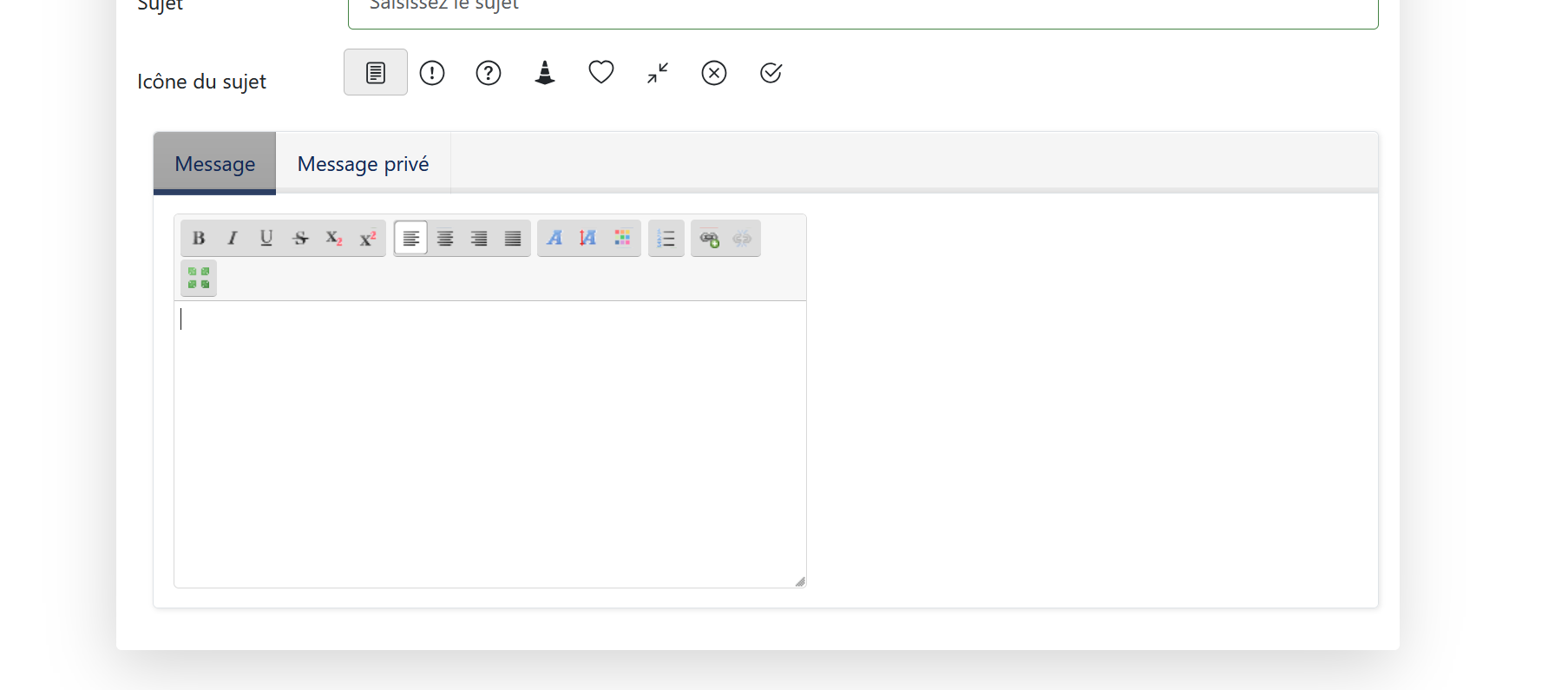
Hello,btw. @ xillibit
have you thought about to combine the the hidetext function with the thanks button (so text is only visible after a reg. member clicked thank you)?
(as seeing in many other forums, - ok it forces the thank you, but is no longer a valid thank you)
If we made such change, it needs a new setting because some users doesn't want this new behaviour

- edit the setup call to use the bbcode settings from the config to en/disable buttons.
- add confidential | hide | spoiler - now can be used in sceditor
- added the undo plugin (with buttons)
- added the language support within sceditor
- little restyling of the editor layout (fixed buttons - undo/redo, cut/copy/paste, source etc on the left side)
- added the poll edit suport in sceditor (if poll exists, data are fetched)
- the main work: image size (as included in 7.0.5) and fetching image attributes if img selected
(also added alt and float attribute for images)
all files in the package are in the edited version, based on 7.0.5 and in their used folder structure
BUT
I have NOT included the minified versions of sceditor and bbcode, because I don't know
a secure online tool - so just keep the simply renamed full versions or the kunena team can minify it.
for a preview you may look here:
bg310.breastguide.org/index.php/de/forum...25-welcome-to-kunena
Part of the message is hidden for the guests. Please log in or register to see it.
updated: jquery poll detect and disable poll edit (if config poll edit = disabled)
new famfamfam.png and default.css including, using kunena icons

I’ve looked into the issue of emoticons again and have identified two possible reasons why they aren’t displaying.
One possibility is that Kunena uses the absolute path to display the emoticons.
The second possibility is the character set. The emoticons in Kunena require the utf8mb4 character set to display properly; utf8 is usually not sufficient. They then appear as ?.
We have already checked the character set before in this topic and it's ok. I agree with you about the other possibility: the absolute path. Do you know how can we change this behaviour? Thanks!
do you have a new K7 installation or is it updated from earlier?
On a new installation, depending on the Joomla directive for languages folders and the given code
it can't work correct
may be your dutch translation stays in admin/components/com_kunena/languages from earlier installations?
I have startet a fresh install with K7.0.2 and so only EN is installed in the kunena admin folder.
this is the official install xml from the de language pack (similar in all languages)
<files folder="admin" target="administrator/language/de-DE">
<filename>com_kunena.controllers.ini</filename>
<filename>com_kunena.ini</filename>
<filename>com_kunena.models.ini</filename>
<filename>com_kunena.libraries.ini</filename>
<filename>com_kunena.sys.ini</filename>
<filename>com_kunena.views.ini</filename>
<filename>com_kunena.install.ini</filename>
</files>
<files folder="site" target="language/de-DE">
<filename>com_kunena.ini</filename>
<filename>com_kunena.models.ini</filename>
<filename>com_kunena.templates.ini</filename>
<filename>com_kunena.views.ini</filename>
<filename>kunena_tmpl_aurelia.ini</filename>
<filename>kunena_ckeditor.js</filename>
</files>
so, no languages files are stored in admin/components/com_kunena/language only in admin/language
so you say, the poll works in SCEditor? cause I didn't get anything (not in preview and not in forum)Apart from the fact that there is no image on the button, creating a poll there worked fine.
edit: got it, forgot to enable poll in this kategorie
so it would be better to disable the poll button, if it is NOT allowed in the active category to avoid confusing
as there is the option in config to allow edit of polls, have you found out where/how this can be done?
I could not find out (no button or something in view or edit mode, also tried the reset function)
In the production system, it looks normal, meaning the button does have the icon. Otherwise, it works exactly the same in PROD as it does in TEST.
(My test system is a copy (using Akeeba) of the PROD system. -- My main focus was actually on testing the update to PHP 8.5—first in TEST, then in PROD

Best regards
Karlheinz Bothmann