


- Posts: 20
- Thank you received: 0
Kunena 7.0.8 Released
The Kunena team has announce the arrival of Kunena 7.0.8 [K 7.0.8] in stable which is now available for download as a native Joomla extension for J! 5.4.x/6.0.x./6.1.x. This version addresses most of the issues that were discovered in K 6.2 / K 6.3 / K 6.4 and issues discovered during the last development stages of K 7.0
Topics that are moved into this category are generally considered to be closed. Users may want to add additional information but these topics should not be resurrected in order to discuss new problems or unrelated matters.
Solved Attempted update K 3.0.4 (originally J! 2.5.9 but later updated to J! 2.5.17): killed the extension
12 years 6 months ago #152494
by lturika
Replied by lturika on topic Attempted update K 3.0.4 (originally J! 2.5.9 but later updated to J! 2.5.17): killed the extension
I did everything as suggested - still unable to open Kunena CP:
Installing Kunena, please wait...
Preparing installation...
running since Friday, can't stop it
Installing Kunena, please wait...
Preparing installation...
running since Friday, can't stop it
Please Log in or Create an account to join the conversation.
12 years 6 months ago #152497
by lturika
Replied by lturika on topic Attempted update K 3.0.4 (originally J! 2.5.9 but later updated to J! 2.5.17): killed the extension
Anyone there? Forum is dead. Can somebody help?
truckinghires.com/index.php/forum/index
Unable to revert to old version nor to upgrade to new version.
Thanks in advance.
truckinghires.com/index.php/forum/index
Unable to revert to old version nor to upgrade to new version.
Thanks in advance.
Please Log in or Create an account to join the conversation.


12 years 6 months ago #152509
by sozzled
I asked you before if you had a backup of your website before you attempted to upgrade from you old forum (on J! 2.5.9) to K 3.0.4 and you did not answer my question; rich suggested that you enable Joomla debug mode to see if the upgrade process displayed any messages - debug messages appear at the bottom of the page - and you did not say if there were any messages or not.
Can you please answer my earlier question about whether you have a backup of your website (when you were using J! 2.5.9) that you can use to restore your site before all these problems began?
Blue Eagle vs. Crypsis reference guide
Read my blog and

Replied by sozzled on topic Attempted update K 3.0.4 (originally J! 2.5.9 but later updated to J! 2.5.17): killed the extension
I do not know the specific cause of whatever is preventing you reverting to the older version of Kunena that you have before all these problems started. My guess is that the Joomla database is corrupted in some way and my suspicion is that the Joomla _assets table is in a state of disrepair.lturika wrote: Unable to revert to old version nor to upgrade to new version.
I asked you before if you had a backup of your website before you attempted to upgrade from you old forum (on J! 2.5.9) to K 3.0.4 and you did not answer my question; rich suggested that you enable Joomla debug mode to see if the upgrade process displayed any messages - debug messages appear at the bottom of the page - and you did not say if there were any messages or not.
It is difficult to determine if a process is actually running or whether there's just the same message displayed. The surest way to end a process is to reboot the webserver.lturika wrote: running since Friday, can't stop it
Can you please answer my earlier question about whether you have a backup of your website (when you were using J! 2.5.9) that you can use to restore your site before all these problems began?
Blue Eagle vs. Crypsis reference guide
Read my blog and
Please Log in or Create an account to join the conversation.
12 years 6 months ago #152510
by lturika
Replied by lturika on topic Attempted update K 3.0.4 (originally J! 2.5.9 but later updated to J! 2.5.17): killed the extension
I apologize for not responding to your previous post.
Yes, I do have backup, but only the backup while site was on J!2.5.9 before J update to 2.5.17.
I did the J update to 2.5.17 after you advised, since the 2.5.9 was not supported.
The update to Kunena 3.0.4 was done prior to Joomla update.
That may be the problem now. Not sure.
I did the debug mode, but i received error 500 on the page, instead on the footer.
See the link: truckinghires.com/index.php/forum/index
Not pointing to any Kunena error.
The site otherwise works without any problems.
Yes, I do have backup, but only the backup while site was on J!2.5.9 before J update to 2.5.17.
I did the J update to 2.5.17 after you advised, since the 2.5.9 was not supported.
The update to Kunena 3.0.4 was done prior to Joomla update.
That may be the problem now. Not sure.
I did the debug mode, but i received error 500 on the page, instead on the footer.
See the link: truckinghires.com/index.php/forum/index
Not pointing to any Kunena error.
The site otherwise works without any problems.
Please Log in or Create an account to join the conversation.
12 years 6 months ago #152511
by lturika
Replied by lturika on topic Attempted update K 3.0.4 (originally J! 2.5.9 but later updated to J! 2.5.17): killed the extension
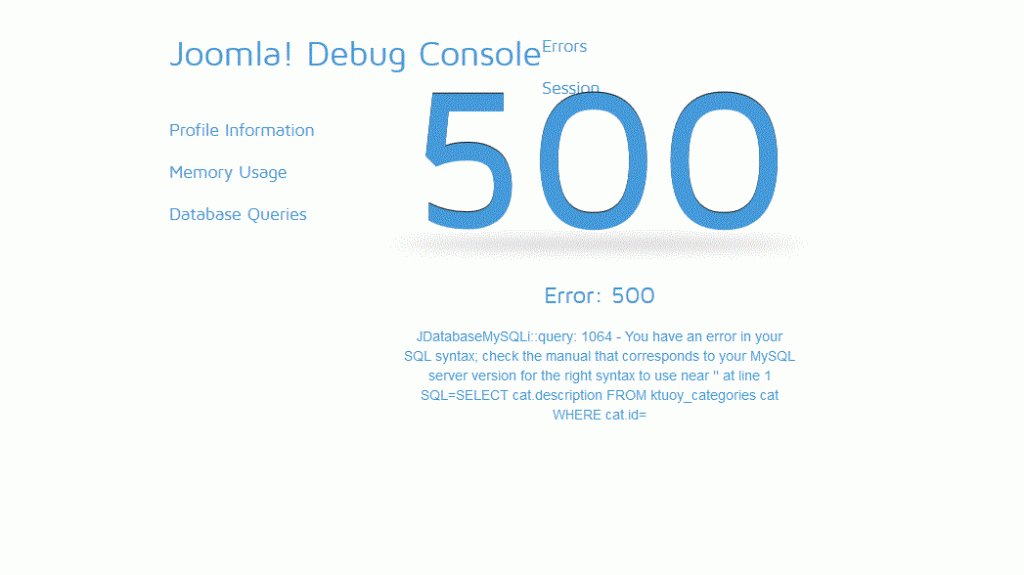
Debug mode is killing all my pages - have to remove the call.
See the included screenshot while in debug mode for forum page
See the included screenshot while in debug mode for forum page
Please Log in or Create an account to join the conversation.
12 years 6 months ago - 12 years 6 months ago #152513
by sozzled
Blue Eagle vs. Crypsis reference guide
Read my blog and
Replied by sozzled on topic Attempted update K 3.0.4 (originally J! 2.5.9 but later updated to J! 2.5.17): killed the extension
Thank you for your reply; we may be getting somewhere.
The information shown when you run Joomla debug mode tells us a few things. The first thing it tells us is that the error message concerns (at least one of) the Joomla database tables: the table _categories. This is the table that deals with Joomla articles - it has nothing to do with Kunena.
The second thing is that you have set MySQLi as the database type in your Joomla global settings. While it may be possible to run Joomla with MySQLi instead of using MySQL - I cannot tell you more about this because I do not use MySQLi on any of my sites - Kunena is optimised to run with MySQL. As a suggestion, try changing to Global Configuration » Server » Database Settings » Database Type = Mysql.
Try this first and see if it makes a difference.
My suspicions remain that your Joomla database tables (one or more of them) are corrupted, possibly because you have not kept your Joomla software up-to-date - you were using a version of J! 2.5 that was superseded in May 2013 - or possibly because there was an issue that has been dormant (and unnoticed by you) until you enabled Joomla debug mode.
The information shown when you run Joomla debug mode tells us a few things. The first thing it tells us is that the error message concerns (at least one of) the Joomla database tables: the table _categories. This is the table that deals with Joomla articles - it has nothing to do with Kunena.
The second thing is that you have set MySQLi as the database type in your Joomla global settings. While it may be possible to run Joomla with MySQLi instead of using MySQL - I cannot tell you more about this because I do not use MySQLi on any of my sites - Kunena is optimised to run with MySQL. As a suggestion, try changing to Global Configuration » Server » Database Settings » Database Type = Mysql.
Try this first and see if it makes a difference.
My suspicions remain that your Joomla database tables (one or more of them) are corrupted, possibly because you have not kept your Joomla software up-to-date - you were using a version of J! 2.5 that was superseded in May 2013 - or possibly because there was an issue that has been dormant (and unnoticed by you) until you enabled Joomla debug mode.
Blue Eagle vs. Crypsis reference guide
Read my blog and
Last edit: 12 years 6 months ago by sozzled.
Please Log in or Create an account to join the conversation.
Time to create page: 0.305 seconds