

- Posts: 8
- Thank you received: 1
Kunena 7.0.9 & Kunena 6.4.14 – Security Updates Released
The Kunena team has announce the arrival of Kunena 7.0.9 [K 7.0.9] in stable which is now available for download as a native Joomla extension for J! 5.4.x/6.0.x./6.1.x. This version addresses most of the issues that were discovered in K 6.2 / K 6.3 / K 6.4 and issues discovered during the last development stages of K 7.0
If you are having problems then, for your own benefit, it would save us all a lot of time if you would kindly post your
configuration report
when you ask for help from this forum. If you do not post your configuration report we will not ask you for it but you will probably not get your problem solved, either.
K 2.0 support will cease on 31 August 2013 and this section of the forum will be closed and archived after that time and no further questions will be answered about this version.
K 2.0 support will cease on 31 August 2013 and this section of the forum will be closed and archived after that time and no further questions will be answered about this version.
Sticky K 2.0 general menu issues
14 years 1 month ago - 14 years 1 month ago #130212
by che1974
Replied by che1974 on topic How do you set up the Kunena menu?
Hi,
I hope you search for this .. (my english is very bad, i do not need it the last 20 years *lol)
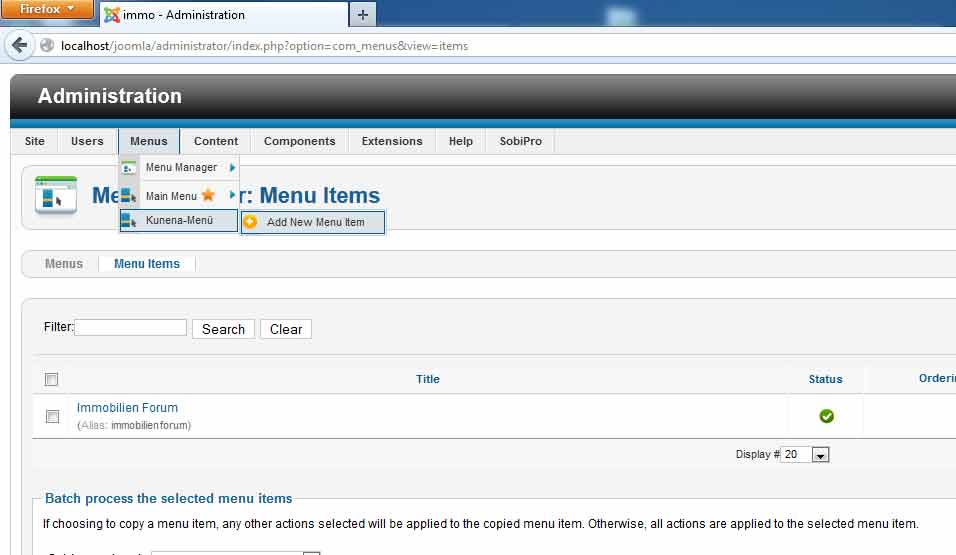
and then ..........

on the same way you can get it on the "Main Menu" ->new Item (Kuena Forum)
i select this way .............
lg
che1974
I hope you search for this .. (my english is very bad, i do not need it the last 20 years *lol)
and then ..........
on the same way you can get it on the "Main Menu" ->new Item (Kuena Forum)
i select this way .............
lg
che1974
Last edit: 14 years 1 month ago by che1974.
Please Log in or Create an account to join the conversation.
14 years 1 month ago #130214
by theodor
Replied by theodor on topic How do you set up the Kunena menu?
Well this only creates the Kunena menu, I dont see the tabs with the items I m creating above my forum.
Please Log in or Create an account to join the conversation.
14 years 1 month ago - 14 years 1 month ago #130220
by theodor
Replied by theodor on topic How do you set up the Kunena menu?
Well I have read the post here
www.kunena.org/forum/K-2-0-General-Quest...Kunena-Menu?start=60 and finally I made it !!
Following sozzled's instructions, this is how you get the Kunena menu (tabs) working after upgrade:
[assume that the main menu is your default menu]
- menus > main menu. Find your existing link to the Forum in the list of items. Trash it. Empty trash
- components > kunena. Go to Control Panel > Forum Tools > menu manager. Click on Trash Menu (top right) to rebuild the Kunena Menu
- return to menus > main menu. You will find a new link to the Forum that was automatically generated when yu rebuilt the Kunena Menu. It will have a status of 'unpublished' - change this to 'published'.
You should now find that the Kunena menu appears when you go to the Forum from your new main menu link - the missing menu tabs will now be there (I hope!)
Thanks for your screenshots !
Too bad that there is no stick post about this from the moderators.
www.kunena.org/forum/K-2-0-General-Quest...Kunena-Menu?start=60 and finally I made it !!
Following sozzled's instructions, this is how you get the Kunena menu (tabs) working after upgrade:
[assume that the main menu is your default menu]
- menus > main menu. Find your existing link to the Forum in the list of items. Trash it. Empty trash
- components > kunena. Go to Control Panel > Forum Tools > menu manager. Click on Trash Menu (top right) to rebuild the Kunena Menu
- return to menus > main menu. You will find a new link to the Forum that was automatically generated when yu rebuilt the Kunena Menu. It will have a status of 'unpublished' - change this to 'published'.
You should now find that the Kunena menu appears when you go to the Forum from your new main menu link - the missing menu tabs will now be there (I hope!)
Thanks for your screenshots !
Too bad that there is no stick post about this from the moderators.
Last edit: 14 years 1 month ago by theodor.
Please Log in or Create an account to join the conversation.
- mitchell65
-

- Offline
- Junior Member
-

Less
More
- Posts: 27
- Thank you received: 1
14 years 1 month ago #130234
by mitchell65
Replied by mitchell65 on topic Lost Menu on Upgrade to V.2
I had problems when i upgraded to V.2 on my Xampp localserver and that unfortunately does not appear to be sovable. So I thought I would test on my Wamp localserver. All went well with the upgrade but i have now lost the Kunena menu. Have checked all the detail and there is nothing I can see that has got changed but the menu does not now show. Any ideas please? It seems the upgrade causes some PHP problems, that's what I conclude anyway but I am not good with PHP!
Have a test host site that i could out the site on and give admin access if needed, thanks.
Have a test host site that i could out the site on and give admin access if needed, thanks.
Please Log in or Create an account to join the conversation.


14 years 1 month ago #130238
by sozzled
Blue Eagle vs. Crypsis reference guide
Read my blog and

Replied by sozzled on topic Missing Kunena Menu
*** Topics merged ***
Answered in this topic
Answered in this topic
Blue Eagle vs. Crypsis reference guide
Read my blog and
Please Log in or Create an account to join the conversation.
- yigitusta9
-
- Offline
- New Member
-

Less
More
- Posts: 9
- Thank you received: 0
14 years 1 month ago - 14 years 1 month ago #130322
by yigitusta9
Replied by yigitusta9 on topic cant create new menu help
hello everybody there was a problem with my kunena menu i deleted it and there is no button called create menu in kunena control panel
also there is no plugin position called kunena_menu
here how my panel looks like:
and no module position called kunena_menu:
also there is no plugin position called kunena_menu
here how my panel looks like:
and no module position called kunena_menu:
Last edit: 14 years 1 month ago by yigitusta9.
Please Log in or Create an account to join the conversation.
Time to create page: 0.307 seconds