
Kunena 7.0.4 Released
The Kunena team has announce the arrival of Kunena 7.0.4 [K 7.0.4] in stable which is now available for download as a native Joomla extension for J! 5.4.x/6.0.x. This version addresses most of the issues that were discovered in K 6.2 / K 6.3 / K 6.4 and issues discovered during the last development stages of K 7.0
This category contains miscellaneous, uncategorised third-party extensions (e.g. JomSocial, Community Builder, etc.) relating to older versions of Kunena that are no longer supported.
This category may also contain a few topics relating to K 1.6 that may have been moved here possibly by mistake.
The topics in this category are for historical interest only. Owing to the structural differences between K 1.6 and K 1.7, the ideas in these topics may not work with later versions and, for that reason, the topics are locked.
This category may also contain a few topics relating to K 1.6 that may have been moved here possibly by mistake.
The topics in this category are for historical interest only. Owing to the structural differences between K 1.6 and K 1.7, the ideas in these topics may not work with later versions and, for that reason, the topics are locked.
Question [Resolved] Guest Avatar Not Showing Up After Upgrade


16 years 2 months ago - 16 years 2 months ago #40952
by sozzled
Blue Eagle vs. Crypsis reference guide
Read my blog and

Replied by sozzled on topic Re:Guest Avatar Not Showing Up After Upgrade
Thank you :blush: - it's a team effort (see also PM).
We'll be looking forward to your discoveries. I think I'll move this topic into our Community Builder category (even though it looks like it's the Kunena side of the integration that's getting in the way of a smooth operation for you).
We'll be looking forward to your discoveries. I think I'll move this topic into our Community Builder category (even though it looks like it's the Kunena side of the integration that's getting in the way of a smooth operation for you).
Blue Eagle vs. Crypsis reference guide
Read my blog and
Last edit: 16 years 2 months ago by sozzled.
The topic has been locked.
- brentwilliams3
-
 Topic Author
- Offline
- Junior Member
-

Less
More
- Posts: 25
- Thank you received: 0
16 years 2 months ago #41107
by brentwilliams3
Replied by brentwilliams3 on topic Re:Guest Avatar Not Showing Up After Upgrade
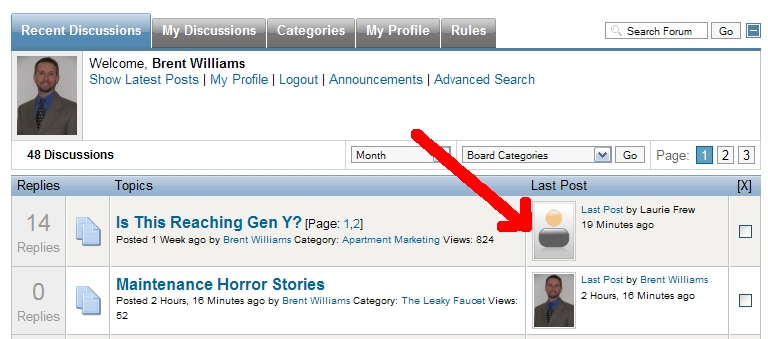
Update: I was told to make sure I had the most current version the Simpleboard plugin, so I'm working on that. However, in the meantime I just noticed something potentially very important! When I looked at the Recent Discussions tab on my site, there was at least one latest post by a guest. And sure enough, the guest avatar showed up!

So it looks like the two areas area acting differently based upon guest avatars...

So it looks like the two areas area acting differently based upon guest avatars...
The topic has been locked.
- brentwilliams3
-
Topic Author
- Offline
- Junior Member
-
Less
More
- Posts: 25
- Thank you received: 0
16 years 1 month ago #41659
by brentwilliams3
Replied by brentwilliams3 on topic Re:Guest Avatar Not Showing Up After Upgrade
Ok, I wasn't able to get a good answer from over at Joomlapolis unfortunately, but in reality, I don't think that is the issue to begin with. Considering that the guest image shows up elsewhere in the forum, it looks like it is a Kunena issue.
But what I did was just fiddle with it and on the view.php file, there is this code around line 581:
And what I did was simply change it to "true" instead of "false". That actually worked, although the images all get resized a different way than before. I am not a coder, so I really have no idea why that worked, but it did. Do you think that's ok - in other words, will that have changed something for the worse somewhere else? (And do you know where the CSS is for the new resized image?)
Thanks!
But what I did was just fiddle with it and on the view.php file, there is this code around line 581:
Code:
else if ($fbConfig->avatar_src == "cb")
{
$msg_avatar = '<span class="fb_avatar">'.$kunenaProfile->showAvatar($userinfo->userid, '', false).'</span>';
And what I did was simply change it to "true" instead of "false". That actually worked, although the images all get resized a different way than before. I am not a coder, so I really have no idea why that worked, but it did. Do you think that's ok - in other words, will that have changed something for the worse somewhere else? (And do you know where the CSS is for the new resized image?)
Thanks!
The topic has been locked.
16 years 1 month ago #41666
by sozzled
Blue Eagle vs. Crypsis reference guide
Read my blog and
Replied by sozzled on topic Re:Guest Avatar Not Showing Up After Upgrade
That's a novel solution to your problem. For the images that are now too large, does
K 1.5.8 & K 1.5.9: Large CB avatar images
help?
Blue Eagle vs. Crypsis reference guide
Read my blog and
The topic has been locked.
- brentwilliams3
-
Topic Author
- Offline
- Junior Member
-
Less
More
- Posts: 25
- Thank you received: 0
16 years 1 month ago #41737
by brentwilliams3
Replied by brentwilliams3 on topic Re:Guest Avatar Not Showing Up After Upgrade
The "novel solution" was actually just randomly changing things until something worked... :woohoo:
Before this latest issue, I actually had that image size problem and the fix you referred to worked for me. BUT, when I made the latest change (changing to "true"), now all images are resized to a max width of 60 pixels. That's not a big deal at all, in the big scheme of things, but if I knew where it was located I would probably make it a bit bigger. No worries, though!
(On a side note, is there not any way to stay logged in to Kunena.com when I use FB Connect to log in? Does it not have a "remember me" feature?)
Before this latest issue, I actually had that image size problem and the fix you referred to worked for me. BUT, when I made the latest change (changing to "true"), now all images are resized to a max width of 60 pixels. That's not a big deal at all, in the big scheme of things, but if I knew where it was located I would probably make it a bit bigger. No worries, though!
(On a side note, is there not any way to stay logged in to Kunena.com when I use FB Connect to log in? Does it not have a "remember me" feature?)
The topic has been locked.
16 years 1 month ago #41747
by sozzled
Blue Eagle vs. Crypsis reference guide
Read my blog and
Replied by sozzled on topic Re:Guest Avatar Not Showing Up After Upgrade
Let me start with your off-topic question first: I don't know anything about Facebook Connect apart from what I wrote earlier today in another discussion:
How to get FACEBOOK connect
.
You would also see, from the K 1.5.8 & K 1.5.9: Large CB avatar images discussion, we were discussing Kunena's use (or non-use) of CB thumbnail images for avatars in the forum.
I think, on the basis of what you have found, and the other discussion on the whole issue of Kunena's use of CB avatar images, that work needs to be done to address the situation in a better way than through our workarounds.
Thank you for your help. I will try to get this matter on the developer's priority list, but I suspect it will be some little while longer before they address it.
You would also see, from the K 1.5.8 & K 1.5.9: Large CB avatar images discussion, we were discussing Kunena's use (or non-use) of CB thumbnail images for avatars in the forum.
I think, on the basis of what you have found, and the other discussion on the whole issue of Kunena's use of CB avatar images, that work needs to be done to address the situation in a better way than through our workarounds.
Thank you for your help. I will try to get this matter on the developer's priority list, but I suspect it will be some little while longer before they address it.
Blue Eagle vs. Crypsis reference guide
Read my blog and
The topic has been locked.
Time to create page: 0.314 seconds