


- Posts: 14
- Thank you received: 0
Kunena 7.0.6 & Kunena 6.4.12 – Security Updates Released
The Kunena team has announce the arrival of Kunena 7.0.6 [K 7.0.6] in stable which is now available for download as a native Joomla extension for J! 5.4.x/6.0.x. This version addresses most of the issues that were discovered in K 6.2 / K 6.3 / K 6.4 and issues discovered during the last development stages of K 7.0.
The Kunena team is also pleased to announce the twelfth version of Kunena 6.4, a native Joomla extension for Joomla! 5.0, 5.1, 5.2, 5.3, 5.4 and 6.0.
Topics that are moved into this category are generally considered to be closed. Users may want to add additional information but these topics should not be resurrected in order to discuss new problems or unrelated matters.
Question [RESOLVED] Font size in message editor is too small; users cannot read it
14 years 8 months ago #107224
by Display
Replied by Display on topic Characters to small
Hello i am using kunena 1.7 and joomla 1.7 and the characters in the input box are to small
How can i make it bigger ?
i am using the default template from kunena 1.7
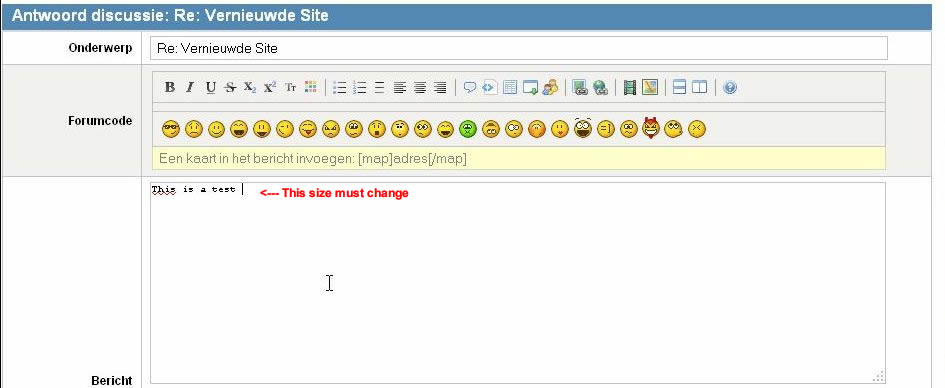
Peter
How can i make it bigger ?
i am using the default template from kunena 1.7
Peter
Please Log in or Create an account to join the conversation.


Less
More
- Posts: 12287
- Thank you received: 2535
14 years 8 months ago #107235
by rich
Important! Always create a backup before you make any changes to your website!
Replied by rich on topic Aw: Characters to small
Hello Display,
add in your Joomla! template css following code:
(1.5em is relative. Try what works for you.)
add in your Joomla! template css following code:
Code:
#Kunena table#kpostmessage .ktxtarea {
font-size: 1.5em;
}
(1.5em is relative. Try what works for you.)
Important! Always create a backup before you make any changes to your website!
The following user(s) said Thank You: Display
Please Log in or Create an account to join the conversation.
14 years 8 months ago #107238
by Display
Replied by Display on topic Re: Aw: Characters to small
Hello Rich
Thats fix the problem
Thanks
peter
Thats fix the problem
Thanks
peter
Please Log in or Create an account to join the conversation.
14 years 8 months ago #107267
by Display
Replied by Display on topic Re: Aw: Characters to small
I was too quick
The problem is still there and now it is in the quickreply box. with the firefox browser 6.0.2
in IE i dont have the problem
Peter
The problem is still there and now it is in the quickreply box. with the firefox browser 6.0.2
in IE i dont have the problem
Peter
Please Log in or Create an account to join the conversation.
Less
More
- Posts: 12287
- Thank you received: 2535
14 years 8 months ago #107284
by rich
Important! Always create a backup before you make any changes to your website!
Replied by rich on topic Aw: Characters to small
Try also additionally
Code:
#Kunena textarea {
font-size: 1.5em;
}
Important! Always create a backup before you make any changes to your website!
The following user(s) said Thank You: Display
Please Log in or Create an account to join the conversation.
14 years 8 months ago - 14 years 8 months ago #107301
by Display
Replied by Display on topic Re: Aw: Characters to small
this option fix also the problem
but i switch back to joomla 1.5 and kunena 1.7 to mutch problems at the moment
to many views in the forum and i dont understand why i have to make this changes in my joomla template in joomla 15 it works oke so i think joomla 17 gives to many problems at the moment
Peter
but i switch back to joomla 1.5 and kunena 1.7 to mutch problems at the moment
to many views in the forum and i dont understand why i have to make this changes in my joomla template in joomla 15 it works oke so i think joomla 17 gives to many problems at the moment
Peter
Last edit: 14 years 8 months ago by Display.
Please Log in or Create an account to join the conversation.
Time to create page: 0.274 seconds