Search Results (Searched for: message)

03 Apr 2026 22:19
Sorry the problem is marked as solved but it not solved. 

 I’ve now updated to Kunena 7.0.3 – but it didn’t work at first. 
But after running "administrator/index.php?option=com_kunena&task=tools.setupcolumnlanguage", the error when logging in has now disappeared. 

But when I reply to a Kunena-topic, I now get the following error message: 

Unknown column 'deleted_time' in 'INSERT INTO'
and (!)
Der Beitrag wurde erfolgreich gesendet.

No replies or short replies are saved. (Emails are sent to subscribers)


A quick question: I did make a backup of the database table #__kunena_users. Do I need to do anything with the backup?

 
03 Apr 2026 16:33
== Messages moved and new topic created ==

Please enable debug mode to get a more detailed error message.  Debug Mode
01 Apr 2026 00:54

Error message on 6.0.3 Joomla
"Joomla! 6.0.3 is not supported. Minimum required version is Joomla! 6.0.4, but it is highly recommended to use Joomla! 5.4.4 or later."

So, not sure if 6.0.3 is really not supported, or if the message is inaccurate. ie: 5.4.4 or later
 
While this message is correct, it is also confusing.

Kunena 7.0.3 can be installed on both Joomla 5.4.4 and higher as well as Joomla 6.0.4 and higher, but not on Joomla 6.0.3.
Maybe this message should be adjusted.
Joomla 6.0.4 and 5.4.4 are Security releases; you should update to these versions if you are still using the older versions 5.3 or 6.0.3.
www.joomla.org/announcements/release-new...-bugfix-release.html
31 Mar 2026 23:51
Error message on 6.0.3 Joomla
"Joomla! 6.0.3 is not supported. Minimum required version is Joomla! 6.0.4, but it is highly recommended to use Joomla! 5.4.4 or later."

So, not sure if 6.0.3 is really not supported, or if the message is inaccurate. ie: 5.4.4 or later
31 Mar 2026 01:14
thank you,  I will try.

what do you mean with reinstall kunena?
after my first test I deinstalled kunena and checked mysql where I saw that all kunena tables also has been deleted,
so how I have to reinstall after db import?  (just simply run an install over the exicsting one?)

I installed EN and DE language files  and use the Allrounder template,  but tested also with Casiopaia.
also I have installed KBee kunena template beside the Aurelia  (always checked both)
_____________________________________________________________

In the moment I found out this:

1.  SCEditor   is working fine  (so the db import looks without errors)

2. in CKEditor  the original message is loaded and present  in the hidden textarea (as it should be)

so there must be some js problem within loading ckeditor  (Uncaught TypeError: can't access property "type", g is null)
as written: when switching to private message ckeditor enables all buttons

thanks
30 Mar 2026 20:41
If this is a bug that affects the protected function, it has persisted unchanged across all Kunena versions since Kunena 3
 /components/com-kunena/controller/topic/item/display.php :476
 $matches = preg_match(‘/\[img]http(s?):\/\/.*\/img]/iu’, $message, $title);

gindi
30 Mar 2026 18:59

I saved all Kunena db entries, updated them to the K7 schema and imported ALL
to the new installation.

Did you reinstall Kunena after importing the tables? That might help.

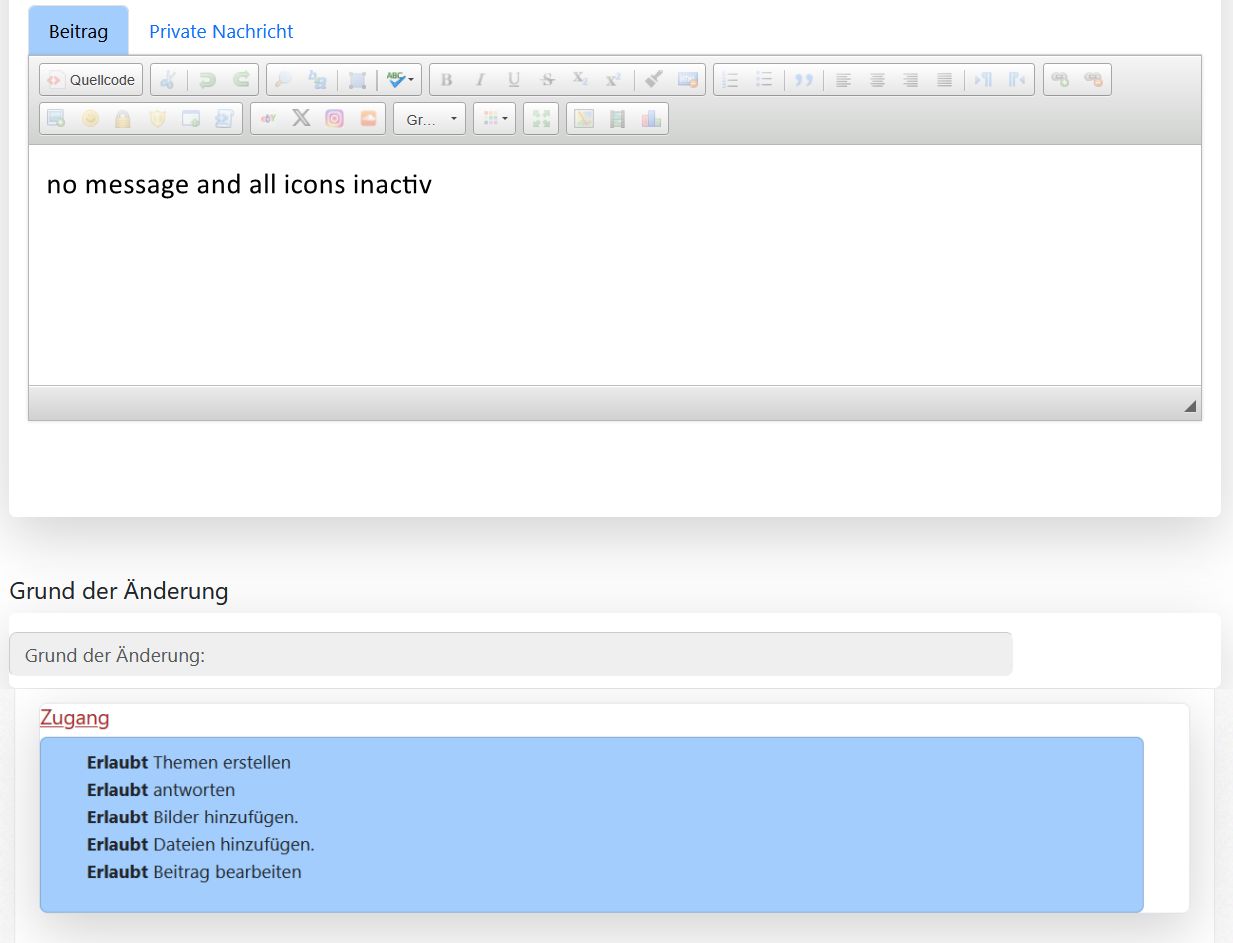
when I'm logged in as superuser I can edit or quote each message BUT NOT the first one of a topic.

In the backend, go to Kunena -> Tools, synchronize the users, and let recount the statistics.

the CKeditor is opened, but no message appears and the browser console gives me this error:
Uncaught TypeError: can't access property "type", g is null

Have you installed the Kunena language files? But there might also be a conflict with a script. Are you using a different Joomla template in your new installation? If so, try using Cassiopeia instead.
30 Mar 2026 11:48
In /components/com_kunena/src/Controller/Topic/Item/TopicItemDisplay, I noticed that on line 582
 $matches = preg_match("/\[img]http(s?):\/\/.*\/img]/iu‘, $message, $title);
 either there is one too much closing square bracket after the first “img”, or the opening square bracket is missing before the second “img”.
 
28 Mar 2026 04:45 - 28 Mar 2026 04:48
hi,
I setup a new Joomla site with a fresh Kunena 7.0.2.

as this should be an update to an old J3 website I saved all Kunena db entries, updated them to the K7 schema and imported ALL
to the new installation.
everything works fine - instead of on error.

when I'm logged in as superuser I can edit or quote each message BUT NOT the first one of a topic.
(the new sample message of the kunena 7 install I can edit)

the CKeditor is opened, but no message appears and the browser console gives me this error:
Uncaught TypeError: can't access property "type", g is null

    onTagClose /media/kunena/core/js/ckeditor.js?aa68f1:1298
    parse /media/kunena/core/js/ckeditor.js?aa68f1:1295
    fromBBCode /media/kunena/core/js/ckeditor.js?aa68f1:1299
    b /media/kunena/core/js/ckeditor.js?aa68f1:1303
    l /media/kunena/core/js/ckeditor.js?aa68f1:10
   .....
   and many, many more

I rerun the installation and during the db import I checked this after each single import,
but the import of categories, topics and messages must be present to open an old topic to check for this error.

in the moment I have not yet importet the kunena user tables, but on the installation before it was complete.

I don't know how the kunena script works on edit or reply and what rights or settings are checked during script run

may be some of you knows what is running in the background and can help me please to find if/where I must change
something. (in the db tables)

as far as I see every all other functions work.

btw.  switching to private message the editor works fine


25 Mar 2026 13:31
OK, thanks! That is easy enough to do... Reverting to older backup wasn't possible (things like payment data, new and updated users' passwords, and discussion timestamps); but just the params column is easy.
25 Mar 2026 13:18
Hello,

You need to import the table #__extensions (by renaming it as #__extensions_bak) from a backup before the day on which the settings deleted.

You could try to compare the two tables, only the column "params" has been touched : stackoverflow.com/questions/950414/mysql...s-between-two-tables
25 Mar 2026 12:10
The suggested fix to run that script/tool worked for me from first time.
Question remains for me --- as accidentally parameters for all components were deleted, how to I set them again / how do I find which ones were deleted? I see no symptoms / other problems (but then, most of my few components were at default settings; my article metadata display settings were quickly corrected), but are also defaults removed? In that last case, do I just open the <options> of each component and <save> them unchanged to get defaults back?  Thanks!
18 Mar 2026 21:11
It's not happening since couple of days i move it to archive
18 Mar 2026 09:49
JoomPMS has an excellent integration with Kunena to allow sending of Private Messages.
17 Mar 2026 17:43
Yep... didn't bother to look there.
I went by the "Joomla is up to date" message.

Thanks a lot.

Problem solved!
Displaying 166 - 180 out of 297 results.
Time to create page: 0.160 seconds