


- Posts: 12291
- Thank you received: 2538
Kunena 7.0.9 & Kunena 6.4.14 – Security Updates Released
The Kunena team has announce the arrival of Kunena 7.0.9 [K 7.0.9] in stable which is now available for download as a native Joomla extension for J! 5.4.x/6.0.x./6.1.x. This version addresses most of the issues that were discovered in K 6.2 / K 6.3 / K 6.4 and issues discovered during the last development stages of K 7.0
Solved Cross-Origin Request Blocked when editing a post on cke4.ckeditor.com/ck
Less
More
2 years 8 months ago #230491
by rich
Is this banner module assigned to all Kunena menu items? I can't find the correct banner module, but have found the large banner (from Home) and it is also displayed on Kunena pages when assigned.
Important! Always create a backup before you make any changes to your website!
Replied by rich on topic Cross-Origin Request Blocked when editing a post on cke4.ckeditor.com/ck
Yes, you can delete it, it is unnecessary in this case.• Can I just delete that initial Kunena Menu (just to clean up) or I should keep it as a template, if needed?
• In the forum Main Home, the Menu Item ownership is lost (no active state), and also the page banner?
— Curiously, in Edition mode, the correct Main Menu Item ownership is back (with its active state), and also the page banner.
Is this banner module assigned to all Kunena menu items? I can't find the correct banner module, but have found the large banner (from Home) and it is also displayed on Kunena pages when assigned.
Important! Always create a backup before you make any changes to your website!
Please Log in or Create an account to join the conversation.
- Chacapamac
-
 Topic Author
- Offline
- Junior Member
-

Less
More
- Posts: 54
- Thank you received: 0
2 years 8 months ago #230501
by Chacapamac
Doesn’t matter that, I probably can fix that by adding the banner option to the Kunena Menu items
What really matter is the lost of the Joomla Main Menu Item “Forum” —> “Active State”
— The same happen with all different Main Top Kunena Menu Items
I know, I can “force” the “Active” state to stay on the Joomla Main Menu Item “Forum” but I’m worry it damage the SEO logic of the Forum?
Replied by Chacapamac on topic Cross-Origin Request Blocked when editing a post on cke4.ckeditor.com/ck
Probably not, the banner is generated by the Menu Item itself (given by the Astroid Framework), not a module.Is this banner module assigned to all Kunena menu items?
Doesn’t matter that, I probably can fix that by adding the banner option to the Kunena Menu items
What really matter is the lost of the Joomla Main Menu Item “Forum” —> “Active State”
— The same happen with all different Main Top Kunena Menu Items
I know, I can “force” the “Active” state to stay on the Joomla Main Menu Item “Forum” but I’m worry it damage the SEO logic of the Forum?
Please Log in or Create an account to join the conversation.
Less
More
- Posts: 12291
- Thank you received: 2538
2 years 8 months ago #230515
by rich
Does your Joomla template use its own cache or a compression tool?
It would be interested to know where the forum gets the css and js information from when it is accessed. I have blocked all css and js files with my browser tool, but the forum is still accessed and the layout is not destroyed (which it should be without css an js).
Important! Always create a backup before you make any changes to your website!
Replied by rich on topic Cross-Origin Request Blocked when editing a post on cke4.ckeditor.com/ck
Probably, the uncompressed files are accessed in edit mode and the compressed in normal mode.— Curiously, in Edition mode, the correct Main Menu Item ownership is back (with its active state), and also the page banner.
Does your Joomla template use its own cache or a compression tool?
It would be interested to know where the forum gets the css and js information from when it is accessed. I have blocked all css and js files with my browser tool, but the forum is still accessed and the layout is not destroyed (which it should be without css an js).
This definitely makes no sense if the menu items are not actually active. And in this case they aren't.I know, I can “force” the “Active” state to stay on the Joomla Main Menu Item “Forum” but I’m worry it damage the SEO logic of the Forum?
Important! Always create a backup before you make any changes to your website!
Please Log in or Create an account to join the conversation.
- Chacapamac
-
Topic Author
- Offline
- Junior Member
-
Less
More
- Posts: 54
- Thank you received: 0
2 years 8 months ago #230530
by Chacapamac
Replied by Chacapamac on topic Cross-Origin Request Blocked when editing a post on cke4.ckeditor.com/ck
First, I fix the Banner problem. You can see it loading now on the Kunena “Index” menu —>
www.graf-test.ca/index.php/forum-fr/index-fr
— I just have to add the banner to each Kunena Menu types
I will try to respond to your questions the best way possible....
— The only cache is the template compiled CSS files in the media > templates > site > MyTemplate folder > css
Also, Joomla “Friendly URL” and mod-Rewrite are on with a basic Joomla .htaccess ( I try mod-Rewrite OFF + no .htaccess = no difference in URL or Active state of the top level “Forum Menu.)
• I made some test for what is loading or not
Here, you will see that the Active state work on the —> Main “Forum” Menu item —> www.graf-test.ca/forum-fr
Because I put back the Kunena top level “Forum” menu item pointing back to the Kunena Menu Item Type —> Home Page
and the “Default Menu Item” to the Kunena Menu —> “Forum (fr-FR)”
— If I put it back to Kunena “Index(fr-FR)” (like you show me) I loose the Active State on the —> Main “Forum” Menu item —> www.graf-test.ca/forum-fr
— The Kunena “Post” and “Edit” work with the Active Main “Forum” Menu Item with both above settings
All the website CSS and JS seem to load correctly in:
— Main “Forum” Menu item —> www.graf-test.ca/forum-fr
— Kunena “Post” —> www.graf-test.ca/forum-fr/questions-gene...af-welcome-to-graf#2
— and “Edit” —> www.graf-test.ca/forum-fr/questions-gene...lcome-to-graf/edit/1
Fore sure, I can see additional css and js loading on top of the base code files that are related to Kunena “Post” and “Edit” pages
The only problem persisting is the lost of the Active state when clicking all top Kunena Menu items

— I just have to add the banner to each Kunena Menu types
I will try to respond to your questions the best way possible....
— For now, Joomla cache is off and no compression plugins or templates tools are usedDoes your Joomla template use its own cache or a compression tool?
— The only cache is the template compiled CSS files in the media > templates > site > MyTemplate folder > css
Also, Joomla “Friendly URL” and mod-Rewrite are on with a basic Joomla .htaccess ( I try mod-Rewrite OFF + no .htaccess = no difference in URL or Active state of the top level “Forum Menu.)
— Not sure I can help here?Probably, the uncompressed files are accessed in edit mode and the compressed in normal mode.
• I made some test for what is loading or not
Here, you will see that the Active state work on the —> Main “Forum” Menu item —> www.graf-test.ca/forum-fr
Because I put back the Kunena top level “Forum” menu item pointing back to the Kunena Menu Item Type —> Home Page
and the “Default Menu Item” to the Kunena Menu —> “Forum (fr-FR)”
— If I put it back to Kunena “Index(fr-FR)” (like you show me) I loose the Active State on the —> Main “Forum” Menu item —> www.graf-test.ca/forum-fr
— The Kunena “Post” and “Edit” work with the Active Main “Forum” Menu Item with both above settings
All the website CSS and JS seem to load correctly in:
— Main “Forum” Menu item —> www.graf-test.ca/forum-fr
— Kunena “Post” —> www.graf-test.ca/forum-fr/questions-gene...af-welcome-to-graf#2
— and “Edit” —> www.graf-test.ca/forum-fr/questions-gene...lcome-to-graf/edit/1
Fore sure, I can see additional css and js loading on top of the base code files that are related to Kunena “Post” and “Edit” pages
The only problem persisting is the lost of the Active state when clicking all top Kunena Menu items
Please Log in or Create an account to join the conversation.
Less
More
- Posts: 12291
- Thank you received: 2538
2 years 8 months ago #230541
by rich
I was on your test site again today, your menu items all seem to be fine, except the Kunena menu items home are linking to themselves again.
But how do you map the menu items to your joomla template?
I switched your Joomla template once to see if the error occurs everywhere, and after switching back only two menu items are displayed at the top, even though I hadn't changed anything in your template.
Important! Always create a backup before you make any changes to your website!
Replied by rich on topic Cross-Origin Request Blocked when editing a post on cke4.ckeditor.com/ck
Probably, the uncompressed files are accessed in edit mode and the compressed in normal mode.
In principle, you can test it by renaming the compressed file. Then either the uncompressed file should be accessed or a new min css will be created.— Not sure I can help here?
I was on your test site again today, your menu items all seem to be fine, except the Kunena menu items home are linking to themselves again.
But how do you map the menu items to your joomla template?
I switched your Joomla template once to see if the error occurs everywhere, and after switching back only two menu items are displayed at the top, even though I hadn't changed anything in your template.
Important! Always create a backup before you make any changes to your website!
Please Log in or Create an account to join the conversation.
- Chacapamac
-
Topic Author
- Offline
- Junior Member
-
Less
More
- Posts: 54
- Thank you received: 0
2 years 8 months ago - 2 years 8 months ago #230545
by Chacapamac
Replied by Chacapamac on topic Cross-Origin Request Blocked when editing a post on cke4.ckeditor.com/ck
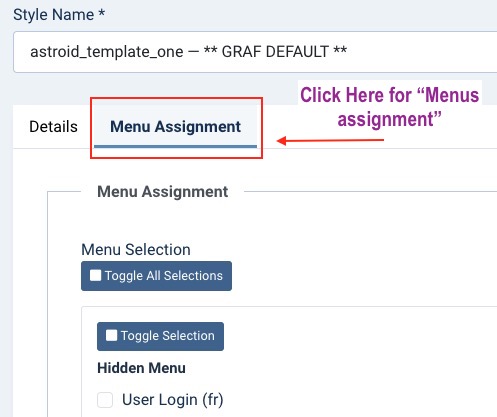
To assign Menus to Templates
Go to JoomlaTemplates Style

— Click one of these template
— Go to the “Menu Assignment” tab to assign menus
I revised completely the menus (English & French)
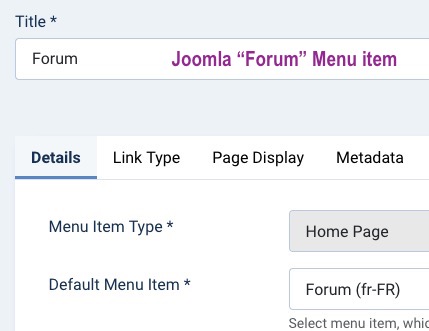
• I put back the Kunena “Forum” main menu at “index (fr-FR)” liked you say before

• Both Joomla Main Menu “Forum” item point to theKunena “Forum” main menu
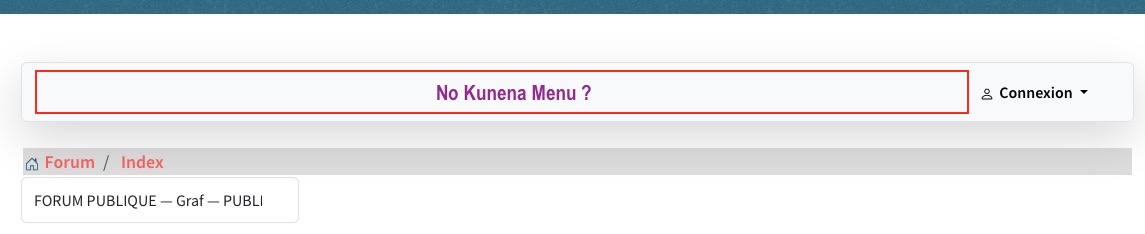
Now everything seem to work ok but I lost the Top Kunena menu?
Go to JoomlaTemplates Style
— Click one of these template
— Go to the “Menu Assignment” tab to assign menus
I revised completely the menus (English & French)
• I put back the Kunena “Forum” main menu at “index (fr-FR)” liked you say before
• Both Joomla Main Menu “Forum” item point to theKunena “Forum” main menu
Now everything seem to work ok but I lost the Top Kunena menu?
Last edit: 2 years 8 months ago by Chacapamac.
Please Log in or Create an account to join the conversation.
Time to create page: 0.261 seconds