


- Posts: 1250
- Thank you received: 188
Kunena 7.0.9 & Kunena 6.4.14 – Security Updates Released
The Kunena team has announce the arrival of Kunena 7.0.9 [K 7.0.9] in stable which is now available for download as a native Joomla extension for J! 5.4.x/6.0.x./6.1.x. This version addresses most of the issues that were discovered in K 6.2 / K 6.3 / K 6.4 and issues discovered during the last development stages of K 7.0
Question Note: Not possible to search from categories in backend with search
3 years 6 hours ago - 3 years 6 hours ago #229440
by Leen
With kind regards
Leen
Replied by Leen on topic Note: Not possible to search from categories in backend with search
I just added the fix again in the latest K6.2.0 beta 3 and still works
However, a small problem when you open the categories folder, search immediately appears in the search bar so then you will not see the current categories
then you have to press the (reset)clear button and they will come
hopefully I explained it well
However, a small problem when you open the categories folder, search immediately appears in the search bar so then you will not see the current categories
then you have to press the (reset)clear button and they will come
hopefully I explained it well
With kind regards
Leen


Last edit: 3 years 6 hours ago by Leen.
The following user(s) said Thank You: Gindi
Please Log in or Create an account to join the conversation.

3 years 3 hours ago - 3 years 51 minutes ago #229443
by Gindi
Replied by Gindi on topic Note: Not possible to search from categories in backend with search
Bravo Leen, you explained that well.
After I clicked on "Reset" in the box above, the categories were also displayed again for me.
So it works also with K6.2.0
The only problem is that I always have to click on "Reset" when I want to see the categories, no matter if I click on the categories in the sidepanel at Kunena Categories or if I click on it from the Dashboard/Kunena Dashboard/Categories.
Addendum:
I just tested the fix with Kunena 6.1.3.2 2023-09-05. The same problem exists there. When you install the fix in Kunena 6.1.3.2 2023-09-05, the categories in Kunena are empty and only become visible when you click on "Reset". You always have to click on "Reset" when you have clicked on categories.
If I comment out line 487 + $this->setState('filter.search', $value); with a hash (#), the categories are always displayed.
Gindi
After I clicked on "Reset" in the box above, the categories were also displayed again for me.
So it works also with K6.2.0
The only problem is that I always have to click on "Reset" when I want to see the categories, no matter if I click on the categories in the sidepanel at Kunena Categories or if I click on it from the Dashboard/Kunena Dashboard/Categories.
Addendum:
I just tested the fix with Kunena 6.1.3.2 2023-09-05. The same problem exists there. When you install the fix in Kunena 6.1.3.2 2023-09-05, the categories in Kunena are empty and only become visible when you click on "Reset". You always have to click on "Reset" when you have clicked on categories.
If I comment out line 487 + $this->setState('filter.search', $value); with a hash (#), the categories are always displayed.
Gindi
Last edit: 3 years 51 minutes ago by Gindi.
The following user(s) said Thank You: Leen
Please Log in or Create an account to join the conversation.
2 years 11 months ago - 2 years 11 months ago #229445
by Leen
With kind regards
Leen
Replied by Leen on topic Note: Not possible to search from categories in backend with search
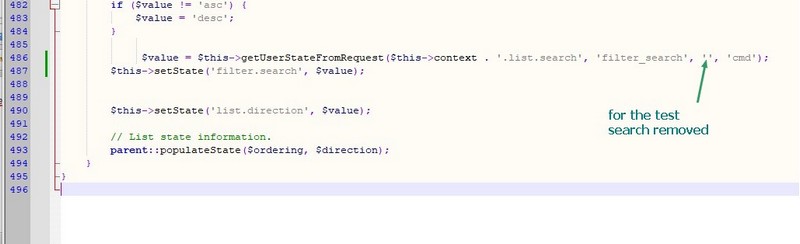
If I leave the word search empty, directories also appear immediately
but I don't know if that is good for possible translation
but I don't know if that is good for possible translation
With kind regards
Leen
Last edit: 2 years 11 months ago by Leen.
The following user(s) said Thank You: Gindi
Please Log in or Create an account to join the conversation.
2 years 11 months ago #229447
by Gindi
Replied by Gindi on topic Note: Not possible to search from categories in backend with search
Leen, your suggestion is the best solution at this time.
With my suggestion, the categories are displayed, but the search does not work.
With your suggestion, the categories are displayed and the search also works, with one exception: If the search word contains a German "ä", "ö", or "ü", this letter is hidden in the search word and the search remains empty.
Gindi
With my suggestion, the categories are displayed, but the search does not work.
With your suggestion, the categories are displayed and the search also works, with one exception: If the search word contains a German "ä", "ö", or "ü", this letter is hidden in the search word and the search remains empty.
Gindi
Please Log in or Create an account to join the conversation.
2 years 11 months ago #229448
by Leen
With kind regards
Leen
Replied by Leen on topic Note: Not possible to search from categories in backend with search
Hi, nice and yes, those special characters?
That's why I wasn't sure if the language package could have something to do with this, but I think xillibit will explain that soon
That's why I wasn't sure if the language package could have something to do with this, but I think xillibit will explain that soon
With kind regards
Leen
Please Log in or Create an account to join the conversation.


Less
More
- Posts: 12291
- Thank you received: 2538
2 years 11 months ago #229449
by rich
Important! Always create a backup before you make any changes to your website!
Replied by rich on topic Note: Not possible to search from categories in backend with search
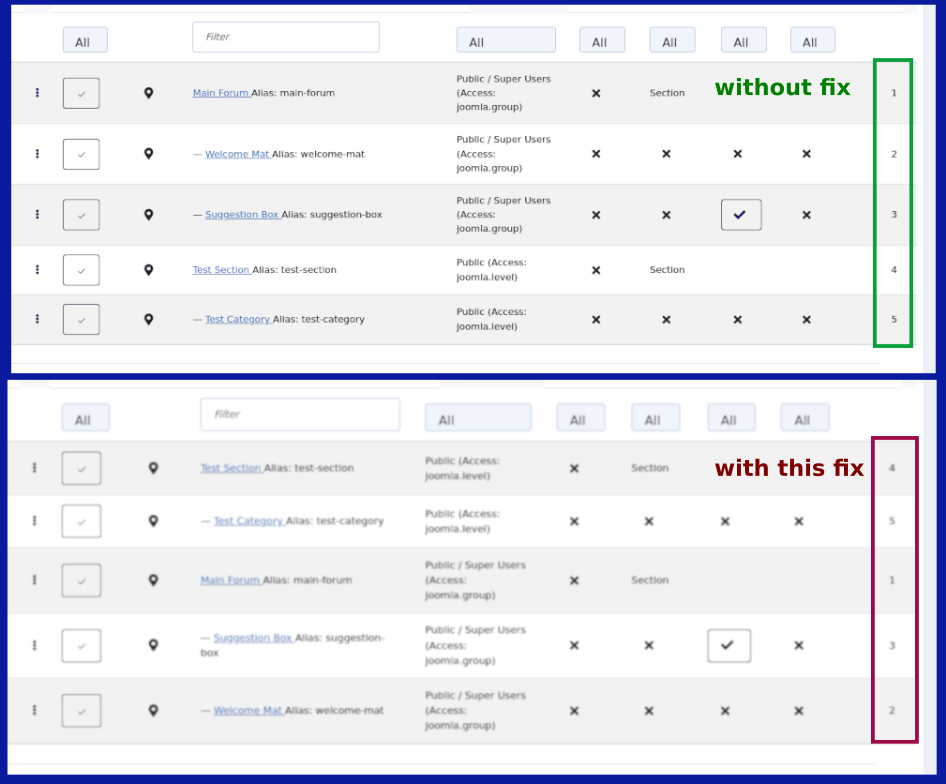
This fix changes the sorting (see image).
Tested with K6.2
.
Tested with K6.2
.
Important! Always create a backup before you make any changes to your website!
Please Log in or Create an account to join the conversation.
Time to create page: 0.240 seconds