


- Posts: 12291
- Thank you received: 2538
Kunena 7.0.9 & Kunena 6.4.14 – Security Updates Released
The Kunena team has announce the arrival of Kunena 7.0.9 [K 7.0.9] in stable which is now available for download as a native Joomla extension for J! 5.4.x/6.0.x./6.1.x. This version addresses most of the issues that were discovered in K 6.2 / K 6.3 / K 6.4 and issues discovered during the last development stages of K 7.0
Solved Ebay widget not working
Less
More
9 years 1 week ago #195946
by rich
Important! Always create a backup before you make any changes to your website!
Replied by rich on topic Ebay widget not working
Maybe is during the upgrade something broken.
Check in the configuration whether the ebay code still is correctly present. Try also reinstall Kunena. I don't think, that's a problem with Blue Eagle, but you can test it if you switch to Crypsis.
Check in the configuration whether the ebay code still is correctly present. Try also reinstall Kunena. I don't think, that's a problem with Blue Eagle, but you can test it if you switch to Crypsis.
Important! Always create a backup before you make any changes to your website!
Please Log in or Create an account to join the conversation.


9 years 1 week ago #195948
by larbut
Replied by larbut on topic Ebay widget not working
I reinstalled Kunena 5.0.11, cleaned the cache, but nothing changed.
I also tried swapping template to Crypsis, but the widget will not show.
Ebay settings in configuration looks to be ok. Please see attached image.
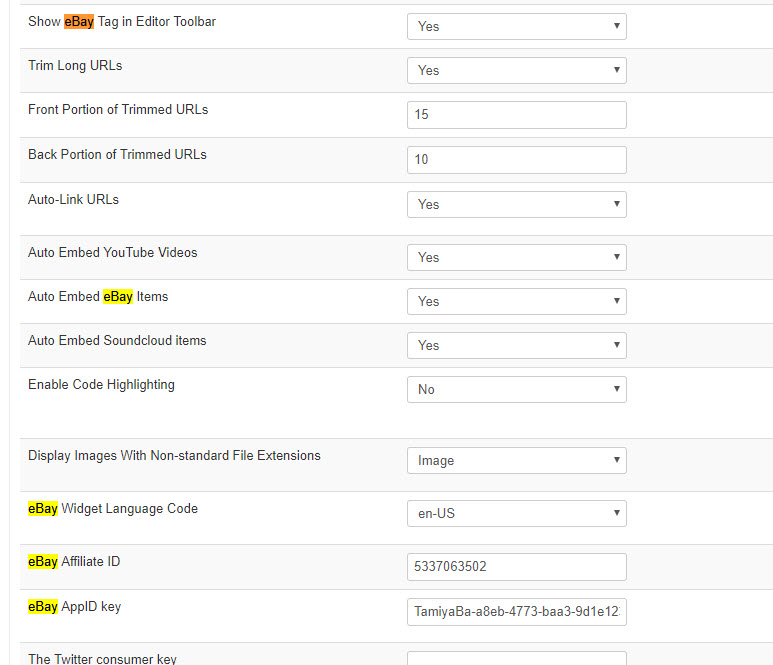
-Lars
I also tried swapping template to Crypsis, but the widget will not show.
Ebay settings in configuration looks to be ok. Please see attached image.
-Lars
rich wrote: Maybe is during the upgrade something broken.
Check in the configuration whether the ebay code still is correctly present. Try also reinstall Kunena. I don't think, that's a problem with Blue Eagle, but you can test it if you switch to Crypsis.
Please Log in or Create an account to join the conversation.
9 years 1 week ago #195949
by larbut
Replied by larbut on topic Ebay widget not working
Is it possible to downgrade to earlier versions of Kunena, just to test?
Please Log in or Create an account to join the conversation.
9 years 1 week ago #195950
by larbut
Replied by larbut on topic Ebay widget not working
When I edit a post from for instance this:
To this:
(removing everything but the Ebay code)
... and press "Submit"
... the result is that the post is not edited, but is automatically set to "Deleted" !
Like this:
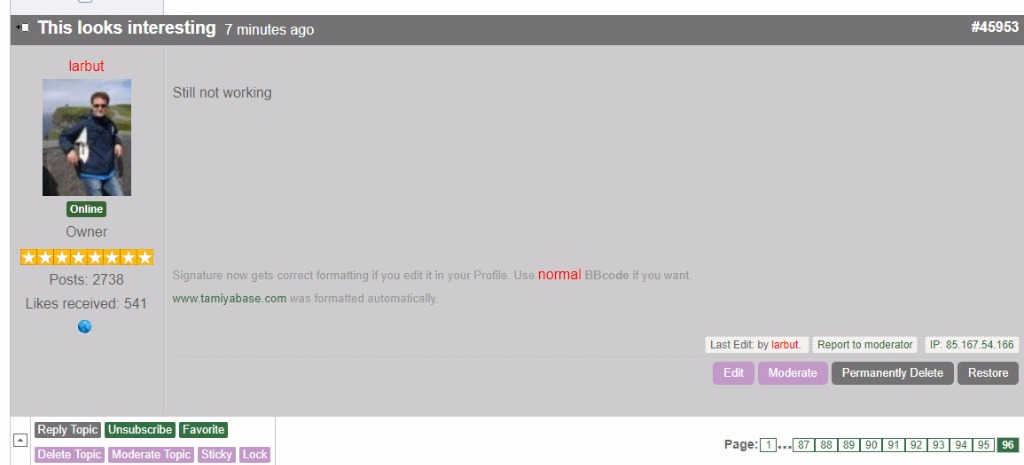
That looks like a bug?
Code:
[ebay]182440419025[/ebay]
Still not working
To this:
Code:
[ebay]182440419025[/ebay]
... and press "Submit"
... the result is that the post is not edited, but is automatically set to "Deleted" !
Like this:
That looks like a bug?
Please Log in or Create an account to join the conversation.
Less
More
- Posts: 12291
- Thank you received: 2538
9 years 1 week ago #195951
by rich
But before you downgrade the forum, try this: Install Blue Eagle again, then go to Blue Eagle -> (tab) bbCode -> Choose Show Ebay button = No and save it. Now switch back to Show Ebay button = Yes and save it again. Empty the cache and check your frontpage.
Important! Always create a backup before you make any changes to your website!
Replied by rich on topic Ebay widget not working
If you had previously a older version of the K5.0 serie it should not be a problem. github.com/Kunena/Kunena-Forum/releasesIs it possible to downgrade to earlier versions of Kunena, just to test?
But before you downgrade the forum, try this: Install Blue Eagle again, then go to Blue Eagle -> (tab) bbCode -> Choose Show Ebay button = No and save it. Now switch back to Show Ebay button = Yes and save it again. Empty the cache and check your frontpage.
Important! Always create a backup before you make any changes to your website!
Please Log in or Create an account to join the conversation.
9 years 1 week ago #195953
by larbut
I did this, but no change. The Template installed fine using the Kunena "New Tamplate" button. I cleared all cache (confirmed by me loosing my colour adjustments...I always forget those) but the same behaviour as described above.
Also getting the strange behaviour that the post is automatically deleted when I try to edit it. I've made a video of it here for you to see:
www.tamiyabase.com/larbut/post_delete.mp4
Let me know, and I will try downgrading Kunena.
-Lars
Replied by larbut on topic Ebay widget not working
rich wrote: ..., try this: Install Blue Eagle again, then go to Blue Eagle -> (tab) bbCode -> Choose Show Ebay button = No and save it. Now switch back to Show Ebay button = Yes and save it again. Empty the cache and check your frontpage.
I did this, but no change. The Template installed fine using the Kunena "New Tamplate" button. I cleared all cache (confirmed by me loosing my colour adjustments...I always forget those) but the same behaviour as described above.
Also getting the strange behaviour that the post is automatically deleted when I try to edit it. I've made a video of it here for you to see:
www.tamiyabase.com/larbut/post_delete.mp4
Let me know, and I will try downgrading Kunena.
-Lars
Please Log in or Create an account to join the conversation.
Time to create page: 0.267 seconds