


- Posts: 11
- Thank you received: 0
Kunena 7.0.9 & Kunena 6.4.14 – Security Updates Released
The Kunena team has announce the arrival of Kunena 7.0.9 [K 7.0.9] in stable which is now available for download as a native Joomla extension for J! 5.4.x/6.0.x./6.1.x. This version addresses most of the issues that were discovered in K 6.2 / K 6.3 / K 6.4 and issues discovered during the last development stages of K 7.0
Question Problems after updating to 5.2
5 years 7 months ago #215630
by SBott
Replied by SBott on topic Problems after updating to 5.2
Ok,
I created a "registered user" for you:
I created a "registered user" for you:
This message contains confidential information
Please Log in or Create an account to join the conversation.


Less
More
- Posts: 12291
- Thank you received: 2538
5 years 7 months ago - 5 years 7 months ago #215633
by rich
Important! Always create a backup before you make any changes to your website!
Replied by rich on topic Problems after updating to 5.2
Maybe I found the problem. The login works only via the main page login module, because the captcha isn't displayed in the forum, so you can't to enter the invoice result.
Test it, f it works if you disable your captcha plugin(s).
In your configuration report I see, you've chosen CAPTCHA Challenge for Users = 3 So I think, maybe my 3 test topics are pending messages and must be approved by a moderator (if yes please delete these).
Test it, f it works if you disable your captcha plugin(s).
In your configuration report I see, you've chosen CAPTCHA Challenge for Users = 3 So I think, maybe my 3 test topics are pending messages and must be approved by a moderator (if yes please delete these).
Important! Always create a backup before you make any changes to your website!
Last edit: 5 years 7 months ago by rich.
Please Log in or Create an account to join the conversation.
5 years 7 months ago #215686
by SBott
Replied by SBott on topic Problems after updating to 5.2
I disabled the "Captcha - ReCAPTCHA" plugin. That didn't change anything though.
I also checked the setting "moderate new users", but it is set to 0, so that should work.
I changed the setting "captcha challenge for users" to 0, too. This shouldn't have been a problem as "display captcha" was already set to "for noone" (if I understand this correctly). Anyway, that also didn't help unfortunately.
Hmm - just to check - if topics would have to be moderated before they appear - where would I have to go to do this?
I also checked the setting "moderate new users", but it is set to 0, so that should work.
I changed the setting "captcha challenge for users" to 0, too. This shouldn't have been a problem as "display captcha" was already set to "for noone" (if I understand this correctly). Anyway, that also didn't help unfortunately.
Hmm - just to check - if topics would have to be moderated before they appear - where would I have to go to do this?
Please Log in or Create an account to join the conversation.
Less
More
- Posts: 12291
- Thank you received: 2538
5 years 7 months ago #215694
by rich
Important! Always create a backup before you make any changes to your website!
Replied by rich on topic Problems after updating to 5.2
If topics should be moderated, you can set this also for single categories (see image). And pending messages will be displayed on the index page.
Menu items like Unread, New Topic, No Replies, My Topics and Profile are default only for registered users available.
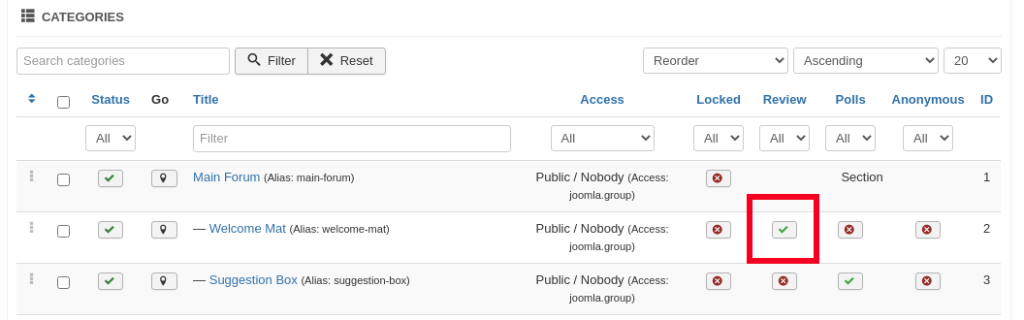
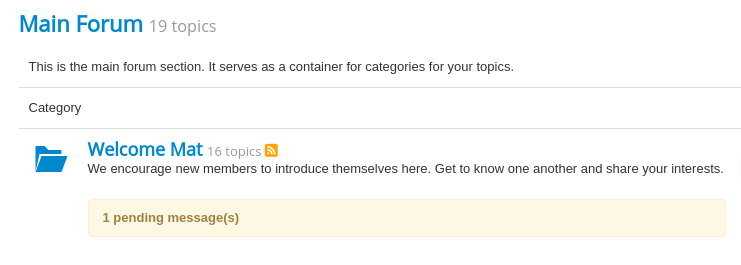
That's not an error, because guests have no access for some things. But all your menus are available for guests and that's a misconfiguration, because the users think, they are logged in. But in fact, they are guests and therefore the 404 error because the guests have no rights for some actions.That seemed to have worked, and the posts in the forum are displayed again. However, it is not possible to post answers (redirects to 404 error message) or to create new topics (redirects to "current threads", but new thread does not exist).
Menu items like Unread, New Topic, No Replies, My Topics and Profile are default only for registered users available.
Important! Always create a backup before you make any changes to your website!
Please Log in or Create an account to join the conversation.
5 years 7 months ago #215696
by SBott
Replied by SBott on topic Problems after updating to 5.2
There are no pending message on the index page.
I did not try any of these actions (reply, new topic) as a guest, but with my admin account. I does not work for the admin, and it does not work for registered users.
I did not try any of these actions (reply, new topic) as a guest, but with my admin account. I does not work for the admin, and it does not work for registered users.
Please Log in or Create an account to join the conversation.
Less
More
- Posts: 12291
- Thank you received: 2538
5 years 7 months ago #215699
by rich
I can't make sense of your homepage. My browser tool and also the source code of your page shows all linked addresses with html at the end. But if you click on it, it will removed this ending from the browser address.
Have you enabled this option in your Joomla SEO configuration? Or have you enabled the redirect plugin? If yes, disable this and test your page again.
It seems, your Joomla template shows no alert messages on top. Switch during the tests to the default template Protostar and read the message on top when you have tried to create a topic.
Important! Always create a backup before you make any changes to your website!
Replied by rich on topic Problems after updating to 5.2
After login, I got no 404 errors on your page.I did not try any of these actions (reply, new topic) as a guest, but with my admin account. I does not work for the admin, and it does not work for registered users.
I can't make sense of your homepage. My browser tool and also the source code of your page shows all linked addresses with html at the end. But if you click on it, it will removed this ending from the browser address.
Have you enabled this option in your Joomla SEO configuration? Or have you enabled the redirect plugin? If yes, disable this and test your page again.
It seems, your Joomla template shows no alert messages on top. Switch during the tests to the default template Protostar and read the message on top when you have tried to create a topic.
Important! Always create a backup before you make any changes to your website!
Please Log in or Create an account to join the conversation.
Time to create page: 0.228 seconds