


- Posts: 23
- Thank you received: 6
Kunena 7.0.4 Released
The Kunena team has announce the arrival of Kunena 7.0.4 [K 7.0.4] in stable which is now available for download as a native Joomla extension for J! 5.4.x/6.0.x. This version addresses most of the issues that were discovered in K 6.2 / K 6.3 / K 6.4 and issues discovered during the last development stages of K 7.0
Solved How can I change category and topic icons in Kunena 4.0.7 ??
10 years 3 months ago - 10 years 3 months ago #171786
by loppan
Oops, sorry, wrong copy / paste .
.
Let's say I still want a newspaper as the default topic icon in my News-category, so I'll edit the xml-file accordingly :
By moderating a message we can confirm that the change took effect :
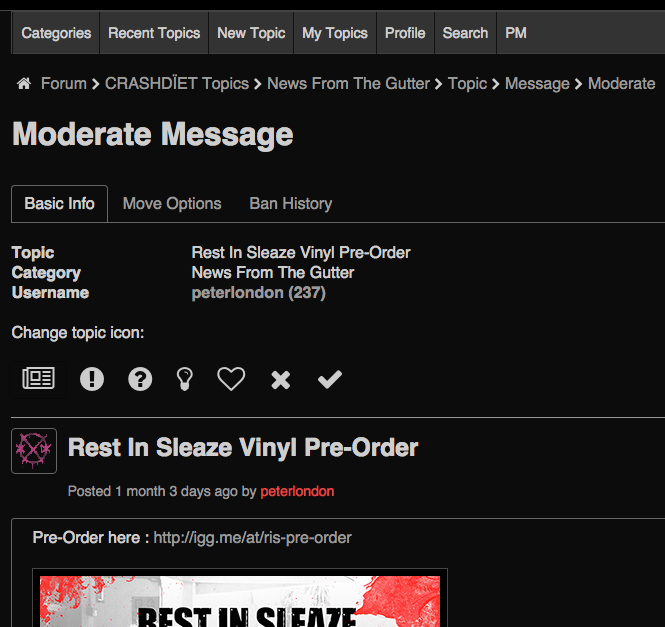
All good so far. But when I go back to category view, all old threads still have the previous "file" topic icon :
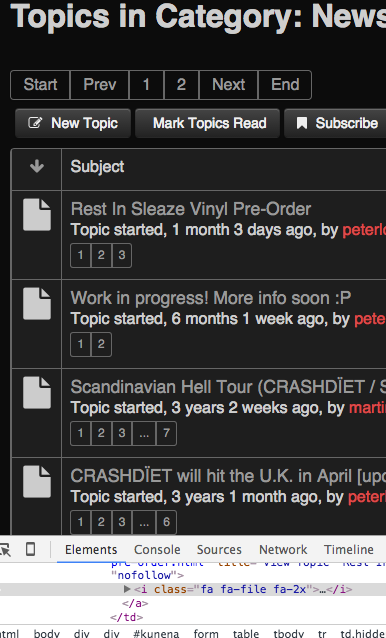
I'd like to change these as well - to my new default topic icon - but I cannot figure out where this icon is defined?
Truly grateful for some advice as usual.
Many thanks in advance!
Peter
Replied by loppan on topic How can I change category and topic icons in Kunena 4.0.7 ??
810 wrote: then you need to change the fa="file" to fa="comment" or something, depends which icon you want: See fortawesome.github.io/Font-Awesome/icons/
Oops, sorry, wrong copy / paste
.Let's say I still want a newspaper as the default topic icon in my News-category, so I'll edit the xml-file accordingly :
<icon id="0" name="default" published="1" b2="file" b3="file" fa="newspaper-o" title="COM_KUNENA_ICON_DEFAULT" src="user/default.png" />
By moderating a message we can confirm that the change took effect :
All good so far. But when I go back to category view, all old threads still have the previous "file" topic icon :
I'd like to change these as well - to my new default topic icon - but I cannot figure out where this icon is defined?
Truly grateful for some advice as usual
.Many thanks in advance!
Peter
Last edit: 10 years 3 months ago by loppan.
Please Log in or Create an account to join the conversation.


10 years 3 months ago #171788
by 810
Replied by 810 on topic How can I change category and topic icons in Kunena 4.0.7 ??
there is a bug in kunena, you see the icon type from the last category.
but if you use just 1 topic icon set for all, then this looks like cache.
So try to clean cache.
but if you use just 1 topic icon set for all, then this looks like cache.
So try to clean cache.
The following user(s) said Thank You: loppan
Please Log in or Create an account to join the conversation.
10 years 3 months ago #171789
by loppan
Thanks 810,
I am indeed using ony 1 topic icon set for all categories, but unfortunately, it did not help to clear the cache .
.
I have searched in all kunena files after a reference to "fa-file" but cannot find it anywhere. So I really don't know where to go from here :ohmy:.
Replied by loppan on topic How can I change category and topic icons in Kunena 4.0.7 ??
810 wrote: there is a bug in kunena, you see the icon type from the last category.
but if you use just 1 topic icon set for all, then this looks like cache.
So try to clean cache.
Thanks 810,
I am indeed using ony 1 topic icon set for all categories, but unfortunately, it did not help to clear the cache
.I have searched in all kunena files after a reference to "fa-file" but cannot find it anywhere. So I really don't know where to go from here :ohmy:.
Please Log in or Create an account to join the conversation.
10 years 3 months ago #171790
by 810
This feature is for template that using bootstrap or fontawesome, or any other framework with icons.
So for example if you use a bootstrap template, then enter like icon-home for the home icon, or icon-star for an star icon ect.
But if you want to use a own icon/image. Then you need to create a css property with
]
then enter at option: own-icon
Replied by 810 on topic How can I change category and topic icons in Kunena 4.0.7 ??
antonio123 wrote:
810 wrote: for Categories (only crypsis):
- open the category manager - edit category - enter css class for icon
Can you elaborate? I’m also trying to figure this out.
This feature is for template that using bootstrap or fontawesome, or any other framework with icons.
So for example if you use a bootstrap template, then enter like icon-home for the home icon, or icon-star for an star icon ect.
But if you want to use a own icon/image. Then you need to create a css property with
Code:
.own-icon {
background-image: yourfile.jpg;
height:32px;
weight:32px; }
then enter at option: own-icon
Please Log in or Create an account to join the conversation.
10 years 3 months ago #171791
by 810
"fa-" is default fontawesome reference, so hardcoded in the core. Then he loads the name: newspaper-o
have you a link for me.
Replied by 810 on topic How can I change category and topic icons in Kunena 4.0.7 ??
loppan wrote:
810 wrote: there is a bug in kunena, you see the icon type from the last category.
but if you use just 1 topic icon set for all, then this looks like cache.
So try to clean cache.
Thanks 810,
I am indeed using ony 1 topic icon set for all categories, but unfortunately, it did not help to clear the cache
I have searched in all kunena files after a reference to "fa-file" but cannot find it anywhere. So I really don't know where to go from here :ohmy:.
"fa-" is default fontawesome reference, so hardcoded in the core. Then he loads the name: newspaper-o
have you a link for me.
Please Log in or Create an account to join the conversation.
10 years 3 months ago #171797
by loppan
Yes of course,
www.crashdiet.org/kunena.html
Every forum category have the default setting for topic icons :
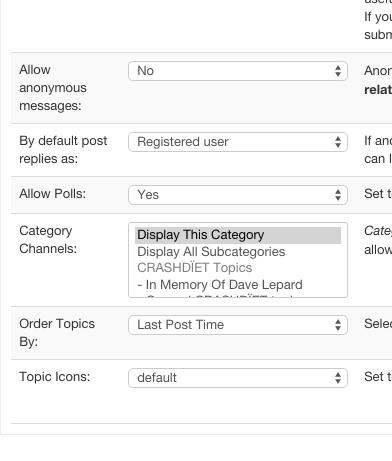
And I have changed some icons in media/kunena/topic_icons/default/topicicons.xml
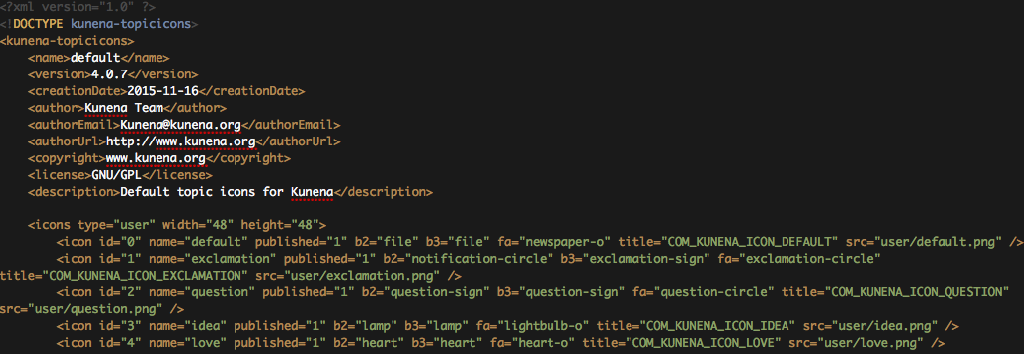
The new icon shows when I create new threads or moderate current ones, but as you can see, the old threads still have the default "file" icon :
www.crashdiet.org/forum/news-from-the-gu...crashdet-topics.html
Very curious of your expertise here.
Thank you!
Cheers
Replied by loppan on topic How can I change category and topic icons in Kunena 4.0.7 ??
have you a link for me.
Yes of course,
www.crashdiet.org/kunena.html
Every forum category have the default setting for topic icons :
And I have changed some icons in media/kunena/topic_icons/default/topicicons.xml
The new icon shows when I create new threads or moderate current ones, but as you can see, the old threads still have the default "file" icon :
www.crashdiet.org/forum/news-from-the-gu...crashdet-topics.html
Very curious of your expertise here
.Thank you!
Cheers
Please Log in or Create an account to join the conversation.
Time to create page: 0.323 seconds