


- Posts: 9
- Thank you received: 0
Kunena 7.0.4 Released
The Kunena team has announce the arrival of Kunena 7.0.4 [K 7.0.4] in stable which is now available for download as a native Joomla extension for J! 5.4.x/6.0.x. This version addresses most of the issues that were discovered in K 6.2 / K 6.3 / K 6.4 and issues discovered during the last development stages of K 7.0
Solved How can I change category and topic icons in Kunena 4.0.7 ??
10 years 3 months ago - 10 years 3 months ago #172081
by ventluc
CAN SOMEONE REPLY TO MY QUESTIONS ABOVE, PLEASE? I NEED AN ANSWER FOR EACH OF THEM THAT SHOWS ME A SOLUTION THAT WORKS!!! IT IS INCREDIBILE THAT SUPPORT TEAM OF KUNENA DIDN'T WRITE A MANUAL TO MODIFY CATEGORY'S ICONS AND TOPIC'S ICONS!!! I NEED A GUIDE STEP BY STEP....(in particular for Blue Eagle template, given that all posts in this forum don't speak about it!). THANKS A LOT IN ADVANCE!!! p.s I read all the posts but they didn't solve my problems!
Replied by ventluc on topic How can I change category and topic icons in Kunena 4.0.7 ??
ventluc wrote:
810 wrote: for Categories (only crypsis):
- open the category manager - edit category - enter css class for icon
Can you explain me better? I mean:
1) If I have understood well do I need to create a new css class for icon? Am i right? If yes, in which file must I put the new css class? How can I set the new css class in the category manager? Where can I find the default css class so that I can modify it?
2) How can I change category icons for Blue Eagle template?
810 wrote: for topic icons:
- open the category manager - edit category - edit topic icons*
*icons + xml should be in media\kunena\topic_icons\your_custom
A question: in the category manager I haven't a section for the topic icons!!! Which section do you refer to?
Thanks a lot,
Luca
CAN SOMEONE REPLY TO MY QUESTIONS ABOVE, PLEASE? I NEED AN ANSWER FOR EACH OF THEM THAT SHOWS ME A SOLUTION THAT WORKS!!! IT IS INCREDIBILE THAT SUPPORT TEAM OF KUNENA DIDN'T WRITE A MANUAL TO MODIFY CATEGORY'S ICONS AND TOPIC'S ICONS!!!
I NEED A GUIDE STEP BY STEP....(in particular for Blue Eagle template, given that all posts in this forum don't speak about it!). THANKS A LOT IN ADVANCE!!! p.s I read all the posts but they didn't solve my problems!
Last edit: 10 years 3 months ago by ventluc.
Please Log in or Create an account to join the conversation.


10 years 3 months ago - 10 years 3 months ago #172087
by rich
Important! Always create a backup before you make any changes to your website!
Replied by rich on topic How can I change category and topic icons in Kunena 4.0.7 ??
It's a old tutorial
but it still works with Blue Eagle. The only difference is that the image *_notlogin.gif is no longer needed.
If you are using a Joomla template which supported bootstrap icons, is it even easier.
Here a example with template Protostar and Crypsis.
Enter the name of icon in the category manager such as icon-home, icon-trash etc.. That's all.
Here is a list with this icons.
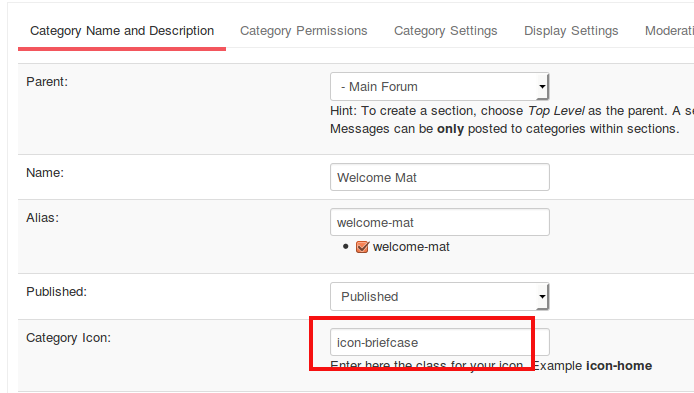

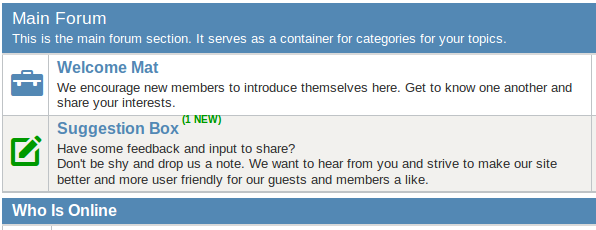
The same works also with Blue Eagle but it needs a little CSS customization.
Go in backend to "Kunena -> Templats -> mark Blue Eagle -> Edit CSS -> custom.css -> Edit CSS" and enter this codes:
If you are using a Joomla template which supported bootstrap icons, is it even easier.
Here a example with template Protostar and Crypsis.
Enter the name of icon in the category manager such as icon-home, icon-trash etc.. That's all.
Here is a list with this icons.
The same works also with Blue Eagle but it needs a little CSS customization.
Go in backend to "Kunena -> Templats -> mark Blue Eagle -> Edit CSS -> custom.css -> Edit CSS" and enter this codes:
Code:
#Kunena .icon-big {
color: #5388b4;
margin-right: 15px;
}
#Kunena .icon-knewchar, #Kunena .knewchar {
color: #090 !important;
}
Important! Always create a backup before you make any changes to your website!
Last edit: 10 years 3 months ago by rich.
Please Log in or Create an account to join the conversation.
10 years 3 months ago #172089
by ventluc
Replied by ventluc on topic How can I change category and topic icons in Kunena 4.0.7 ??
Sorry, but I think you didn't understood my problem! I would like:
a) to create my own icon and associate it to a category: that is to say, for example, that I want to create a .png or jpg icon (for example: heart.png - 32x32 px) and associate it to the category "Love" in my forum (that uses Blue Eagle template);
b) I would like to do the same thing described above for each topic;
I WOULDN'T LIKE TO USE PREDEFINED ICONS OF KUNENA. So what you told me makes no sense! In fact:
a) You told me "Enter the name of icon in the category manager such as icon-home, icon-trash etc..": what does it mean? Is the "name of icon" that you refers to the name of the file of the icon without extension (for example if I have heart.png I should insert "heart" in that field??) ??? If not, how can I associate the name of my icon to its file (eg. "heart" (or I can choose also "love" for the name of the icon) to heart.png)?
b) In the case of "Blue Eagle template" you told me that I must modify the custom.css: but where must I insert the name of the image file of the icon (eg. heart.png)? And where must I put the name of the icon associated to heart.png?
c) How can I do the same thing for the topics of each category? I mean: if I would associate my own icons to topics of a particular category of the forum which steps should I follow? You didn't talk about this in your post...
Thanks a lot.
Luca
a) to create my own icon and associate it to a category: that is to say, for example, that I want to create a .png or jpg icon (for example: heart.png - 32x32 px) and associate it to the category "Love" in my forum (that uses Blue Eagle template);
b) I would like to do the same thing described above for each topic;
I WOULDN'T LIKE TO USE PREDEFINED ICONS OF KUNENA. So what you told me makes no sense! In fact:
a) You told me "Enter the name of icon in the category manager such as icon-home, icon-trash etc..": what does it mean? Is the "name of icon" that you refers to the name of the file of the icon without extension (for example if I have heart.png I should insert "heart" in that field??) ??? If not, how can I associate the name of my icon to its file (eg. "heart" (or I can choose also "love" for the name of the icon) to heart.png)?
b) In the case of "Blue Eagle template" you told me that I must modify the custom.css: but where must I insert the name of the image file of the icon (eg. heart.png)? And where must I put the name of the icon associated to heart.png?
c) How can I do the same thing for the topics of each category? I mean: if I would associate my own icons to topics of a particular category of the forum which steps should I follow? You didn't talk about this in your post...
Thanks a lot.
Luca
Please Log in or Create an account to join the conversation.
10 years 3 months ago - 10 years 3 months ago #172092
by rich
Important! Always create a backup before you make any changes to your website!
Replied by rich on topic How can I change category and topic icons in Kunena 4.0.7 ??
Sorry, but I think you didn't understood my problem! I would like:
a) to create my own icon and associate it to a category: that is to say, for example, that I want to create a .png or jpg icon (for example: heart.png - 32x32 px) and associate it to the category "Love" in my forum (that uses Blue Eagle template);
I WOULDN'T LIKE TO USE PREDEFINED ICONS OF KUNENA. So what you told me makes no sense!
Here with more details the same in German language: www.kunena.org/forum/36-German/125164-ge...orien-aendern#134091rich wrote: It's a old tutorial but it still works with Blue Eagle. The only difference is that the image *_notlogin.gif is no longer needed.
in my forum (that uses Blue Eagle template)
a) to create my own icon and associate it to a category
I'm sorry, I know no way.b) I would like to do the same thing described above for each topic;
Important! Always create a backup before you make any changes to your website!
Last edit: 10 years 3 months ago by rich.
Please Log in or Create an account to join the conversation.
10 years 3 months ago - 10 years 3 months ago #172175
by ventluc
Replied by ventluc on topic How can I change category and topic icons in Kunena 4.0.7 ??
Ok rich...thanks anyway for you feedback but I need to know an answer to my questions in italian or english language  Can someone else answer to my questions please?
Can someone else answer to my questions please?
Last edit: 10 years 3 months ago by ventluc.
Please Log in or Create an account to join the conversation.
10 years 3 months ago #172206
by rich
Important! Always create a backup before you make any changes to your website!
Replied by rich on topic How can I change category and topic icons in Kunena 4.0.7 ??
I need to know an answer to my questions in italian or english language
a) to create my own icon and associate it to a category
This is in English language and it works with Blue Eagle.rich wrote: It's a old tutorial but it still works with Blue Eagle. The only difference is that the image *_notlogin.gif is no longer needed.
That's not possible. You can replace the existing topic icons, but these are selectable for topics in all categories.b) I would like to do the same thing described above for each topic;
Important! Always create a backup before you make any changes to your website!
Please Log in or Create an account to join the conversation.
Time to create page: 0.268 seconds