
Kunena 7.0.9 & Kunena 6.4.14 – Security Updates Released
The Kunena team has announce the arrival of Kunena 7.0.9 [K 7.0.9] in stable which is now available for download as a native Joomla extension for J! 5.4.x/6.0.x./6.1.x. This version addresses most of the issues that were discovered in K 6.2 / K 6.3 / K 6.4 and issues discovered during the last development stages of K 7.0
Topics must relate to a currently supported version of Kunena. If you are unsure what is the current supported version of Kunena, please go to the
download
page.
If you are having problems then, for your own benefit, it would save us all a lot of time if you would kindly post your configuration report when you ask for help from this forum. If you do not post your configuration report we will not ask you for it but you will probably not get your problem solved, either.
If you are having problems then, for your own benefit, it would save us all a lot of time if you would kindly post your configuration report when you ask for help from this forum. If you do not post your configuration report we will not ask you for it but you will probably not get your problem solved, either.
Question CKeditor
- HanKortekaas
-
 Topic Author
- Offline
- Premium Member
-

- familiewapen
Less
More
2 years 9 months ago #230300
by HanKortekaas
And SCeditor also has items for twitter, instagram and the like which I don't want.
Han
Replied by HanKortekaas on topic CKeditor
I found that one can insert images, but you don't see it instantly. Only after posting it shows.I also like the SCEditor better, but it is not yet fully integrated (e.g. smileys, or insert images in messages do not work).
And SCeditor also has items for twitter, instagram and the like which I don't want.
Han
The following user(s) said Thank You: Ratman
Please Log in or Create an account to join the conversation.

2 years 7 months ago #230872
by Ratman
I've tried to figure out where the SCEditor configuration is stored, but with not much success. When I use the browsers developer tools, I can see that the SCEditor searches for emoticons in the wrong path ".../media/kunena/emoticons/emoticons". I created a new folder "emoticons" inside the /media/emoticons folder and copied the complete emoticon files into this folder, but the SCEditor shows only some (default?) smilies in the dropdown menu. So I wonder where is the list of emoticons that SCEditor wants to load?
And where can I configure the toolbar, e.g. which buttons should be shown and which not?
Yes, I know that the SCEditor is not yet fully integrated into Kunena and the Devs sure are working hard on this topic. But the problem is that the CKeditor is not usable anymore since the last update, so I was forced to switch to the SCEditor. But as this is still not completely usable, I can see that more and more of my users are keeping away from my forum. The number of posts is rapidly decreasing which is twice as hard for me, because it is a small niche forum.
So any hint is highly appreciated!
Thanks a lot in advance!
And where can I configure the toolbar, e.g. which buttons should be shown and which not?
Yes, I know that the SCEditor is not yet fully integrated into Kunena and the Devs sure are working hard on this topic. But the problem is that the CKeditor is not usable anymore since the last update, so I was forced to switch to the SCEditor. But as this is still not completely usable, I can see that more and more of my users are keeping away from my forum. The number of posts is rapidly decreasing which is twice as hard for me, because it is a small niche forum.
So any hint is highly appreciated!
Thanks a lot in advance!
Please Log in or Create an account to join the conversation.


Less
More
- Posts: 1019
- Thank you received: 165
2 years 7 months ago - 2 years 7 months ago #230875
by Ratman
The problem with CKEditor was discussed here ->
www.kunena.org/forum/k-6-2-0-support/168344-no-editor-showing
Strange thing is that it does not hit all users of my forum, but many of them.
Strange thing is that it does not hit all users of my forum, but many of them.
Last edit: 2 years 7 months ago by Ratman.
Please Log in or Create an account to join the conversation.

Less
More
- Posts: 12291
- Thank you received: 2538
2 years 7 months ago #230876
by rich
Important! Always create a backup before you make any changes to your website!
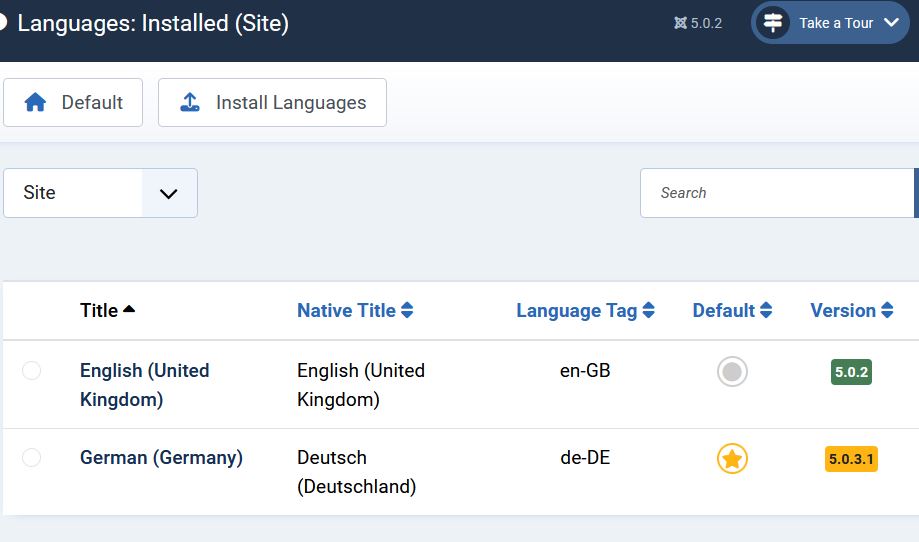
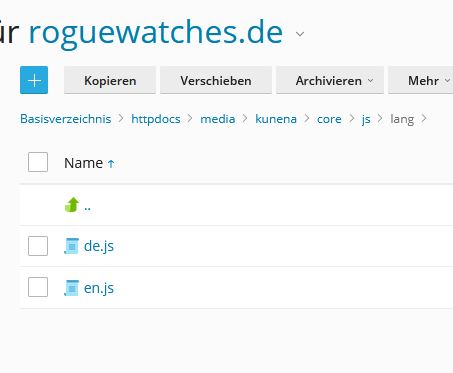
How many languages do you have installed in Joomla? Navigate to /media/kunena/core/js/lang/ and check if there are the same number of script files. For each language installed in Joomla there must be a corresponding script.
Important! Always create a backup before you make any changes to your website!
Please Log in or Create an account to join the conversation.
Time to create page: 0.262 seconds