
Kunena 7.0.4 Released
The Kunena team has announce the arrival of Kunena 7.0.4 [K 7.0.4] in stable which is now available for download as a native Joomla extension for J! 5.4.x/6.0.x. This version addresses most of the issues that were discovered in K 6.2 / K 6.3 / K 6.4 and issues discovered during the last development stages of K 7.0
If you are having problems then, for your own benefit, it would save us all a lot of time if you would kindly post your configuration report when you ask for help from this forum. If you do not post your configuration report we will not ask you for it but you will probably not get your problem solved, either.
Question What kind of topic


The arrow is pointing not at the file, but at the label '? question'. The ? is not replaced by car.rich wrote: On your first image it shows the default topic icon "file" and his label has the id="0" (it's the default label when users not select another symbol). But you have changed the label with ID = 2. Therefore you see not the car.
Second question: You see your customized topic symbols in the editor, if you create the topic in a category, where your customized topic icons are allowed (Category Manager -> Category -> Category Settings -> Topic Icons: Own Icon folder).
Will give that a try, it's very confusing as you have labels that are displayed as labels (? question) and are set in the template (crypsis), but that are triggered as 'topic icons' which are configured not in the template and which show up as category images....
IMO there are to many 'variables' that need to change...
Will give it another shot at trying to 'fix' this
Thanks @rich for your help so far!
sharing = caring
Please Log in or Create an account to join the conversation.


Here the labels from the origina file.
As you can see, we have 2x the same label. It shows the "?" on label default and also on label question. Therefore I had changed the labels in my file.<labels type="qa" width="48" height="48">
<label id="0" name="COM_KUNENA_LABELS_QUESTION" b2="question-sign" b3="question-sign" fa="question-circle" labeltype="primary"/>
<label id="1" name="COM_KUNENA_LABELS_IMPORTANT" b2="notification-circle" b3="exclamation-sign" fa="exclamation-circle" labeltype="primary"/>
<label id="2" name="COM_KUNENA_LABELS_QUESTION" b2="question-sign" b3="question-sign" fa="question-circle" labeltype="primary"/>
My file:
It works correctly<labels type="qa" width="48" height="48">
<label id="0" name="COM_KUNENA_LABELS_DISCUSSION" b2="file" b3="file" fa="file" labeltype="discussion"/>
<label id="1" name="COM_KUNENA_LABELS_IMPORTANT" b2="notification-circle" b3="exclamation-sign" fa="exclamation-circle" labeltype="important-label" />
<label id="2" name="COM_KUNENA_LABELS_QUESTION" b2="question-sign" b3="question-sign" fa="question-circle" labeltype="primary"/>
</labels>
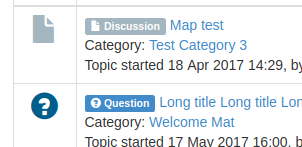
If you change the fa image on label id="2", it shows the car symbol on label.
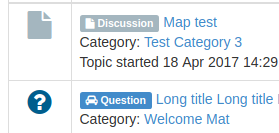
Now you must change also the topic symbol to car and you have for both the car.
But if you want different labels for special categories, that's not possible. This works only with own topic icons.
Important! Always create a backup before you make any changes to your website!
Please Log in or Create an account to join the conversation.
In the original files are the topic icons and labels with IDs 5, 6 and 7 comment out. If you edit this lines, you can use additionally (or instead of other symbols) these icons and labels for your own categories.
Important! Always create a backup before you make any changes to your website!
Please Log in or Create an account to join the conversation.
thanks foryour help. I got it now

sticking to the labels only: only language overrides and color changes.
Not using the topic icons.
Now it fits perfectly my support process :woohoo:
Thanks!
regards,
Ruud.
sharing = caring
Please Log in or Create an account to join the conversation.


rich wrote: @ruud
In the original files are the topic icons and labels with IDs 5, 6 and 7 comment out. If you edit this lines, you can use additionally (or instead of other symbols) these icons and labels for your own categories.
This is actually what I did on my side. But, if you want to ADD new icons, extra to the existing one, you need to edit somewhere else, which is like HTML, and until now, I have no clue where to add some html lines in the blue_eagle5 template.
Please Log in or Create an account to join the conversation.
rich wrote: Second question: You see your customized topic symbols in the editor, if you create the topic in a category, where your customized topic icons are allowed (Category Manager -> Category -> Category Settings -> Topic Icons: Own Icon folder).
There is definately a bug in here (or I am missing something :S
I have adjusted the labels > these work correct now,
I have copied the media/kunena/topic_icons/default directory to media/kunena/topic_icons/och-support
I have changed an icon and I have added (uncommented) an icon in file media/kunena/topic_icons/och-support/topicicons.xml.
I set in the category settings the new directory to och-support
In the kunena configuration I set the 'Selectable Topic Icons' to yes...
when adding a new topic into the category I get the new buttons... so far so good.
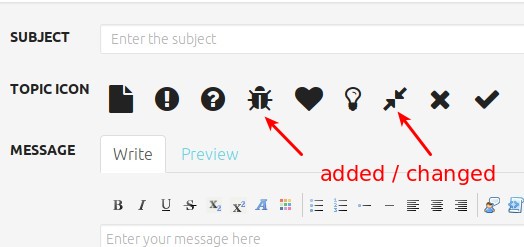
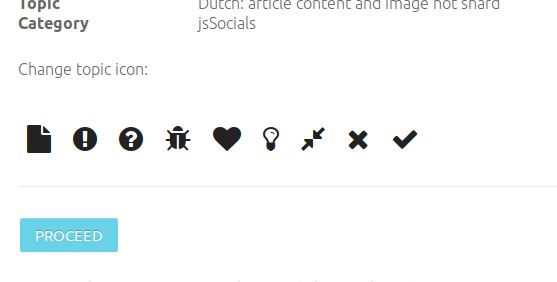
But when I moderate a topic in that category I get the default buttons....
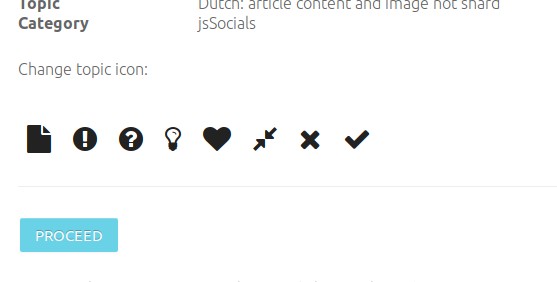
So it looks like the moderate buttons are NOT respecting the category topic icons, OR I am still missing a change....
EDIT: I think this is a bug... when changing the /media/kunena/topic_icons/default/topicicons.xml to be the same as media/kunena/topic_icons/och-support/topicicons.xml then in the moderate screen the correct buttons are shown... BUT when updating Kunena I will loose my changes

EDIT2: reported: github.com/Kunena/Kunena-Forum/issues/5523
sharing = caring
Please Log in or Create an account to join the conversation.