


- Posts: 7329
- Thank you received: 1425
Kunena 7.0.9 & Kunena 6.4.14 – Security Updates Released
The Kunena team has announce the arrival of Kunena 7.0.9 [K 7.0.9] in stable which is now available for download as a native Joomla extension for J! 5.4.x/6.0.x./6.1.x. This version addresses most of the issues that were discovered in K 6.2 / K 6.3 / K 6.4 and issues discovered during the last development stages of K 7.0
If you are having problems then, for your own benefit, it would save us all a lot of time if you would kindly post your
configuration report
when you ask for help from this forum. If you do not post your configuration report we will not ask you for it but you will probably not get your problem solved, either.
K 2.0 support will cease on 31 August 2013 and this section of the forum will be closed and archived after that time and no further questions will be answered about this version.
K 2.0 support will cease on 31 August 2013 and this section of the forum will be closed and archived after that time and no further questions will be answered about this version.
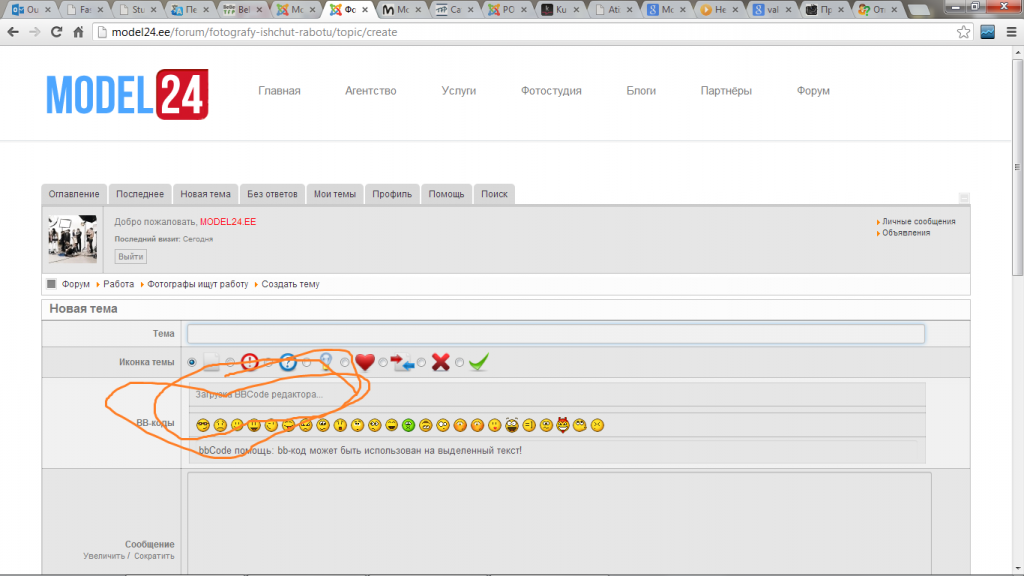
Merged I see the message "Loading BBCode editor..."
- aleksi2004
-

- Offline
- New Member
-

Less
More
- Posts: 4
- Thank you received: 0
13 years 4 months ago #144158
by aleksi2004
Replied by aleksi2004 on topic BBCode
Do not load the editor BBCode, Kunena 3, Joomla 3.
Please Log in or Create an account to join the conversation.
13 years 3 months ago #144592
by chils41
It happen because you remove the Font Resizer on Right top of you page.
Now try this.
1. Enable it back : <div id="fontsize"></div>
2. Or use this code to disable it: <div id="fontsize" style="display:none"></div>
This code is found in your joomla templets index.php file
Admin Pannel>Templete Manager>Templetes>Beez_20 Details and Files>Edit main page template
find and replace the code.
Now try this.
1. Enable it back : <div id="fontsize"></div>
2. Or use this code to disable it: <div id="fontsize" style="display:none"></div>
This code is found in your joomla templets index.php file
Admin Pannel>Templete Manager>Templetes>Beez_20 Details and Files>Edit main page template
find and replace the code.
Please Log in or Create an account to join the conversation.


13 years 3 months ago - 13 years 2 months ago #144597
by sozzled
Blue Eagle vs. Crypsis reference guide
Read my blog and

Replied by sozzled on topic I see the message "Loading BBCode editor..."
These days (when people see the text "Loading BBCode editor...") these things occur when people view a J! 1.5 site with FF 18+. I recently had this problem, too, on an old J! 1.5 site and I fixed the problem by replacing the files in ../plugins/system/mtupgrade with the files from the J! 1.5.26 installation kit.
After that, I added the following lines to the template:
That's what worked for me.
After that, I added the following lines to the template:
Code:
<script language="javascript" type="text/javascript">
String.prototype.contains = function(string, separator){
return (separator) ? (separator + this + separator).indexOf(separator + string + separator) > -1 : String(this).indexOf(string) > -1;
};
</script>
That's what worked for me.
Blue Eagle vs. Crypsis reference guide
Read my blog and
Last edit: 13 years 2 months ago by sozzled.
Please Log in or Create an account to join the conversation.
- OpenEyesAndEars
-

- Offline
- New Member
-
Less
More
- Posts: 10
- Thank you received: 1
13 years 2 months ago - 13 years 2 months ago #146241
by OpenEyesAndEars
Replied by OpenEyesAndEars on topic I see the message "Loading BBCode editor..."
I resolved my similar issue...
Disabling - "System - JB Library" allowed my BBcode editor to load properly.
If you are using the Inspire template (or any template from Joomlabamboo ), try this. It should resolve the issue since the plugin controls the loading of Javascript libraries.
From what I've researched this issue happens because of a Javascript conflict with a plug-in you have enabled, so before posting for help here - try disabling/re-enabling your plug-ins one at a time to see if it resolves the issue.
Best Wishes and Good Luck to you all !
OpenEyesAndEars
Disabling - "System - JB Library" allowed my BBcode editor to load properly.
If you are using the Inspire template (or any template from Joomlabamboo ), try this. It should resolve the issue since the plugin controls the loading of Javascript libraries.
From what I've researched this issue happens because of a Javascript conflict with a plug-in you have enabled, so before posting for help here - try disabling/re-enabling your plug-ins one at a time to see if it resolves the issue.
Best Wishes and Good Luck to you all !
OpenEyesAndEars
Last edit: 13 years 2 months ago by sozzled. Reason: Minor changes from the original and include URL link to Joomlabamboo site
The following user(s) said Thank You: sozzled
Please Log in or Create an account to join the conversation.
Time to create page: 0.244 seconds