


- Posts: 260
- Thank you received: 0
Kunena 7.0.9 & Kunena 6.4.14 – Security Updates Released
The Kunena team has announce the arrival of Kunena 7.0.9 [K 7.0.9] in stable which is now available for download as a native Joomla extension for J! 5.4.x/6.0.x./6.1.x. This version addresses most of the issues that were discovered in K 6.2 / K 6.3 / K 6.4 and issues discovered during the last development stages of K 7.0
This category contains miscellaneous, uncategorised user contributions, (templates, modules, plugins and hacks) relating to older versions of Kunena that are no longer supported.
This category may also contain a few topics relating to K 1.6 that may have been moved here possibly by mistake.
The topics in this category are for historical interest only. Owing to the structural differences between K 1.6 and K 1.7, these ideas in these topics will not work with later versions and, for that reason, the topics are locked.
This category may also contain a few topics relating to K 1.6 that may have been moved here possibly by mistake.
The topics in this category are for historical interest only. Owing to the structural differences between K 1.6 and K 1.7, these ideas in these topics will not work with later versions and, for that reason, the topics are locked.
Important K 1.5 latest posts module - no longer supported or maintained. Do NOT use this with K 1.6!
17 years 7 months ago #6625
by jerry
Replied by jerry on topic Re:Kunena latest posts module
holgenoni wrote:
You can create new template based on 4 templates in this module. If you submit your changes, we can add this as new template. Templates are files in folder tmpl.Hello,
is it possible to make KunenaLatest module look like this:

Where to change some fontsize and the alignment of the avatar?
thx
holgenoni
Please Log in or Create an account to join the conversation.
17 years 7 months ago #6626
by jerry
Replied by jerry on topic Re:Kunena latest posts module
Italywins wrote:
Actually these bugs are fixed. Which version did you install? %A in use?aniphreak wrote:
thanks for this...
many bugs tho that still the same with ported version of tarugis:
*not showing any avatar.
*readmore link not showing on 2 columns
hope it will be fixed soon!
Yep... confirm ... me too. :blink: :lol:
Please Log in or Create an account to join the conversation.


17 years 7 months ago #6692
by holgenoni
Replied by holgenoni on topic Re:Kunena latest posts module
I took a look on that files, and unfortunately i have no idea how to make the template look like this on my picture.
So the only thing that i can do is to wait, maybe someone make a template like this some day!
jerry wrote:
You can create new template based on 4 templates in this module. If you submit your changes, we can add this as new template. Templates are files in folder tmpl.[/quote]
So the only thing that i can do is to wait, maybe someone make a template like this some day!
jerry wrote:
You can create new template based on 4 templates in this module. If you submit your changes, we can add this as new template. Templates are files in folder tmpl.[/quote]
Please Log in or Create an account to join the conversation.
17 years 7 months ago #6701
by holgenoni
Replied by holgenoni on topic Re:Kunena latest posts module
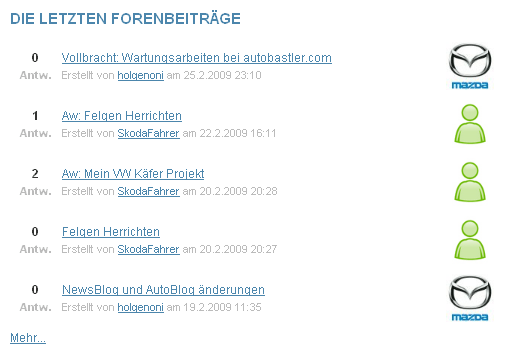
I am proud to present you a new template named (newstyle) for KunenaLatest module!
It wasn't so difficult like I thought on the beginning.
But I'm not quite sure if the way i made it, is correct.
Because I had to make changes on the helper.php
The template look like this:

And here are the files that I've changed:
The only thing I don't know is how to change the font size of the answers.
Can someone tell me how to do that?
For use just replace the existing files with the attached one. And then go to the module configuration in joomla, and change the layout to "newstyle"!
@jerry
How to implement this in your original?
It wasn't so difficult like I thought on the beginning.
But I'm not quite sure if the way i made it, is correct.
Because I had to make changes on the helper.php
The template look like this:
And here are the files that I've changed:
The only thing I don't know is how to change the font size of the answers.
Can someone tell me how to do that?
For use just replace the existing files with the attached one. And then go to the module configuration in joomla, and change the layout to "newstyle"!
@jerry
How to implement this in your original?
Please Log in or Create an account to join the conversation.

17 years 7 months ago #7249
by klausre
Replied by klausre on topic Re:Kunena latest posts module
Hi, is it possible to ad a feature for crop avatar, so it has the same hight and widht?
Please Log in or Create an account to join the conversation.


17 years 6 months ago #7692
by itgl72
Replied by itgl72 on topic Re:Kunena latest posts module
Is anyone using this with JACLPlus by
www.byostech.com
?
Please Log in or Create an account to join the conversation.
Time to create page: 0.252 seconds