


- Posts: 42
- Thank you received: 1
Kunena 7.0.9 & Kunena 6.4.14 – Security Updates Released
The Kunena team has announce the arrival of Kunena 7.0.9 [K 7.0.9] in stable which is now available for download as a native Joomla extension for J! 5.4.x/6.0.x./6.1.x. This version addresses most of the issues that were discovered in K 6.2 / K 6.3 / K 6.4 and issues discovered during the last development stages of K 7.0
Topics that are moved into this category are generally considered to be closed. Users may want to add additional information but these topics should not be resurrected in order to discuss new problems or unrelated matters.
Question which CSS file for editing background colour
14 years 8 months ago #115893
by oates
Replied by oates on topic Re: which CSS file for editing background colour
got it.
when you said "Add the following lines to the end of your main Joomla template CSS file"
I thought 'main' referred to joomla and not the given template I am using (which of course is unique to me).
thanks again.
when you said "Add the following lines to the end of your main Joomla template CSS file"
I thought 'main' referred to joomla and not the given template I am using (which of course is unique to me).
thanks again.
The topic has been locked.
- Limbless_One
-

- Offline
- New Member
-

Less
More
- Posts: 8
- Thank you received: 0
14 years 8 months ago #116233
by Limbless_One
Replied by Limbless_One on topic background color
just posting to find out which lines to edit in the Default kuena css to change the backrounf colors pls 
The topic has been locked.


14 years 8 months ago #116234
by 810
Replied by 810 on topic Re: background color
Hi,
Welcome on kunena.
You can change the css in the backend
Backend-Kunena- template manager- edit template. There you will see some options.
regards 810
Welcome on kunena.
You can change the css in the backend
Backend-Kunena- template manager- edit template. There you will see some options.
regards 810
The following user(s) said Thank You: Limbless_One
The topic has been locked.
- Limbless_One
-
- Offline
- New Member
-
Less
More
- Posts: 8
- Thank you received: 0
14 years 8 months ago #116247
by Limbless_One
Replied by Limbless_One on topic Re: background color
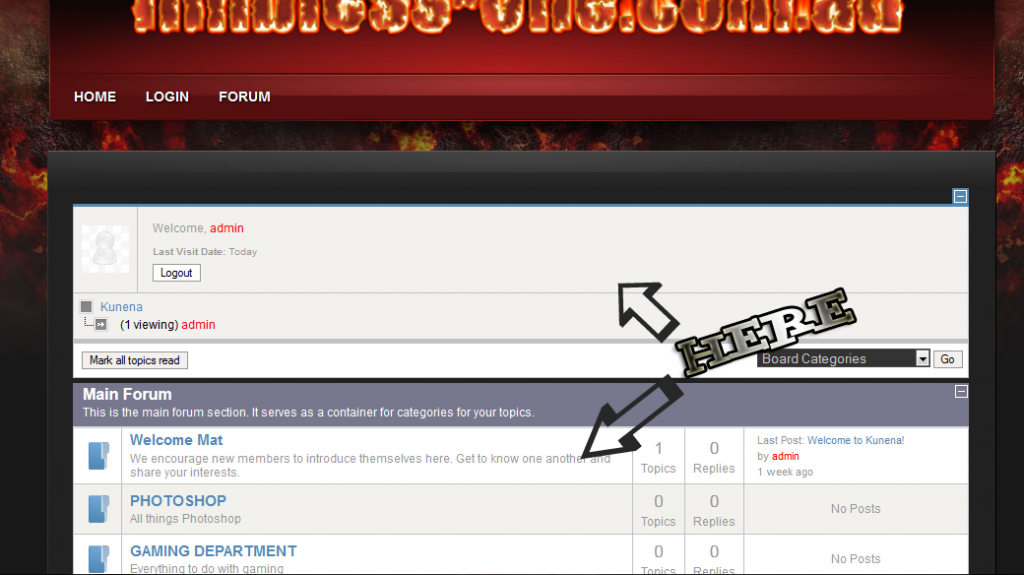
and these area's in the following submitted pic , can they be changed also ?
Warning: Spoiler!
The topic has been locked.
- CheechDogg
-

- Offline
- Premium Member
-

14 years 8 months ago - 14 years 8 months ago #116252
by CheechDogg
 Find me on Facebook.
CAG Clan 1st and 3rd Person Shooter Clan on XBOX 360 & PS3
Replied by CheechDogg on topic Re: background color
Limbless_One,
To change the background on that add to your joomla template the following:
#Kunena tr.krow1 td{background-color:#000000;} - This will modify the background for the area marked with the top arrow
#Kunena tr.krow2 td{background-color:#000000;} - This will modify the background for the area marked with the lower arrow
Avoid making any changes in your kunena.forum-min.css files. Making the changes in your joomla template will make things easier for you when you upgrade to newer versions of Kunena.
To change the background on that add to your joomla template the following:
#Kunena tr.krow1 td{background-color:#000000;} - This will modify the background for the area marked with the top arrow
#Kunena tr.krow2 td{background-color:#000000;} - This will modify the background for the area marked with the lower arrow
Avoid making any changes in your kunena.forum-min.css files. Making the changes in your joomla template will make things easier for you when you upgrade to newer versions of Kunena.
CAG Clan 1st and 3rd Person Shooter Clan on XBOX 360 & PS3
Last edit: 14 years 8 months ago by CheechDogg.
The following user(s) said Thank You: Limbless_One
The topic has been locked.
14 years 8 months ago #116284
by oates
I added this to the end of my main template file in template manager and it brought the site down, 500 error. Had to remove it again.
Replied by oates on topic Re: which CSS file for editing background colour
Code:
#Kunena .kpagination .active {
background-color: #561717;
border-color: #561717;
}
#Kunena .kpagination a {
border-color: #561717;
}
#Kunena #ktop span.ktoggler {
background-color: #561717 !important;
}
I added this to the end of my main template file in template manager and it brought the site down, 500 error. Had to remove it again.
Code:
<?php
/**
* @package yoo_corona
* @author YOOtheme http://www.yootheme.com
* @copyright Copyright (C) YOOtheme GmbH
* @license YOOtheme Proprietary Use License (http://www.yootheme.com/license)
*/
// no direct access
defined('_JEXEC') or die('Restricted access');
// include config
include_once(dirname(__FILE__).'/config.php');
// get warp
$warp =& Warp::getInstance();
// load main template file, located in /layouts/template.php
echo $warp->template->render('template');
The topic has been locked.
Time to create page: 0.300 seconds