
Kunena 7.0.8 Released
The Kunena team has announce the arrival of Kunena 7.0.8 [K 7.0.8] in stable which is now available for download as a native Joomla extension for J! 5.4.x/6.0.x./6.1.x. This version addresses most of the issues that were discovered in K 6.2 / K 6.3 / K 6.4 and issues discovered during the last development stages of K 7.0
Question How to know If you have a mootools Conflict!


Thanks Blake. Just to add to your Q&A, add the how to turn on/off mootools. ;0)Blake wrote: Posted updated with questions and answers.
Kunena 2.0.4 | 2013-01-18 [ Pharmacopoeia ], J!1.5.25, rhuk_milkyway, CB 1.8.1, AUP 1.5.13, UddeIM 2.5 and Akeeba Backup 3.3.9
EsferaDoBem.com.br | iLucato.com.br | BemDoado.com.br


iLucato wrote:
Thanks Blake. Just to add to your Q&A, add the how to turn on/off mootools. ;0)Blake wrote: Posted updated with questions and answers.
mootools 1.2 is a system plugin and required by joomla so CAN NOT be disabled..


The way of the future for Joomla (and its extensions) is Mootools. Please read an excellent short explanation written by fxstein:
Blue Eagle vs. Crypsis reference guide
Read my blog and


Cerberus wrote:
iLucato wrote:
Thanks Blake. Just to add to your Q&A, add the how to turn on/off mootools. ;0)Blake wrote: Posted updated with questions and answers.
mootools 1.2 is a system plugin and required by joomla so CAN NOT be disabled..
I think he is was talking about the upgrade plugin, not the core plugin that is always turned on for mootools 1.11 on all Joomla 1.5.X.
The image below is from a site running K 1.5.12:
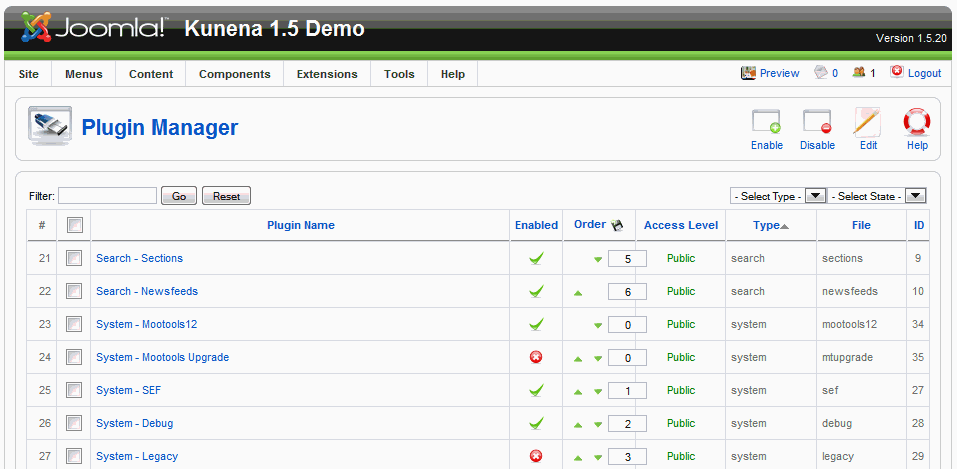
You will see that basic Mootools 1.2 plugin is enabled; the Mootools Upgrade plugin is disabled. This is, as Blake wrote earlier, the default Joomla behaviour.
The next image below is from a site running K 1.6
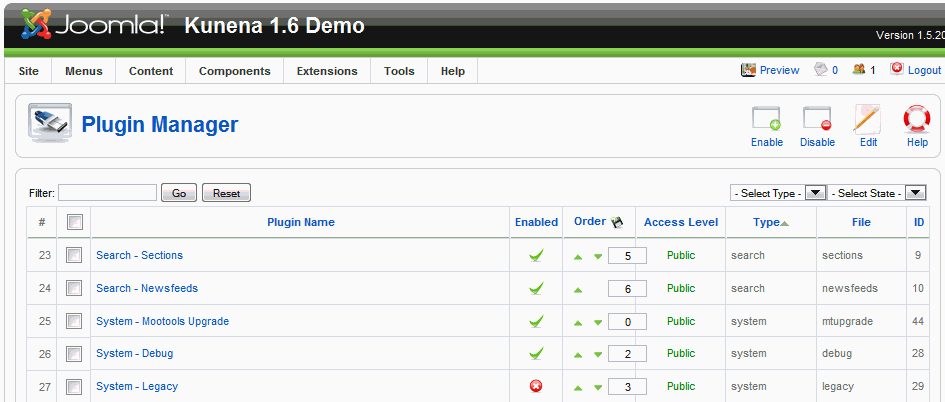
You will see that the basic Mootools 1.2 plugin is enabled; the Mootools Upgrade plugin is also enabled. I believe that the Mootools Upgrade plugin is automatically enabled by the Kunena installation. At least, if the K 1.6 installation process works properly, the Mootools Upgrade plugin should be automatically enabled.
A quick search at the Joomla forum site reveals the following information about the Mootools Upgrade plugin:
Kunena 1.6 requires full Mootools 1.2 functionality.This plugin is installed in a disabled state the first time you login to a 1.5.19 site. Since the plugin is disabled, it has no impact on existing Joomla! 1.5.19 sites unless you choose to enable it.
When enabled, this plugin overrides the JHTMLBehavior and loads the new Mootools 1.2.4 Javascript files instead of the version 1.1 files. Compatibility with existing Mootools functionality is preserved using the Mootools compatibility layer.
If you require the expanded functionality of Mootools 1.2.4, then you should enable this plugin. If not, then you don't need to do anything.
If you use this new plugin, please report any issues you find through the normal bug reporting process. If you use this feature, we would like to hear feedback on how this works for you.
Blue Eagle vs. Crypsis reference guide
Read my blog and
Hmmm, mine just have 'System - Mootools Upgrade' and doesn't have any 'System - Mootools12' as your screenshot shows. Do I have to have this 'System - Mootools12'? If so, where can I find it to install?Kunena 1.6 requires full Mootools 1.2 functionality.
Kunena 2.0.4 | 2013-01-18 [ Pharmacopoeia ], J!1.5.25, rhuk_milkyway, CB 1.8.1, AUP 1.5.13, UddeIM 2.5 and Akeeba Backup 3.3.9
EsferaDoBem.com.br | iLucato.com.br | BemDoado.com.br