
- Posts: 2
- Thank you received: 0
Kunena 7.0.8 Released
The Kunena team has announce the arrival of Kunena 7.0.8 [K 7.0.8] in stable which is now available for download as a native Joomla extension for J! 5.4.x/6.0.x./6.1.x. This version addresses most of the issues that were discovered in K 6.2 / K 6.3 / K 6.4 and issues discovered during the last development stages of K 7.0
Topics that are moved into this category are generally considered to be closed. Users may want to add additional information but these topics should not be resurrected in order to discuss new problems or unrelated matters.
Question How to know If you have a mootools Conflict!
- Lord_Helmchen
-

- Offline
- New Member
-

Less
More
16 years 2 weeks ago - 16 years 2 weeks ago #57059
by Lord_Helmchen
Replied by Lord_Helmchen on topic Re: How to know If you have a mootools Conflict!
Joomla Mootools Upgrade seems to conflict with JCE Utilities 2.2.0 Plugin and Rokbox System 2.2 Plugin. I disabled both on my site and now i can see the Kunena Editor Panel.
EDIT: Updated both to latest Versions (JCE Mediabox 1.0.10 and Rokbox System 2.4, Content 1.6) and everything works fine now.
EDIT: Updated both to latest Versions (JCE Mediabox 1.0.10 and Rokbox System 2.4, Content 1.6) and everything works fine now.
Last edit: 16 years 2 weeks ago by Lord_Helmchen.
The topic has been locked.
- deshivoicechat
-

- Offline
- Junior Member
-

Less
More
- Posts: 52
- Thank you received: 1
16 years 2 weeks ago - 16 years 2 weeks ago #57176
by deshivoicechat
Replied by deshivoicechat on topic Re: How to know If you have a mootools Conflict!
sir,
sozzled,
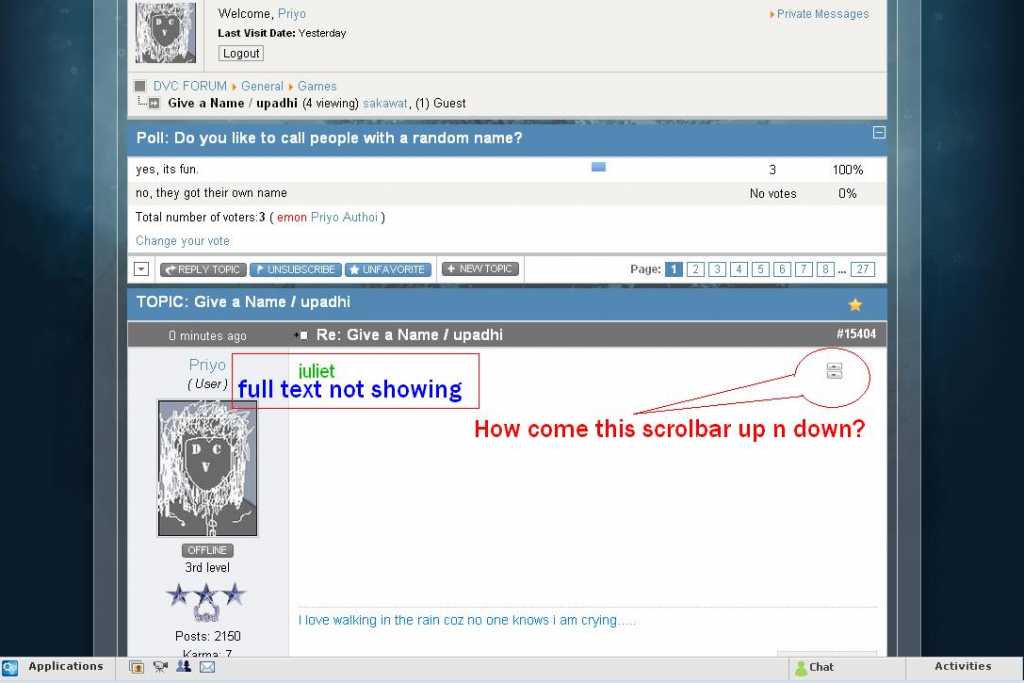
i don't know what is this. mootools problem?
sozzled,
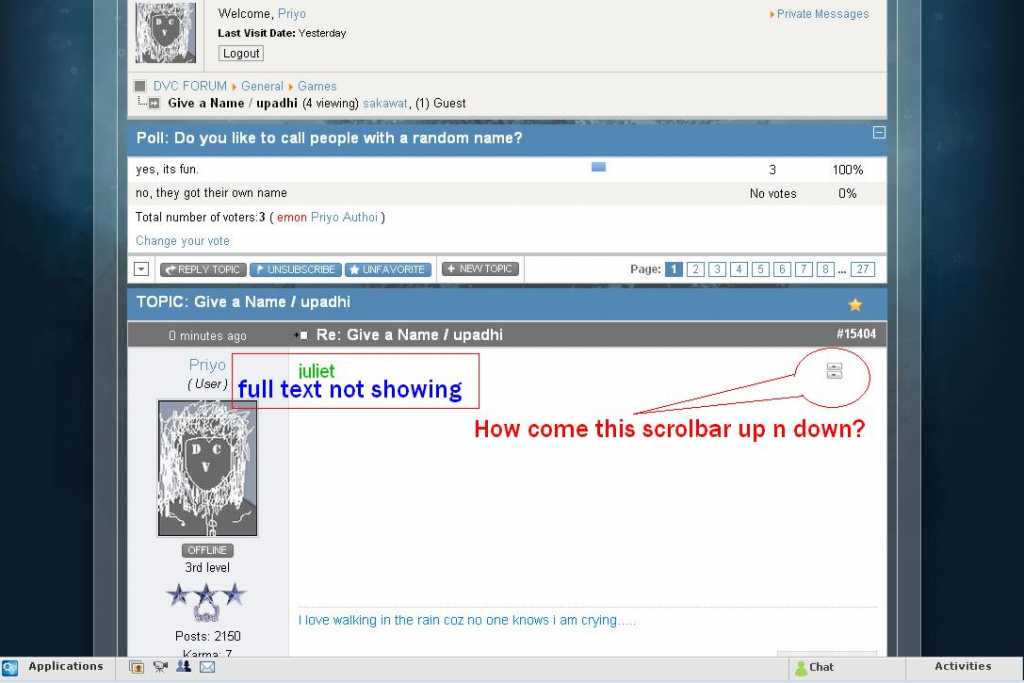
i don't know what is this. mootools problem?
Last edit: 16 years 2 weeks ago by deshivoicechat.
The topic has been locked.
16 years 2 weeks ago - 16 years 2 weeks ago #57177
by Blake
Nope, it's seems to be a bug to me. I got the same problem on my forums has well. I checked the css and that element has overflow: hidden on, so for some reason your content is overflowing past the div.
Replied by Blake on topic Re: How to know If you have a mootools Conflict!
deshivoicechat wrote: sir,
sozzled,
i don't know what is this. mootools problem?
Nope, it's seems to be a bug to me. I got the same problem on my forums has well. I checked the css and that element has overflow: hidden on, so for some reason your content is overflowing past the div.
Last edit: 16 years 2 weeks ago by Blake.
The topic has been locked.
- deshivoicechat
-
- Offline
- Junior Member
-
Less
More
- Posts: 52
- Thank you received: 1
16 years 2 weeks ago #57180
by deshivoicechat
Replied by deshivoicechat on topic Re: How to know If you have a mootools Conflict!
Blake wrote:
deshivoicechat wrote: sir,
sozzled,
i don't know what is this. mootools problem?
now okay?
The topic has been locked.


16 years 2 weeks ago #57183
by sozzled
Blue Eagle vs. Crypsis reference guide
Read my blog and

Replied by sozzled on topic Re: How to know If you have a mootools Conflict!
This thread has gone off-topic quite a lot of times. Before I archive this topic, I would like to know if Blake has the answers that he sought and that his difficulties have now been sorted out. Thanks.
Blue Eagle vs. Crypsis reference guide
Read my blog and
The topic has been locked.
16 years 2 weeks ago - 16 years 2 weeks ago #57302
by Blake
This hack only loads the old Javascript libary that comes with the template for anything but the Kunena Forums, then takes out the mtupgrade plugin for everything but the Kunena Forums and loads the old core plugin for everything but the Kunena Forums has well. The only problem with this work around is if your template uses Javascript on the Kunena Forums like the header menu being a dropdown for the template, etc.
If you want to use this hack yourself, copy the code up top and put it in the php file that the template calls the old javascript in ( usually the index file ). Don't forget to Get rid of the old Javascript script tag before you replace it with this php code
and change MY-TEMPLATES-OLD-JAVASCRIPT-FRAMEWORK-HERE with the src location of the old Javascript framework.
Enjoy, have any troubles with the php snippet let me know!
Replied by Blake on topic Re: How to know If you have a mootools Conflict!
I got the answers I sought but my difficulties haven't been sorted out, the developers know about the issue with Kunena 1.6 but don't want to upgrade their Javascript functions so it can use the new mootools 1.2.4 framework. So I am left with the problems myself to fix, which I did with a nice little hack I developedsozzled wrote: This thread has gone off-topic quite a lot of times. Before I archive this topic, I would like to know if Blake has the answers that he sought and that his difficulties have now been sorted out. Thanks.
Code:
if ($option != 'com_kunena') { echo '<script type="text/javascript" src="templates/'.$this->template.'/src/mootools.'.$jsextens.'"></script>';
$headerstuff = $this->getHeadData();
$key = '/plugins/system/mtupgrade/mootools.js';
unset( $headerstuff['scripts'][$key] );
$this->setHeadData( $headerstuff );
echo '<script type="text/javascript" src="/media/system/js/mootools.js"></script>'; }
This hack only loads the old Javascript libary that comes with the template for anything but the Kunena Forums, then takes out the mtupgrade plugin for everything but the Kunena Forums and loads the old core plugin for everything but the Kunena Forums has well. The only problem with this work around is if your template uses Javascript on the Kunena Forums like the header menu being a dropdown for the template, etc.
If you want to use this hack yourself, copy the code up top and put it in the php file that the template calls the old javascript in ( usually the index file ). Don't forget to Get rid of the old Javascript script tag before you replace it with this php code
Code:
if ($option != 'com_kunena') { echo '<script type="text/javascript" src="MY-TEMPLATES-OLD-JAVASCRIPT-FRAMEWORK-HERE"></script>';
$headerstuff = $this->getHeadData();
$key = '/plugins/system/mtupgrade/mootools.js';
unset( $headerstuff['scripts'][$key] );
$this->setHeadData( $headerstuff );
echo '<script type="text/javascript" src="/media/system/js/mootools.js"></script>'; }
and change MY-TEMPLATES-OLD-JAVASCRIPT-FRAMEWORK-HERE with the src location of the old Javascript framework.
Enjoy, have any troubles with the php snippet let me know!
Last edit: 16 years 2 weeks ago by Blake.
The topic has been locked.
Time to create page: 0.246 seconds