
Kunena 7.0.9 & Kunena 6.4.14 – Security Updates Released
The Kunena team has announce the arrival of Kunena 7.0.9 [K 7.0.9] in stable which is now available for download as a native Joomla extension for J! 5.4.x/6.0.x./6.1.x. This version addresses most of the issues that were discovered in K 6.2 / K 6.3 / K 6.4 and issues discovered during the last development stages of K 7.0
Topics that are moved into this category are generally considered to be closed. Users may want to add additional information but these topics should not be resurrected in order to discuss new problems or unrelated matters.
Question [Resolved] Attached images are uploaded but not displayed


14 years 10 months ago #112607
by sozzled
Blue Eagle vs. Crypsis reference guide
Read my blog and

Replied by sozzled on topic Re: Posts containning images are not showed
There are several things you can try. You can try setting the Forum configuration settings to their default values. You could try using the standard approach to Joomla SEO. You could try reinstalling K 1.7.1 again. You could try creating a test account and posting the details here so that we can try to see what's happening. You could check the Joomla Global Configuration settings to see if the MIME types of the images are allowed.
I cannot see what is contained in msg #1 of that topic www.dumbravitatimis.ro/index.php/forum/1...i/3-magazin-kaufland and so I don't know anything more. Is this the only topic that you cannot link images? What is the name of the image that you're trying to link? We need to understand more about what images you're trying to use and that might help us understand the problems that you're having.
I cannot see what is contained in msg #1 of that topic www.dumbravitatimis.ro/index.php/forum/1...i/3-magazin-kaufland and so I don't know anything more. Is this the only topic that you cannot link images? What is the name of the image that you're trying to link? We need to understand more about what images you're trying to use and that might help us understand the problems that you're having.
Blue Eagle vs. Crypsis reference guide
Read my blog and
The topic has been locked.


14 years 10 months ago #112610
by Focus123
Replied by Focus123 on topic Re: Posts containning images are not showed
Thank you for your answer. I will check the points in the first paragraph. If I have no positive result I will write back with a test account details.
The topic has been locked.
14 years 10 months ago #112615
by sozzled
Blue Eagle vs. Crypsis reference guide
Read my blog and
Replied by sozzled on topic Re: Posts containning images are not showed
Please don't limit your investigation to only the questions I asked in the first paragraph of my previous reply to you. The second paragraph is actually more important.
In the example you gave, when you started this topic, you wrote that images don't appear in msg #1 of www.dumbravitatimis.ro/index.php/forum/1...i/3-magazin-kaufland
I do not know what is in that message (it looks empty to me). Is there anything there? Is this the only place where you have not been able to see an image? Have you tried to display other images? For example, create a topic on your site and try to use the following BBcode:
Let us know if this works.
In the example you gave, when you started this topic, you wrote that images don't appear in msg #1 of www.dumbravitatimis.ro/index.php/forum/1...i/3-magazin-kaufland
I do not know what is in that message (it looks empty to me). Is there anything there? Is this the only place where you have not been able to see an image? Have you tried to display other images? For example, create a topic on your site and try to use the following BBcode:
Code:
[img]http://www.kunena.org/images/kunena.png[/img]
Blue Eagle vs. Crypsis reference guide
Read my blog and
The topic has been locked.
14 years 10 months ago - 14 years 10 months ago #112713
by Focus123
Replied by Focus123 on topic Re: Posts containning images are not showed
Hello,
If used the BBcode above works. I have created a test topic www.dumbravitatimis.ro/index.php/forum/1...siteu/275-forum-test and sent you an account details. There are 2 posts in this topic. The first one with the indicated BBcode and the second one with an image attached ([ attachment=26]biciclete.JPG[/attachment]). The content of the second one is not visible (but only when the reply (or edit) button is hit against this topic).
If used the BBcode above works. I have created a test topic www.dumbravitatimis.ro/index.php/forum/1...siteu/275-forum-test and sent you an account details. There are 2 posts in this topic. The first one with the indicated BBcode and the second one with an image attached ([ attachment=26]biciclete.JPG[/attachment]). The content of the second one is not visible (but only when the reply (or edit) button is hit against this topic).
Last edit: 14 years 10 months ago by Focus123.
The topic has been locked.
14 years 10 months ago - 14 years 10 months ago #112724
by sozzled
So, can we try again to understand what is the problem? It seems to me that the problem is that you may have attached an image to a message you posted 12 months ago and that this attachment seems to have disappeared. It's possible that someone or something has deleted the attachment (you need to look at the folder ../media/kunena/attachments/63 to see if there is a file called biciclete.JPG).
I asked you nearly three days ago:
sozzled wrote:
Maybe I should have broken this question down into
(a) You can upload images to your website, because you can view them on the backend with the "Uploaded Image Browser"?
(b) You cannot view uploaded images on the frontend?
Now, I'll ask you again to check the file permissions and the folder permissions of the folder ../media and all the sub-folders of this (especially ../media/kunena/attachments/63 and all the files in that folder) and compare what you are using to the recommended settings in Securing Kunena .
You don't have to use our recommendations if you don't want to. For example, you don't have to follow the recommendations in Search Engine Optimisation (SEO). Our recommendations are based on the recommendations of the Joomla project. But, if you don't follow those recommendations then things may not always work as you expect them to.
Blue Eagle vs. Crypsis reference guide
Read my blog and
Replied by sozzled on topic "Posts containing images are not shown" is incorrect. What's the problem?
That's all that I would have done, too! So, the fact that you can post one image on your site means that the statement "posts containing images are not shown" is incorrect.Focus123 wrote: If used the BBcode above works.
So, can we try again to understand what is the problem? It seems to me that the problem is that you may have attached an image to a message you posted 12 months ago and that this attachment seems to have disappeared. It's possible that someone or something has deleted the attachment (you need to look at the folder ../media/kunena/attachments/63 to see if there is a file called biciclete.JPG).
I asked you nearly three days ago:
sozzled wrote:
and you replied Yes.(3) You can upload images to your website?
Maybe I should have broken this question down into
(a) You can upload images to your website, because you can view them on the backend with the "Uploaded Image Browser"?
(b) You cannot view uploaded images on the frontend?
Now, I'll ask you again to check the file permissions and the folder permissions of the folder ../media and all the sub-folders of this (especially ../media/kunena/attachments/63 and all the files in that folder) and compare what you are using to the recommended settings in Securing Kunena .
You don't have to use our recommendations if you don't want to. For example, you don't have to follow the recommendations in Search Engine Optimisation (SEO). Our recommendations are based on the recommendations of the Joomla project. But, if you don't follow those recommendations then things may not always work as you expect them to.
Blue Eagle vs. Crypsis reference guide
Read my blog and
Last edit: 14 years 10 months ago by sozzled.
The topic has been locked.
14 years 9 months ago #112949
by Focus123
Replied by Focus123 on topic Re: "Posts containing images are not shown" is incorrect. What's the problem?
I have checked the file permissions and they are ok. I have checked the file presence also. I have modified the SEO settings to match the recommended ones.
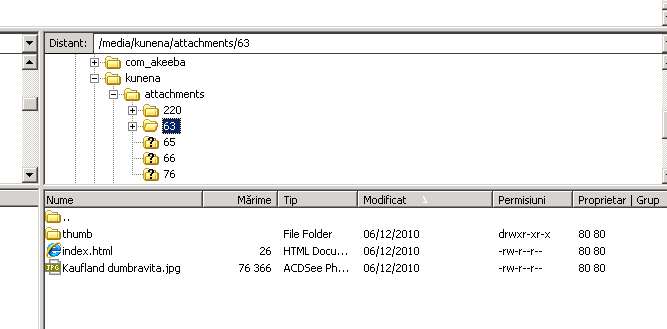
Please note that for posts containing the attachment - neither the text is showed.
Please note that for posts containing the attachment - neither the text is showed.
The topic has been locked.
Time to create page: 0.299 seconds