
- Posts: 13
- Thank you received: 0
Kunena 7.0.9 & Kunena 6.4.14 – Security Updates Released
The Kunena team has announce the arrival of Kunena 7.0.9 [K 7.0.9] in stable which is now available for download as a native Joomla extension for J! 5.4.x/6.0.x./6.1.x. This version addresses most of the issues that were discovered in K 6.2 / K 6.3 / K 6.4 and issues discovered during the last development stages of K 7.0
Sticky If you are having problems with Kunena, please read this first
- levalencia
-

- Offline
- New Member
-

Less
More
15 years 4 months ago #94674
by levalencia
Replied by levalencia on topic Re: If you are having problems with K 1.6, please read this first
solved the edit issue thanks
Please Log in or Create an account to join the conversation.
15 years 4 months ago #94959
by accannon
Replied by accannon on topic Can't Edit Profile? MooTools is enabled, everything else works....
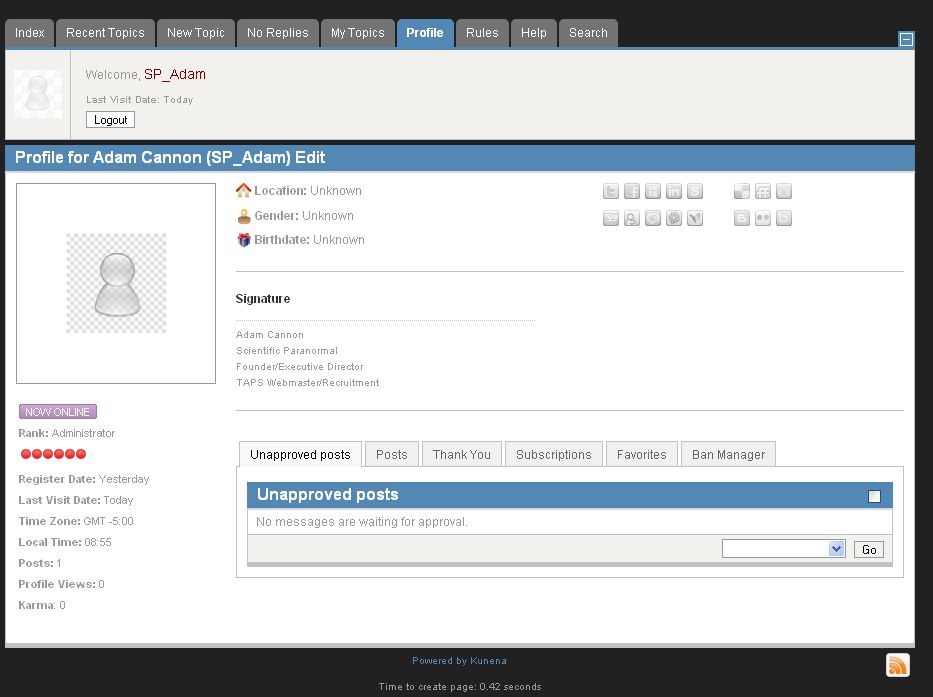
Hey guys, sorry to bother everyone w/a common problem, but I can't seem to figure this one out. I recently created a Kunena Forum on my site (a great forum tool by the way). I activated the MooTools upgrade plugin, and everything works great, except no user can "edit" their profile. When they click on their profile, all the normal tabs appear and work, but the "edit" button moves from the right side to the left next to the user's name and is no longer a link. Is this a template issue or is there a config I'm missing. Here is a screenshot. Any ideas? It's using Joomla 1.5 with Kunena 1.6. It is using a Rockettheme "Dominion" template.
Please Log in or Create an account to join the conversation.


15 years 4 months ago #94964
by xillibit
I don't provide support by PM, because this can be useful for someone else.
Replied by xillibit on topic Re: Can't Edit Profile? MooTools is enabled, everything else works....
Hello,
You have a common issue where the edit button is misplaced, there is a conflict with your template
You have a common issue where the edit button is misplaced, there is a conflict with your template
I don't provide support by PM, because this can be useful for someone else.
Please Log in or Create an account to join the conversation.
15 years 4 months ago #94968
by accannon
Replied by accannon on topic Re: Can't Edit Profile? MooTools is enabled, everything else works....
Yup, your absolutely right. Switching to the default joomla template it removed this issue. Do you have any experience in how to config a template if it experiences this issue? I'm contacting Rocketheme now, but if someone here has dealt with this if you can let me know how to modify this that would be great, thanks!
Please Log in or Create an account to join the conversation.
15 years 4 months ago #94969
by accannon
Replied by accannon on topic Re: Can't Edit Profile? MooTools is enabled, everything else works....
You know what - Disregard, I figured it out. Well, sorta.
It has to do with custom css titles. On the template manager, if you disable "Build Title Spans" it works. Since I don't use any title spans, this is fine. If I can figure out how to enable this and still make it work I'll post it again.
Useful info for anyone running into this issue though
Thanks for the quick response!
It has to do with custom css titles. On the template manager, if you disable "Build Title Spans" it works. Since I don't use any title spans, this is fine. If I can figure out how to enable this and still make it work I'll post it again.
Useful info for anyone running into this issue though
Thanks for the quick response!
Please Log in or Create an account to join the conversation.
15 years 4 months ago #94974
by accannon
Replied by accannon on topic Re: Can't Edit Profile? MooTools is enabled, everything else works....
Here's another workaround -
1 step: copy this file
joomla-root/components/com_gantry/features/jstools.php
into this location
joomla-root/templates/template name/features/
2. step: open this new jstools.php
find line 45-47
if ($gantry->get('buildspans-enabled')) {
$modules = "";
$headers = "";
and change it to this
if ($gantry->get('buildspans-enabled')) {
$modules = "";
$headers = "";
Works like a charm, and you can keep Build Title Spans on for the rest of your articles. I haven't found anything broken w/this yet, so this seems to be the best solution.
1 step: copy this file
joomla-root/components/com_gantry/features/jstools.php
into this location
joomla-root/templates/template name/features/
2. step: open this new jstools.php
find line 45-47
if ($gantry->get('buildspans-enabled')) {
$modules = "";
$headers = "";
and change it to this
if ($gantry->get('buildspans-enabled')) {
$modules = "";
$headers = "";
Works like a charm, and you can keep Build Title Spans on for the rest of your articles. I haven't found anything broken w/this yet, so this seems to be the best solution.
The following user(s) said Thank You: JuggZaPoppiN
Please Log in or Create an account to join the conversation.
Time to create page: 0.348 seconds