
Kunena 7.0.9 & Kunena 6.4.14 – Security Updates Released
The Kunena team has announce the arrival of Kunena 7.0.9 [K 7.0.9] in stable which is now available for download as a native Joomla extension for J! 5.4.x/6.0.x./6.1.x. This version addresses most of the issues that were discovered in K 6.2 / K 6.3 / K 6.4 and issues discovered during the last development stages of K 7.0
Question [Merged topic]The great Mootools/Javascript conflict discussion


There are no drawbacks (obvious ones or otherwise) to enabling the System - Mootools Upgrade plugin unless you are using another Joomla extension that does not like Mootools 1.2.4. Under those circumstances, enabling this plugin will cause other Joomla extensions to misbehave. If you don't use any of those other Joomla extensions, you have nothing to worry about.geoffr wrote: Are there any obvious drawbacks, conflicts or limitations in having this enabled?
Blue Eagle vs. Crypsis reference guide
Read my blog and


Simple said at the moment I either have option to access the editing form, but editing doesn't work. Or with mootools upgrade enabled editing works, but I have not buttons to access the form.
If it's not Joomla, maybe there is a conflict between the Kunena css and the rocket theme I use? A screenshot is attachted.
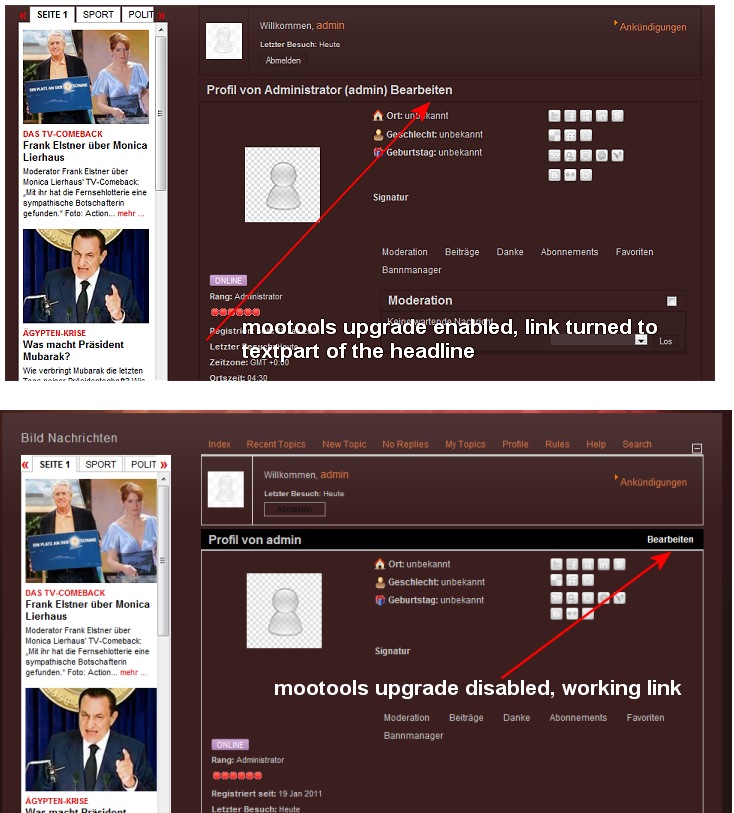
Your situation does not seem to be a case of a conflict between the CSS of Rockettheme and Kunena. CSS does not usually affect the way that web pages operate in ways like you have described.
Thank you. I hope this helps all of us.

Blue Eagle vs. Crypsis reference guide
Read my blog and
So at the moment I can confirm that admin profil editing work. I will test it with a user account also and add the information.
Update: Profile editing works for user accounts also.
Hi Soz,
Yes, that link enabled me to find the problem
I also have a rocket based theme !! but built by somebody else, and after following Johns same issue I "turned off" build title spans in Theme Advanced ... and low and behold my edit button appeared and I can now edit my profile
Gary
Which all the more should make people appreciate that these issues are not actually Kunena issues but are issues with other Joomla extension. As you have discovered, in your case, the issue lie at the heart of the Joomla site template that you are using.celdric wrote: I guess you are aware that this merged thread has 82 pages?
People assume, quite reasonably and understandably (and I say that we are most sympathetic to understanding how frustrating these things must appear to be), that, because Kunena does not function properly, the cause of that fault lies at the core of Kunena product. That is partly true. The cause of the problems lies within the software that Kunena relies upon (Mootools 1.2.4). What people fail to understand is that it is very easy to change the way that Joomla behaves when you add other software (such as a site template that introduces its own Javascript behaviours). By the time people have added several other Joomla extensions, the software "soup" is already too rich for Kunena to blend with the mixture.
In summary: Yes, known Rockettheme issue with well-documented explanations about how to resolve the problems.
Blue Eagle vs. Crypsis reference guide
Read my blog and

