


- Posts: 19
- Thank you received: 0
Kunena 7.0.4 Released
The Kunena team has announce the arrival of Kunena 7.0.4 [K 7.0.4] in stable which is now available for download as a native Joomla extension for J! 5.4.x/6.0.x. This version addresses most of the issues that were discovered in K 6.2 / K 6.3 / K 6.4 and issues discovered during the last development stages of K 7.0
Question [Merged topic]The great Mootools/Javascript conflict discussion
15 years 4 months ago #78513
by derwijko
Replied by derwijko on topic Re: Missing boardcode on new topic / reply topic.
I've tried all tricks you mention and boardcode still doesn't work for me.
wirtualnawyspa.net/index.php?option=com_...ultmenu=94&Itemid=92
wirtualnawyspa.net/index.php?option=com_...ultmenu=94&Itemid=92
The topic has been locked.

15 years 4 months ago #78545
by gunta
You are right. The Template I used was K1.5 - InfinityHU Template and its a version for kunena 1.5 ... hm.
Blue Eagle (default) Kunena template (of course ) works fine.
The website I want to use Kunena with, has a dark template, so I am searching for a dark Kunena template ...
 ... will try to find a correct module in the Kunena directory.
Thank you very much, for your time to answer to my prob ... now I know what to look for
Gunta
Replied by gunta on topic Re: [Merged topic]The great Mootools/Javascript conflict discussion
sozzled wrote: gunta: I see that you are not using the Blue Eagle (default) Kunena template. [.. ]Have you tried to replace the template that you are using with the Blue Eagle (default) template and does this fix the problem for you?
You are right. The Template I used was K1.5 - InfinityHU Template and its a version for kunena 1.5 ... hm.
Blue Eagle (default) Kunena template (of course
) works fine.The website I want to use Kunena with, has a dark template, so I am searching for a dark Kunena template ...
I uninstalled it. No idea why I installed outdated modulessozzled wrote: I see, from your configuration report, that you have installed the wrong "latest post" module for K 1.6.1. [..] Please uninstall that module and do not use it.
... will try to find a correct module in the Kunena directory.Thank you very much, for your time to answer to my prob
... now I know what to look for Gunta
The topic has been locked.
15 years 4 months ago - 15 years 4 months ago #78555
by gunta
Replied by gunta on topic Re: [Merged topic]The great Mootools/Javascript conflict discussion
argh ... while playing arround with the standard template of kunena, the prob once again occured.
I also tried some kunena 1.6 templates, with same results. So it seems not to be a kunena template problem.
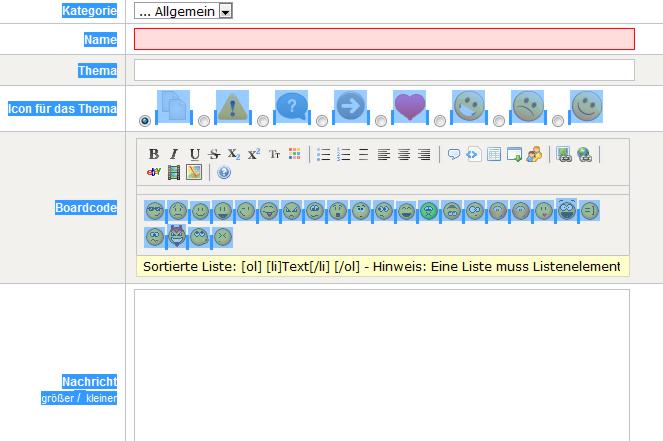
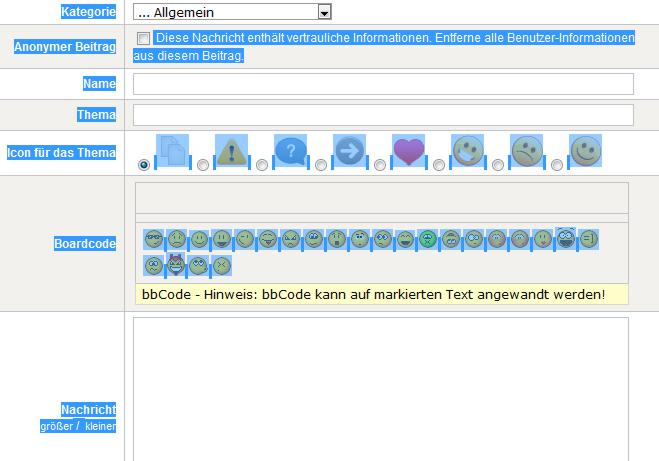
Guest users, creating new topics see the bb code buttons, while logged in users don´t
I removed the outdated module for latest joomla topics, which was not in use, although it was installed.
I will try some other templates, but mayby you have other ideas to solve the problem with the missing bb code buttons for logged in users.
Attached you´ll find a pic for logged out and another for logged in users, using the standard kunena template. Text colours look little strange, because they don´t match the site template colours, thats why I marked the text, to make it visible.
Guest user:
Logged in user:
Thanx,
Gunta
Edit says: I also tried it with the joomla standard template in combination with the kunena standard template ... same results as described above.
I also tried some kunena 1.6 templates, with same results. So it seems not to be a kunena template problem.
Guest users, creating new topics see the bb code buttons, while logged in users don´t
I removed the outdated module for latest joomla topics, which was not in use, although it was installed.
I will try some other templates, but mayby you have other ideas to solve the problem with the missing bb code buttons for logged in users.
Attached you´ll find a pic for logged out and another for logged in users, using the standard kunena template. Text colours look little strange, because they don´t match the site template colours, thats why I marked the text, to make it visible.
Guest user:
Logged in user:
Thanx,
Gunta
Edit says: I also tried it with the joomla standard template in combination with the kunena standard template ... same results as described above.
Last edit: 15 years 4 months ago by gunta.
The topic has been locked.
15 years 4 months ago #78559
by derwijko
Replied by derwijko on topic Re: Problem
Is there anybody who can help.
I can offer some payment for somebody, who can fix this problem.
Thank u.
I can offer some payment for somebody, who can fix this problem.
Thank u.
The topic has been locked.
15 years 4 months ago #78561
by derwijko
Replied by derwijko on topic Missing boardcode: urgent help needed for WirtualnaWyspa.Net forum
Please email me if you can help: [email protected]
The topic has been locked.


15 years 4 months ago #78563
by sozzled
Blue Eagle vs. Crypsis reference guide
Read my blog and

Replied by sozzled on topic Re: [Merged topic]The great Mootools/Javascript conflict discussion
G'day, derwijko, and welcome to Kunena.
We don't normally provide direct one-on-one support via e-mail but your problems can be solved. When you write that you require your problems to be solved "urgently", how urgently do you mean? Within the hour, within a day, within a week? :dry:
The problem with the missing BBcode toolbar, the inability to insert smileys, the inability to edit user profiles - and a few other problems for users of Kunena - is caused by a Javascript library conflict. The solution to this problem is to disable, one by one, other Joomla extensions until you discover which extension is causing the Javascript library conflict. When you have discovered which extension is responsible for causing the problem you need to decide whether it's more important to keep that extension (and lose Kunena) or to lose the extension (and keep Kunena).
Your website uses [at least] 11 different Javascript libraries. I see that you are using the K2 component and you are also using jQuery, too. You should read the article Mootools 1.2.4 to gain a better understanding of what is happening at your website and why things are not working properly for Kunena in your case.
We don't normally provide direct one-on-one support via e-mail but your problems can be solved. When you write that you require your problems to be solved "urgently", how urgently do you mean? Within the hour, within a day, within a week? :dry:
The problem with the missing BBcode toolbar, the inability to insert smileys, the inability to edit user profiles - and a few other problems for users of Kunena - is caused by a Javascript library conflict. The solution to this problem is to disable, one by one, other Joomla extensions until you discover which extension is causing the Javascript library conflict. When you have discovered which extension is responsible for causing the problem you need to decide whether it's more important to keep that extension (and lose Kunena) or to lose the extension (and keep Kunena).
Your website uses [at least] 11 different Javascript libraries. I see that you are using the K2 component and you are also using jQuery, too. You should read the article Mootools 1.2.4 to gain a better understanding of what is happening at your website and why things are not working properly for Kunena in your case.
Blue Eagle vs. Crypsis reference guide
Read my blog and
The topic has been locked.
Time to create page: 0.279 seconds