


- Posts: 19
- Thank you received: 0
Kunena 7.0.4 Released
The Kunena team has announce the arrival of Kunena 7.0.4 [K 7.0.4] in stable which is now available for download as a native Joomla extension for J! 5.4.x/6.0.x. This version addresses most of the issues that were discovered in K 6.2 / K 6.3 / K 6.4 and issues discovered during the last development stages of K 7.0
Question [Merged topic]The great Mootools/Javascript conflict discussion
15 years 4 months ago #78365
by iVeedu
Replied by iVeedu on topic Re: 1.6.1 error help
It looks like no way to fix this without breaking something else.
The topic has been locked.


15 years 4 months ago #78369
by Azure
"Do or do not, there is no try..."
Replied by Azure on topic Re: 1.6.1 error help
Please note that if you use Core Design's Scriptegrator plugin, this stops all sorts of things like inserting smiley's. Turning it off and using another login module solution cured the problem.
"Do or do not, there is no try..."
The topic has been locked.


15 years 4 months ago - 15 years 4 months ago #78374
by gunta
Replied by gunta on topic Re: 1.6.1 error help
Hi there,
I run into the same error, which is already widely discussed in this thread.
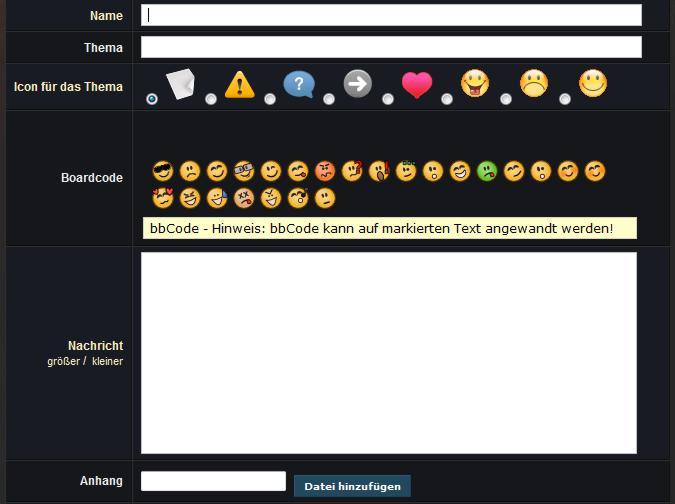
I have no bb editor buttons in the Kunena dialogs ... when logged in as a registered user.
When not logged in and writing an answer in the public part of the forum, bbeditor buttons are shown.
My installation is joomla with community builder, jcomments and uddeim. no further components, except a template for the site.
For research I disabled the template and used the standard jommla template, which did not change anything.
For the javascript error i figured out, that the following javascripts are loaded:
Do you have any ideas what I can do, to get the bbcode buttons?
Thanks
Gunta
I run into the same error, which is already widely discussed in this thread.
I have no bb editor buttons in the Kunena dialogs ... when logged in as a registered user.
When not logged in and writing an answer in the public part of the forum, bbeditor buttons are shown.
My installation is joomla with community builder, jcomments and uddeim. no further components, except a template for the site.
For research I disabled the template and used the standard jommla template, which did not change anything.
For the javascript error i figured out, that the following javascripts are loaded:
Code:
<script type="text/javascript" src="/includes/js/joomla.javascript.js"></script>
<script type="text/javascript" src="/plugins/system/mtupgrade/mootools.js"></script>
<script type="text/javascript" src="/components/com_kunena/js/slimbox/slimbox-min.js"></script>
<script type="text/javascript" src="/components/com_kunena/template/default/js/default-min.js"></script>
<script type="text/javascript" src="/components/com_kunena/template/default/plugin/poll/js/kunena.poll-min.js"></script>
<script type="text/javascript" src="/components/com_kunena/template/default/js/editor-min.js"></script>
<script type="text/javascript" src="/media/system/js/validate.js"></script>
<script type="text/javascript" src="/media/system/js/calendar.js"></script>
<script type="text/javascript" src="/media/system/js/calendar-setup.js"></script>
<script type="text/javascript" src="/components/com_comprofiler/js/jquery-1.4.4/jquery-1.4.4.min.js"></script>
<script type="text/javascript"><!-- jQuery.noConflict(); --></script>
<script type="text/javascript" src="/components/com_comprofiler/js/tabpane.min.js"></script>
Thanks
Gunta
This message contains confidential information
Database collation check: The collation of your table fields are correct
Legacy mode: Disabled | Joomla! SEF: Disabled | Joomla! SEF rewrite: Disabled | FTP layer: Enabled |
This message contains confidential informationhtaccess: Exists | PHP environment: Max execution time: 180 seconds | Max execution memory: 128M | Max file upload: 8M
This message contains confidential information
Joomla default template details : cata | author: | version: 1.0 | creationdate: 2010-02-14
Kunena version detailled: Installed version: 1.6.1 | Build: 3858 | Version name: Timu | Kunena detailled configuration:
Warning: Spoiler![th]Kunena config settings:[/th]
board_title Forum board_offline 0 board_ofset 0.00 offline_message <h2>The Forum is currently offline for maintenance.</h2>
<div>Check back soon!</div>enablerss 1 enablepdf 1 threads_per_page 20 messages_per_page 10 messages_per_page_search 15 showhistory 1 historylimit 6 shownew 1 jmambot 1 disemoticons 0 template infinityhu16 showannouncement 1 avataroncat 0 catimagepath category_images/ showchildcaticon 1 annmodid 62 rtewidth 420 rteheight 300 enableforumjump 1 reportmsg 0 username 1 askemail 0 showemail 0 showuserstats 1 showkarma 1 useredit 1 useredittime 10 useredittimegrace 600 editmarkup 1 allowsubscriptions 1 subscriptionschecked 1 allowfavorites 1 maxsubject 50 maxsig 300 regonly 0 changename 0 pubwrite 1 floodprotection 10 mailmod 0 mailadmin 0 captcha 0 mailfull 0 allowavatar 1 allowavatarupload 1 allowavatargallery 1 avatarquality 65 avatarsize 2048 allowimageupload 0 allowimageregupload 1 imageheight 800 imagewidth 800 imagesize 500 allowfileupload 0 allowfileregupload 1 filetypes txt,rtf,pdf,zip,tar.gz,tgz,tar.bz2 filesize 500 showranking 0 rankimages 0 avatar_src fb fb_profile fb pm_component no userlist_rows 30 userlist_online 0 userlist_avatar 0 userlist_name 0 userlist_username 1 userlist_posts 1 userlist_karma 1 userlist_email 0 userlist_usertype 0 userlist_joindate 0 userlist_lastvisitdate 1 userlist_userhits 0 latestcategory 0 showstats 1 showwhoisonline 0 showgenstats 1 showpopuserstats 0 popusercount 5 showpopsubjectstats 1 popsubjectcount 5 usernamechange 0 rules_infb 1 rules_cid 1 help_infb 1 help_cid 1 showspoilertag 1 showvideotag 1 showebaytag 1 trimlongurls 1 trimlongurlsfront 40 trimlongurlsback 20 autoembedyoutube 1 autoembedebay 1 ebaylanguagecode de-de fbsessiontimeout 1800 highlightcode 0 rss_type topic rss_timelimit month rss_limit 100 rss_included_categories rss_excluded_categories rss_specification rss2.0 rss_allow_html 1 rss_author_format name rss_author_in_title 1 rss_word_count 0 rss_old_titles 1 rss_cache 900 fbdefaultpage recent default_sort asc alphauserpointsnumchars 30 sef 0 sefcats 0 sefutf8 0 showimgforguest 1 showfileforguest 0 pollnboptions 4 pollallowvoteone 1 pollenabled 1 poppollscount 5 showpoppollstats 1 polltimebtvotes 00:15:00 pollnbvotesbyuser 100 pollresultsuserslist 1 maxpersotext 50 ordering_system replyid post_dateformat ago post_dateformat_hover datetime hide_ip 1 js_actstr_integration 0 imagetypes jpg,jpeg,gif,png checkmimetypes 1 imagemimetypes image/jpeg,image/jpg,image/gif,image/png imagequality 50 thumbheight 32 thumbwidth 32 hideuserprofileinfo put_empty integration_access communitybuilder integration_login none integration_avatar communitybuilder integration_profile communitybuilder integration_private uddeim integration_activity communitybuilder boxghostmessage 0 userdeletetmessage 1 latestcategory_in 0 topicicons 1 onlineusers 1 debug 0 catsautosubscribed 0 showbannedreason 0 version_check 1 showthankyou 1 showpopthankyoustats 1 popthankscount 5 mod_see_deleted 1 bbcode_img_secure text listcat_show_moderators 0 lightbox 1 activity_limit 0
Third-party components: AlphaUserPoints: Disabled or not installed | CommunityBuilder: Installed (Version : 1.3.1) | Jomsocial: Disabled or not installed | UddeIm: Installed (Version : 2.1)
Plugins: System - Mootools12: Disabled | System - Mootools Upgrade: Enabled | JFirePHP: Disabled or not installed | Kunena Discuss: Disabled or not installed | Kunena Search: Disabled or not installed | My Kunena Forum Menu: Disabled or not installed | My Kunena Forum Posts: Disabled or not installed
Modules: Kunena Latest: Enabled (Version : 1.0.47) | Kunena Stats: Disabled or not installed | Kunena Login: Disabled or not installed
Last edit: 15 years 4 months ago by gunta.
The topic has been locked.


15 years 4 months ago - 15 years 4 months ago #78398
by sozzled
Blue Eagle vs. Crypsis reference guide
Read my blog and

Replied by sozzled on topic Re: [Merged topic]The great Mootools/Javascript conflict discussion
gunta: I see that you are not using the Blue Eagle (default) Kunena template. It is possible that the loss of the BBcode toolbar is the result of the Kunena template that you are using. Have you tried to replace the template that you are using with the Blue Eagle (default) template and does this fix the problem for you?
I see, from your configuration report, that you have installed the wrong "latest post" module for K 1.6.1. The "latest posts" module that you have installed was not developed as part of the Kunena project, is not supported nor endorsed by the Kunena project, is not suitable for K 1.6 and, if you use it, it will break your website. Please uninstall that module and do not use it. Please read the important information contained in the K 1.6.1 release notes about using outdated software.
When Kunena does not work for you as you would expect we strongly recommend that you use standard software, unchanged and unmodified, that is endorsed and supported by the Kunena project. If the unchanged and unmodified software works, then you should gradually introduce other changes, one at a time, and test each change that you make to ensure that everything still works. In this way you can quickly identify the causes of problems that you now seem to be having.
I see, from your configuration report, that you have installed the wrong "latest post" module for K 1.6.1. The "latest posts" module that you have installed was not developed as part of the Kunena project, is not supported nor endorsed by the Kunena project, is not suitable for K 1.6 and, if you use it, it will break your website. Please uninstall that module and do not use it. Please read the important information contained in the K 1.6.1 release notes about using outdated software.
When Kunena does not work for you as you would expect we strongly recommend that you use standard software, unchanged and unmodified, that is endorsed and supported by the Kunena project. If the unchanged and unmodified software works, then you should gradually introduce other changes, one at a time, and test each change that you make to ensure that everything still works. In this way you can quickly identify the causes of problems that you now seem to be having.
Blue Eagle vs. Crypsis reference guide
Read my blog and
Last edit: 15 years 4 months ago by sozzled.
The following user(s) said Thank You: gunta
The topic has been locked.
15 years 4 months ago #78476
by derwijko
Replied by derwijko on topic Boardcode missing and problems with uploading pictures, files in Kunena 1.6
Hello,
I tried to fix this problem by:
- disabling / enabling System - Mootools Upgrade (I use 1.2.4 upgrade)
- upgrading Joomla to the latest version (I use 1.5.22)
- reinstalling Kunena 1.6
- changing configuration settings in the backend
- trying different browsers (Safari, Firefox)
- changing templates for Joomla (including common rhuk_milkyway and Ja_Purity)
- disabling other plugins on the forum site
Nothing has helped. Could you give me any advice what else I can do to fix it.
My site is www.wirtualnawyspa.net/index.php?option=...ultmenu=94&Itemid=92
Expect for missing boardcode, I can't add any smileys and when I click add file in attachments the attachment is not visible.
I tried to fix this problem by:
- disabling / enabling System - Mootools Upgrade (I use 1.2.4 upgrade)
- upgrading Joomla to the latest version (I use 1.5.22)
- reinstalling Kunena 1.6
- changing configuration settings in the backend
- trying different browsers (Safari, Firefox)
- changing templates for Joomla (including common rhuk_milkyway and Ja_Purity)
- disabling other plugins on the forum site
Nothing has helped. Could you give me any advice what else I can do to fix it.
My site is www.wirtualnawyspa.net/index.php?option=...ultmenu=94&Itemid=92
Expect for missing boardcode, I can't add any smileys and when I click add file in attachments the attachment is not visible.
The topic has been locked.
15 years 4 months ago #78480
by derwijko
Hello,
I tried to fix this problem by:
- disabling / enabling System - Mootools Upgrade (I use 1.2.4 upgrade)
- upgrading Joomla to the latest version (I use 1.5.22)
- reinstalling Kunena 1.6
- changing configuration settings in the backend
- trying different browsers (Safari, Firefox)
- changing templates for Joomla (including common rhuk_milkyway and Ja_Purity)
- disabling other plugins on the forum site
Nothing has helped. Could you give me any advice what else I can do to fix it.
My site is www.wirtualnawyspa.net/index.php?option=...enu=94&Itemid=92
Expect for missing boardcode, I can't add any smileys and when I click add file in attachments the attachment is not visible.
I tried to fix this problem by:
- disabling / enabling System - Mootools Upgrade (I use 1.2.4 upgrade)
- upgrading Joomla to the latest version (I use 1.5.22)
- reinstalling Kunena 1.6
- changing configuration settings in the backend
- trying different browsers (Safari, Firefox)
- changing templates for Joomla (including common rhuk_milkyway and Ja_Purity)
- disabling other plugins on the forum site
Nothing has helped. Could you give me any advice what else I can do to fix it.
My site is www.wirtualnawyspa.net/index.php?option=...enu=94&Itemid=92
Expect for missing boardcode, I can't add any smileys and when I click add file in attachments the attachment is not visible.
The topic has been locked.
Time to create page: 0.284 seconds