


- Posts: 15
- Thank you received: 0
Kunena 7.1.1 & Kunena 6.4.17 – Security Updates Released
The Kunena team has announce the arrival of Kunena 7.1.1 [K 7.1.1] in stable which is now available for download as a native Joomla extension for J! 5.4.x/6.0.x./6.1.x./6.2.x This version addresses most of the issues that were discovered in K 6.2 / K 6.3 / K 6.4 / K7.0 and issues discovered during the last development stages of K 7.1
Just a reminder: K6.4.17 receives only securities fixes until end of 2026, so it's advised for users to upgrade to K7.1.
Before posting new topics in this category
K 1.5.x Support: Please read this first.
Question Email problems with categories set Review = Yes
16 years 2 months ago - 16 years 2 months ago #58161
by MGSMKS
Email problems with categories set Review = Yes was created by MGSMKS
Hello,
I am fairly new to Kunena and I am not a techie. I have a few issues and would appreciate your help. I have the 1.5.4 version.
I've set up the forum with several categories and each category has a sub-category. The category posts are not pre-moderated, but the subcategory posts are pre-moderated. When I test, this is what happens:
(1) When I post in a non-pre-moderated category, I get a "cannot initialize the send function" (screen-shot attached although it is in Russian) yet the posting appears fine without a problem. However, I have it set to receive a note about the new posting as the moderator, but I receive nothing.
(2) When I post in a pre-moderated sub-category, I don't receive anything to alert me that there is a post waiting to be moderated (I am using a test account to post). I only see that there is a new post waiting to be moderated when I log into the forum and go to that sub-category. I set it up to receive notifications by e-mail (at least I think I did). Or am I doing something wrong here?
Thank you.
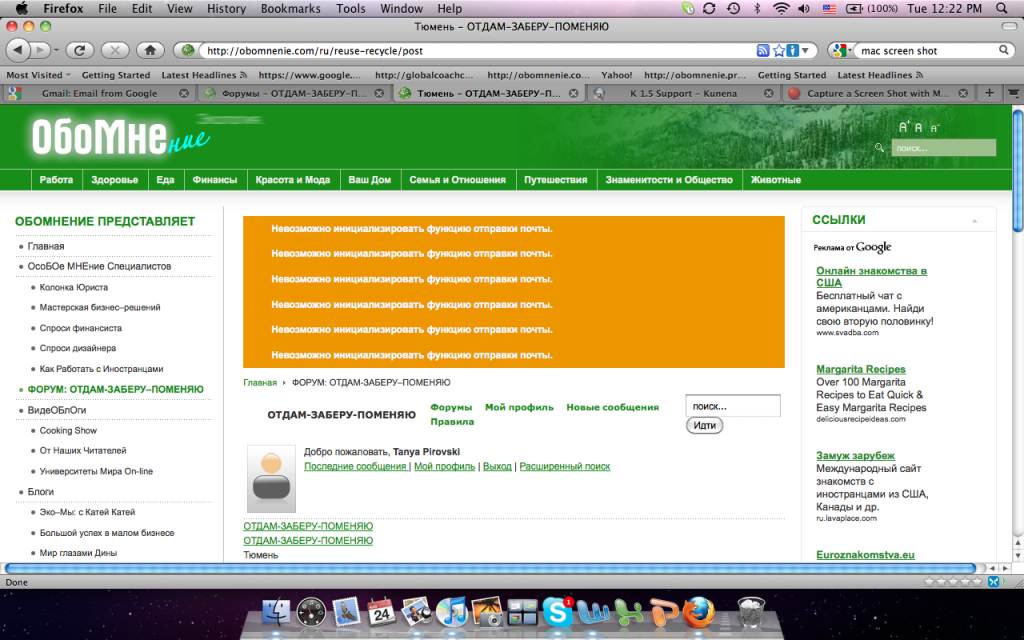
Last edit: 16 years 2 months ago by sozzled. Reason: Changed subject to improve the relevance in searching
Please Log in or Create an account to join the conversation.


16 years 2 months ago #58165
by Cerberus
Replied by Cerberus on topic Re: Few Issues -- please help
upgrade to latest version K1.5.12 as there have been 100s of fixes since K1.5.4
Please Log in or Create an account to join the conversation.
16 years 2 months ago #58170
by MGSMKS
Replied by MGSMKS on topic Re: Few Issues -- please help
Thank you for your reply. How do I upgrade? Is there a tutorial on how to do it? Appreciate your help.
Please Log in or Create an account to join the conversation.


16 years 2 months ago #58172
by xillibit
I don't provide support by PM, because this can be useful for someone else.
Replied by xillibit on topic Re: Few Issues -- please help
Hello,
You just need to install kunena 1.5.12, but backup your template and others things
You cna take a look at the doc : docs.kunena.com/index.php/Upgrade_Information_V1.5
You just need to install kunena 1.5.12, but backup your template and others things
You cna take a look at the doc : docs.kunena.com/index.php/Upgrade_Information_V1.5
I don't provide support by PM, because this can be useful for someone else.
Please Log in or Create an account to join the conversation.
16 years 2 months ago #58176
by MGSMKS
Replied by MGSMKS on topic Re: Few Issues -- please help
This looks really complicated.  Can I just uninstall the old version and install the new one?
 Please Log in or Create an account to join the conversation.
16 years 2 months ago - 16 years 2 months ago #58178
by Cerberus
Replied by Cerberus on topic Re: Few Issues -- please help
Cerbs simple step to upgrading K1.5x to K1.5.12
1. Backup your site and database
2. Download latest version of kunena from Here
3. Go to joomla installer and install
4. Check every thing is working
FYI: no need to uninstall old version its all done for you
1. Backup your site and database
2. Download latest version of kunena from Here
3. Go to joomla installer and install
4. Check every thing is working
FYI: no need to uninstall old version its all done for you
Last edit: 16 years 2 months ago by Cerberus.
Please Log in or Create an account to join the conversation.
Time to create page: 0.131 seconds