
Kunena 7.0.4 Released
The Kunena team has announce the arrival of Kunena 7.0.4 [K 7.0.4] in stable which is now available for download as a native Joomla extension for J! 5.4.x/6.0.x. This version addresses most of the issues that were discovered in K 6.2 / K 6.3 / K 6.4 and issues discovered during the last development stages of K 7.0
Question sync users failure - error 1146 and SQL error


16 years 3 months ago - 16 years 3 months ago #36280
by xillibit
I don't provide support by PM, because this can be useful for someone else.
Replied by xillibit on topic Re:sync users failure - error 1146 and SQL error
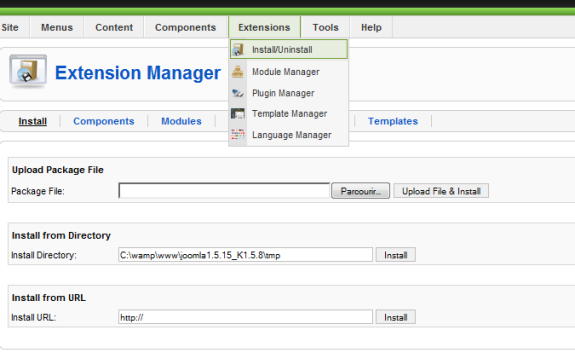
Don't touch at php files, for installation/uninstalltion process you need to go in joomla! backend -> extension manager -> Install/Uninstall, here in the tab components you uninstall kunena and in the tab install, install kunena. :silly:
For installation, the better way is to use Install from Directory, in this field put the path for your temp diretory.
For installation, the better way is to use Install from Directory, in this field put the path for your temp diretory.
I don't provide support by PM, because this can be useful for someone else.
Last edit: 16 years 3 months ago by xillibit.
Please Log in or Create an account to join the conversation.


16 years 3 months ago #36307
by robcohen
Replied by robcohen on topic Re:sync users failure - error 1146 and SQL error
Thanks for the detailed answer. Just logged in to see if I could follow your instructions but I don't see the backend or extension manager from the Joomla administrator panel at
www.domain.com/administrator
. Should I be looking elsewhere or have I missed something?
By the way, there's some info on the main Joomla panel when I first sign on as administrator at www.domain/administrator/ labeled "Site Support" that gives the hosting company info as well as some other (all out of date) info. Have been looking everywhere for the right place to update this. Can you tell me?
Rob
By the way, there's some info on the main Joomla panel when I first sign on as administrator at www.domain/administrator/ labeled "Site Support" that gives the hosting company info as well as some other (all out of date) info. Have been looking everywhere for the right place to update this. Can you tell me?
Rob
Please Log in or Create an account to join the conversation.
16 years 3 months ago - 16 years 3 months ago #36309
by xillibit
I don't provide support by PM, because this can be useful for someone else.
Replied by xillibit on topic Re:sync users failure - error 1146 and SQL error
This is here :

I think it's the first time that you use joomla!
I think it's the first time that you use joomla!
I don't provide support by PM, because this can be useful for someone else.
Last edit: 16 years 3 months ago by xillibit.
Please Log in or Create an account to join the conversation.
16 years 3 months ago #36312
by robcohen
Replied by robcohen on topic Re:sync users failure - error 1146 and SQL error
Indeed - I made it clear I'm new to Joomla, though I've been in IT for more than 25 years. Thank you for your patience. We all have to walk before we run...
Now I see where to uninstall as well as install from your excellent instructions.
Will post again when I have some down-time to make the changes.
Thank you so much!
Rob
Now I see where to uninstall as well as install from your excellent instructions.
Will post again when I have some down-time to make the changes.
Thank you so much!
Rob
Please Log in or Create an account to join the conversation.
16 years 3 months ago #38563
by robcohen
Replied by robcohen on topic Re:sync users failure - error 1146 and SQL error
I have another question. I need to know how to backup any templates that may have been changed before I do the uninstall and how to restore them after the install. I can see the backup now item in the Components/JoomlaPack and will do both the Backup Site and Backup Database in addition to a normal full home directory backup.
The crux of the matter is I don't understand how I'd restore any of these templates after I un-installed and then re-installed Kunena. If that's not too complex can you get me pointed in the right direction?
I see these templates:
[ ]JA_Purity
[ ]rhuk_milkyway
RedEye_Aphelion
[ ]beez
khepri
[] represents a check box; those without it are grayed out
Thanks!
Rob
The crux of the matter is I don't understand how I'd restore any of these templates after I un-installed and then re-installed Kunena. If that's not too complex can you get me pointed in the right direction?
I see these templates:
[ ]JA_Purity
[ ]rhuk_milkyway
RedEye_Aphelion
[ ]beez
khepri
[] represents a check box; those without it are grayed out
Thanks!
Rob
Please Log in or Create an account to join the conversation.
16 years 3 months ago #38564
by robcohen
Replied by robcohen on topic Re:sync users failure - error 1146 and SQL error
Wondering if this is the answer. I understand that templates are just files stored in the templates directory of my site. As long as I have a good backup of /$HOME/www/templates/ then do I not have what I need to restore this directory?
I found the place to un-install templates but just don't know which ones I should zap. Don't want to take away templates used for something else by accident. Can I just leave the the templates in place or will I get a failure on the install because it may need to over-write them?
Thanks again. I'm finally getting better at locating what I need in the docs -- just not everything
Rob
I found the place to un-install templates but just don't know which ones I should zap. Don't want to take away templates used for something else by accident. Can I just leave the the templates in place or will I get a failure on the install because it may need to over-write them?
Thanks again. I'm finally getting better at locating what I need in the docs -- just not everything
Rob
Please Log in or Create an account to join the conversation.
Time to create page: 0.250 seconds