


- Posts: 12
- Thank you received: 4
Kunena 7.0.4 Released
The Kunena team has announce the arrival of Kunena 7.0.4 [K 7.0.4] in stable which is now available for download as a native Joomla extension for J! 5.4.x/6.0.x. This version addresses most of the issues that were discovered in K 6.2 / K 6.3 / K 6.4 and issues discovered during the last development stages of K 7.0
Merged How to install a language when using Kunena 2.0.2
13 years 5 months ago #136284
by oldfart
Replied by oldfart on topic How to install a language when using Kunena 2.0.2
Doesn't really help.
The Wiki (which I had read before attempting to install the language files) does not give any advice for Kunena 2 with Joomla 2.x
'download and extract it' .. to where??
thanks for the interest; I am surprised not more people want a multi-language site
The Wiki (which I had read before attempting to install the language files) does not give any advice for Kunena 2 with Joomla 2.x
'download and extract it' .. to where??
thanks for the interest; I am surprised not more people want a multi-language site
Please Log in or Create an account to join the conversation.


13 years 5 months ago - 13 years 5 months ago #136285
by sozzled
Blue Eagle vs. Crypsis reference guide
Read my blog and

Replied by sozzled on topic How to install a language when using Kunena 2.0.2
(1) Download the translation package file
joomlacode.org/gf/download/frsrelease/17...2.0.2_2012-09-02.zip
to your PC
(2) Extract the files on your PC. This is what sjaak meant when he wrote "download ... and extract"
(3) After downloading and extracting, I guess what sjaak meant with "select" is to locate the specific translation that you need from the files that you have downloaded and decompressed on your PC. Then all you need to do is install the language(s) that you need in the usual manner.
I'm using intuitive guesswork here. When you have successfully completed the activity, oldfart, maybe you could help us with a detailed set of instructions we could put into the Wiki to help others? It would certainly save everyone's time in trying to learn the procedure, wouldn't it?
(2) Extract the files on your PC. This is what sjaak meant when he wrote "download ... and extract"
(3) After downloading and extracting, I guess what sjaak meant with "select" is to locate the specific translation that you need from the files that you have downloaded and decompressed on your PC. Then all you need to do is install the language(s) that you need in the usual manner.
I'm using intuitive guesswork here. When you have successfully completed the activity, oldfart, maybe you could help us with a detailed set of instructions we could put into the Wiki to help others? It would certainly save everyone's time in trying to learn the procedure, wouldn't it?
Blue Eagle vs. Crypsis reference guide
Read my blog and
Last edit: 13 years 5 months ago by sozzled.
Please Log in or Create an account to join the conversation.

13 years 5 months ago #136289
by TKtemp
***********
Installing languages in Joomla! 2.5
===================================
Just install this package by using Joomla installer. If you cannot install the package because of 2MB upload limit, you can either
install the package from URL or make the file smaller by removing a few languages you do not need.
Installer will detect which languages have been installed into your system. It will install or update only existing languages,
so If you add new languages after installing this package, you will need to install this language pack again.
Every language will be installed separately to allow you to uninstall them one by one if needed. You can find the language
packages by going to "Extension Manager: Manage", selecting type File and filtering results by "Kunena Language".
Additionally extension manager will have a package called "Kunena Language Pack". Uninstalling this package will also uninstall
all the languages that were added during installation.
***********
Replied by TKtemp on topic How to install a language when using Kunena 2.0.2
From README.txt file inside language package.The Wiki (which I had read before attempting to install the language files) does not give any advice for Kunena 2 with Joomla 2.x
***********
Installing languages in Joomla! 2.5
===================================
Just install this package by using Joomla installer. If you cannot install the package because of 2MB upload limit, you can either
install the package from URL or make the file smaller by removing a few languages you do not need.
Installer will detect which languages have been installed into your system. It will install or update only existing languages,
so If you add new languages after installing this package, you will need to install this language pack again.
Every language will be installed separately to allow you to uninstall them one by one if needed. You can find the language
packages by going to "Extension Manager: Manage", selecting type File and filtering results by "Kunena Language".
Additionally extension manager will have a package called "Kunena Language Pack". Uninstalling this package will also uninstall
all the languages that were added during installation.
***********
The following user(s) said Thank You: sozzled
Please Log in or Create an account to join the conversation.
13 years 5 months ago #136291
by oldfart
Replied by oldfart on topic How to install a language when using Kunena 2.0.2
Hi Guys
Thanks for the help so far; managed to get a language installed (will do detailed write-up later).
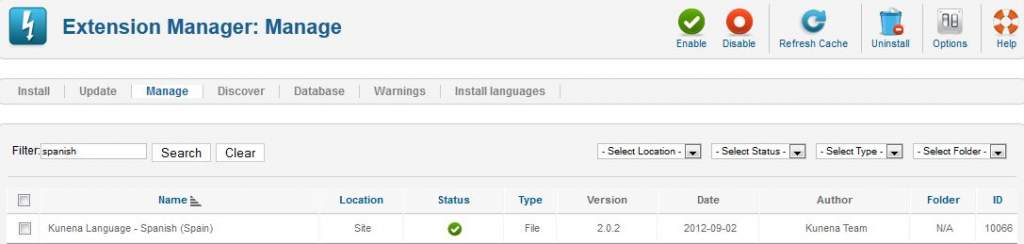
But, now, how do I get Kunena to use that language??
Thanks for the help so far; managed to get a language installed (will do detailed write-up later).
But, now, how do I get Kunena to use that language??
The following user(s) said Thank You: sozzled
Please Log in or Create an account to join the conversation.
13 years 5 months ago #136292
by TKtemp
Replied by TKtemp on topic How to install a language when using Kunena 2.0.2
Hi,
Kunena display your JOOMLA default language
Kunena display your JOOMLA default language
Please Log in or Create an account to join the conversation.
13 years 5 months ago #136293
by sozzled
Blue Eagle vs. Crypsis reference guide
Read my blog and
Replied by sozzled on topic How to install a language when using Kunena 2.0.2
Thanks to both of you: oldfart and TKtemp 
Blue Eagle vs. Crypsis reference guide
Read my blog and
The following user(s) said Thank You: 810
Please Log in or Create an account to join the conversation.
Time to create page: 0.305 seconds