


- Posts: 12
- Thank you received: 4
Kunena 6.4.13 Released
The Kunena team has announce the arrival of Kunena 6.4.13 [6.4.13] in stable which is now available for download as a native Joomla extension for J! 5.4.x/6.0.x./6.1.x. This version addresses most of the issues that were discovered in K 6.2 / K 6.3 / K 6.4 and issues discovered during the last development stages of K 6.0
Hint: This version is primarily intended to facilitate an upgrade if Joomla was first updated to version 6.1 before Kunena was up to dated.
Merged How to install a language when using Kunena 2.0.2
13 years 8 months ago #136294
by oldfart
So, despite having installed the language for Kunena; it has no effect, and you have to control Kunena's language using Joomla tools, where (in my case, with Spanish installed) I would have to install Spanish for Joomla and change default language.
I guess the Kunena specific words (haven't looked) will be in the Kunena spanish dictionary??
I can investigate this theory, but if you know the answer it will save some time.
Replied by oldfart on topic How to install a language when using Kunena 2.0.2
TKtemp wrote: Hi,
Kunena display your JOOMLA default language

So, despite having installed the language for Kunena; it has no effect, and you have to control Kunena's language using Joomla tools, where (in my case, with Spanish installed) I would have to install Spanish for Joomla and change default language.
I guess the Kunena specific words (haven't looked) will be in the Kunena spanish dictionary??
I can investigate this theory, but if you know the answer it will save some time.
Please Log in or Create an account to join the conversation.


13 years 8 months ago #136296
by sozzled
Blue Eagle vs. Crypsis reference guide
Read my blog and

Replied by sozzled on topic How to install a language when using Kunena 2.0.2
It depends on how complete is the translation. According to the information here ( www.transifex.com/projects/p/Kunena/ ) it would seem that Spanish is 100% complete but, really, who knows?oldfart wrote: I guess the Kunena specific words (haven't looked) will be in the Kunena spanish dictionary?
Blue Eagle vs. Crypsis reference guide
Read my blog and
Please Log in or Create an account to join the conversation.
13 years 8 months ago #136297
by oldfart
Replied by oldfart on topic How to install a language when using Kunena 2.0.2
This guide is valid for Kunena 2.0.2 & Joomla 2.5.7
1. Download the language pack from the downloads section
2. Unzip it (on your PC is easiest)
3. there is a directory called /languages, with a load of different languages for Kunena (as zip files) - select which one you want to install
4. Using JOOMLA's Extensions | Extension manager, Upload Package File;
upload the zip file you want to install. For this example I used Spanish:
That's it for the Kunena part.
5. You now have to install Spanish into JOOMLA: Extensions | Language Manager - click the Install Language Icon and search for spanish, select it and click the install icon.
6. Go back to Extensions | Language Manager - Spanish should be in the list - select it and make it default.
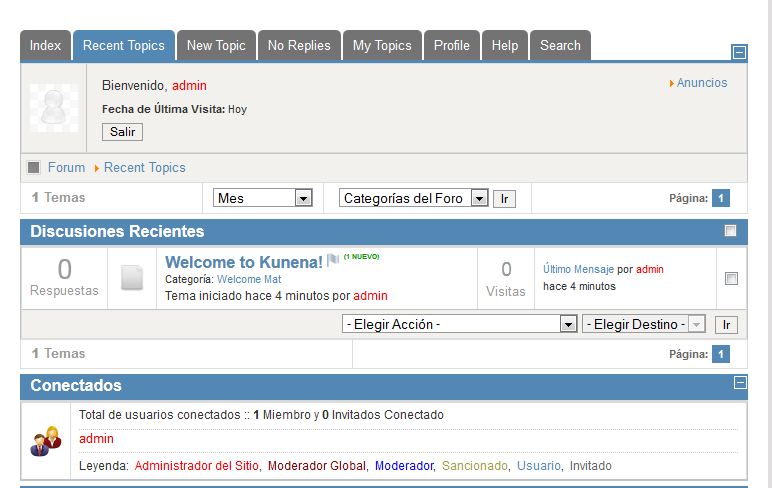
That's as far as I have got - this is what it looks like
1. Download the language pack from the downloads section
Code:
http://joomlacode.org/gf/download/frsrelease/17387/75811/pkg_kunena_languages_v2.0.2_2012-09-02.zip
3. there is a directory called /languages, with a load of different languages for Kunena (as zip files) - select which one you want to install
4. Using JOOMLA's Extensions | Extension manager, Upload Package File;
upload the zip file you want to install. For this example I used Spanish:
Code:
com_kunena_es-ES_v2.0.2.zip
5. You now have to install Spanish into JOOMLA: Extensions | Language Manager - click the Install Language Icon and search for spanish, select it and click the install icon.
6. Go back to Extensions | Language Manager - Spanish should be in the list - select it and make it default.
That's as far as I have got - this is what it looks like
Please Log in or Create an account to join the conversation.
13 years 8 months ago #136302
by sozzled
Blue Eagle vs. Crypsis reference guide
Read my blog and
Replied by sozzled on topic How to install a language when using Kunena 2.0.2
I made an attempt to update the Wiki with better information, based on what oldfart has given us. Please review the article
K 2.0 Language Installation Guide
and add/update it as you see fit.
Blue Eagle vs. Crypsis reference guide
Read my blog and
Please Log in or Create an account to join the conversation.

13 years 8 months ago #136303
by TKtemp
Replied by TKtemp on topic How to install a language when using Kunena 2.0.2
Hi,
Kunena language installer detect which languages are already installed on your Joomla site and install all present languages from package.
So, the right way to install kunena language (J!2.5) should be:
J!2.5
1. Install Spanish language for Joomla and make it default
2. Download language package from Kunena site
3. Install this package using Joomla Extension Manager
If installation fail:
4. Extract the files from the archive and install language file you wish using Joomla Extension Manager
J!1.5:
steps 1, 2 and 4 (step 3 doesn't work)
Best Regards
Kunena language installer detect which languages are already installed on your Joomla site and install all present languages from package.
So, the right way to install kunena language (J!2.5) should be:
J!2.5
1. Install Spanish language for Joomla and make it default
2. Download language package from Kunena site
3. Install this package using Joomla Extension Manager
If installation fail:
4. Extract the files from the archive and install language file you wish using Joomla Extension Manager
J!1.5:
steps 1, 2 and 4 (step 3 doesn't work)
Best Regards
Please Log in or Create an account to join the conversation.
13 years 8 months ago - 13 years 8 months ago #136304
by sozzled
Blue Eagle vs. Crypsis reference guide
Read my blog and
Replied by sozzled on topic How to install a language when using Kunena 2.0.2
You are quite correct - the order of installation is important - and I have updated the documentation accordingly.
Blue Eagle vs. Crypsis reference guide
Read my blog and
Last edit: 13 years 8 months ago by sozzled.
The following user(s) said Thank You: oldfart
Please Log in or Create an account to join the conversation.
Time to create page: 0.256 seconds