


- Posts: 2
- Thank you received: 1
Kunena 7.0.8 Released
The Kunena team has announce the arrival of Kunena 7.0.8 [K 7.0.8] in stable which is now available for download as a native Joomla extension for J! 5.4.x/6.0.x./6.1.x. This version addresses most of the issues that were discovered in K 6.2 / K 6.3 / K 6.4 and issues discovered during the last development stages of K 7.0
Merged How to install a language when using Kunena 2.0.2
13 years 10 months ago #133207
by Sjaak
How to install a language when using Kunena 2.0.2 was created by Sjaak
Hi everyone,
I was wondering if someone could help me with a problem. I've installed Kunena 2.0.2, but it is by default in English. I have downloaded the language pack I need, but I do not know how to install it. Does anyone know how to install a language pack?
Thanks in advance!
I was wondering if someone could help me with a problem. I've installed Kunena 2.0.2, but it is by default in English. I have downloaded the language pack I need, but I do not know how to install it. Does anyone know how to install a language pack?
Thanks in advance!
Please Log in or Create an account to join the conversation.
13 years 10 months ago - 13 years 10 months ago #133209
by Dario
Replied by Dario on topic How to install a language when using Kunena 2.0.2
Just Install it from
www.kunena.org/download
Then press F5 to refresh the Forum-Page^^lg
If not work - what language do you want to have?lg
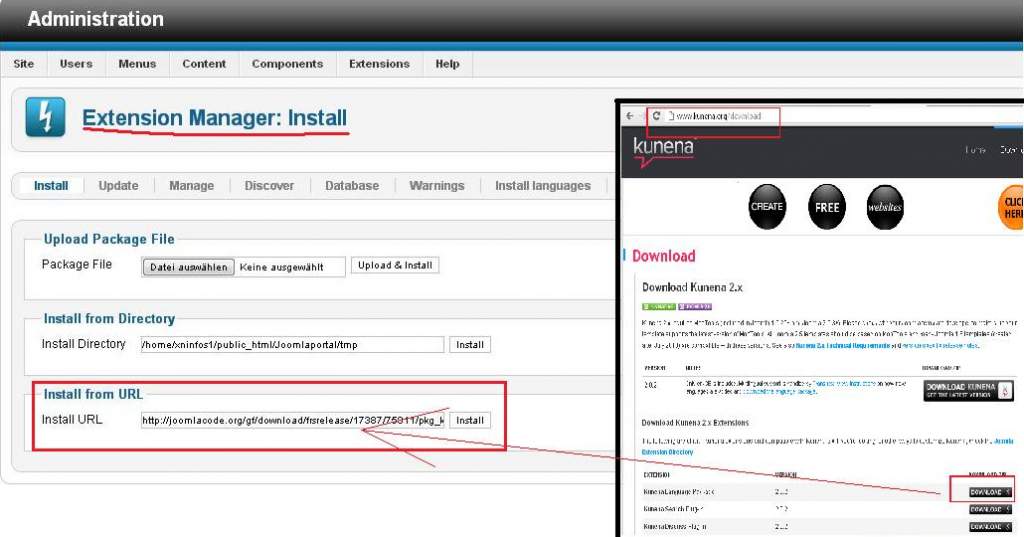
www.kunena.org/download
Then press F5 to refresh the Forum-Page^^lg
If not work - what language do you want to have?lg
Last edit: 13 years 10 months ago by Dario.
The following user(s) said Thank You: sozzled
Please Log in or Create an account to join the conversation.
13 years 10 months ago #133212
by Sjaak
Replied by Sjaak on topic How to install a language when using Kunena 2.0.2
I was able to download the language pack and to extract it. After that, I was able to select the language I would like to use and install it, using the extension manager.
I got the message: Language pack installed succesfully!
But, the forum was not translated to the intended language. Do you know how to fix this?
Thanks for your quick response!
I got the message: Language pack installed succesfully!
But, the forum was not translated to the intended language. Do you know how to fix this?
Thanks for your quick response!
Please Log in or Create an account to join the conversation.


13 years 10 months ago #133220
by sozzled
Perhaps it may help to show us how, specifically, "the forum was not translated into the intended language"? :dry:
Blue Eagle vs. Crypsis reference guide
Read my blog and

Replied by sozzled on topic How to install a language when using Kunena 2.0.2
I do not understand the statement "the forum was not translated into the intended language". For example, if you have 100 messages written in English, installing the language pack will not translate the 100 messages for you.Sjaak wrote: But, the forum was not translated to the intended language. Do you know how to fix this?
Perhaps it may help to show us how, specifically, "the forum was not translated into the intended language"? :dry:
Blue Eagle vs. Crypsis reference guide
Read my blog and
The following user(s) said Thank You: future trans
Please Log in or Create an account to join the conversation.
13 years 9 months ago #136275
by oldfart
Replied by oldfart on topic How to install a language when using Kunena 2.0.2
I too am having problems installing the language pack.
Following the example given above (install URL) where the URL is
results in an error:-
Package Install: There were no files to install!
Trying the other methods:-
install from directory
JInstaller: :Install: Cannot find XML setup file
Path does not have a valid package.
upload package file
There was an error uploading this file to the server.
run install.script.php
no screen output & no action taken?
Following the example given above (install URL) where the URL is
Code:
http://joomlacode.org/gf/download/frsrelease/17387/75811/pkg_kunena_languages_v2.0.2_2012-09-02.zip
Package Install: There were no files to install!
Trying the other methods:-
install from directory
JInstaller: :Install: Cannot find XML setup file
Path does not have a valid package.
upload package file
There was an error uploading this file to the server.
run install.script.php
no screen output & no action taken?
Please Log in or Create an account to join the conversation.
13 years 9 months ago #136281
by sozzled
Blue Eagle vs. Crypsis reference guide
Read my blog and
Replied by sozzled on topic How to install a language when using Kunena 2.0.2
I must admit that I have never, myself, tried to have a forum where Kunena was translated into a different language. I must also concede that it should be a lot easier to find instructions in the
Kunena Wiki
that explain the specific steps involved. However, I think the key to helping you - who, like me, lacks the "experience" or cannot easily find help in the Wiki - is here:

I hope this helpsSjaak wrote: I was able to download the language pack and to extract it. After that, I was able to select the language I would like to use and install it, using the extension manager.
Blue Eagle vs. Crypsis reference guide
Read my blog and
Please Log in or Create an account to join the conversation.
Time to create page: 0.272 seconds