
Kunena 7.1.1 & Kunena 6.4.17 – Security Updates Released
The Kunena team has announce the arrival of Kunena 7.1.1 [K 7.1.1] in stable which is now available for download as a native Joomla extension for J! 5.4.x/6.0.x./6.1.x./6.2.x This version addresses most of the issues that were discovered in K 6.2 / K 6.3 / K 6.4 / K7.0 and issues discovered during the last development stages of K 7.1
Just a reminder: K6.4.17 receives only securities fixes until end of 2026, so it's advised for users to upgrade to K7.1.
Question *SOLVED* How-to: CSS Speech Bubbles & Topmenu links into Profilebox ..


I know that my browser can display the bubble (I replaced my kunena.forum.css file with Eddy's version and demonstrated that the method works but not the implementation) but I can't figure out what other elements in the default_ex template need to be targetted.
Thanks. This is a really interesting idea that I think is worth playing with.
Blue Eagle vs. Crypsis reference guide
Read my blog and

Please Log in or Create an account to join the conversation.

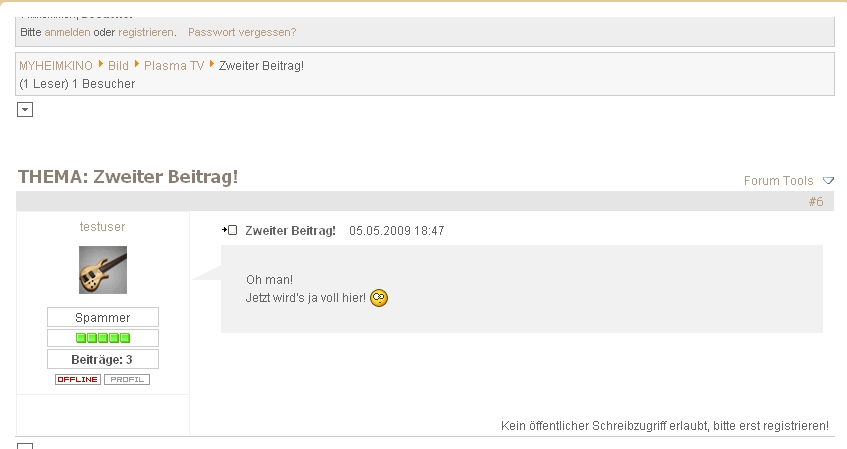
div.msgtext {
background-color:#F1F1F1;
padding:25px;
position:relative;
}
td.fb-msgview-right {
background-color:#FFFFFF;
padding:5px 10px 5px 30px;
vertical-align:top;
border-right:1px solid #F1F1F1;
}
span.arrow {
border-bottom:15px solid #F1F1F1;
border-left:30px solid #FFFFFF;
height:0;
left:-30px;
line-height:0;
position:absolute;
top:20px;
width:0;
}
td.fb-msgview-right-c {
background-color:#FFFFFF;
padding:1px 5px;
vertical-align:top;
border-right:1px solid #F1F1F1;
}
td.fb-msgview-right-b {
background-color:#FFFFFF;
padding:1px 5px;
vertical-align:top;
border-right:1px solid #F1F1F1;
}
div.fb-msgview-l-cover {
overflow:auto;
padding:5px;
text-align:center;
background:#FFFFFF;
}
div.viewcover {
background:#FFFFFF none repeat scroll 0 0;
border:1px solid #CCCCCC;
color:#515151;
margin:2px 25px;
text-align:center;
}
td.fb-msgview-left-c {
background:#FFFFFF none repeat scroll 0 0;
vertical-align:top;
border-left:1px solid #F1F1F1;
border-right:1px solid #F1F1F1;
}
td.fb-msgview-left-b {
background:#FFFFFF none repeat scroll 0 0;
vertical-align:top;
width:170px;
border-left:1px solid #F1F1F1;
border-right:1px solid #F1F1F1;
}
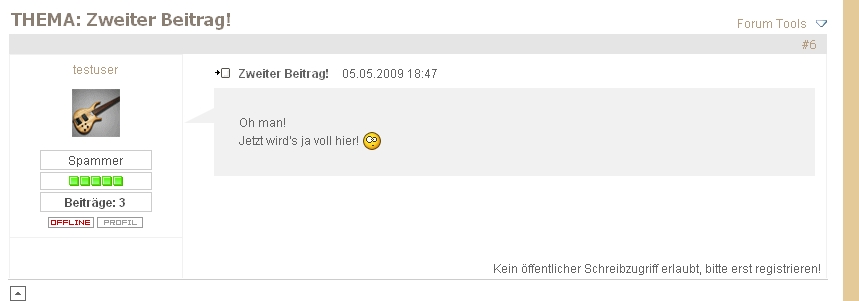
This will look like on screenshot:

Please Log in or Create an account to join the conversation.

Blue Eagle vs. Crypsis reference guide
Read my blog and
Please Log in or Create an account to join the conversation.

Please Log in or Create an account to join the conversation.


Didn't know, people would be so into this ... :woohoo:
@ grumblemarc
No ... no images used. Pure CSS.
@ all
I tried to do it vice-versa too (grey bubbles, white background). The problem is: the smileys.

On a grey color (the bubble) they don't look good (frenzied out).
That's why I made the forum background grey and the bubbles white.
But, as said before, this is work in progress ... my website is in development and I'm still playing around with color schemes.
The point is: it can be done.
And you have to play around with the css to get the colors and the look you want.
Took me 4 hours yesterday to get this result only ...
About making it a template
Yeah, I thought about it too.
I will probably make it available, once I'm done with my site.
There are still missing buttons and further optimizing.
And now the bad part:
The css bubbles won't work on IE6.
I think it's because the "arrow" has an absolute position.
(Anybody know a solution to put in the ie.css?)
And before the praise goes on:
I'm just a guy with ideas – looking to get things done the way that I want them.
I don't know anything about coding or css.
(Just use the fairly nice CSSedit for mac, which is perfect for visual editing, i.e. no code
 )
I searched the net for CSS bubbles and then I asked here.
So, I just had the idea, but it's other ppl (thanks again, ida) that actually knew what coding was needed to get this done.
Please Log in or Create an account to join the conversation.
- grumblemarc
-

- Offline
- Elite Member
-

- Still making trouble
- Posts: 1107
- Thank you received: 3
And now the bad part:
The css bubbles won't work on IE6.
I knew there would be a downside. The default templates had something similar in them but relied on an image to act as the arrow. More stable that way I think.
We love stars on the Joomla Extension Directory .
Please Log in or Create an account to join the conversation.