

- Posts: 6
- Thank you received: 0
Kunena 7.0.5 & Kunena 6.4.11 – Security Updates Released
The Kunena team has announce the arrival of Kunena 7.0.5 [K 7.0.5] in stable which is now available for download as a native Joomla extension for J! 5.4.x/6.0.x. This version addresses most of the issues that were discovered in K 6.2 / K 6.3 / K 6.4 and issues discovered during the last development stages of K 7.0.
The Kunena team is also pleased to announce the eleventh version of Kunena 6.4, a native Joomla extension for Joomla! 5.0, 5.1, 5.2, 5.3, 5.4 and 6.0.
Question Can I Install more than one kunena forum in my site? (Solved)
17 years 3 months ago #3062
by Caestor
 But in this case of Kunena the component name is différent from the tables in the database !
com_kunena, and in the database is jos_fb_something
In your last post you havn't changed any string _fb_ something!!!
I'm confused
Replied by Caestor on topic Re:Can I Install more than one kunena forum in my site?
But in this case of Kunena the component name is différent from the tables in the database !com_kunena, and in the database is jos_fb_something
In your last post you havn't changed any string _fb_ something!!!
I'm confused
Please Log in or Create an account to join the conversation.
17 years 3 months ago - 17 years 3 months ago #3064
by Lintzy
Replied by Lintzy on topic Re:Can I Install more than one kunena forum in my site?
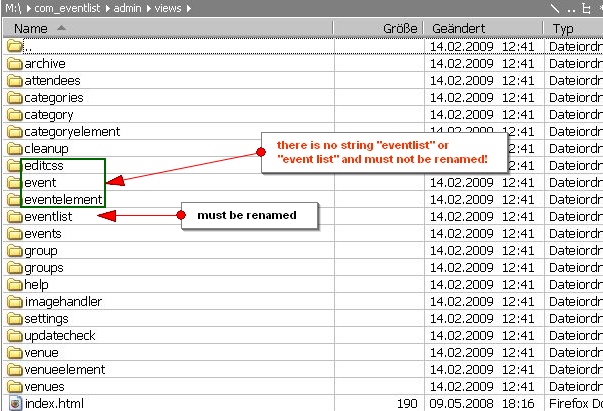
hmmm, you are right. Really that's difficult. Just let me post last (how to) screenshot (only 1 screenshot per post possible) and than i'll try to duplicate kunena. Wish me luck!

Last edit: 17 years 3 months ago by Lintzy.
Please Log in or Create an account to join the conversation.
- MasterVision
-

- Offline
- Junior Member
-

Less
More
- Posts: 17
- Thank you received: 0
17 years 3 months ago #3067
by MasterVision
Replied by MasterVision on topic Re:Can I Install more than one kunena forum in my site?
Wish you good luck Lintzy 
Im sure you'll need to duplicate your jos_fb_**** tables to something like jos_fb1_*** tables and re-write every single settings of your 2nd Kunena.
Hope you will get it working since many members might want to have multiple Kunena Forums in their Site or me in the future
Im sure you'll need to duplicate your jos_fb_**** tables to something like jos_fb1_*** tables and re-write every single settings of your 2nd Kunena.
Hope you will get it working since many members might want to have multiple Kunena Forums in their Site or me in the future
Please Log in or Create an account to join the conversation.
- grumblemarc
-

- Offline
- Elite Member
-

- Still making trouble
Less
More
- Posts: 1107
- Thank you received: 3
17 years 3 months ago #3069
by grumblemarc
We love stars on the Joomla Extension Directory .
Replied by grumblemarc on topic Re:Can I Install more than one kunena forum in my site?
I honestly don't think it's possible without a lot (I mean a LOT) of delicate hacking. More than what is shown here. This isn't a simple component. I wish you luck though. This has been requested by a few for quite a while.
We love stars on the Joomla Extension Directory .
Please Log in or Create an account to join the conversation.
17 years 3 months ago - 17 years 3 months ago #3084
by Lintzy
Replied by Lintzy on topic Re:Can I Install more than one kunena forum in my site?
Ok, i did it  and it looks good to me
  . But without any guarantee, and only for your own risk! And make a Backup before install!!!
You have to search and replace in quellcode (with Dreamweaver or PSPad) (instructions see my first post) Kunena, kunena and KUNENA. Then you have to change the filenames and foldernames. I have changed string kunena in secondforum, KUNENA in SECONDFORUM and Kunena in Secondforum.
Now for database you have to search and replace fb_ in blub_ (or another string, important ist string and _ =string_ or blub_ and to search for fb AND _ = fb_. And you have to rename files and folders with fb_ into blub_ , for example the file fb_category_list_bottom.php into blub_category_list_bottom.php. Do not search only for fb without _ !!!
At last you have to zip it and install. I have put the working file as attachment. But you should realize, that you have to make changes for every kunena update in same way. So you must change the new file with secondforum and blub_ (or the strings you have chosen).
The file is to large... just a minute. Ok, here is the download of the duplicated kunena forum called secondforum.
Edit: You can download this file and install it in addition to your original Kunena Forum and you will have two forums: Kunena and Second Forum - but please backup Database before and first of all try it in testing enviroment.
and it looks good to me . But without any guarantee, and only for your own risk! And make a Backup before install!!!
You have to search and replace in quellcode (with Dreamweaver or PSPad) (instructions see my first post) Kunena, kunena and KUNENA. Then you have to change the filenames and foldernames. I have changed string kunena in secondforum, KUNENA in SECONDFORUM and Kunena in Secondforum.
Now for database you have to search and replace fb_ in blub_ (or another string, important ist string and _ =string_ or blub_ and to search for fb AND _ = fb_. And you have to rename files and folders with fb_ into blub_ , for example the file fb_category_list_bottom.php into blub_category_list_bottom.php. Do not search only for fb without _ !!!
At last you have to zip it and install. I have put the working file as attachment. But you should realize, that you have to make changes for every kunena update in same way. So you must change the new file with secondforum and blub_ (or the strings you have chosen).
The file is to large... just a minute. Ok, here is the download of the duplicated kunena forum called secondforum.
Edit: You can download this file and install it in addition to your original Kunena Forum and you will have two forums: Kunena and Second Forum - but please backup Database before and first of all try it in testing enviroment.
Last edit: 17 years 3 months ago by Lintzy.
Please Log in or Create an account to join the conversation.
- MasterVision
-
- Offline
- Junior Member
-
Less
More
- Posts: 17
- Thank you received: 0
17 years 3 months ago #3090
by MasterVision
Replied by MasterVision on topic Re:Can I Install more than one kunena forum in my site?
you changed/replaced fb_ to blub_ not duplicating? :dry:
how about the old Kunena... what tables it is using?
how about the old Kunena... what tables it is using?
Please Log in or Create an account to join the conversation.
Time to create page: 0.303 seconds