


- Posts: 6
- Thank you received: 0
Kunena 7.0.9 & Kunena 6.4.14 – Security Updates Released
The Kunena team has announce the arrival of Kunena 7.0.9 [K 7.0.9] in stable which is now available for download as a native Joomla extension for J! 5.4.x/6.0.x./6.1.x. This version addresses most of the issues that were discovered in K 6.2 / K 6.3 / K 6.4 and issues discovered during the last development stages of K 7.0
Question Can I Install more than one kunena forum in my site? (Solved)
17 years 7 months ago - 17 years 7 months ago #3050
by Caestor
I want install more than one forum in my site, is'it possible??
Last edit: 17 years 7 months ago by Caestor.
Please Log in or Create an account to join the conversation.

17 years 7 months ago - 17 years 7 months ago #3054
by Lintzy
Replied by Lintzy on topic Re:Can I Install more than one kunena forum in my site?
I don't know, if there is an easy way to make it. But a solution exists, how to realize it with every component in joomla!
You have to use an Editor, which will be able to "search and edit" all files in folders. I make it with dreamweaver, but PSPad will do the same.
For example, i have realized a second eventlist (from schlu) one for registerd and one special. Therefore i had to change the string eventlist in another word, ex. mylist.
First of all i had to unzip the com_evenlist.zip in folder com_eventlist. Important!: If there are more zipped files in folder com_eventlist you have to unzip them too. Next i searched the string "eventlist" (without ") with notepad ++ in folder com_evenlist (important! take the options from screenshot below). Notepad is listing all combinations from eventlist, as Eventlist, eventList, EVENTlist and so on. This is a checklist for me, what i have all to change.
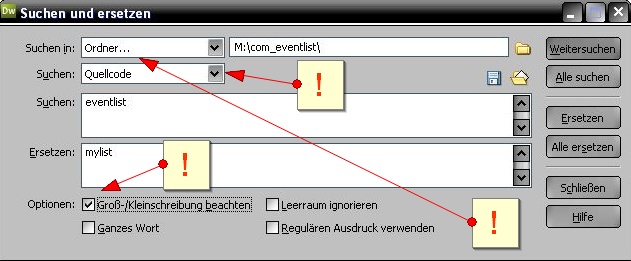
Second step is to do search AND edit with Dreamweaver (or PSPad ), but here i enable the option "use of capital and small initial letters", so if i search and edit Eventlist, Dreamweaver only finds Eventlist, but not eventlist. The replace of the strings follow the same rule... change eventlist to mylist, and Eventlist to Mylist, and eventList to myList (and so on).
Ok, all words found by notepad are replaced? Now i have to search again, may be, there exist eventlist in two words too. So i search for "event list" (without ")(same options as on screenshot below) and if i found event list or Event list etc i have to replace them with my list or My list etc.
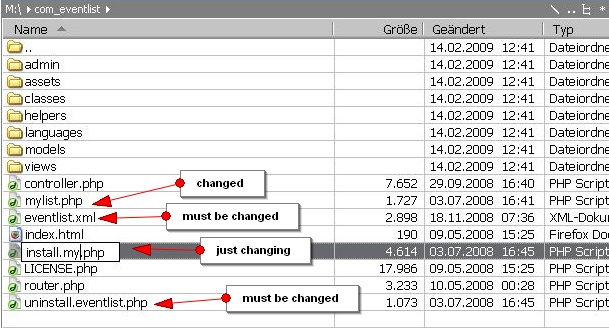
Ready? No :silly:! Next step is to open the folder com_eventlist with explorer, norton commander etc. and to rename the foldernames and the filenames, which contain the string eventlist (Eventlist etc). I have to rename those strings with mylist (Mylist etc). And of course the folder com_eventlist itself has to be renamed into com_mylist.
And at last i have to zip the folder com_mylist into com_mylist.zip. Important, if there were more zipped files in folder com_evenlist= now com_mylist, they first must be zipped, too (see point 1).
It is not so complicated, as it seems (most complication make my english knowledge ^^)
If you want to use plugins and modules for the new mylist (eventlist), you have to rename them too (string eventlist into mylist, folder rename, mod_mylist etc) in the same way as told above.
To make kunena twice, change the string kunena.

I'll hope, this will help
You have to use an Editor, which will be able to "search and edit" all files in folders. I make it with dreamweaver, but PSPad will do the same.
For example, i have realized a second eventlist (from schlu) one for registerd and one special. Therefore i had to change the string eventlist in another word, ex. mylist.
First of all i had to unzip the com_evenlist.zip in folder com_eventlist. Important!: If there are more zipped files in folder com_eventlist you have to unzip them too. Next i searched the string "eventlist" (without ") with notepad ++ in folder com_evenlist (important! take the options from screenshot below). Notepad is listing all combinations from eventlist, as Eventlist, eventList, EVENTlist and so on. This is a checklist for me, what i have all to change.
Second step is to do search AND edit with Dreamweaver (or PSPad ), but here i enable the option "use of capital and small initial letters", so if i search and edit Eventlist, Dreamweaver only finds Eventlist, but not eventlist. The replace of the strings follow the same rule... change eventlist to mylist, and Eventlist to Mylist, and eventList to myList (and so on).
Ok, all words found by notepad are replaced? Now i have to search again, may be, there exist eventlist in two words too. So i search for "event list" (without ")(same options as on screenshot below) and if i found event list or Event list etc i have to replace them with my list or My list etc.
Ready? No :silly:! Next step is to open the folder com_eventlist with explorer, norton commander etc. and to rename the foldernames and the filenames, which contain the string eventlist (Eventlist etc). I have to rename those strings with mylist (Mylist etc). And of course the folder com_eventlist itself has to be renamed into com_mylist.
And at last i have to zip the folder com_mylist into com_mylist.zip. Important, if there were more zipped files in folder com_evenlist= now com_mylist, they first must be zipped, too (see point 1).
It is not so complicated, as it seems (most complication make my english knowledge ^^)
If you want to use plugins and modules for the new mylist (eventlist), you have to rename them too (string eventlist into mylist, folder rename, mod_mylist etc) in the same way as told above.
To make kunena twice, change the string kunena.
I'll hope, this will help

Last edit: 17 years 7 months ago by Lintzy.
Please Log in or Create an account to join the conversation.
17 years 7 months ago #3056
by Caestor
Replied by Caestor on topic Re:Can I Install more than one kunena forum in my site?
Complicated but well explained! Thx
I will give a try
I will give a try
Please Log in or Create an account to join the conversation.
17 years 7 months ago #3057
by Caestor
Replied by Caestor on topic Re:Can I Install more than one kunena forum in my site?
Question: And what about database? The 2 forums will use the same tables names??
Please Log in or Create an account to join the conversation.
17 years 7 months ago #3059
by Lintzy
Replied by Lintzy on topic Re:Can I Install more than one kunena forum in my site?
I had duplicated the components eventlist and easytemplate. And don't ask me how  , but in both cases there were build two databases automatically, eg eventlist: jos_eventlist, jos_mylist.
Make a backup before duplicating and try it.
Here is the screenshot from Dreamweaver settings:

, but in both cases there were build two databases automatically, eg eventlist: jos_eventlist, jos_mylist.Make a backup before duplicating and try it.
Here is the screenshot from Dreamweaver settings:
Please Log in or Create an account to join the conversation.
17 years 7 months ago #3060
by Lintzy
Replied by Lintzy on topic Re:Can I Install more than one kunena forum in my site?
files have to be renamed:

Please Log in or Create an account to join the conversation.
Time to create page: 0.221 seconds