


- Posts: 15
- Thank you received: 0
Kunena 7.0.9 & Kunena 6.4.14 – Security Updates Released
The Kunena team has announce the arrival of Kunena 7.0.9 [K 7.0.9] in stable which is now available for download as a native Joomla extension for J! 5.4.x/6.0.x./6.1.x. This version addresses most of the issues that were discovered in K 6.2 / K 6.3 / K 6.4 and issues discovered during the last development stages of K 7.0
Solved After the installation of Kunena 6.2.1 to J4.4. no searching and expanding works
2 years 10 months ago - 2 years 10 months ago #229956
by M007.file
Replied by M007.file on topic After the installation of Kunena 6.2.1 to J4.4. no searching and expanding works
OK, I would, but until I added the "aliases", there was no option to display the login form (login form to the forum). I do not want to make displayed login form to Joomla, allowing other features, (e.g. registration), and moreover it just wastes the space on the page.
Once I created the Joomla Main Menu items calling using items from the Kunena menu, which was displayed as one of the types to use its options from, and then it finally started to work at least like this.
See the image here:
ibb.co/WkW7kcJ
However, not to allow to search and the inability to expand the topics is something, that is not expected from users. The option is not to allow other people to smuggle through the board, as there will be discussed internal info only though.
I have manually created the accounts for users, whose emails were delivered to me. I am not expecting and not willing to allow them, to register themselves.
What is the correct method to display the items from Kunena aside from the Main menu in Joomla? I expect, that the Board will be opened using the link in Joomla Main Menu, and then it will be possible to expand items/topics/categories and search. When I made it like this, either I received 404 errors, or it was not displayed at all.
I disabled the menu items you mentioned, and now I can see the Board, but except for the Login dialog of the Board, there is no menu item available to use the board at all. Is this expected behavior? About the Security - I changed that (previously I reverted several times to the default setup, so it can be, that I missed this option setting this time).
When it is set like mentioned and I logged in, I hit the item "edit" and another 404 error appeared. Until the items you mentioned were disabled, it worked. Now it returns 404s. I Is there any specific module position, that is used for the Board to display the Kunena menu?
Currently, I do have 3 positions (hmenu - Main horizontal menu from Joomla!, position-sidebar (as per its name it is just a vertical bar for blocks, and lastly the position breadcrumbs).
If I place the Kunena menu in the same position as the Main menu, it still throws 404 errors on the item clicked.
Thanks again for your patience, hints, and support.
Best M007.file
Once I created the Joomla Main Menu items calling using items from the Kunena menu, which was displayed as one of the types to use its options from, and then it finally started to work at least like this.
See the image here:
ibb.co/WkW7kcJ
However, not to allow to search and the inability to expand the topics is something, that is not expected from users. The option is not to allow other people to smuggle through the board, as there will be discussed internal info only though.
I have manually created the accounts for users, whose emails were delivered to me. I am not expecting and not willing to allow them, to register themselves.
What is the correct method to display the items from Kunena aside from the Main menu in Joomla? I expect, that the Board will be opened using the link in Joomla Main Menu, and then it will be possible to expand items/topics/categories and search. When I made it like this, either I received 404 errors, or it was not displayed at all.
I disabled the menu items you mentioned, and now I can see the Board, but except for the Login dialog of the Board, there is no menu item available to use the board at all. Is this expected behavior? About the Security - I changed that (previously I reverted several times to the default setup, so it can be, that I missed this option setting this time).
When it is set like mentioned and I logged in, I hit the item "edit" and another 404 error appeared. Until the items you mentioned were disabled, it worked. Now it returns 404s. I Is there any specific module position, that is used for the Board to display the Kunena menu?
Currently, I do have 3 positions (hmenu - Main horizontal menu from Joomla!, position-sidebar (as per its name it is just a vertical bar for blocks, and lastly the position breadcrumbs).
If I place the Kunena menu in the same position as the Main menu, it still throws 404 errors on the item clicked.
Thanks again for your patience, hints, and support.
Best M007.file
Last edit: 2 years 10 months ago by M007.file.
Please Log in or Create an account to join the conversation.


Less
More
- Posts: 12291
- Thank you received: 2538
2 years 10 months ago #229960
by rich
Important! Always create a backup before you make any changes to your website!
Replied by rich on topic After the installation of Kunena 6.2.1 to J4.4. no searching and expanding works
Kunena does not have its own registration, it is only redirected to the Joomla registration. Joomla user and Kunena user are the same. If you have deactivated the Joomla registration, nobody can register in Kunena either. So a single login form on the main page and an alias link to the forum would suffice instead of the many redirects.I have manually created the accounts for users, whose emails were delivered to me. I am not expecting and not willing to allow them, to register themselves.
Kunena needs a working menu, otherwise it will not work properly. Therefore you are not allowed to move the menu items to other menus. You can add a module so that the menu items are displayed in Kunena and in another module position. However, this has the disadvantage that every change (e.g. unpublish) affects both menus. It's better if you use menu item Alias.When it is set like mentioned and I logged in, I hit the item "edit" and another 404 error appeared. Until the items you mentioned were disabled, it worked. Now it returns 404s. I Is there any specific module position, that is used for the Board to display the Kunena menu?
Currently, I do have 3 positions (hmenu - Main horizontal menu from Joomla!, position-sidebar (as per its name it is just a vertical bar for blocks, and lastly the position breadcrumbs).
If I place the Kunena menu in the same position as the Main menu, it still throws 404 errors on the item clicked.
Where do you see a difference whether the menu items are in the forum or in the main menu? Who or which user group has access to the forum categories and can see them is defined in the category manager in the category permissions, not with the menu items.The option is not to allow other people to smuggle through the board, as there will be discussed internal info only though.
Probablly it would help, if you restore the original Kunena menu (Backend -> Kunena -> Tools -> menu Manager -> Restore Kunena Menu).However, not to allow to search and the inability to expand the topics is something, that is not expected from users.
Important! Always create a backup before you make any changes to your website!
Please Log in or Create an account to join the conversation.
2 years 9 months ago #229979
by M007.file
Replied by M007.file on topic After the installation of Kunena 6.2.1 to J4.4. no searching and expanding works
Thanks, I already did. The only issue now is, that on click to the drop-down item does not keep such an item expanded, but disappears immediately.
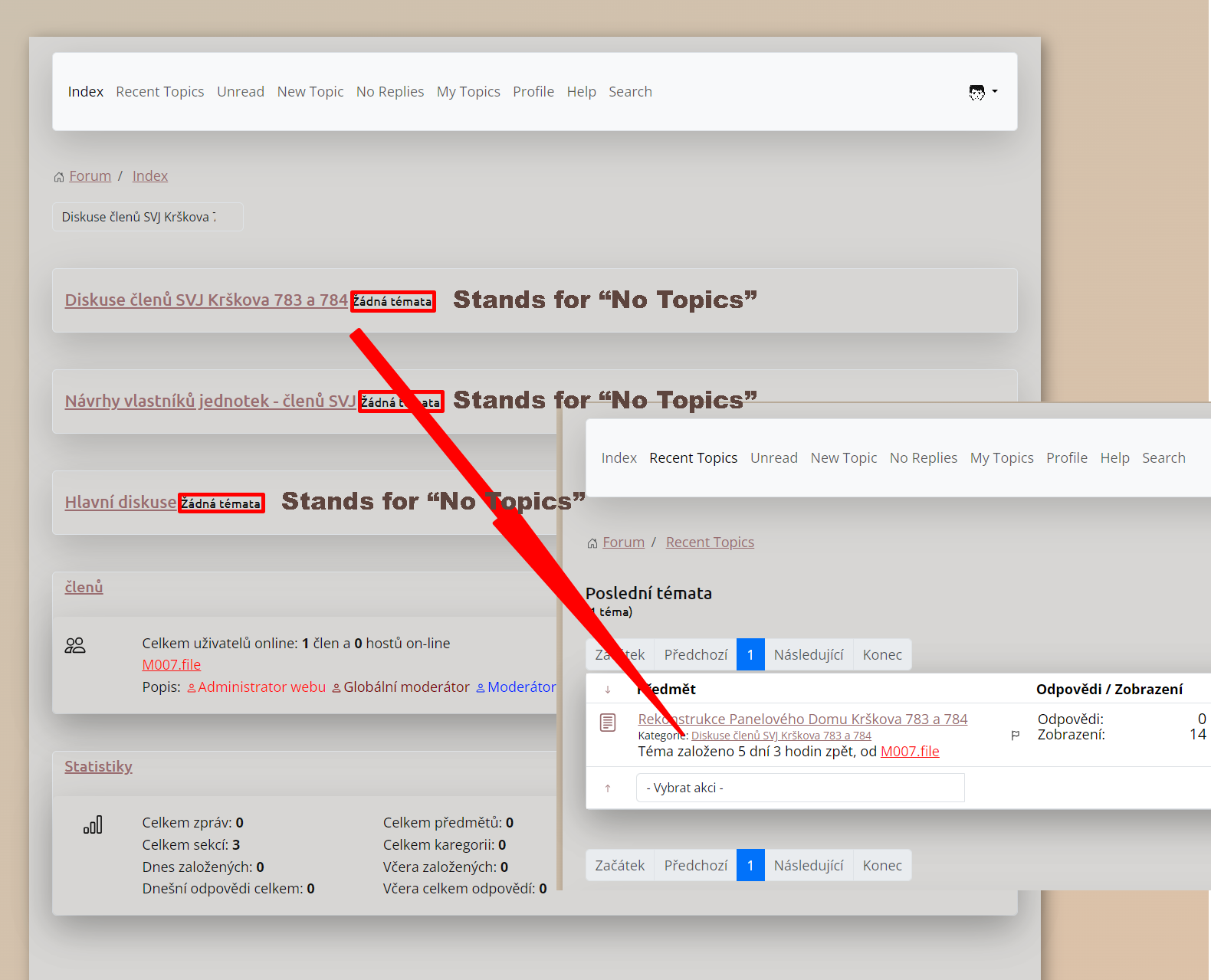
Is this expected behavior, that even within the Category is Topic, but on the Index Page it says "No Topics" (it is using the Czech Language - it might be incorrectly translated. I assume, there should be something like "No unread topics")? When I click on Recent Topics, the Topic that cannot be seen in the Index, is displayed.
Is this expected behavior, that even within the Category is Topic, but on the Index Page it says "No Topics" (it is using the Czech Language - it might be incorrectly translated. I assume, there should be something like "No unread topics")? When I click on Recent Topics, the Topic that cannot be seen in the Index, is displayed.
Please Log in or Create an account to join the conversation.


2 years 9 months ago #229982
by Gindi
Replied by Gindi on topic After the installation of Kunena 6.2.1 to J4.4. no searching and expanding works
The index page is the overview page of the categories and does not contain any topics. The categories contain the topics that are displayed when you click on "Current topics" (Recent topics). The topics then contain the user contributions. For unread topics, there is the "Unread" menu in the forum.
gindi
gindi
Please Log in or Create an account to join the conversation.
2 years 9 months ago #229983
by M007.file
Replied by M007.file on topic After the installation of Kunena 6.2.1 to J4.4. no searching and expanding works
Hello Gindi,
I understand, but why are there confusing labels next to each category, like this "No topics"? Is it possible to disable them somewhere in the configuration, not to lead our users, to that it is simply empty, it does not make any sense to waste time by clicking, to get in and check if any topic is available...
See the image attached. Thanks for any hints or tips, how to make it working and understandable for every user.
I understand, but why are there confusing labels next to each category, like this "No topics"? Is it possible to disable them somewhere in the configuration, not to lead our users, to that it is simply empty, it does not make any sense to waste time by clicking, to get in and check if any topic is available...
See the image attached. Thanks for any hints or tips, how to make it working and understandable for every user.
Please Log in or Create an account to join the conversation.
2 years 9 months ago #229985
by Gindi
Replied by Gindi on topic After the installation of Kunena 6.2.1 to J4.4. no searching and expanding works
Normally each category name is followed by the number of topics it contains. If the category is empty, it will say "No topics".
gindi
gindi
Please Log in or Create an account to join the conversation.
Time to create page: 0.227 seconds