


- Posts: 15
- Thank you received: 0
Kunena 7.0.9 & Kunena 6.4.14 – Security Updates Released
The Kunena team has announce the arrival of Kunena 7.0.9 [K 7.0.9] in stable which is now available for download as a native Joomla extension for J! 5.4.x/6.0.x./6.1.x. This version addresses most of the issues that were discovered in K 6.2 / K 6.3 / K 6.4 and issues discovered during the last development stages of K 7.0
Solved After the installation of Kunena 6.2.1 to J4.4. no searching and expanding works
2 years 10 months ago - 2 years 10 months ago #229943
by M007.file
After the installation of Kunena 6.2.1 to J4.4. no searching and expanding works was created by M007.file
Hello all,
can you please help me with the setup of the new site (Joomla! 4.4.0!, Kunena 6.2.1, Nicepage 6.0), when the default configuration does not allow me to expand the Topics, and neither the Search form is not displayed properly. Even using an alias at the Joomla menu to the Kunena menu Search item, it either disappears or displays the error 404.
Excepting entering the users in Joomla and adding them to custom Access LVL, and some articles were created, nothing else was installed on my site.
Any advice from you would be valuable, as I just started with Kunena.
THX in advance,
M007.file
can you please help me with the setup of the new site (Joomla! 4.4.0!, Kunena 6.2.1, Nicepage 6.0), when the default configuration does not allow me to expand the Topics, and neither the Search form is not displayed properly. Even using an alias at the Joomla menu to the Kunena menu Search item, it either disappears or displays the error 404.
Excepting entering the users in Joomla and adding them to custom Access LVL, and some articles were created, nothing else was installed on my site.
Any advice from you would be valuable, as I just started with Kunena.
THX in advance,
M007.file
Last edit: 2 years 10 months ago by M007.file.
Please Log in or Create an account to join the conversation.
- 9themestore
-

- Offline
- Premium Member
-

2 years 10 months ago #229945
by 9themestore
- Please provide your site url if it has been lived.
- Please share tip if it worked fine with you.
- Don't be shy about using the "Thanks" button below if you found my comment helpful
Replied by 9themestore on topic After the installation of Kunena 6.2.1 to J4.4. no searching and expanding works
Hi M007.file,
Can you share your website link here? We will try to check and find the solution.
Regards,
Can you share your website link here? We will try to check and find the solution.
Regards,
- Please provide your site url if it has been lived.
- Please share tip if it worked fine with you.
- Don't be shy about using the "Thanks" button below if you found my comment helpful
Please Log in or Create an account to join the conversation.
2 years 10 months ago - 2 years 10 months ago #229946
by M007.file
Replied by M007.file on topic After the installation of Kunena 6.2.1 to J4.4. no searching and expanding works
Hello 9themestore,
indeed: www.svjkrskova783-784.cz
I created the Joomla Access Level as per the instructions and gave access to people, based on their membership in this Access Level. The Forum can be found in the main menu under the item "Diskuse". If needed, I can grant you access and membership in the Access Level where the rest of the people were assigned.
It is just a default installation. If needed, I can grant also access to the backend, but my web hoster usually blocks access to BE, when not connecting from the CZ IP range.
Thanks for your tip.
Best,
M007.file
indeed: www.svjkrskova783-784.cz
I created the Joomla Access Level as per the instructions and gave access to people, based on their membership in this Access Level. The Forum can be found in the main menu under the item "Diskuse". If needed, I can grant you access and membership in the Access Level where the rest of the people were assigned.
It is just a default installation. If needed, I can grant also access to the backend, but my web hoster usually blocks access to BE, when not connecting from the CZ IP range.
Thanks for your tip.
Best,
M007.file
Last edit: 2 years 10 months ago by M007.file.
Please Log in or Create an account to join the conversation.


Less
More
- Posts: 12291
- Thank you received: 2538
2 years 10 months ago #229949
by rich
Important! Always create a backup before you make any changes to your website!
Replied by rich on topic After the installation of Kunena 6.2.1 to J4.4. no searching and expanding works
Please create a configuration report so that I can see your menu configuration.Even using an alias at the Joomla menu to the Kunena menu Search item, it either disappears or displays the error 404.
Important! Always create a backup before you make any changes to your website!
Please Log in or Create an account to join the conversation.
2 years 10 months ago - 2 years 10 months ago #229951
by M007.file
Replied by M007.file on topic After the installation of Kunena 6.2.1 to J4.4. no searching and expanding works
Here it is:
This message contains confidential information
Database collation check: The collation of your table fields are correct
Joomla! SEF: Enabled | Joomla! SEF rewrite: Enabled | FTP layer: Disabled |
This message contains confidential informationhtaccess: Exists | PHP environment: Max execution time: 30 seconds | Max execution memory: 128M | Max file upload:
Kunena menu details:
Warning: Spoiler!
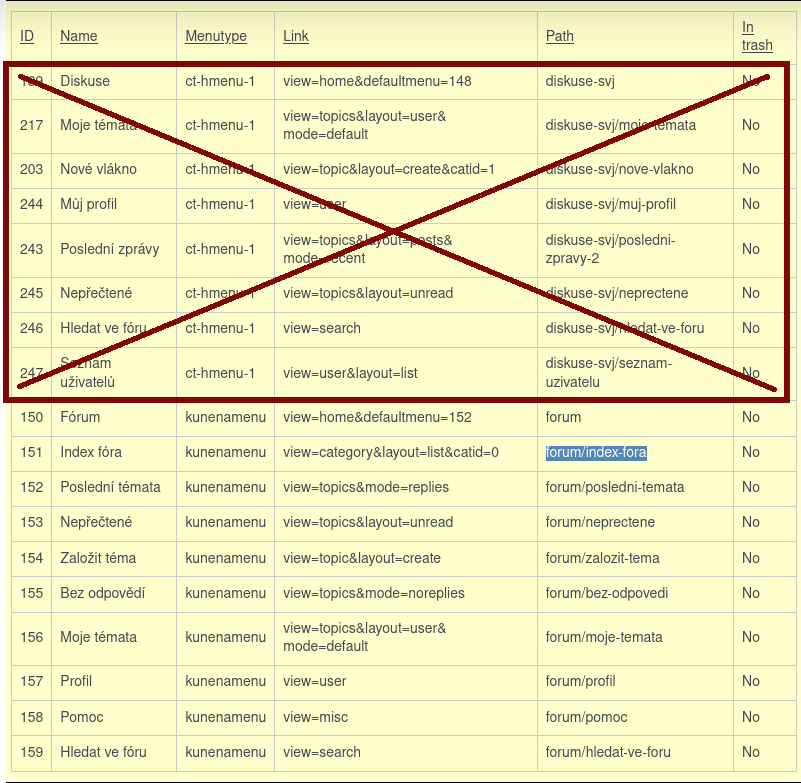
ID Name Menutype Link Path In trash 189 Diskuse ct-hmenu-1 view=home&defaultmenu=148 diskuse-svj No 217 Moje témata ct-hmenu-1 view=topics&layout=user&mode=default diskuse-svj/moje-temata No 203 Nové vlákno ct-hmenu-1 view=topic&layout=create&catid=1 diskuse-svj/nove-vlakno No 244 Můj profil ct-hmenu-1 view=user diskuse-svj/muj-profil No 243 Poslední zprávy ct-hmenu-1 view=topics&layout=posts&mode=recent diskuse-svj/posledni-zpravy-2 No 245 Nepřečtené ct-hmenu-1 view=topics&layout=unread diskuse-svj/neprectene No 246 Hledat ve fóru ct-hmenu-1 view=search diskuse-svj/hledat-ve-foru No 247 Seznam uživatelů ct-hmenu-1 view=user&layout=list diskuse-svj/seznam-uzivatelu No 150 Fórum kunenamenu view=home&defaultmenu=152 forum No 151 Index fóra kunenamenu view=category&layout=list&catid=0 forum/index-fora No 152 Poslední témata kunenamenu view=topics&mode=replies forum/posledni-temata No 153 Nepřečtené kunenamenu view=topics&layout=unread forum/neprectene No 154 Založit téma kunenamenu view=topic&layout=create forum/zalozit-tema No 155 Bez odpovědí kunenamenu view=topics&mode=noreplies forum/bez-odpovedi No 156 Moje témata kunenamenu view=topics&layout=user&mode=default forum/moje-temata No 157 Profil kunenamenu view=user forum/profil No 158 Pomoc kunenamenu view=misc forum/pomoc No 159 Hledat ve fóru kunenamenu view=search forum/hledat-ve-foru No
Joomla default template details : svjkrskova783784 | author: M007.file | version: 1.0 | creationdate: Unknown
Kunena default template details : Aurelia | author: Kunena Team | version: 6.2.1 | creationdate: 2023-11-10
Kunena template params:
Warning: Spoiler!
DefaultCategoryicon profileIconset default DefaultIconset default editorIconset default bootstrap 1 borderless 1 tooltips 1 SubjectLengthMessage 80 fullactions 1 quick 0 displayMenu 1 displayDropdownMenu 1 displayDropdownContent 1 displayModule 1 displayBreadcrumb 1 displayAnnouncement 1 displayFooter 0 avatarPosition left formRecover 0 labels 0 whoisonlineName default avatarType rounded topicicontype svg fontawesome 0 socialshare 0 socialsharetag socialtheme flat optional_username 0 writeaccess 0 localstorage 0 moduleIdWebauthn 0 IconColor inherit IconColorNew #48a348 editorType ckeditor Bold 1 Italic 1 Underline 1 Strike 1 Subscript 1 Superscript 1 RemoveFormat 1 BulletedList 1 NumberedList 1 Blockquote 1 JustifyLeft 1 JustifyCenter 1 JustifyRight 1 JustifyBlock 1 Link_Unlink 1 Image 1 Smiley 1 Confidential 1 Hidetext 1 Spoiler 1 Code 1 Ebay 1 1 1 Soundcloud 1 FontSize 1 TextColor 1 Maximize 1 Map 1 Video 1 editorButtons nameskinckeditor ckeditorcustomprefixconfigfile avatarSizeX 40 avatarSizeY 90 avatarSizeXThumb 36 avatarSizeYThumb 36 avatarSizeXWelcome 72 avatarSizeYWelcome 72 avatarSizeXList 36 avatarSizeYList 36 avatarSizeXPost 144 avatarSizeYPost 144 avatarSizeXProfile 200 avatarSizeYProfile 200 templatebyText templatebyName templatebyLink
Kunena version detailed: Kunena 6.2.1 | 2023-11-10 [ Git Repository ]
| Kunena detailed configuration:| Kunena integration settings:Warning: Spoiler!
Kunena config settings: boardOffline 0 enableRss 0 threadsPerPage 20 messagesPerPage 20 messagesPerPageSearch 15 showHistory 1 historyLimit 10 showNew 1 disableEmoticons 0 template aurelia showAnnouncement 1 avatarOnCategory 0 showChildCatIcon 1 rteWidth 450 rteHeight 300 enableForumJump 1 reportMsg 1 username 1 askEmail 0 showEmail 0 showUserStats 1 showKarma 1 userEdit 1 userEditTime 0 userEditTimeGrace 600 editMarkup 1 allowSubscriptions 1 subscriptionsChecked 1 allowFavorites 1 maxSig 300 regOnly 0 pubWrite 0 floodProtection 0 mailModerators 0 mailAdministrators 0 captcha 0 mailFull 1 allowAvatarUpload 1 allowAvatarGallery 1 avatarQuality 75 avatarSize 2048 imageHeight 800 imageWidth 800 imageSize 250 fileTypes txt,rtf,pdf,zip,tar.gz,tgz,tar.bz2 fileSize 5120 showRanking 1 rankImages 1 userlistRows 30 userlistOnline 1 userlistAvatar 1 userlistPosts 1 userlistKarma 1 userlistEmail 0 userlistJoinDate 1 userlistLastVisitDate 1 userlistUserHits 1 latestCategory 0 showStats 1 showWhoIsOnline 1 showGenStats 1 showPopUserStats 1 popUserCount 5 showPopSubjectStats 1 popSubjectCount 5 showSpoilerTag 1 showVideoTag 1 showEbayTag 1 trimLongUrls 1 trimLongUrlsFront 40 trimLongUrlsBack 20 autoEmbedYoutube 0 autoEmbedEbay 0 ebayLanguageCode en-us sessionTimeOut 1800 highlightCode 0 rssType topic rssTimeLimit 1 month rssLimit 100 rssIncludedCategories 0 rssExcludedCategories 0 rssSpecification rss2.0 rssAllowHtml 1 rssAuthorFormat name rssAuthorInTitle 1 rssWordCount 0 rssOldTitles 1 rssCache 900 defaultPage recent defaultSort asc sef 1 showImgForGuest 1 showFileForGuest 1 pollNbOptions 4 pollAllowVoteOne 1 pollEnabled 1 popPollsCount 5 showPopPollStats 1 pollTimeBtVotes 00:15:00 pollNbVotesByUser 100 pollResultsUserslist 1 allowUserEditPoll 0 maxPersonalText 50 orderingSystem mesid postDateFormat ago postDateFormatHover datetime hideIp 1 imageTypes jpg,jpeg,gif,png checkMimeTypes 1 imageMimeTypes image/jpeg,image/jpg,image/gif,image/png imageQuality 50 thumbHeight 32 thumbWidth 32 hideUserProfileInfo put_empty boxGhostMessage 0 userDeleteMessage 0 latestCategoryIn 1 topicIcons 1 debug 0 catsAutoSubscribed 0 showBannedReason 0 showThankYou 1 showPopThankYouStats 1 popThanksCount 5 modSeeDeleted 0 bbcodeImgSecure text listCatShowModerators 1 lightbox 1 showListTime 720 showSessionType 2 showSessionStartTime 1800 userlistAllowed 1 userlistCountUsers 1 enableThreadedLayouts 0 categorySubscriptions post topicSubscriptions every pubProfile 1 thankYouMax 10 emailRecipientCount 0 emailRecipientPrivacy bcc captchaPostLimit 0 imageUpload registered fileUpload registered topicLayout flat timeToCreatePage 0 showImgFilesManageProfile 1 holdNewUsersPosts 0 holdGuestPosts 0 attachmentLimit 8 pickupCategory 1 articleDisplay intro sendEmails 1 fallbackEnglish 1 cache 1 cacheTime 60 ipTracking 1 rssFeedBurnerUrl autoLink 1 accessComponent 1 statsLinkAllowed 1 superAdminUserlist 0 attachmentProtection 0 categoryIcons 1 avatarCrop 0 userReport 1 searchTime all teaser 0 ebayLanguage 0 ebayCertId allowChangeSubject 1 maxLinks 6 readOnly 0 ratingEnabled 0 urlSubjectTopic 0 logModeration 0 attachStart 0 attachEnd 14 attachmentUtf8 1 autoEmbedSoundcloud 0 emailHeader media/kunena/email/hero-wide.jpg userStatus 1 signature 1 personal 1 social 1 plainEmail 0 moderatorPermDelete 0 avatarTypes gif,jpeg,jpg,png smartLinking 0 defaultAvatar nophoto.png defaultAvatarSmall s_nophoto.png quickReply 1 avatarEdit 0 activeMenuItem mainMenuId homeId indexId moderatorsId topicListId miscId profileId searchId custom_id avatarType 1 sefRedirect 1 allowEditPoll 1 useSystemEmails 0 autoEmbedInstagram 0 disableRe 0 email_sender_name Diskusní SVJ Bot display_filename_attachment 1 new_users_prevent_post_url_images 0 minimal_user_posts_add_url_image 10 utmSource 0 emailHeaderSizeY 560 emailHeaderSizeX 560 moderator_id profiler 0 pickup_category privateMessage 1 datePickerFormat dd.mm.yyyy sendMailUserBanned 0 mailBodyUserBanned | Joomla! detailed language files installed:Warning: Spoiler!Kunena - Finder Disabled
Kunena - AltaUserPoints Disabled
Kunena - Community Builder Disabled
Kunena - Easyblog Disabled
Kunena - Easyprofile Disabled
Kunena - Easysocial Disabled
Kunena - Gravatar Disabled
Kunena - JomSocial Disabled
Kunena - Joomla Enabled: access=1 login=1
Kunena - Kunena Enabled: avatar=1 profile=1
Kunena - UddeIm Disabled
Warning: Spoiler!
Joomla! languages installed: cs-CZ Czech (Čeština) en-GB English (United Kingdom)
Third-party components: None
Third-party SEF components: None
Plugins: Content - Kunena Discuss 6.0.3
Modules: Kunena Latest 6.0.4 | Kunena Search 6.0.3
Last edit: 2 years 10 months ago by M007.file. Reason: removal of sensitive info
Please Log in or Create an account to join the conversation.
Less
More
- Posts: 12291
- Thank you received: 2538
2 years 10 months ago - 2 years 10 months ago #229954
by rich
Important! Always create a backup before you make any changes to your website!
Replied by rich on topic After the installation of Kunena 6.2.1 to J4.4. no searching and expanding works
None of the menu items marked in red is an alias menu item, so that the Kunena menu (tabs) is not displayed when you call them up. Incorrectly created menu items do not necessarily have to, but can always lead to errors.
Menu Issues
If you only want the forum to be available to registered members, then select this option in the configuration (Security tab) Registered Users Only = Yes, so that guests cannot see any of the forum at all (some areas are currently open to the public).
.
If you only want the forum to be available to registered members, then select this option in the configuration (Security tab) Registered Users Only = Yes, so that guests cannot see any of the forum at all (some areas are currently open to the public).
.
Important! Always create a backup before you make any changes to your website!
Last edit: 2 years 10 months ago by rich.
Please Log in or Create an account to join the conversation.
Time to create page: 0.262 seconds