


- Posts: 12291
- Thank you received: 2538
Kunena 7.0.9 & Kunena 6.4.14 – Security Updates Released
The Kunena team has announce the arrival of Kunena 7.0.9 [K 7.0.9] in stable which is now available for download as a native Joomla extension for J! 5.4.x/6.0.x./6.1.x. This version addresses most of the issues that were discovered in K 6.2 / K 6.3 / K 6.4 and issues discovered during the last development stages of K 7.0
Solved Succecfully installed but NO kunena at components
Less
More
4 years 2 weeks ago #224853
by rich
Important! Always create a backup before you make any changes to your website!
Replied by rich on topic Succecfully installed but NO kunena at components
Yes, Leen is right the missing menu items are the problem. Kunena only works properly when these are present in the Kunena Menu.
1. First create a database backup of your complete Joomla 4 site. Since this is too large to import it back with phpMyAdmin in an emergency, you can split it. First mark only the Joomla tables and export them and then all Kunena tables.
2. Delete all Kunena menu items.
3. Trash all existing menus and menu items that relate to your Kunena forum.
4. Remove these menu items from the trash.
5. Go from Kunena Dashboard to Tools and restore the Kunena menu
6. Go to the main menu and publish the automatically created menu item.
After that the forum should work.
1. First create a database backup of your complete Joomla 4 site. Since this is too large to import it back with phpMyAdmin in an emergency, you can split it. First mark only the Joomla tables and export them and then all Kunena tables.
2. Delete all Kunena menu items.
3. Trash all existing menus and menu items that relate to your Kunena forum.
4. Remove these menu items from the trash.
5. Go from Kunena Dashboard to Tools and restore the Kunena menu
6. Go to the main menu and publish the automatically created menu item.
After that the forum should work.
Important! Always create a backup before you make any changes to your website!
Please Log in or Create an account to join the conversation.


4 years 2 weeks ago #224914
by uzbaby
Replied by uzbaby on topic Succecfully installed but NO kunena at components
Thank you very much! But now there is no forum at all.
Here are the screens:
#1 Screen. Page where you can see that I did created according to this: Go from Kunena Dashboard to Tools and restore the Kunena menu (I trashed and deleted Trash for Kunena Menus before that).
#2 Screen. After publishing Menu I see only empty Forum.
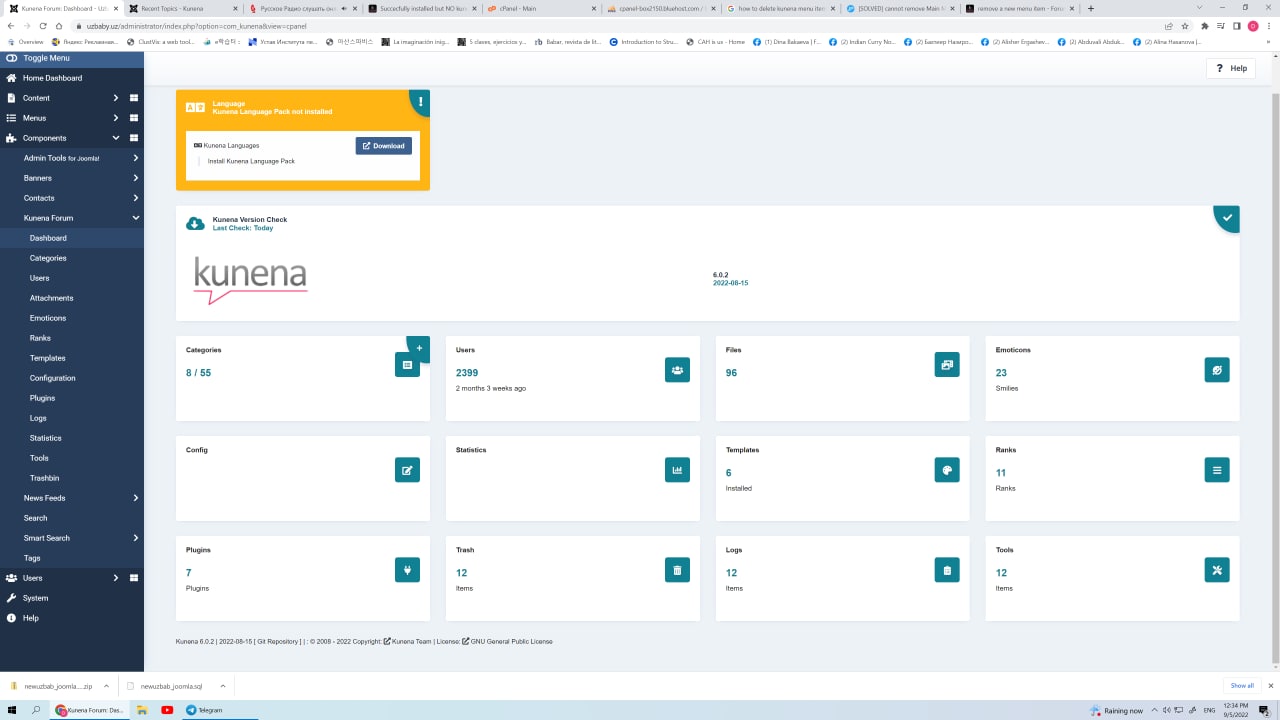
#3 Screen. My Kunena Dashboard screen after all.
Also I will add Configuration Report after all:
Here are the screens:
#1 Screen. Page where you can see that I did created according to this: Go from Kunena Dashboard to Tools and restore the Kunena menu (I trashed and deleted Trash for Kunena Menus before that).
#2 Screen. After publishing Menu I see only empty Forum.
#3 Screen. My Kunena Dashboard screen after all.
Also I will add Configuration Report after all:
This message contains confidential informationDatabase collation check: The collation of your table fields are correct
Joomla! SEF: Enabled | Joomla! SEF rewrite: Disabled | FTP layer: Disabled |
This message contains confidential informationhtaccess: Exists | PHP environment: Max execution time: 60 seconds | Max execution memory: 512M | Max file upload:Kunena menu details:
Warning: Spoiler!
ID Name Menutype Link Path In trash 2358 Forum kunenamenu view=home&defaultmenu=2360 forum No 2359 Index kunenamenu view=category&layout=list forum/index No 2360 Recent Topics kunenamenu view=topics&mode=replies forum/recent No 2361 Unread kunenamenu view=topics&layout=unread forum/unread No 2362 New Topic kunenamenu view=topic&layout=create forum/newtopic No 2363 No Replies kunenamenu view=topics&mode=noreplies forum/noreplies No 2364 My Topics kunenamenu view=topics&layout=user&mode=default forum/mylatest No 2365 Profile kunenamenu view=user forum/profile No 2366 Help kunenamenu view=misc forum/help No 2367 Search kunenamenu view=search forum/search No 2368 Forum beez Itemid=2358 kunena-2022-09-05 No Joomla default template details : cassiopeia | author: Joomla! Project | version: 1.0 | creationdate: 2017-02
Kunena default template details : Aurelia | author: Kunena Team | version: 6.0.2 | creationdate: 2022-08-15
Kunena template params:
Warning: Spoiler!
DefaultCategoryicon profileIconset default DefaultIconset default editorIconset default bootstrap 1 borderless 1 tooltips 1 SubjectLengthMessage 80 fullactions 1 quick 0 displayMenu 1 displayDropdownMenu 1 displayDropdownContent 1 displayModule 1 displayBreadcrumb 1 displayAnnouncement 1 displayFooter 1 avatarPosition left formRecover 0 labels 0 whoisonlineName default avatarType rounded topicicontype svg fontawesome 0 socialshare 0 socialsharetag socialtheme classic optional_username 0 writeaccess 0 localstorage 0 IconColor inherit IconColorNew #48a348 editorType ckeditor Bold 1 Italic 1 Underline 1 Strike 1 Subscript 1 Superscript 1 RemoveFormat 1 BulletedList 1 NumberedList 1 Blockquote 1 JustifyLeft 1 JustifyCenter 1 JustifyRight 1 JustifyBlock 1 Link_Unlink 1 Image 1 Smiley 1 Confidential 1 Hidetext 1 Spoiler 1 Code 1 Ebay 1 1 1 Soundcloud 1 FontSize 1 TextColor 1 Maximize 1 Map 1 Video 1 editorButtons nameskinckeditor ckeditorcustomprefixconfigfile avatarSizeX 40 avatarSizeY 90 avatarSizeXThumb 36 avatarSizeYThumb 36 avatarSizeXWelcome 72 avatarSizeYWelcome 72 avatarSizeXList 36 avatarSizeYList 36 avatarSizeXPost 144 avatarSizeYPost 144 avatarSizeXProfile 200 avatarSizeYProfile 200 templatebyText templatebyName templatebyLink
Kunena version detailed: Kunena 6.0.2 | 2022-08-15 [ Git Repository ]
| Kunena detailed configuration:| Kunena integration settings:Warning: Spoiler!
Kunena config settings: boardOffline 0 enableRss 1 threadsPerPage 20 messagesPerPage 6 messagesPerPageSearch 15 showHistory 1 historyLimit 6 showNew 1 disableEmoticons 0 template crypsis showAnnouncement 0 avatarOnCategory 0 showChildCatIcon 1 rteWidth 450 rteHeight 300 enableForumJump 1 reportMsg 1 username 1 askEmail 0 showEmail 0 showUserStats 1 showKarma 1 userEdit 1 userEditTime 0 userEditTimeGrace 600 editMarkup 1 allowSubscriptions 1 subscriptionsChecked 1 allowFavorites 1 maxSig 300 regOnly 0 pubWrite 0 floodProtection 0 mailModerators 0 mailAdministrators 0 captcha 0 mailFull 1 allowAvatarUpload 1 allowAvatarGallery 1 avatarQuality 75 avatarSize 2048 imageHeight 800 imageWidth 800 imageSize 150 fileTypes txt,rtf,pdf,zip,tar.gz,tgz,tar.bz2 fileSize 120 showRanking 1 rankImages 1 userlistRows 30 userlistOnline 1 userlistAvatar 1 userlistPosts 1 userlistKarma 1 userlistEmail 0 userlistJoinDate 1 userlistLastVisitDate 1 userlistUserHits 1 latestCategory 0 showStats 1 showWhoIsOnline 1 showGenStats 1 showPopUserStats 1 popUserCount 5 showPopSubjectStats 1 popSubjectCount 5 showSpoilerTag 1 showVideoTag 1 showEbayTag 1 trimLongUrls 1 trimLongUrlsFront 40 trimLongUrlsBack 20 autoEmbedYoutube 1 autoEmbedEbay 1 ebayLanguageCode en-us sessionTimeOut 1800 highlightCode 0 rssType topic rssTimeLimit 1 month rssLimit 100 rssIncludedCategories rssExcludedCategories rssSpecification rss2.0 rssAllowHtml 1 rssAuthorFormat name rssAuthorInTitle 1 rssWordCount 0 rssOldTitles 1 rssCache 900 defaultPage recent defaultSort asc sef 1 showImgForGuest 1 showFileForGuest 1 pollNbOptions 4 pollAllowVoteOne 1 pollEnabled 1 popPollsCount 5 showPopPollStats 1 pollTimeBtVotes 00:15:00 pollNbVotesByUser 100 pollResultsUserslist 1 allowUserEditPoll 0 maxPersonalText 50 orderingSystem mesid postDateFormat ago postDateFormatHover datetime hideIp 1 imageTypes jpg,jpeg,gif,png checkMimeTypes 1 imageMimeTypes image/jpeg,image/jpg,image/gif,image/png imageQuality 50 thumbHeight 32 thumbWidth 32 hideUserProfileInfo put_empty boxGhostMessage 0 userDeleteMessage 0 latestCategoryIn 1 topicIcons 1 debug 0 catsAutoSubscribed 0 showBannedReason 0 showThankYou 1 showPopThankYouStats 1 popThanksCount 5 modSeeDeleted 0 bbcodeImgSecure text listCatShowModerators 1 lightbox 0 showListTime 720 showSessionType 2 showSessionStartTime 1800 userlistAllowed 1 userlistCountUsers 1 enableThreadedLayouts 0 categorySubscriptions post topicSubscriptions every pubProfile 1 thankYouMax 10 emailRecipientCount 0 emailRecipientPrivacy bcc captchaPostLimit 0 imageUpload registered fileUpload registered topicLayout flat timeToCreatePage 1 showImgFilesManageProfile 1 holdNewUsersPosts 0 holdGuestPosts 0 attachmentLimit 8 pickupCategory 0 articleDisplay intro sendEmails 1 fallbackEnglish 1 cache 1 cacheTime 60 ipTracking 1 rssFeedBurnerUrl autoLink 1 accessComponent 1 statsLinkAllowed 1 superAdminUserlist 0 attachmentProtection 0 categoryIcons 1 avatarCrop 0 userReport 1 searchTime 365 teaser 0 ebayLanguage 0 ebayCertId allowChangeSubject 1 maxLinks 6 readOnly 0 ratingEnabled 0 urlSubjectTopic 0 logModeration 0 attachStart 0 attachEnd 14 attachmentUtf8 1 autoEmbedSoundcloud 1 emailHeader media/kunena/email/hero-wide.png userStatus 1 signature 1 personal 1 social 0 plainEmail 0 moderatorPermDelete 0 avatarTypes gif,jpeg,jpg,png smartLinking 0 defaultAvatar nophoto.png defaultAvatarSmall s_nophoto.png quickReply 1 avatarEdit 0 activeMenuItem mainMenuId homeId indexId moderatorsId topicListId miscId profileId searchId custom_id avatarType 1 sefRedirect 1 allowEditPoll 1 useSystemEmails 0 autoEmbedInstagram 1 disableRe 0 email_sender_name display_filename_attachment 0 new_users_prevent_post_url_images 0 minimal_user_posts_add_url_image 10 utmSource 0 emailHeaderSizeY 560 emailHeaderSizeX 560 moderator_id profiler 0 pickup_category 0 board_title Forum board_offline 0 offline_message FORUM VAQTINCHALIK ISHLAMAYAPTI!
Iltimos, keyinroq kiring!enablerss 0 threads_per_page 20 messages_per_page 20 messages_per_page_search 15 showhistory 1 historylimit 6 shownew 1 disemoticons 0 showannouncement 1 avataroncat 0 catimagepath category_images showchildcaticon 0 rtewidth 450 rteheight 300 enableforumjump 1 reportmsg 1 askemail 0 showemail 0 showuserstats 1 showkarma 0 useredit 1 useredittime 0 useredittimegrace 600 editmarkup 1 allowsubscriptions 1 subscriptionschecked 0 allowfavorites 1 maxsubject 50 maxsig 300 regonly 0 pubwrite 0 floodprotection 0 mailmod 0 mailadmin 0 mailfull 1 allowavatarupload 1 allowavatargallery 1 avatarquality 75 avatarsize 2048 imageheight 1200 imagewidth 1200 imagesize 2400 filetypes txt,rtf,pdf,zip,tar.gz,tgz,tar.bz2 filesize 120 showranking 1 rankimages 3 userlist_rows 30 userlist_online 1 userlist_avatar 1 userlist_posts 1 userlist_karma 0 userlist_email 0 userlist_joindate 1 userlist_lastvisitdate 1 userlist_userhits 1 latestcategory 0 showstats 1 showwhoisonline 1 showgenstats 1 showpopuserstats 1 popusercount 10 showpopsubjectstats 1 popsubjectcount 5 showspoilertag 1 showvideotag 1 showebaytag 0 trimlongurls 1 trimlongurlsfront 40 trimlongurlsback 20 autoembedyoutube 1 autoembedebay 1 ebaylanguagecode en-us sessiontimeout 4800 highlightcode 0 rss_type topic rss_timelimit month rss_limit 100 rss_included_categories rss_excluded_categories rss_specification rss2.0 rss_allow_html 1 rss_author_format name rss_author_in_title 1 rss_word_count 0 rss_old_titles 1 rss_cache 900 defaultpage recent default_sort asc showimgforguest 1 showfileforguest 1 pollnboptions 14 pollallowvoteone 1 pollenabled 1 poppollscount 5 showpoppollstats 1 polltimebtvotes 00:15:00 pollnbvotesbyuser 1 pollresultsuserslist 1 allow_user_edit_poll 0 maxpersotext 50 ordering_system mesid post_dateformat datetime post_dateformat_hover datetime_today hide_ip 1 imagetypes jpg,jpeg,gif,png checkmimetypes 1 imagemimetypes image/jpeg,image/jpg,image/gif,image/png imagequality 50 thumbheight 32 thumbwidth 32 hideuserprofileinfo put_empty boxghostmessage 1 userdeletetmessage 0 latestcategory_in 1 topicicons 1 catsautosubscribed 0 showbannedreason 0 showthankyou 1 showpopthankyoustats 1 popthankscount 10 mod_see_deleted 1 bbcode_img_secure image listcat_show_moderators 0 show_list_time 720 show_session_type 0 show_session_starttime 0 userlist_allowed 0 userlist_count_users 0 enable_threaded_layouts 0 category_subscriptions topic topic_subscriptions disabled pubprofile 1 thankyou_max 25 email_recipient_count 0 email_recipient_privacy bcc email_visible_address captcha_post_limit 0 image_upload file_upload registered topic_layout flat time_to_create_page 0 show_imgfiles_manage_profile 1 hold_newusers_posts 0 hold_guest_posts 0 attachment_limit 0 article_display intro send_emails 1 fallback_english 1 cache_time 1800 ebay_affiliate_id 5337089937 iptracking 1 rss_feedburner_url autolink 1 access_component 1 statslink_allowed 1 superadmin_userlist 0 legacy_urls 1 attachment_protection 0 categoryicons 1 avatarresizemethod 1 avatarcrop 0 user_report 1 searchtime 365 ebay_language 0 ebay_api_key twitter_consumer_key twitter_consumer_secret allow_change_subject 1 max_links 6 read_only 0 ratingenabled 1 url_subject_topic 0 log_moderation 1 attach_start 0 attach_end 14 google_map_api_key attachment_utf8 1 autoembedsoundcloud 1 emailheader /media/kunena/email/hero-wide.png user_status 1 plain_email 0 moderator_permdelete 0 avatartypes gif, jpeg, jpg, png smartlinking 0 defaultavatar nophoto.png defaultavatarsmall s_nophoto.png stopforumspam_key quickreply 1 avataredit 0 activemenuitem mainmenu_id home_id index_id moderators_id topiclist_id misc_id profile_id search_id avatar_type 0 sef_redirect 1 allow_edit_poll 0 use_system_emails 0 autoembedinstagram 1 disable_re 0 recaptcha_publickey 6LfO1QsTAAAAAF_otLIk9sMn0pWW_sB_pC1wnnrP recaptcha_privatekey 6LfO1QsTAAAAAPJoaC2Ppz84vRry8rmmxaFecC_Y recaptcha_theme white keywords 0 userkeywords 0 userlist_name 1 usernamechange 0 version_check 1 userlist_usertype 0 sefutf8 0 | Joomla! detailed language files installed:Warning: Spoiler!Kunena - Finder Disabled
Kunena - AltaUserPoints Disabled
Kunena - Community Builder Disabled
Kunena - Easyblog Disabled
Kunena - Easyprofile Disabled
Kunena - Easysocial Disabled
Kunena - Gravatar Disabled
Kunena - JomSocial Disabled
Kunena - Joomla Enabled: access=1 login=1
Kunena - Kunena Enabled: avatar=1 profile=1
Warning: Spoiler!
Joomla! languages installed: en-GB English (United Kingdom) Third-party components: None
Third-party SEF components: None
Plugins: None
Modules: None


Please Log in or Create an account to join the conversation.


4 years 2 weeks ago - 4 years 2 weeks ago #224917
by Leen
With kind regards
Leen
Replied by Leen on topic Succecfully installed but NO kunena at components
Hello,
clean browser cache by pressing ctrl+f5
and your post empty forum is because those are no new topics that month ?
and possibly that setting is view month and there is no recent post everything seems to work itself with pictures.
click on kunena menu index and check it again
clean browser cache by pressing ctrl+f5
and your post empty forum is because those are no new topics that month ?
and possibly that setting is view month and there is no recent post everything seems to work itself with pictures.
click on kunena menu index and check it again
With kind regards
Leen


Last edit: 4 years 2 weeks ago by Leen.
Please Log in or Create an account to join the conversation.
Less
More
- Posts: 12291
- Thank you received: 2538
4 years 2 weeks ago #224930
by rich
Important! Always create a backup before you make any changes to your website!
Replied by rich on topic Succecfully installed but NO kunena at components
1. I visited your forum, and it works as it should. You don't see anything in Recent Topics because there hasn't been any activity for a long time. Change the time period from month to a year in the Kunena configuration (tab Frontend).
.

.
2. If you want to have the index as the start page again, go to the Kunena Menu, click on the first menu item "Forum" and select the entry Index in the drop-down list there.
.
1

.
2

.
.
2. If you want to have the index as the start page again, go to the Kunena Menu, click on the first menu item "Forum" and select the entry Index in the drop-down list there.
.
1
.
2
Important! Always create a backup before you make any changes to your website!
Please Log in or Create an account to join the conversation.
4 years 2 weeks ago #224948
by uzbaby
Replied by uzbaby on topic Succecfully installed but NO kunena at components
I can't believe it!
I cannot believe it at all!!!
You did it! You make it!
Thank you so much! How can I thank you, dear Leen and dear Rich?
Thank you very much for your time and SUPER HELP.
I though I will never see my forum again.
Thank you very very very much.
I cannot believe it at all!!!
You did it! You make it!
Thank you so much! How can I thank you, dear Leen and dear Rich?
Thank you very much for your time and SUPER HELP.
I though I will never see my forum again.
Thank you very very very much.
Please Log in or Create an account to join the conversation.
4 years 2 weeks ago #224952
by Leen
With kind regards
Leen
Replied by Leen on topic Succecfully installed but NO kunena at components
Glad it's working again.
Make a good backup (Akeebda) of the website and transfer it to your computer with an FTP program so that you can use it in case of emergency
can easily put back.
Make a good backup (Akeebda) of the website and transfer it to your computer with an FTP program so that you can use it in case of emergency
can easily put back.
With kind regards
Leen
Please Log in or Create an account to join the conversation.
Time to create page: 0.302 seconds